
TikTok Ads Manager isn’t complicated. But most people walk in and immediately do three things wrong, and it costs them weeks of wasted budget before they figure it out.
The platform runs on a strict three-level structure. Pixel tracking needs to be live before you spend a cent.
And the learning phase will punish you hard if you touch campaigns too early. None of this is hidden. It’s just skipped.
Here’s the full picture, from account setup to campaign structure to the dashboard metrics that actually matter.
TL;DR
- TikTok Ads Manager runs on a three-level structure: Campaign, Ad Group, and Ad, and mixing up which settings live where is the most common beginner error.
- The minimum daily budget is $50 at the campaign level and $20 at the ad group level, setting it below this triggers delivery problems.
- Your TikTok Pixel and Conversion API should both be active before you run a single paid campaign.
Get Up to $6,000 in Free TikTok Ad Credits
TikTok offers ad credit incentives for new advertisers, helping you test campaigns with a lower upfront cost.
Table of Contents
What is TikTok Ads Manager?
TikTok Ads Manager is TikTok’s self-serve advertising platform where you build, run, and manage paid campaigns. You access it at ads.tiktok.com by creating a Business Center account, then setting up your ad account with billing and your Pixel before launching your first campaign.
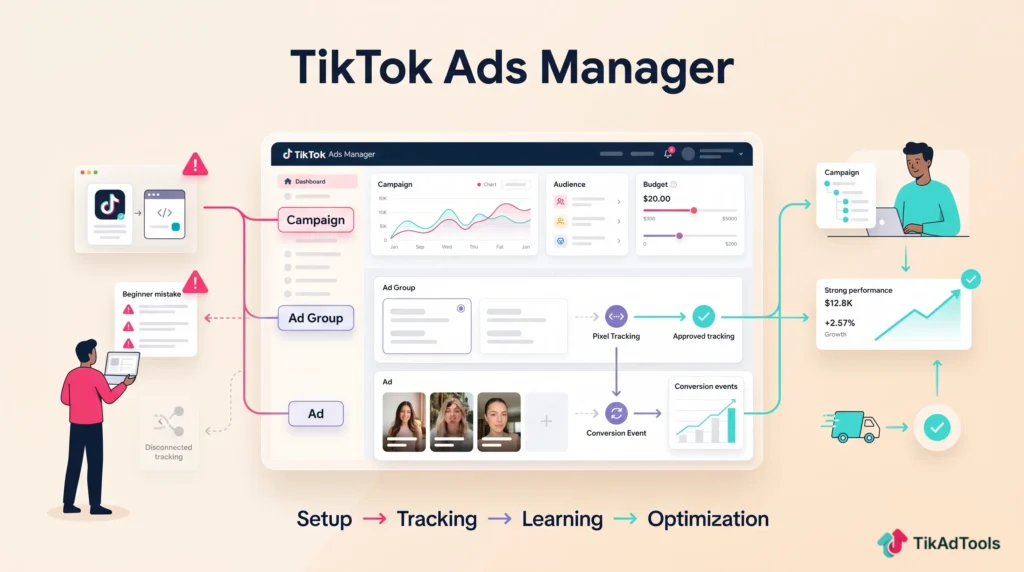
How to access TikTok Ads Manager
You don’t create a TikTok Ads Manager account directly. You create a TikTok Business Center account first, then set up an ad account inside it.
Go to ads.tiktok.com, sign up with a business email, and choose your country and currency.
That currency selection is permanent, so don’t rush it. Your billing currency locks on account creation and can’t be changed later.
Once inside, you’ll connect your TikTok For Business account and assign your ad account.
If you’re managing ads for clients, the Business Center structure also lets you manage multiple ad accounts and assign team roles without sharing login credentials.
The three-level campaign structure
TikTok Ads Manager runs on three levels: Campaign, Ad Group, and Ad. Getting confused about what lives at each level is the fastest way to break your campaign structure.
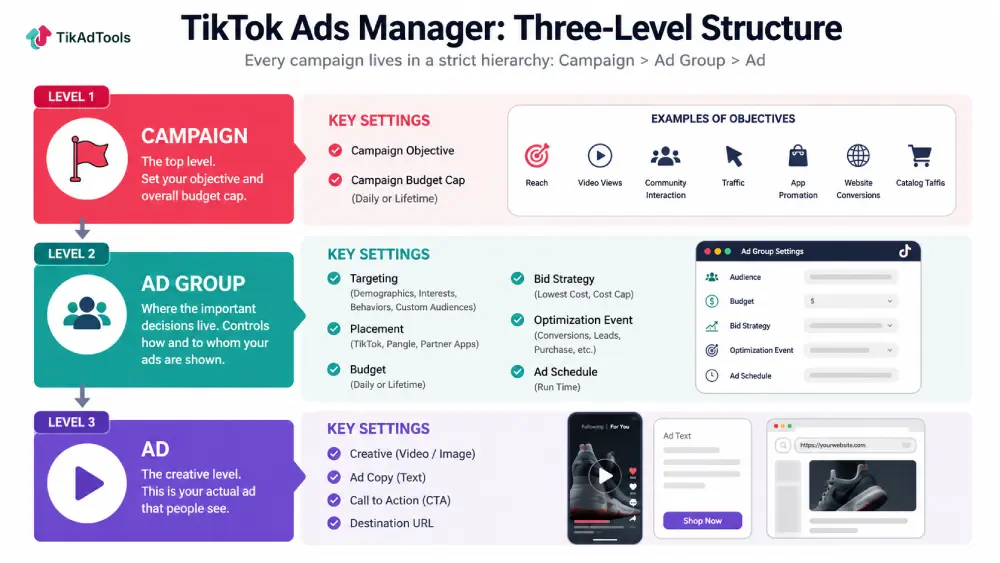
Campaign level is where you set your objective and your campaign-level budget cap. That’s it. Don’t overthink it.
Ad group level is where the real decisions live. Targeting, placement, budget, schedule, bid strategy, and optimization event are all set here. If you’re running multiple audience segments, you’d create separate ad groups inside the same campaign.
Ad level is just your creative. Video, copy, CTA, and destination URL.
For a deeper look at how to structure campaigns correctly from the start, the TikTok ads structure guide covers the logic behind separating audiences into ad groups versus separate campaigns.
Choosing a campaign objective
There are six campaign objectives in TikTok Ads Manager: Reach, Video Views, Community Interaction, Traffic, App Promotion, Lead Generation, Website Conversions, Catalog Sales, and Store Traffic.
Pick the wrong objective and the algorithm optimizes for the wrong event. If you choose Traffic when you want purchases, you’ll get clicks from people who never buy.
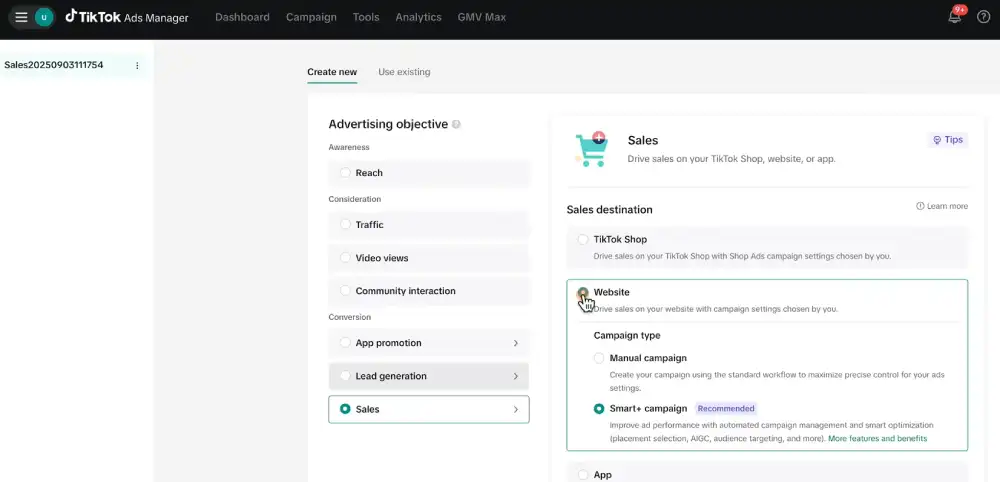
The algorithm finds the users most likely to do whatever action you tell it to optimize for.
For ecommerce, Website Conversions or Catalog Sales are the defaults. For apps, use App Promotion.
For most service businesses running lead campaigns, Lead Generation or Website Conversions work, depending on whether you want instant forms or landing page submissions.
If you’re newer to the platform, the TikTok ads for beginners breakdown explains objective selection in plain terms without overcomplicating the decision.
Ad group settings: the part most people rush
The ad group is where campaigns actually succeed or fail. Most people spend 10 minutes here and wonder why the results are inconsistent.
Targeting
TikTok’s targeting options include demographics, interests, behaviors, device type, and custom audiences.
For most accounts, broad targeting outperforms heavy interest-layer stacking, especially if you’re running video creative that can do the filtering work itself.
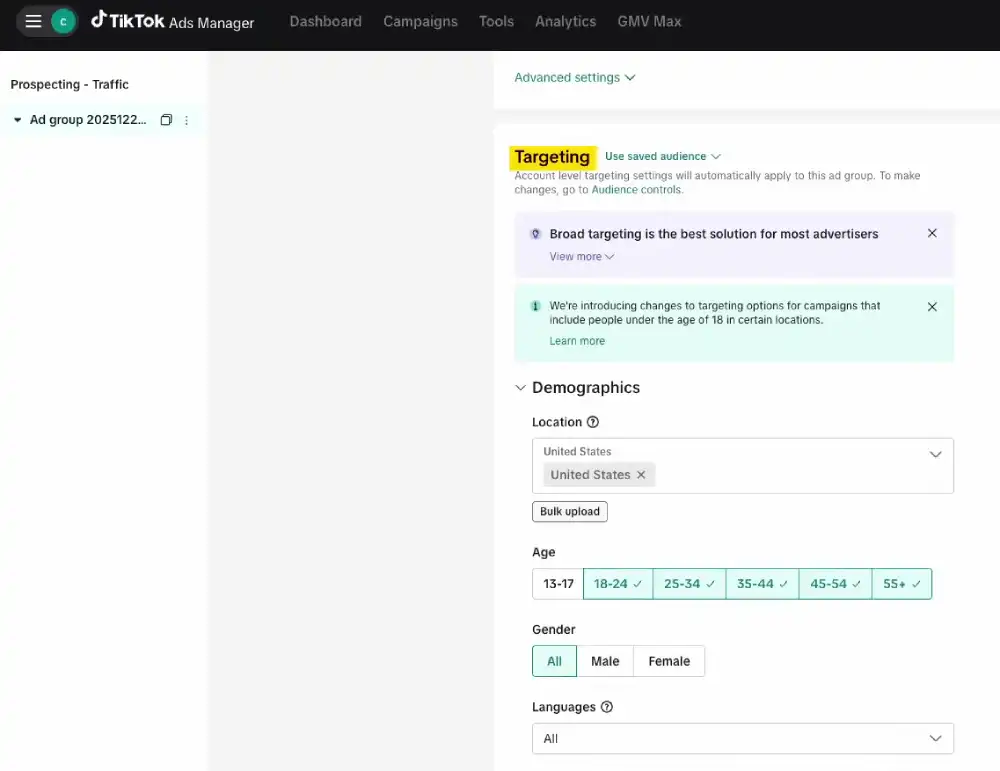
If your audience pool drops below 1 million at the ad group level, you’ll often see delivery problems and inflated frequency.
TikTok’s algorithm needs room to find the right users. Lookalike audiences fit into that same targeting mix and are covered separately.
For a complete walkthrough of every targeting layer and when to use each one, the TikTok ads targeting guide goes deep on this.
Budget and Bidding
The minimum daily budget at the ad group level is $20. Campaign level minimum is $50. These aren’t suggestions; setting budgets below these thresholds causes erratic delivery.
According to TikTok’s learning phase documentation, ad group volatility typically starts to decline around 25 conversions within 7 days. Separately, TikTok’s budget guidance sizes a healthy daily budget around reaching 50 conversions in that same window.
That means your budget needs to support that volume. If you’re spending $20 a day and your cost per conversion is $15, you’re barely generating enough signal for the algorithm to learn.
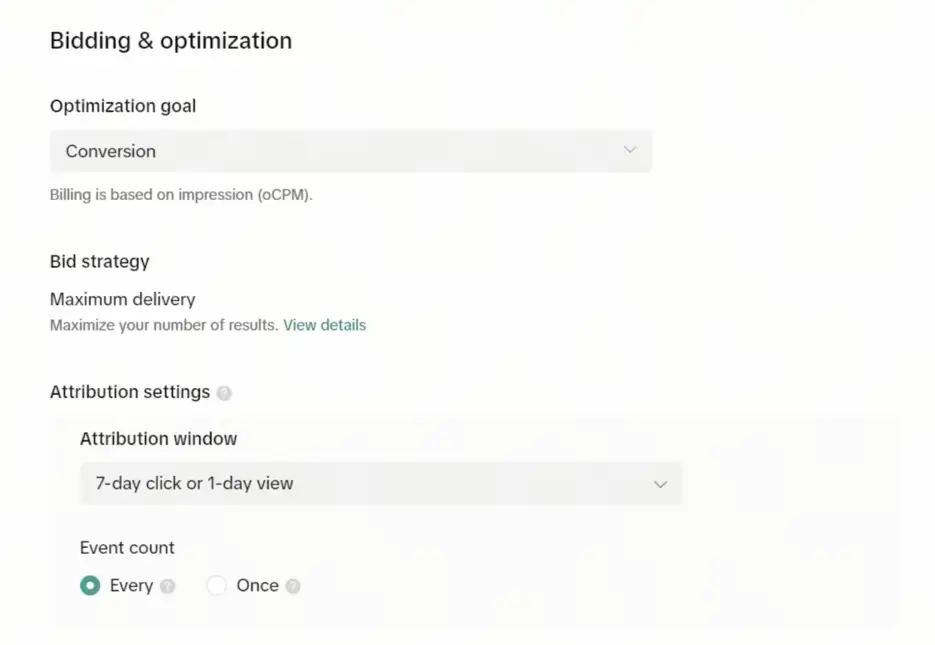
Bid strategy matters too. Lowest Cost lets TikTok spend your budget to find conversions at whatever price it can. Cost Cap locks a target cost per result but can limit delivery if set too aggressively.
For more on how budget decisions affect results across campaign types, the TikTok ads budget strategy guide is worth reading alongside this one.
Ad schedule
You can run ads continuously or set specific hours. Most direct response campaigns run 24/7 and let performance data reveal when conversions happen naturally.
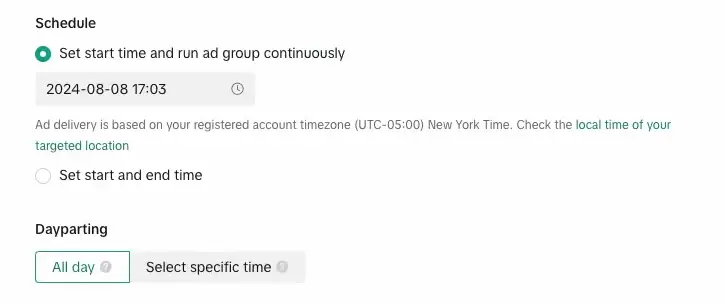
Restricting hours too early cuts delivery before you have enough data to make that call.
A dedicated ad schedule guide covers when it actually makes sense to restrict hours versus when it just limits your reach unnecessarily.
Placements and where your ads actually appear
By default, TikTok Ads Manager shows ads across multiple placements: TikTok, Pangle (TikTok’s audience network), and other partner apps.
Most performance advertisers turn off Pangle early and run TikTok-only placements until they have enough data to evaluate whether Pangle adds value.
Automatic placements are fine when you’re starting out. But once you’re spending meaningfully, check your placement breakdown in the reporting tab.
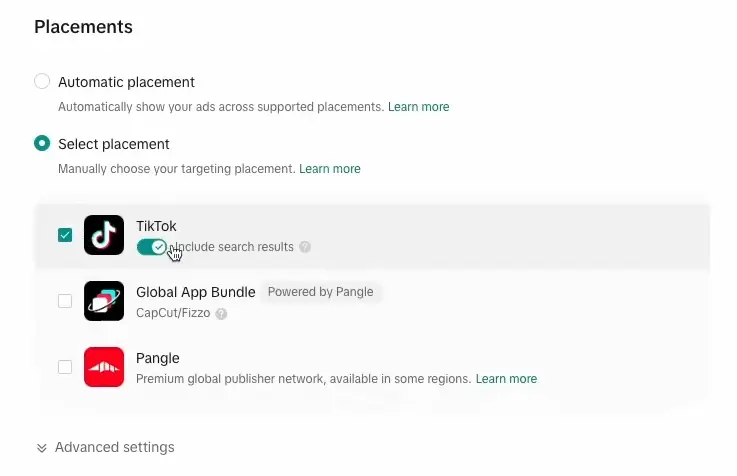
If Pangle is eating 30% of your budget with zero conversions, that’s a dial you want to turn.
For a look at how the platform’s different ad formats interact with placements, a dedicated ad types guide explains which formats are available where.
Pixel setup and conversion tracking
Your TikTok Pixel needs to be installed and verified before you run paid traffic. This is non-negotiable.
Without the Pixel, you’re flying blind. TikTok can’t optimize for purchases, leads, or any on-site event if it can’t see what users do after they click.
According to TikTok’s developer documentation, the Pixel fires events on your website that feed back into Ads Manager for optimization and reporting.
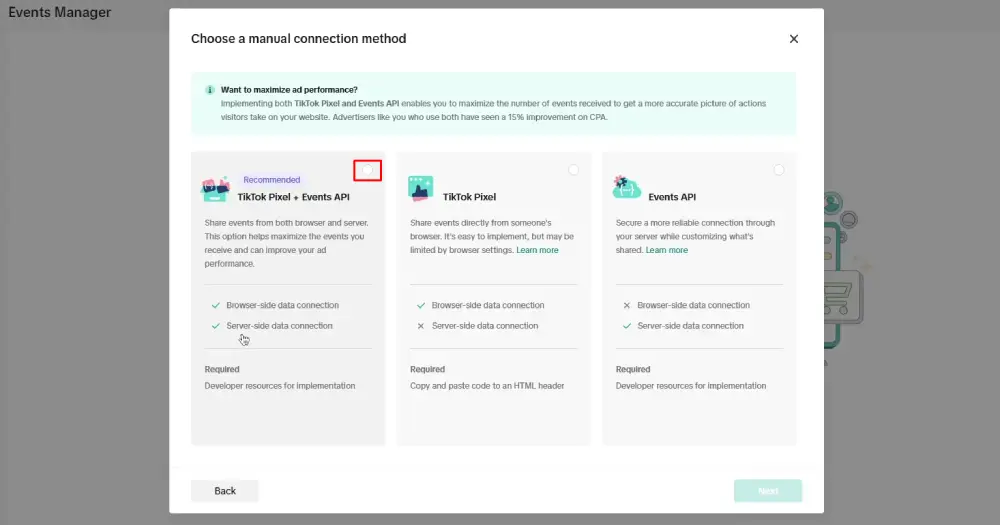
In 2024, TikTok also pushed hard on Conversion API adoption. The Conversion API sends event data directly from your server to TikTok, bypassing browser-side tracking limitations from ad blockers and iOS privacy changes. Running both together gives you the most complete signal.
For ecommerce specifically, a dedicated Pixel setup guide walks through the technical installation step by step.
The learning phase: don’t touch it
Every new ad group enters a learning phase when you first launch. The algorithm is testing users, creative, and signals to find what works.
According to TikTok’s learning phase documentation, this phase typically takes 7 days or 25 optimization events to exit.
Most advertisers destroy their campaigns here by making edits too early. Changing your bid, audience, or budget during the learning phase resets it. You end up in a loop of perpetual learning with no stable performance.
The TikTok ad learning phase guide explains exactly what triggers a reset and how to structure launches that give campaigns the best shot at exiting learning fast.
Creative setup inside Ads Manager
At the ad level, you’re uploading video, writing your copy, picking a CTA, and setting your destination URL. TikTok recommends 9:16 vertical video between 15 and 60 seconds for in-feed placements.
That said, 15 seconds outperforms longer formats for direct response in most tests. If you’re running product ads, the first 3 seconds determine whether anyone watches. A bad hook kills the ad before it starts.
The platform’s Creative Center is genuinely useful for benchmarking. You can search top-performing ads by industry, region, and objective, and see which hooks are working right now.
For building creative that converts, dedicated guides on ad creative and hooks cover that side in detail.
On the copywriting side, a dedicated ad copywriting guide goes into ad text and CTA structure.
If you want to know which video specs are required across formats, a dedicated video specs guide has the exact dimensions, file sizes, and format requirements.
The Ads Manager dashboard: what to watch
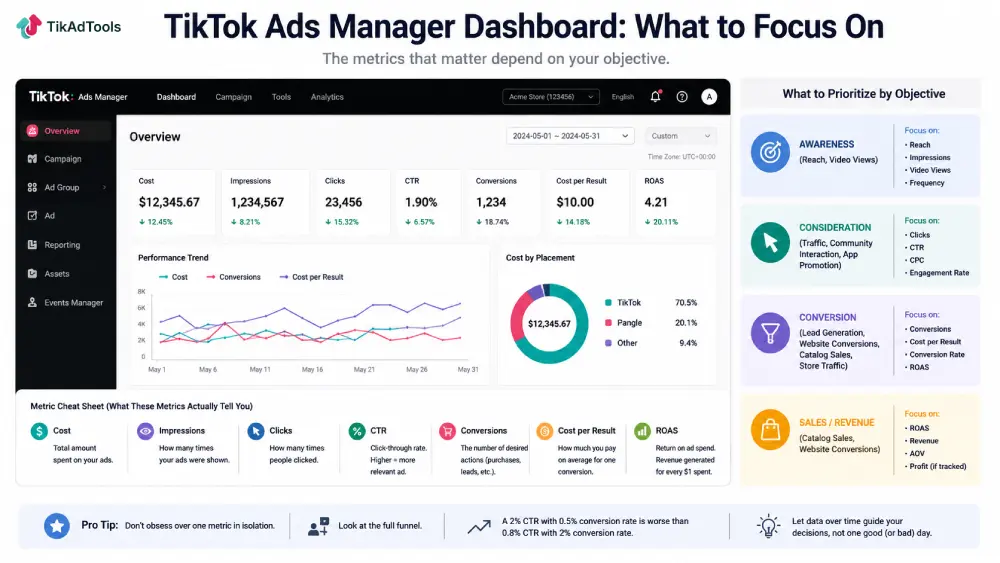
When you open TikTok Ads Manager, the default dashboard shows spend, impressions, clicks, CTR, conversions, and cost per result. It’s a lot of numbers. Most of them are noise if you’re not clear on what you’re optimizing for.
The metrics that actually matter depend on your objective. For conversion campaigns, track cost per result, ROAS, and conversion rate.
For awareness, track reach and video views. CTR matters, but don’t obsess over it in isolation. A 2% CTR with a 0.5% conversion rate is worse than a 0.8% CTR with a 2% conversion rate.
DataReportal’s Global Overview reports that TikTok users spend an average of over 34 hours on the app per month. That’s an unusually long engagement window for an ad platform, and it means your creative has multiple chances to hit the same user.
A dedicated ads metrics guide breaks down each metric and what it actually tells you about campaign health.
Reporting in TikTok Ads Manager
The built-in reporting tool inside Ads Manager is better than most advertisers give it credit for.
You can create custom reports, set automated delivery schedules, and break data down by placement, device, region, and creative.
The most useful view for most accounts is the ad-level breakdown. Compare creative performance side by side.
If one video has a 1.8% CTR and another has 0.4% with the same audience, that’s your answer about what to scale and what to cut.
TikTok also lets you set up automated rules to pause underperforming ads, scale budgets on winning ones, or get email alerts when key metrics cross a threshold.
These are genuinely useful and worth setting up on any account spending more than $200 per day.
A dedicated ads reporting guide covers how to pull the reports that matter and avoid the ones that waste your time.
How TikTok Ads Manager compares to Meta Ads Manager
The interface looks similar. The logic underneath is different.
TikTok’s algorithm is more content-driven than Facebook’s. On Meta, audience targeting carries a lot of weight. On TikTok, the creative does more of the filtering.
A well-made video for a broad audience often outperforms a tightly targeted one. That’s a different muscle to build.
TikTok’s average CPM also sits lower than Meta’s. Statista’s social media advertising data puts TikTok’s global ad revenue at $23.1 billion, with CPM rates averaging around $3 to $10 depending on the market, compared to Meta’s typical $9 to $20 range in competitive markets.
For a head-to-head breakdown of where each platform wins, a dedicated TikTok-vs-Facebook comparison goes through the differences in targeting, creative requirements, costs, and use cases.
Common setup mistakes in TikTok Ads Manager
Here are the ones that show up constantly in underperforming accounts.
Running ads without the Pixel: You can’t optimize for conversions you can’t see. Install the Pixel first, verify it’s firing on the right pages, then launch.
Setting budgets too low: A $10/day ad group with a $20 cost per conversion will never get enough data to learn. The algorithm needs signal volume, not just time.
Editing during the learning phase: Every major edit resets learning. Let the campaign run for at least 7 days, ideally clearing TikTok’s 50-conversion budget target, before making structural changes.
Running too many ad groups at once: Budget gets diluted. Five ad groups at $20/day each is worse than two ad groups at $50/day each. Fewer, better-funded ad groups learn faster.
Ignoring the ad approval process: TikTok’s review can take 24 to 48 hours. If your creative or landing page touches restricted categories even tangentially, you’ll hit rejections that delay your whole launch.
A dedicated ads mistakes guide goes through the full list of errors that silently drain accounts.
Testing inside TikTok Ads Manager
TikTok has a built-in split testing tool. You can test audiences, creatives, and bidding strategies with a controlled experiment structure that splits the budget evenly and produces statistically valid results.
Most advertisers skip this and just run multiple ad groups, which works but introduces more variables.
The native A/B testing tool removes ambiguity. If you’re running any volume at all, it’s worth using it for at least one creative test per month.
Scaling campaigns in Ads Manager
Once a campaign is performing, the instinct is to double the budget immediately. That’s usually wrong.
TikTok’s algorithm can handle budget increases of 20 to 30% every 3 to 4 days without significantly disrupting the learning phase. A jump from $100/day to $500/day overnight often resets performance.
Horizontal scaling, meaning duplicating ad groups and running them in parallel, is another approach.
It gives the algorithm fresh audiences to optimize against without touching a winning ad group’s settings.
A dedicated scaling guide covers the specific methods and budget thresholds that actually hold in practice.
Frequently asked questions
How do I create a TikTok Ads Manager account?
Go to ads.tiktok.com and sign up with a business email. You’ll set up a Business Center account first, then create an ad account inside it. Choose your billing country and currency carefully; they can’t be changed after account creation.
What’s the minimum budget for TikTok Ads Manager?
The minimum daily budget is $50 at the campaign level and $20 at the ad group level. Lifetime budgets start at $50 across both levels. Running below these minimums typically causes delivery to stop or become extremely uneven.
How long does the learning phase take in TikTok Ads Manager?
TikTok’s learning phase typically runs 7 days or until the ad group accumulates 50 optimization events, whichever comes first. Avoid changing your targeting, bid, or budget during this window, as major edits restart the clock.
Can I run TikTok Ads Manager without a TikTok account?
Yes. You can run ads through TikTok Ads Manager without a personal or business TikTok profile. However, if you want to run Spark Ads (which boost existing organic posts), you’ll need a connected TikTok account. For standard in-feed ads, no TikTok profile is required.
Why are my TikTok ads not spending?
The most common reasons are: ad group budget set too low, ad still in review, creative rejected, audience size too small, or a bid cap set too aggressively below the market rate. Check the ad group status column first. If it shows “Learning” with very low spend, your budget probably isn’t sufficient for the optimization goal you’ve set. Running the account through the Ad Account Health Checker is a fast way to rule out an account-level issue before you start second-guessing your budget.
Conclusion
TikTok Ads Manager is a capable platform once you understand the structure. Get the Pixel right, respect the learning phase, fund your ad groups properly, and let the creative do the targeting work. Most accounts that fail here do so because they cut corners on setup, not because TikTok doesn’t work.
Sources