
Your TikTok campaigns aren’t underperforming because of bad creative. Nine times out of ten, it’s the targeting.
We’ve audited a lot of accounts that stack interests, layer demographics, and narrow the audience until it “feels” right.
That’s Meta thinking applied to a platform that works differently, and it’s the fastest way to stall in the learning phase.
Table of Contents
Get Up to $6,000 in Free TikTok Ad Credits
TikTok offers ad credit incentives for new advertisers, helping you test campaigns with a lower upfront cost.
TL;DR
- Broad audiences (80%+ of a country’s potential users) get 15% lower CPA and 20% higher conversion rates than narrow ones, straight from TikTok’s own data.
- Interest targeting signals general affinity. Behavior targeting signals recent intent. For conversion campaigns, one behavior signal beats three stacked interests.
- Enable Smart Targeting anytime you’re using manual Audience or Interest and Behavior settings. There’s no real downside to leaving it on.
- Narrow audiences stall the learning phase because TikTok can’t find the conversion volume it wants (its own volatility marker sits at 25 results, and its budget guidance targets 50) from a small pool inside 7 days.
- Retargeting needs its own creative. Running prospecting ads against a warm audience wastes your best traffic.
Quick answer
Start broad on every new TikTok campaign. Let age and location be your only filters until your pixel has real conversion data, then build custom and lookalike audiences from actual buyers. Stacking interests and demographics before that data exists is the single most common reason accounts stall in the learning phase.
How TikTok targeting actually works
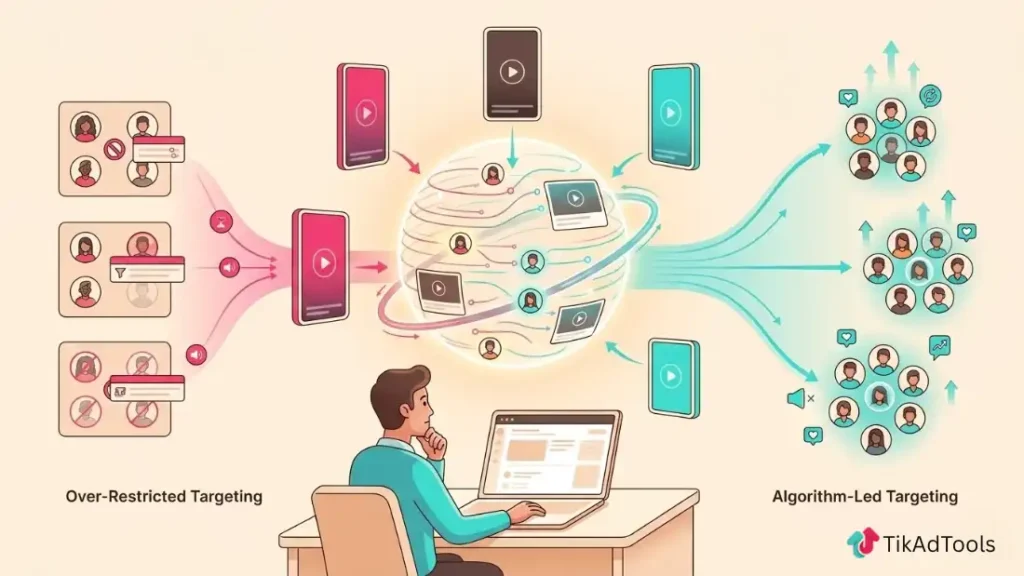
You set targeting at the ad group level, inside campaign creation. Every choice you make there tells TikTok’s algorithm how much room it has to find your buyers.
Give it too little room, and it can’t collect enough signal to optimize. Give it enough room, paired with the right supporting signals, and it outperforms almost any manual filter combination you could build by hand.
That’s not an opinion. It’s what TikTok’s own targeting data shows, and it’s the reason this guide leads with broad targeting instead of burying it under five categories of settings.
The five targeting categories, and what actually matters in each
TikTok organizes targeting into five categories: demographic, audience, interest and behavior, device, and Smart Targeting. Here’s what to actually do with each one, not just what each one is.
Demographic Targeting
Demographic targeting covers location, age, gender, language, household income (US only), and spending power. Selections across these fields use AND logic, so picking Female and 25 to 44 only reaches people who match both.
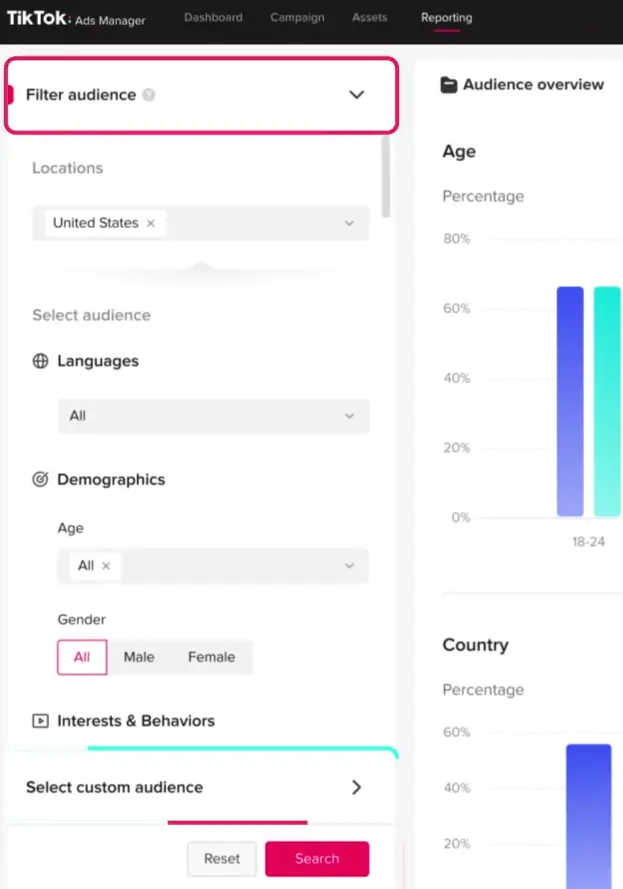
Use age and location as your baseline filters on every campaign. Skip gender and spending power unless your product genuinely only sells to one segment, because every extra filter here shrinks the pool the algorithm has to learn from.
Custom Audiences
Custom Audiences let you target or exclude people based on your own data: website visitors, app users, a customer file upload, or people who engaged with your TikTok content. You need 1,000 matched users before TikTok will activate one in an ad group, according to TikTok’s Custom Audiences documentation.
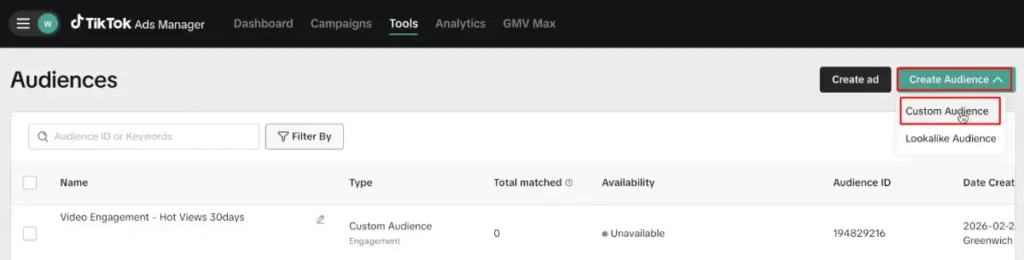
The audience is only as good as the event behind it. A Custom Audience built from “all website visitors” performs nothing like one built from “initiated checkout in the last 14 days.” For a full walkthrough on building these correctly, TikTok’s Custom Audience guide covers setup and segmentation in depth.
Lookalike Audiences
Lookalike Audiences find new users who share traits with a seed audience you choose. TikTok offers three sizes, Narrow, Balanced, and Broad, and the tradeoff runs opposite to what most advertisers assume, according to TikTok’s Lookalike Audiences documentation.
Narrow gets you closer matches at lower volume. Broad trades a bit of match precision for more reach.
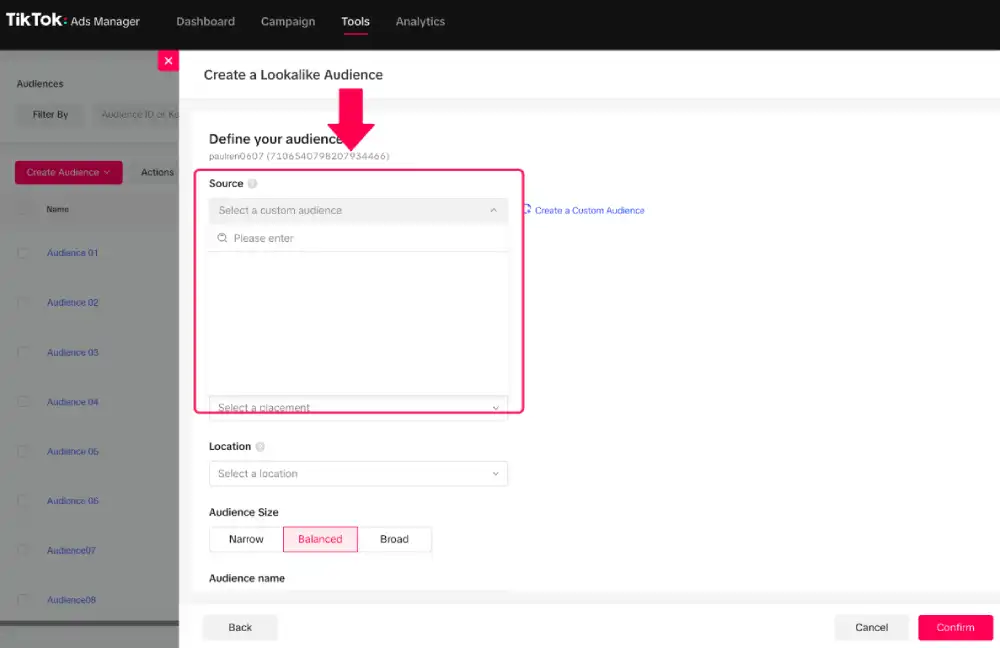
A Lookalike built from your top 20% of customers by order value consistently outperforms one built from all purchasers. The seed audience is doing more work than the size setting.
TikTok’s Lookalike Audiences guide breaks down seed selection and testing sequence, or you can build one directly with the Lookalike Audience Builder.
Interest and Behavior Targeting
This is where most targeting mistakes happen, because interest and behavior sound similar and aren’t.
Interest targeting reflects long-term content consumption. TikTok offers over 700 interest categories, and someone tagged under “fitness” has shown consistent engagement with fitness content, not active buying intent right now.
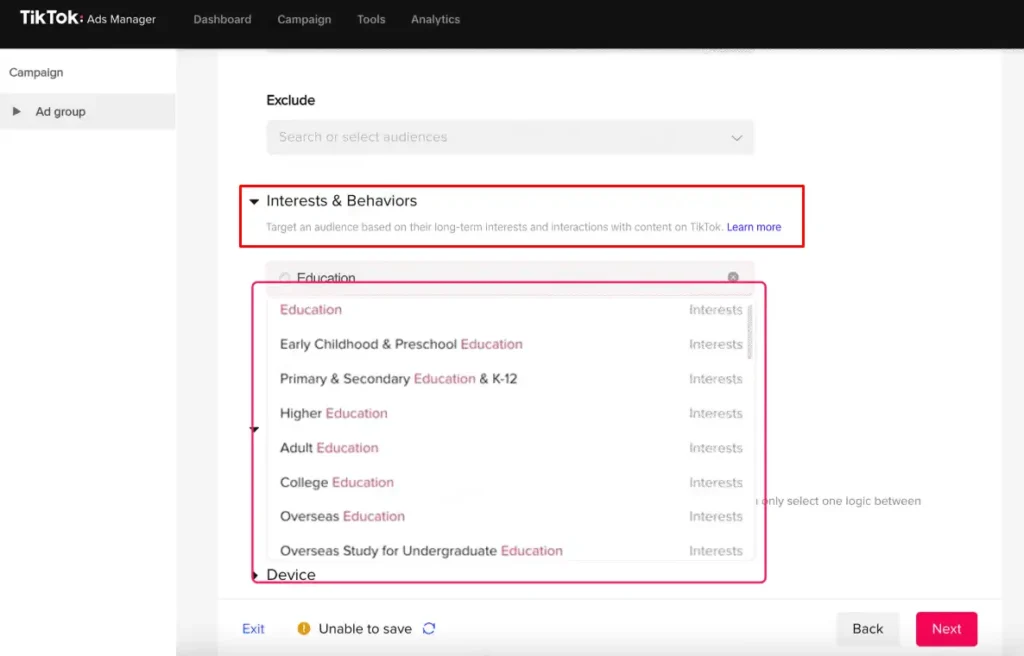
Behavior targeting reflects recent action: video completions and likes from the last 15 days, creator follows from the last 90. That’s a much sharper intent signal.
Selections within the same dimension use OR logic and expand your pool. Selections across dimensions use AND logic and shrink it. Mixing those up by accident is how advertisers end up with an audience a fraction of the size they meant to build.
For conversion campaigns, one or two behavior signals layered onto broad demographics beats stacking four or five interests almost every time. Save the full 700-category interest list for prospecting, where you can browse the TikTok interests list for ideas, or pull a shortlist with the Audience Interest Finder.
Device Targeting
Device targeting filters by OS, device model, price tier, carrier, and ISP. It matters for app campaigns where OS compatibility is a hard requirement, and it’s mostly noise for everyone else.
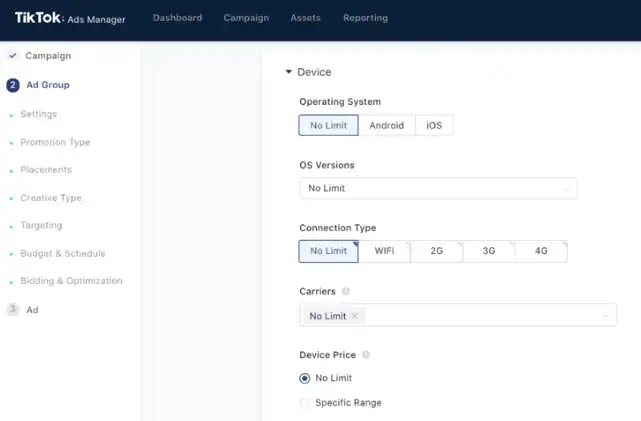
If you’re running ecommerce or lead gen and you’re not sure why device targeting is on, turn it off. It rarely earns its keep outside app install.
Smart Targeting
Smart Targeting expands your manual settings whenever TikTok predicts the expansion will improve results. It only kicks in on top of Audience or Interest and Behavior targeting, and it reduces CPA and ad fatigue for most advertisers.
Turn it on every time you’re using manual targeting. Advertisers skip it out of habit, then wonder why a well-built audience still underperforms broad.
Don’t confuse this with Smart+, TikTok’s separate automated campaign type that removes manual targeting selection entirely and lets the algorithm handle audience, placement, and bidding from your objective and creative alone. Smart Targeting is a toggle inside a manual ad group. Smart+ replaces the manual ad group setup altogether. The TikTok ads structure guide covers how Smart+ changes the standard campaign hierarchy.
Which targeting should you actually use
If you’re not sure which row you’re in, you’re probably still in “broad.” Stay there until your data says otherwise.
| Situation | Use This |
|---|---|
| Brand-new account, no pixel data | Broad targeting, age and location only |
| Under $50/day budget | Broad. A narrow audience won’t get enough volume to exit learning |
| Pixel has 90+ days of purchase data | Lookalike built from purchasers, segmented by order value |
| App install campaign | Device targeting by OS, plus a lookalike from retained users |
| Local service business | Location targeting first, interest targeting kept light |
| Retargeting warm traffic | Custom Audience from Pixel events, never broad |
| B2B lead generation | Interest and behavior targeting on professional categories |
Broad vs. Smart Targeting: they’re not the same thing
Broad targeting means you set almost no constraints and let TikTok build the audience from scratch. Smart Targeting means you set constraints, and TikTok expands past them when it predicts that’ll help.
Use broad when you have no data yet. Use Smart Targeting once you already have a working audience and want the algorithm to stretch it without you manually testing every expansion.
Running both at once doesn’t stack the benefit. Smart Targeting layered on top of already-broad targeting has almost nothing left to expand into.
Interest vs. behavior: which one actually converts
Interest targeting tells TikTok what someone’s generally into. Behavior targeting tells TikTok what someone just did.
For cold prospecting, interests work fine as a light directional signal. For conversion campaigns, a single behavior signal, like “watched 75% of a product video in the last 7 days,” consistently beats three or four stacked interests.
If a conversion campaign is underperforming and you’re leaning on interests instead of behaviors, that’s the first thing to change.
TikTok retargeting: turning warm traffic into revenue
Retargeting is the highest-return targeting move available on TikTok, because you’re reaching people who already know you instead of introducing yourself cold.
You can build retargeting audiences from website visitors tracked through the Pixel, video viewers segmented by watch percentage, profile engagers, and users who started checkout without finishing. Each of those deserves its own creative, not a repurposed prospecting ad.
Exclude recent purchasers from conversion-focused retargeting. Someone who bought in the last 30 days needs a retention offer, not another push to buy the same thing.
TikTok’s Retargeting Ads guide walks through campaign structure by funnel stage, and the Ad Retargeting Builder can help you map out which segments to build first.
The targeting mistakes that actually cost you money
Stacking too many interests. Each one dilutes the algorithm’s read on what actually converts, even though it technically grows the pool.
Narrowing before you have data. Under 50 total conversions in your Pixel isn’t enough signal to justify narrow targeting yet.
Retargeting with prospecting creative. If a Custom Audience sees the same intro-to-brand video a cold audience sees, you’re wasting your warmest traffic.
Forgetting to exclude recent purchasers. Anyone who bought in the last 30 days shouldn’t see conversion-focused retargeting.
Leaving Smart Targeting off on manual campaigns. There’s no real reason to skip it, and skipping it is one of the most common self-inflicted CPA problems we see.
This is a short list on purpose. For the full breakdown, including budget and structure mistakes outside of targeting, see TikTok’s Ads Mistakes guide.
Getting out of the Learning Phase
If your ad group hasn’t exited learning after 7 days, audience size is the first thing to check, not your creative and not your bid.
Per TikTok’s learning phase documentation, volatility starts to decline around 25 results, and TikTok’s budget guidance sizes a healthy daily budget around reaching 50 conversions. A narrow audience simply can’t generate that volume fast enough, no matter how relevant it looks on paper.
Widening the audience is almost always the faster fix. TikTok’s ad learning phase guide covers the full mechanics and what to do if widening doesn’t solve it.
Targeting by Business type
Ecommerce. Start broad to let the algorithm find your organic audience. Once purchase data accumulates, build Lookalikes segmented by order value and run retargeting against add-to-cart and initiate-checkout events. TikTok Ads for Ecommerce covers the full setup, and getting your TikTok Pixel installed correctly matters more here than any targeting setting.
App install. Device targeting earns its place here in a way it doesn’t elsewhere. Filter by OS and build Lookalikes from retained users, not just installs, since install volume without retention gives you nothing useful to target against later. See TikTok’s App Install guide for campaign structure.
Local business. Location targeting is your primary tool. Layer age and gender lightly, and keep interest targeting conservative since local reach is already a narrowing factor on its own. TikTok Ads for Local Businesses has city-level setup examples.
B2B lead generation. Interest and behavior targeting on professional categories does more work here than broad targeting, unlike most other business types. TikTok Ads for B2B covers the specific categories worth testing first.
Frequently asked questions
Should I enable Smart Targeting or leave it off?
Enable it any time you’re using manual Audience or Interest and Behavior settings. It only expands delivery when TikTok predicts it’ll improve results, so there’s no real downside.
Why is my TikTok ad group stuck in the learning phase?
Audience size is the first thing to check. If you haven’t exited learning after 7 days, your targeting is probably too narrow for the algorithm to gather the conversion volume it needs, TikTok’s own volatility marker sits at 25 results, with its budget guidance targeting 50, in that window.
Is broad targeting still better in 2026, or has that changed?
It’s still the stronger default. Per TikTok’s best practices data, broad audiences covering 80%+ of a country’s users get 15% lower CPA and 20% higher conversion rates than narrow ones.
When should I stop using broad targeting and go narrow?
Once your pixel has real purchase data, usually 90 days or more. At that point, Lookalikes built from actual buyers outperform staying broad.
Why did my retargeting campaign underperform even though the audience was warm?
Most likely you ran prospecting creative against a warm audience. Retargeting needs creative that skips the introduction and addresses a specific objection, not brand storytelling.
Does device targeting help ecommerce campaigns?
Rarely. It’s mainly useful for app installs where OS compatibility matters. For most ecommerce accounts, it just shrinks delivery without improving CPA.
Conclusion
Every mistake on this list comes back to the same thing: narrowing before the data justifies it. Stay broad, let the pixel do its job, and build from what it shows you.
If you’re setting up your first campaign, TikTok’s ad credit offers are worth checking before you spend your first dollar testing this yourself.
Sources