
Most TikTok advertisers don’t have a targeting problem. They have a precision problem. They’re spending their budget on cold audiences when their best-performing targets already exist inside their own data. That’s what TikTok Custom Audiences fix.
A TikTok Custom Audience lets you build a targeting pool from people who’ve already interacted with your brand. Unlike broad TikTok ads audiences built from interests or demographics, these audiences are based on first-party data such as website visitors, app users, customer lists, and video engagement.
These are warmer signals than any interest category you’ll find in a dropdown. And when you’re working with a platform that already reaches over 1.9 billion potential ad viewers globally, knowing how to narrow to the right ones makes all the difference.
This guide covers what TikTok Custom Audiences are, every type you can build, and exactly how to use them at different stages of your funnel.
Table of Contents
Get Up to $6,000 in Free TikTok Ad Credits
TikTok offers ad credit incentives for new advertisers, helping you test campaigns with a lower upfront cost.
TL;DR
- TikTok Custom Audiences let you target or exclude people based on first-party data like website traffic, app activity, video engagement, and customer files.
- You need at least 1,000 matched users in an audience before you can use it in an ad group.
- Custom audiences are most powerful when used for retargeting warm traffic and seeding lookalike audiences for prospecting.
What is a TikTok Custom Audience?
A TikTok Custom Audience is a targeting feature in TikTok Ads Manager that builds an audience from known or engaged users. Among all TikTok audiences, custom audiences are the most precise because they rely on real interactions with your business instead of estimated interests or behaviors.
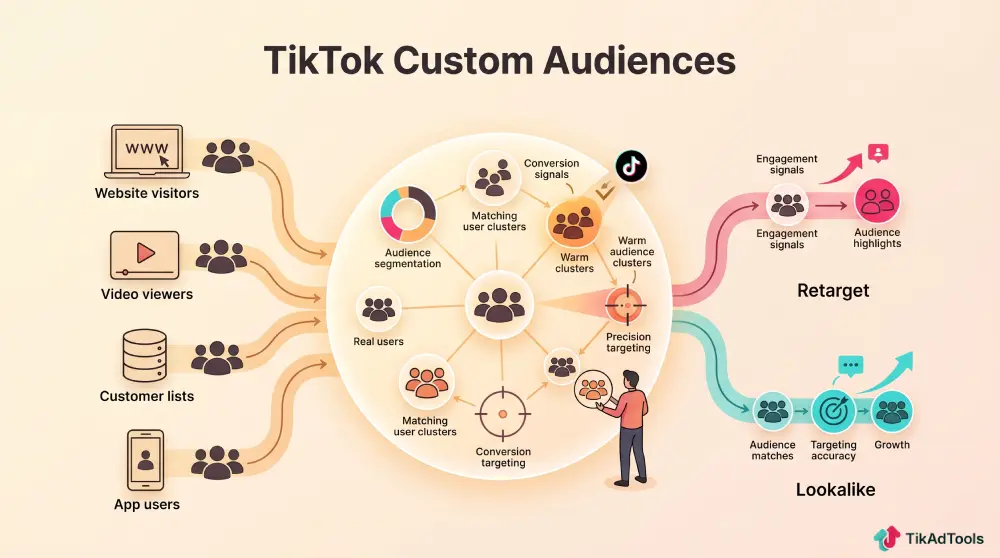
According to TikTok’s official documentation, you can build custom audiences from five main sources: customer files, website traffic, app activity, TikTok engagement, and lead generation data. Each source gives you a different layer of intent.
The minimum threshold to activate a custom audience is 1,000 matched users. If your list doesn’t hit that number, the audience won’t run. It’s worth keeping that in mind before you try to build micro-segments too early.
Types of Custom Audiences
Together, these audience types form the core TikTok audiences list available inside TikTok Ads Manager, giving advertisers multiple ways to reach users at different stages of the buying journey.
| Audience Type | Data Source | Best Use Case | Min. Audience Size |
|---|---|---|---|
| Customer File | Uploaded email or phone list | Re-engage existing customers or CRM contacts | 1,000 matched users |
| Website Traffic | TikTok Pixel | Retarget page visitors, cart abandoners, and purchasers | 1,000 matched users |
| App Activity | TikTok SDK / App events | Retarget app users by in-app actions | 1,000 matched users |
| Engagement | TikTok video views, profile visits, and ad clicks | Retarget warm organic and paid content viewers | 1,000 matched users |
| Lead Generation | TikTok Lead Gen form submissions | Follow up with leads already in the funnel | 1,000 matched users |
| Shop Activity | TikTok Shop purchase and browse events | Retarget shoppers by product interaction | 1,000 matched users |
| Business Account | Followers and profile visitors | Re-engage existing TikTok community | 1,000 matched users |
Customer file audiences
Upload a list of customer emails or phone numbers, and TikTok matches them against user accounts to create one of the most reliable TikTok Custom Audiences for customer retention and remarketing.
The match rate varies, but TikTok’s matching is strongest when you provide phone numbers, as that’s the primary identifier most users register with. Clean your list before uploading. Duplicates and invalid entries reduce your match pool.
Website traffic audiences
This is the most commonly used custom audience type, and for good reason. If you’ve set up the TikTok Pixel on your eCommerce store, you can build audiences based on specific URL patterns, event types, and time windows.
Examples of useful website traffic segments:
- All website visitors in the last 30 days
- Product page viewers (exclude purchasers)
- Cart abandoners in the last 7 days
- Checkout initiators who didn’t convert
The most powerful setup is cart abandoners with purchasers excluded. That’s your highest-intent pool with the lowest risk of wasted spend.
App activity audiences
If you’re running mobile app campaigns, the TikTok SDK unlocks retargeting based on in-app events. You can build audiences around users who completed a tutorial, reached a paywall, or didn’t complete registration.
For subscription apps, this is especially valuable. Users who hit the paywall but didn’t subscribe are a natural retargeting pool for a discount offer or a push notification-style creative.
Engagement audiences
Engagement audiences are built from TikTok-native interactions. That includes video views, profile visits, ad engagements, and more. You don’t need a Pixel or SDK. The data comes directly from within TikTok.
This makes engagement audiences accessible even for newer advertisers who haven’t fully deployed their tracking stack yet. Someone who watched 75% of your last three videos is a warm lead, even without a Pixel event.
Lead generation audiences
If you’re running TikTok lead generation ads, every form submission creates a pool you can retarget. Use this to reach people who showed enough intent to fill out a form but haven’t moved to the next step.
This works especially well in longer-consideration categories like B2B, real estate, or financial services.
Shop activity and Business account audiences
TikTok Shop audiences let you retarget based on specific shopping behaviors. Product viewers, add-to-cart actions, and past purchasers can all be built into separate segments.
It’s granular enough to run win-back campaigns for lapsed buyers without touching active ones.
Business Account audiences let you reach your TikTok followers and profile visitors. Small but high-intent. These people already know you.
How you can use them
Knowing what TikTok Custom Audiences you have available is only the first step. The real value comes from using each audience strategically throughout your advertising funnel.
Retargeting cart abandoners
This is the highest ROI application for most eCommerce brands. Build an audience of cart abandoners from the last 7 to 14 days, exclude recent purchasers, and run a separate ad group with urgency-driven creative.
You don’t need a discount. Sometimes a simple “still thinking about it?” style video outperforms a 20% off offer. Test both, but keep them in separate ad groups so you can run a clean A/B test on each message.
| Retargeting Segment | Lookback Window | Creative Angle | Expected CPM vs Cold |
|---|---|---|---|
| Cart abandoners | 7 days | Urgency/scarcity | Lower |
| Product page viewers | 14 days | Social proof/reviews | Lower |
| Video viewers (75%+) | 30 days | Conversion offer | Moderate |
| Past purchasers | 60-90 days | Upsell / complementary | Lower |
| Lead form submitters | 30 days | Follow-up / CTA | Moderate |
Suppressing recent buyers from acquisition campaigns
One of the most practical uses of custom audiences is exclusion. If someone bought yesterday, they shouldn’t see your “first-time buyer” ad today. It wastes spend and it looks sloppy.
Build a purchaser audience with a rolling 30 to 60-day window and exclude it from your top-of-funnel ad groups. This is basic hygiene. It’s surprising how many accounts skip it.
Seeding Lookalike Audiences
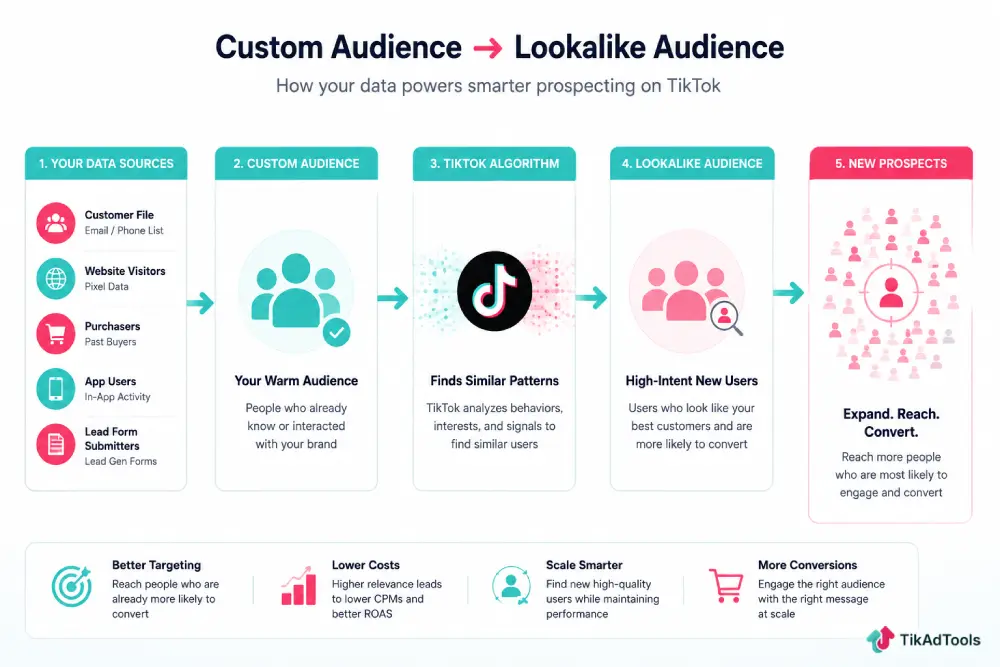
Your custom audiences don’t just work for retargeting. They’re also the seed data for TikTok Lookalike Audiences, which let TikTok find new users who share characteristics with your best existing ones.
Seed quality matters. A lookalike seeded from your top 1,000 purchasers will almost always outperform one seeded from general website visitors. The more specific the behavior in your seed audience, the more relevant the lookalike will be.
Funnel-Stage audience structure
The smartest advertisers organize their TikTok ads audience strategy around the entire marketing funnel instead of placing every audience into one campaign.
| Funnel Stage | Audience Type | Goal |
|---|---|---|
| Top of Funnel | Lookalike (seeded from purchasers) | Prospecting new users |
| Mid Funnel | Video viewers (50-75%+) / Page visitors | Warm engagement |
| Bottom of Funnel | Cart abandoners / Lead form submitters | Conversion push |
| Retention | Past purchasers (30-90 days) | Repeat purchase / upsell |
| Suppression | Recent purchasers (7-30 days) | Exclude from cold campaigns |
This structure isn’t complicated. But most accounts conflate all their audiences into one campaign, and then wonder why their TikTok ROAS looks flat.
Running Engagement-Based retargeting without a Pixel
Not every advertiser has a fully instrumented tracking setup. If you’re still getting your TikTok Conversion API deployed or haven’t fully validated your Pixel events, engagement audiences give you a retargeting option right now.
Build an audience from 75%+ video viewers over the last 30 days. Run a direct-response ad to that pool. It won’t be as precise as Pixel-based retargeting, but it’s far better than spending everything on cold traffic while your tracking is being set up.
How long do TikTok Custom Audiences last?
Audience membership in TikTok is time-bound, depending on the source.
Here’s what to expect:
| Audience Type | Maximum Lookback Window |
|---|---|
| Website Traffic | 180 days |
| App Activity | 180 days |
| Customer File | Until you delete it |
| Engagement (Video Views) | 365 days |
| Engagement (Profile/Ad) | 365 days |
| Lead Generation | 365 days |
| Shop Activity | 180 days |
Video engagement audiences last the longest. If you’re running ongoing organic content alongside paid, you’re continuously refreshing your engagement pool. That’s an asset worth tracking in TikTok Audience Insights.
What affects match rate?
Match rate is how many people from your uploaded list TikTok can find in its system. A higher match rate means a larger usable audience. Here are the factors that affect it.
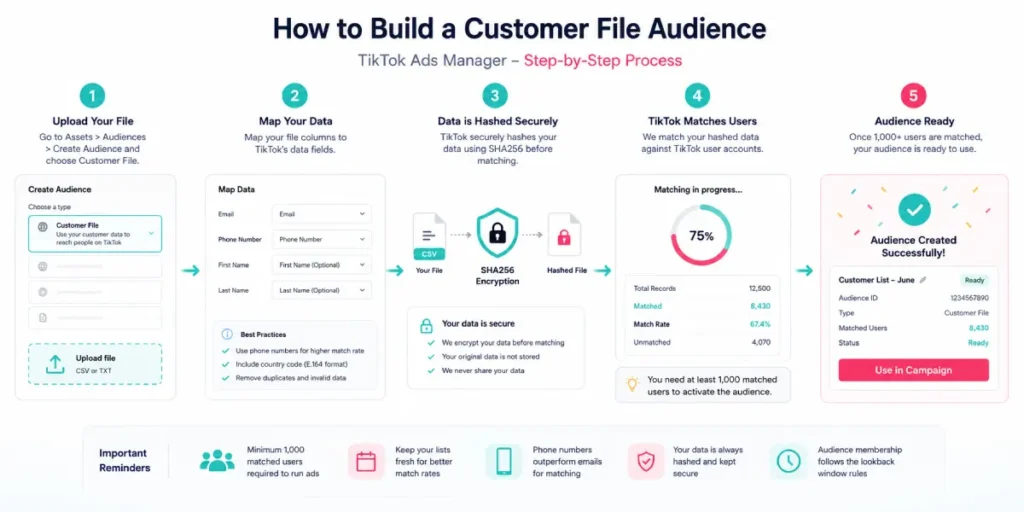
Data quality matters most: Duplicates, typos, and old emails reduce your match. Clean your list in a spreadsheet before uploading. Standardize format. Remove inactive addresses.
Phone numbers outperform emails: TikTok users register primarily with phone numbers. A list of phone numbers in E.164 format (country code included) will typically yield a higher match than emails alone.
Hashing is required: TikTok requires uploaded customer files to be SHA256-hashed. Ads Manager will hash the file on upload if you don’t do it manually, but double-check the format requirements before uploading large files.
Audience freshness matters: A list of customers from three years ago will match worse than a list from the last 12 months. People change email addresses and phone numbers.
How to build a Custom Audience in TikTok Ads Manager
The process is straightforward. Here’s where to go and what to do.
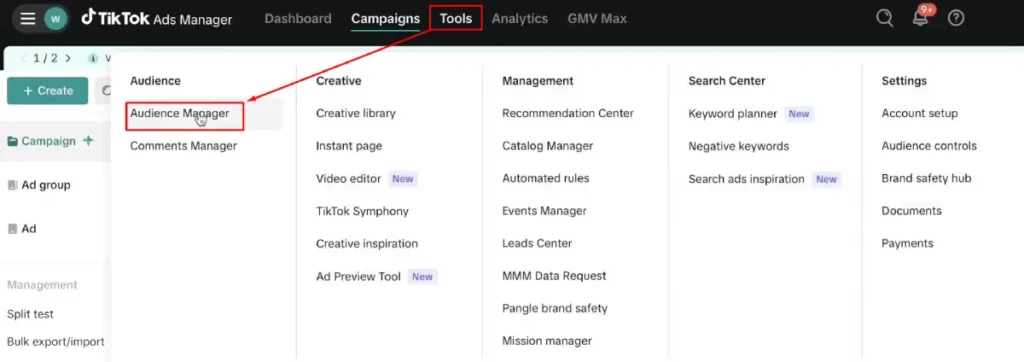
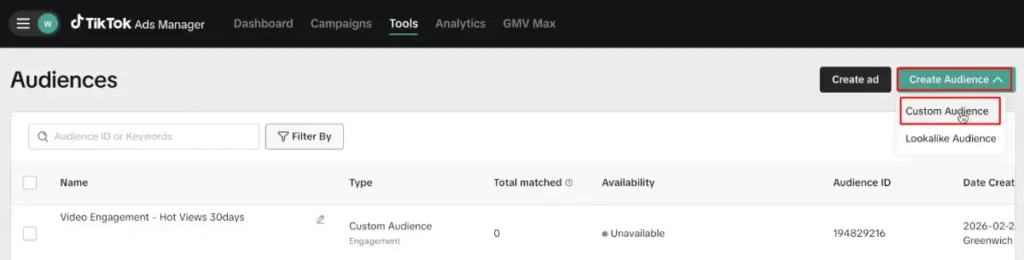
- Open TikTok Ads Manager and navigate to Tools> Audience Manager
- Click Create Audience and select Custom Audience
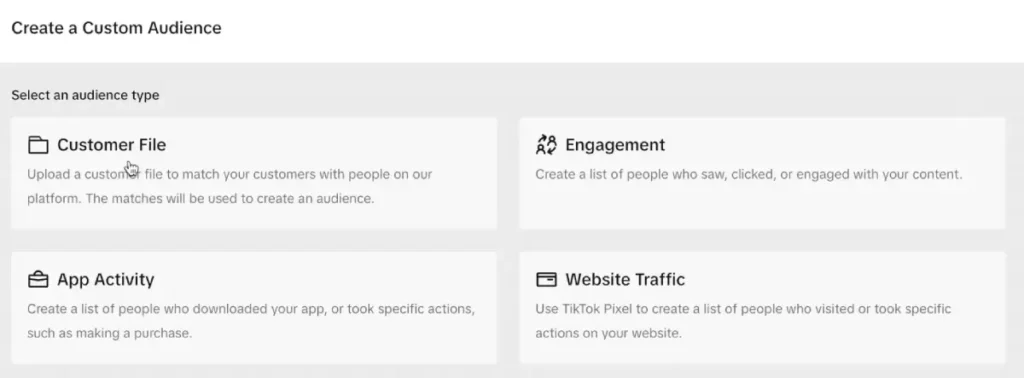
- Choose your audience type (Customer File, Website Traffic, App Activity, etc.)
- Follow the setup instructions specific to each type
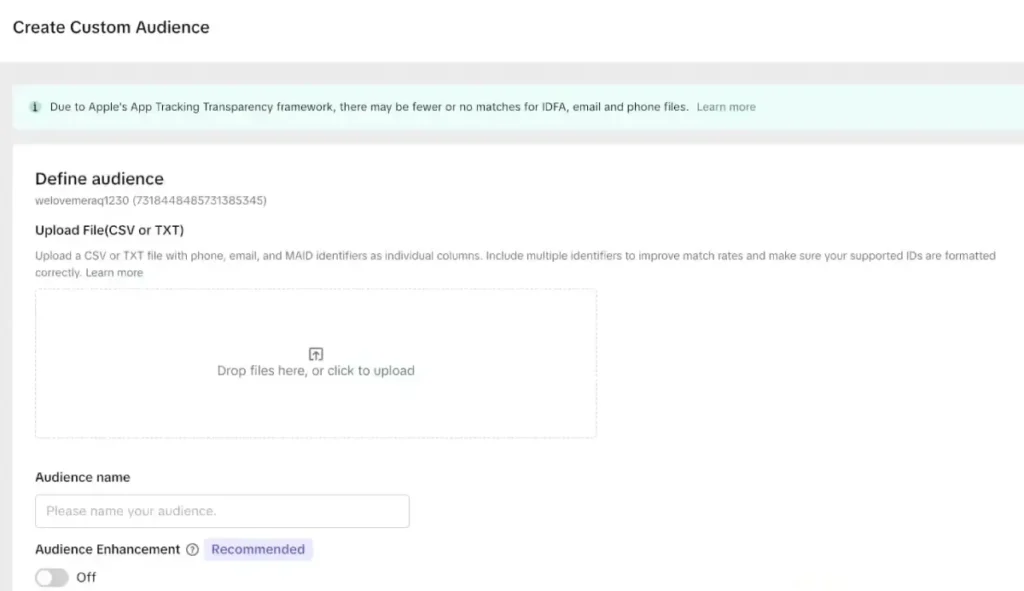
- Name the audience clearly with the type and date (e.g., “Cart Abandoners – 14D – June 2026”)

- Wait for the audience size to populate. You’ll need 1,000+ matched users before it activates.
Naming conventions save you a lot of confusion at scale. When you’re managing multiple campaigns with overlapping audiences, clear labels are the difference between a clean structure and a mess.
TikTok Custom Audiences vs Interest Targeting
Here’s the honest comparison most guides don’t give you.
| Factor | Custom Audiences | Interest Targeting |
|---|---|---|
| Signal strength | High (first-party behavior) | Moderate (inferred interest) |
| CPM | Typically lower for warm segments | Variable |
| Audience size | Smaller but more precise | Large but less precise |
| Setup requirements | Pixel, SDK, or data upload needed | None |
| Best for | Mid-to-bottom funnel | Top of funnel prospecting |
| Learning phase speed | Faster with quality seed data | Slower with broad targeting |
Interest targeting isn’t bad. It simply serves a different purpose than TikTok Custom Audiences. The strongest TikTok audiences strategy combines broad prospecting with interest targeting at the top of the funnel and custom audiences for remarketing and retention.
FAQs
How many people do I need in a TikTok Custom Audience?
You need at least 1,000 matched users to activate a custom audience in an ad group. If your list or behavioral pool doesn’t reach 1,000, the audience won’t be available for targeting.
Can I use TikTok Custom Audiences to exclude people?
Yes, and you should. Exclusion audiences work at the ad group level. Excluding recent purchasers from acquisition campaigns and excluding your customer list from cold prospecting are both standard practices that reduce wasted spend.
Do TikTok Custom Audiences expire?
Audience membership expires based on the lookback window you set. Website traffic and app activity audiences support up to 180 days.
What’s the difference between TikTok Custom Audiences and Lookalike Audiences?
A custom audience is built from your own data. It targets known users.
Can I combine Custom Audiences with other targeting?
Yes. You can layer custom audiences with demographic, device, and location filters.
Conclusion
TikTok Custom Audiences are one of the few targeting tools where every input reflects real customer intent. Whether you’re building a warm TikTok ads audience for remarketing or expanding with lookalikes, keeping these audiences clean and up to date gives your campaigns a lasting performance advantage.
Sources