
Running TikTok ads at the wrong hours doesn’t just waste budget. It feeds the algorithm bad conversion signals.
Most accounts default to All Day delivery and never touch it again. That’s fine while you’re still gathering data.
But once you’ve got 25+ conversions in a campaign, scheduling can cut wasted spend and improve your cost per result without touching your creative.
TL;DR
- TikTok ad scheduling lets you restrict delivery to specific hours and days of the week
- You can only set custom schedules on daily budget campaigns, not lifetime budget campaigns
- Pull your hourly performance data from TikTok Ads Manager before locking in any time slots
Get Up to $6,000 in Free TikTok Ad Credits
TikTok offers ad credit incentives for new advertisers, helping you test campaigns with a lower upfront cost.
Table of Contents
Quick Answer
TikTok ad scheduling, also called dayparting, lets you choose exactly which hours and days of the week your ads run. You set it at the ad group level under “Dayparting” in the Budget and Schedule section, and it’s only available when you’re using a daily budget, not a lifetime budget.
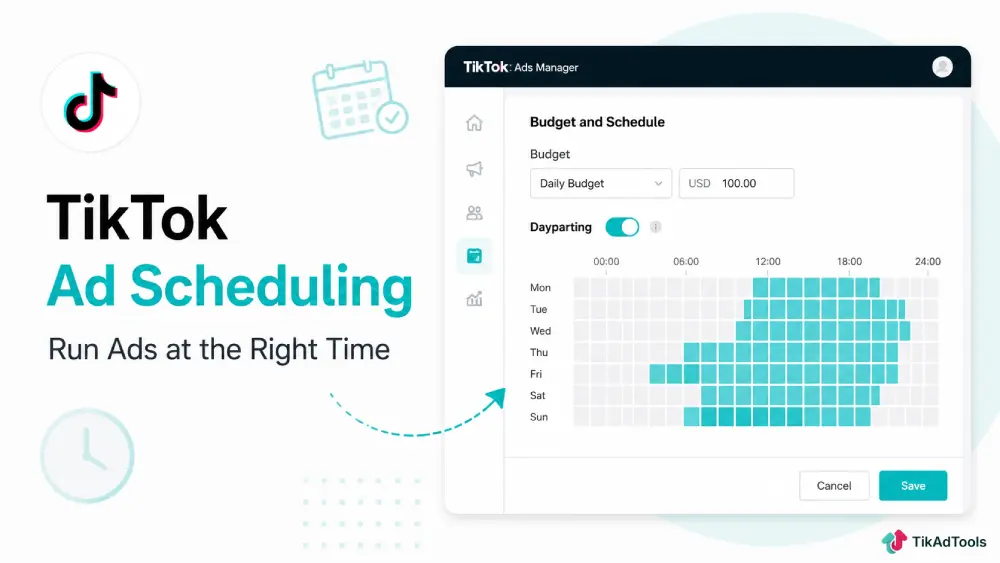
What TikTok ad scheduling actually does
TikTok ad scheduling, officially called dayparting inside Ads Manager, controls when your ads are eligible to serve. Outside your scheduled hours, TikTok won’t spend your budget at all.
It doesn’t pause your campaign. It just tells TikTok’s delivery system to hold off until the time window you’ve selected. The rest of your settings, targeting, bid, and creative stay exactly the same.
TikTok’s ad scheduling Help Center article lays out a list of supported budget types and how time zone selection affects delivery.
This matters because TikTok’s algorithm allocates spend based on predicted conversion probability.
If you’re running all day, it’ll still prioritize the hours it thinks will convert. But scheduling forces it to work only inside your defined window, which can actually sharpen delivery during high-intent periods.
Where to set up ad scheduling in TikTok Ads Manager
The setting lives at the ad group level, not the campaign level. This is where most people look in the wrong place first.
Open your ad group settings and scroll to the Budget and Schedule section. You’ll see a “Dayparting” option below your budget settings.
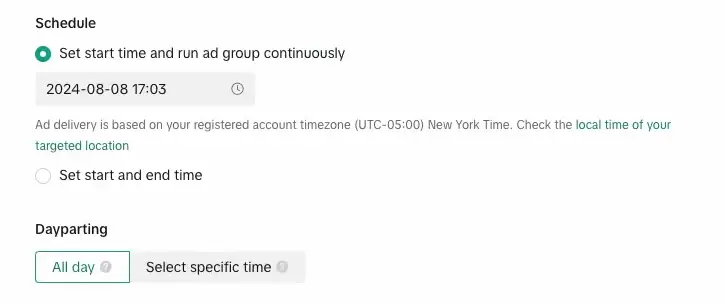
Toggle it on, and you’ll get a 7-day, 24-hour grid. Select the blocks you want active, and TikTok will only deliver during those hours.
One hard rule: this option only appears when you’re using a daily budget. If your campaign is set to a lifetime budget, TikTok handles delivery pacing automatically, and dayparting isn’t available. You can open a TikTok Ads Manager account if you haven’t set up your campaign structure yet.
How to find your best hours before you schedule
Don’t guess at hours. Pull your actual data first.
Go to TikTok Ads Manager and open the Reporting tab. Build a custom report and add “Hour of Day” as a breakdown dimension.
Set your date range to the last 30 to 60 days, and pull metrics like cost per result, CTR, and conversion volume by hour.
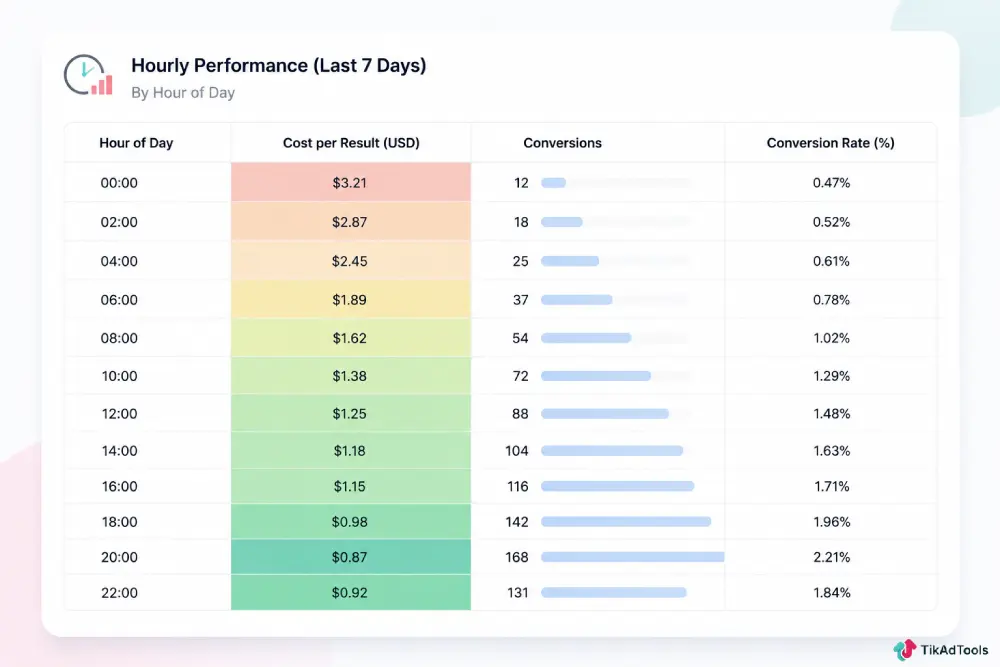
Look for two things. First, find the hours where your cost per conversion is consistently lowest. Second, find the hours with the highest conversion volume. Those two don’t always overlap, and that’s important.
TikTok users globally average over 95 minutes per day on the platform, according to DataReportal’s Digital Global Overview, with the heaviest usage concentrated in the evening. That benchmark is a starting point, not a rule. Your audience’s actual behavior inside your account will tell you more than any global average.
You want to schedule during hours that convert at a good rate AND have enough volume to spend your daily budget. A single hour with one cheap conversion isn’t useful. You need a cluster of hours that deliver real volume.
A practical way to check this is through TikTok ads reporting, where you can filter by conversion event and segment by time to see patterns across your account.
Scheduling by campaign objective
Not every campaign type uses scheduling the same way. The setup is identical, but how aggressively you restrict hours changes based on what you’re optimizing for.
Scheduling for conversion campaigns
Conversion campaigns benefit the most from dayparting. If your audience buys during specific hours, which most eCommerce and app install campaigns see clearly in their data, restricting to those windows stops budget from going into low-intent time slots.
A common pattern: eCommerce brands running to a US audience often see conversions cluster between 7 pm and 11 pm local time.
Running ads during the 2 am to 7 am window rarely pays off. If your data shows the same pattern, cut those hours and let the daily budget concentrate where conversions actually happen.
Keep in mind your TikTok ads budget strategy should account for compressed delivery windows. If you restrict to 6 hours per day, your daily budget needs to be high enough for TikTok to generate sufficient data signals inside that window.
Scheduling for awareness and traffic campaigns
Awareness campaigns are less sensitive to hour-by-hour conversion data because you’re not optimizing for a purchase or install. But scheduling still applies if you’re targeting specific contexts.
Restaurant ads, event promotions, and local service campaigns often perform better during hours when people are actively making decisions.
A lunch delivery campaign showing ads at 11 am to 1 pm outperforms the same campaign running at midnight. That’s obvious, but it’s worth running the data before assuming.
Does ad scheduling hurt the Learning Phase?
Yes, it can, if you apply it too early.
TikTok’s algorithm needs enough conversion data to optimize delivery effectively. Restrict your hours before you have 30 to 50 conversions in a campaign, and you slow down the learning phase. That means higher CPAs and less stable delivery while TikTok figures out who to target.
The right time to add scheduling is after a campaign exits the learning phase and has stable performance data. If you’re still seeing TikTok ad learning phase signals, keep delivery on All Day and let TikTok gather full data first.
Once you’ve got clean hourly data and a campaign that’s performing consistently, then you restrict hours. Not before.
Does ad scheduling affect frequency?
It does, and not always in the way you’d expect.
When you compress your delivery into fewer hours, you’re reaching your target audience more intensively during those windows.
If your audience pool is small, say under 100,000 people, compressing into 8 hours per day can drive frequency up fast.
High frequency inside a short window causes creative fatigue faster than the same budget spread across a full day. Monitor frequency closely when you first apply a schedule, and watch CTR over the following week.
If CTR starts dropping while frequency climbs, you either need to expand your hours, increase your audience size, or rotate creative more aggressively.
You can read more about managing this in the TikTok ad frequency guide.
Common scheduling mistakes that drain budget
Setting a schedule based on gut feel instead of data is the most expensive mistake. The second most common: applying the same schedule across all ad groups regardless of audience or objective.
A retargeting ad group targeting recent website visitors behaves differently from a cold audience ad group. Warm audiences often convert during evening hours because they’ve already seen your brand and they’re in a browsing mindset.
Cold audiences might respond better during lunch breaks or mid-morning. Run the data for each separately before locking in hours.
Another mistake: setting a schedule and never updating it. User behavior shifts seasonally. The hours that worked in January don’t necessarily hold through summer.
Re-pull your hourly data every 6 to 8 weeks and check whether your scheduled windows still match your actual conversion patterns.
The TikTok Creative Center is also worth checking regularly; its trend data shows when specific content categories and audiences are most active, which can inform when to run ads by niche.
FAQs
Can you use ad scheduling with a lifetime budget on TikTok?
No. TikTok’s dayparting feature is only available when you’re using a daily budget at the ad group level. Lifetime budget campaigns use TikTok’s automatic pacing system, which distributes spend across the full campaign duration and doesn’t support custom hour selection.
What are the best hours to run TikTok ads?
There’s no universal answer. The right hours depend on your audience location, demographic, and campaign objective. Generally, eCommerce campaigns targeting US consumers see higher conversion rates between 7 pm and 11 pm EST. But you should pull your own account’s hourly data from Ads Manager before making any scheduling decisions.
Will changing my ad schedule reset the learning phase?
Significant changes to delivery settings can push a campaign back into the learning phase. Adding a tight scheduling restriction to a campaign that was previously running All Day counts as a meaningful change. Make scheduling adjustments gradually if your campaign is performing well to reduce the risk of disrupting algorithm stability.
Can I set different schedules for different ad groups in the same campaign?
Yes. Scheduling is set at the ad group level, not the campaign level. You can have one ad group running 9 am to 5 pm and another running 6 pm to midnight inside the same campaign. This is useful when you’re testing different audience segments that have different peak activity windows.
Should TikTok ad scheduling follow the audience’s time zone or mine?
TikTok Ads Manager applies scheduling based on the time zone set in your ad account settings, not the audience’s local time. If you’re targeting a US audience from an account set to a different time zone, you need to convert your target hours manually. Always double-check your account time zone settings before setting up dayparting for a cross-region campaign.
Conclusion
Scheduling isn’t a fix for a bad campaign. But for a campaign that’s already working, it’s one of the cleanest ways to stop budget from bleeding into hours that don’t convert. Pull the data, wait until you’re out of the learning phase, and then tighten the window.
Sources