
Running TikTok ads without a solid reporting process is like driving without a dashboard. You might get somewhere, but you won’t know why or how to repeat it.
TikTok ads reporting gives you the data to answer real questions: which creatives are connecting with your audience, where your budget is going, and what is actually driving conversions.
In this guide, you will learn about the metrics that matter, how TikTok Ads Manager structures its reports, and which tools save you time without sacrificing accuracy.
Table of Contents
Get Up to $6,000 in Free TikTok Ad Credits
TikTok offers ad credit incentives for new advertisers, helping you test campaigns with a lower upfront cost.
What TikTok Ads reporting actually tells you
TikTok ads reporting is the process of collecting, organizing, and analyzing performance data from your TikTok ad campaigns. It covers everything from how many people saw your ad to whether they clicked, converted, and at what cost. A complete report connects spend to outcomes, so you can make decisions based on evidence rather than instinct.
The core metrics every TikTok advertiser should track
Not every metric deserves equal attention. These are the ones that consistently signal whether a campaign is working:
Impressions and Reach: Impressions count how many times your ad was shown. Reach measures how many unique users saw it. Together, they tell you about scale and frequency.
Click-Through Rate (CTR): CTR is the percentage of people who clicked after seeing your ad. A low CTR often points to a creative or targeting problem, not a budget one.
Cost Per Click (CPC): CPC tells you how much each click costs. This matters most in traffic campaigns, where your goal is getting people to a landing page.
Cost Per Mille (CPM): CPM is the cost per 1,000 impressions. It reflects how competitive your auction is and how efficiently you are buying attention.
Video View Rate and Video Completion Rate: Since TikTok is video-first, these two metrics are critical. View rate tells you how many people watched any portion of your video. Completion rate tells you how many watched it all the way through. A low completion rate usually means your hook is not strong enough, or the content loses momentum midway.
Conversion Rate (CVR): CVR measures the share of clicks that resulted in a desired action, whether that is a purchase, sign-up, or download. High CVR with low traffic still limits scale, so watch this alongside CPC.
Cost Per Acquisition (CPA): CPA shows what you are paying for each conversion. This is the most direct measure of campaign efficiency when your goal is performance.
Return on Ad Spend (ROAS): ROAS divides revenue generated by ad spend. It is the headline metric for eCommerce campaigns, but it needs context to be meaningful.
Want a deeper breakdown? The complete guide to TikTok ad metrics covers each one in depth.
Why ROAS alone won’t tell you enough
ROAS is useful, but relying on it exclusively, though, creates real blind spots.
A campaign can show a strong ROAS while quietly burning budget on a narrow audience that is close to fatigue. Another campaign might show a weak ROAS simply because TikTok’s attribution window does not align with your purchase cycle.
The smarter approach is to track ROAS alongside CPA, frequency, and creative performance.
When ROAS drops, frequency and creative fatigue are usually the first places to investigate. When ROAS looks healthy but total sales are flat, audience size or budget caps are often the constraint.
TikTok’s attribution defaults to a 7-day click and 1-day view window. You can customize this window to match your typical buying timeline, which makes a meaningful difference for higher-consideration products.
Adjusting attribution before concluding your data is worth doing early, not as an afterthought.
How TikTok Ads Manager reporting works
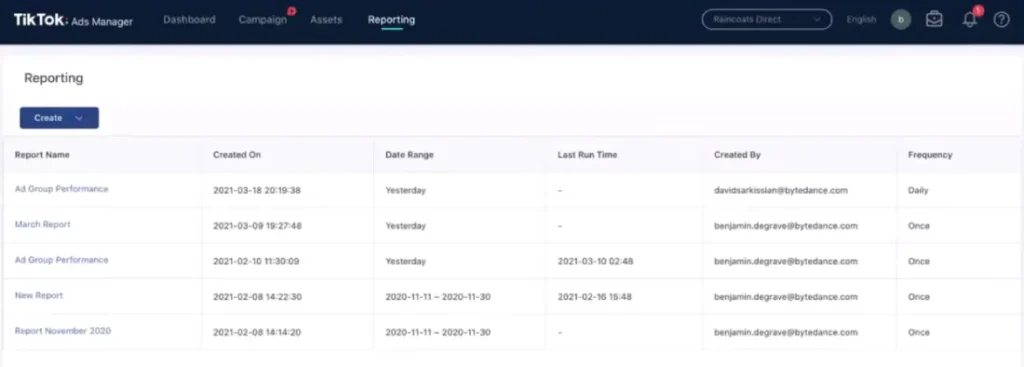
TikTok Ads Manager organizes data across three levels: campaign, ad group, and ad. Each level answers a different question.
- Campaign level: Is the overall budget performing? Is the campaign hitting its stated objective?
- Ad group level: Which audiences, placements, or schedules are delivering results?
- Ad level: Which creative is connecting? Which format (In-Feed, Spark Ads, TopView) is outperforming the others?
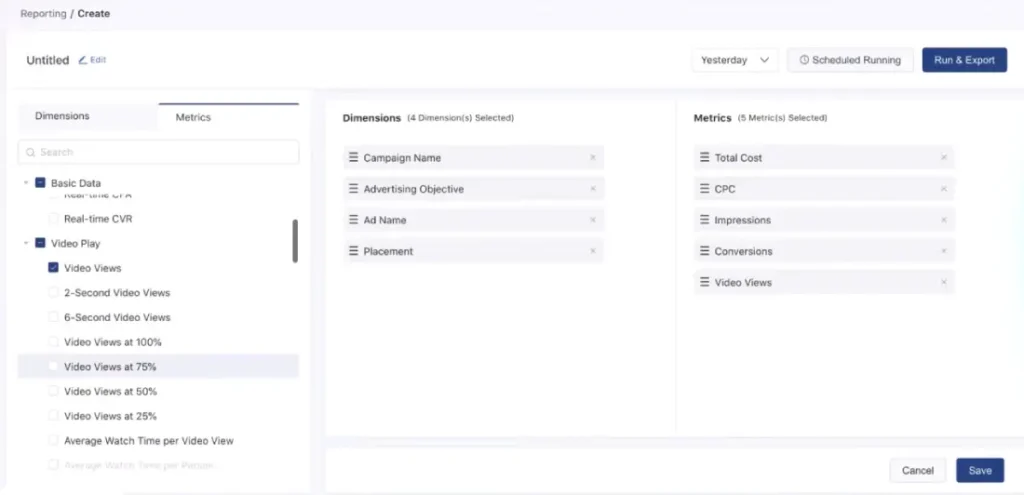
You can build custom reports inside Ads Manager by selecting the metrics you want, applying date ranges, and grouping by the dimension that matters most.
For example, you can break down performance by device type, age group, or creative to find where results are concentrated.
TikTok also offers a Creative Insights dashboard, which surfaces top-performing ad elements based on hook rate, engagement, and CTR. If you are running multiple creatives at the same time, checking them weekly is a good habit.
What tools make TikTok Ads reporting faster
Manual reporting from Ads Manager works for small accounts. At scale, it becomes a time sink, especially when you are pulling data across multiple campaigns or clients.
TikTok’s Native Export: You can export any report as a CSV directly from Ads Manager. It works well for one-off analyses, less so for ongoing reporting.
Google Looker Studio: Connect TikTok Ads data through a third-party connector and build automated dashboards. According to Google’s Data Studio overview, the tool supports scheduled email delivery and shareable live views, which suits team reporting well.
Third-Party Reporting Platforms: Tools like Supermetrics, Funnel.io, and Whatagraph pull TikTok Ads data automatically and let you combine it with data from other ad channels. This is especially useful if you run paid social across multiple platforms and need a single performance view.
Spreadsheet-Based Reporting: Some teams pull data into Google Sheets or Excel and build their own dashboards. This requires more setup but gives full control over formatting and custom calculations.
The right tool depends on how often you report, how many accounts you manage, and whether stakeholders need live dashboards or periodic summaries.
How do you set up a TikTok Ads report?
Setting up a report in TikTok Ads Manager is straightforward once you know where to look.
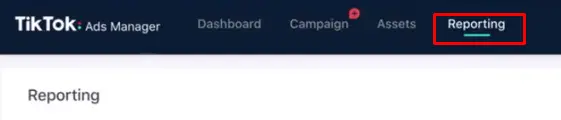
- Go to Reporting in the top navigation bar.
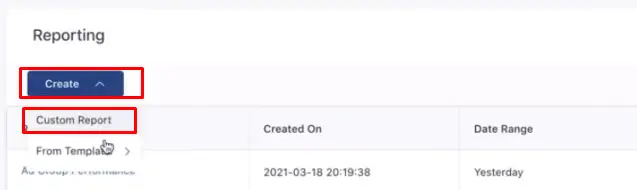
- Select Create Report, then choose Custom Report.
- Pick your dimensions: campaign, ad group, or ad level.
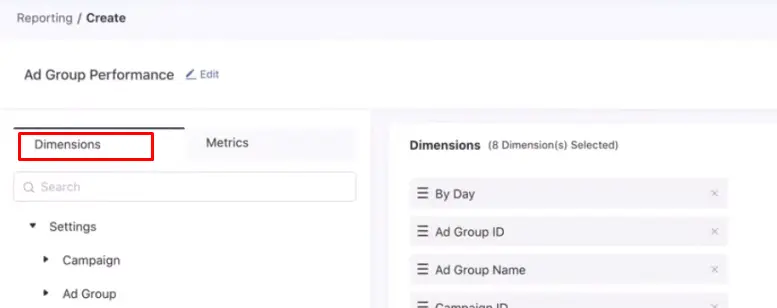
- Add the metrics you want from the available list.
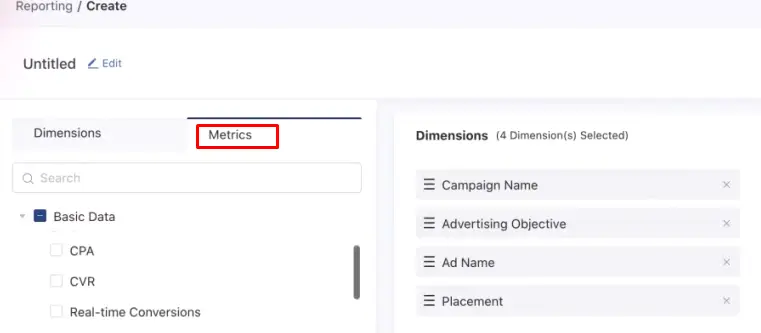
- Set your date range and apply any filters, such as by objective, status, or placement.
- Save the report as a template so you can reuse it without rebuilding it each time.
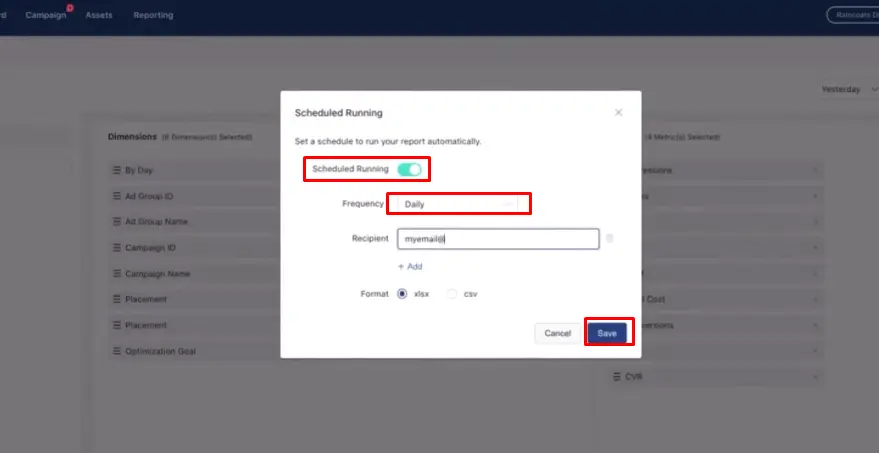
For recurring reports, you can schedule automatic email delivery directly from the platform. This keeps stakeholders updated without requiring manual exports.
What’s a good CTR for TikTok Ads?
CTR benchmarks vary by industry, objective, and creative format. Spark Ads, which boost organic content from creator or brand accounts, tend to perform above standard In-Feed ad benchmarks because the format feels native rather than promotional.
A CTR below 0.5% usually signals a targeting or creative issue worth addressing. A CTR sitting noticeably above your baseline for that campaign type is a signal to take seriously: the creative is connecting, and expanding the budget or duplicating the ad group can extend that momentum.
CTR should always be read alongside CVR. A high CTR paired with a low CVR points to a landing page or offer issue, not an ad problem. Fixing the wrong thing wastes time and budget.
Turning report data into actual campaign decisions
Reporting only creates value when it leads to action. Here is how to close the loop between data and decisions.
Identify your top three to five creatives by CVR and CPA, and concentrate budget behind them. Let low performers run with minimal spend until you have gathered enough data to confirm they will not improve, then cut.
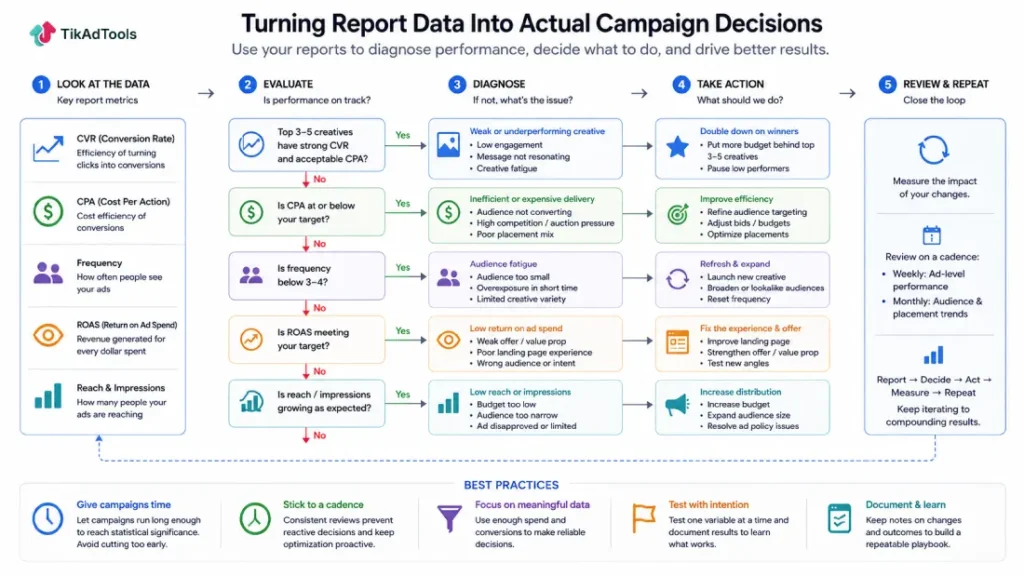
Watch frequency closely. When frequency climbs above three or four within a short window, performance typically dips. Refreshing your creative or expanding your audience are the fastest ways to reset it.
Set a review cadence and stick to it. Weekly check-ins on ad-level performance, monthly analysis of audience and placement trends. Reporting without a schedule becomes reactive, and reactive optimization usually lags behind the problem.
Give campaigns enough time before making cuts. TikTok’s auction system needs time to optimize delivery. Pulling the plug too early, before statistically meaningful spend has accumulated, often means cutting campaigns that would have stabilized.
FAQs
What metrics should I focus on for a TikTok brand awareness campaign?
For brand awareness, prioritize impressions, reach, frequency, and video completion rate. These measures how many people you are reaching and whether your content holds attention long enough to register. ROAS and CPA matter less here because the goal is visibility, not immediate conversion.
How often should I check TikTok ads reports?
For active campaigns with meaningful spend, reviewing ad-level metrics two to three times per week is reasonable. Full performance reviews covering audience and placement breakdowns work best weekly or biweekly. Checking too frequently leads to premature optimization before the data has time to stabilize.
Can I combine TikTok ads data with data from other platforms?
Yes. Tools like Supermetrics, Funnel.io, and Looker Studio connectors pull TikTok Ads data alongside Google, Meta, and other platform data into a single view. This is particularly useful when customers regularly touch multiple channels before converting.
What is the TikTok ads attribution window, and why does it matter?
The attribution window defines how long after an ad interaction TikTok credits a conversion to that ad. The default is 7-day click and 1-day view. For products with longer consideration cycles, expanding the click window to 14 or 28 days gives a more accurate picture of how much your ads are actually contributing to sales.
How do I know when to pause a TikTok ad based on report data?
Pause an ad when it has received statistically meaningful spend (typically at least five to ten times your target CPA) and consistently shows CPA above your threshold, CTR below 0.5%, or video completion rate under 25%. Give new creatives at least 48 to 72 hours before drawing firm conclusions.
The difference between data and direction
Pulling metrics is easy. Knowing which numbers signal a real problem, and what to do next, is what separates accounts that grow from ones that plateau.
Start with the metrics tied directly to your campaign objective, build a reporting rhythm your team will actually follow, and let the data guide your creative and budget decisions rather than gut feel.
Once your reporting rhythm is in place, the TikTok ads optimization guide covers what to actually change based on what your reports show.
Sources