
TikTok’s algorithm can burn through your entire daily budget before you have your morning coffee. That is not a flaw; that is how the platform works.
And if you are still managing your campaigns by hand, you are fighting that speed with the wrong tools.
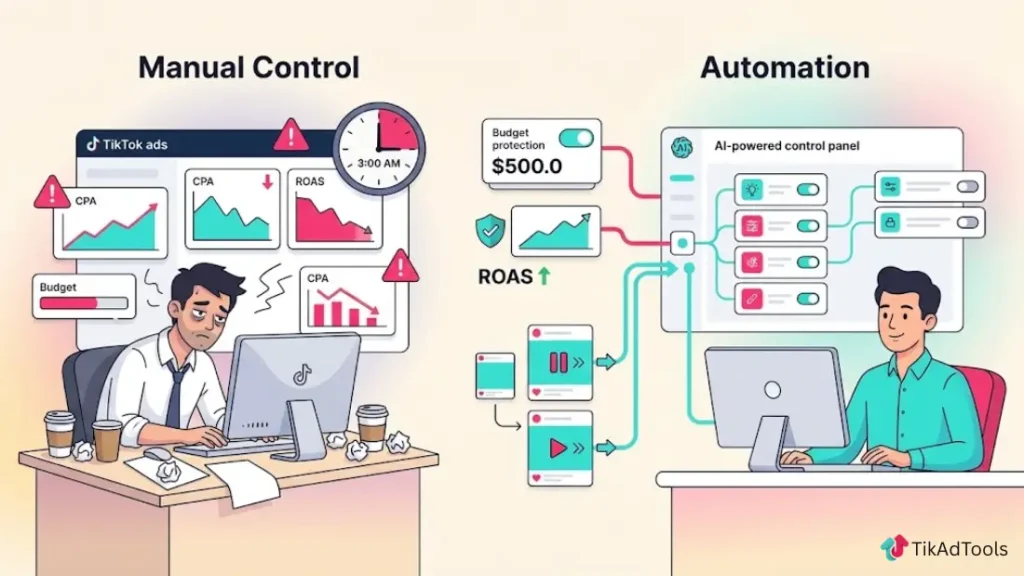
Your creative or targeting is not the problem. The problem is your reaction time. Manual campaign management means your CPA can spike at 3 AM while you sleep, and by the time you log in, the damage is done. Budgets drain, ROAS drops, and a winning ad dies before you ever get to scale it.
This article covers exactly how TikTok Ads Automation works, which native tools you should be using right now, what you should never automate, and how to set up rules protecting your budget while keeping your campaign’s learning phase intact.
Table of Contents
Get Up to $6,000 in Free TikTok Ad Credits
TikTok offers ad credit incentives for new advertisers, helping you test campaigns with a lower upfront cost.
Key Takeaways
- TikTok’s auction moves fast enough that manual, hands-on budget management usually reacts too late to protect performance.
- Native automation tools like Smart+, Automated Rules, and Smart Performance Campaigns each solve a different problem, not one universal fix.
- Automated Rules can raise or lower budgets, pause underperformers, and adjust bids on a schedule you set, without you watching the account.
- Automation works best layered on top of a stable learning phase, not as a replacement for good targeting and creative fundamentals.
- Some decisions, like creative strategy and offer testing, should stay manual even as budget and bidding become automated.
Quick Answer
TikTok Ads automation refers to native tools like Smart+, Automated Rules, and Smart Performance Campaigns that let TikTok’s system adjust targeting, bidding, budget, and creative selection in real time instead of you making every change by hand. Used correctly, it protects your account from the kind of overnight budget swings manual management can’t react to fast enough to stop.
What is TikTok Ads automation? (and why it matters in 2026)
TikTok Ads Automation refers to software-driven systems that monitor, adjust, and optimize your TikTok ad campaigns without manual input. These systems use API integration and rule-based logic to evaluate metrics like CPA, ROAS, and CTR in real time, then execute predefined actions automatically. Results vary based on your campaign structure, spend level, and how precisely your rules are configured.
Is TikTok Ads automation worth it in 2026?
For most advertisers, yes. But the answer depends on where you stand right now.
If you are spending over $1,000 per month on TikTok ads and you are only reviewing your campaigns once a day, you are already losing money to delayed decisions. Automation helps you to close that gap.
TikTok Ads Automation practical decision framework:
| Your Situation | Recommended Approach |
|---|---|
| Under $1K/month, early stage | Use TikTok’s native Automated Rules. Free and sufficient. |
| $1K to $10K/month | Smart+ for campaign optimization, plus Automated Rules for budget guardrails. |
| Over $10K/month | Add a third-party tool like Bïrch for rule complexity and scan frequency. |
| TikTok Shop seller, any spend level | GMV Max is now your required campaign type. |
One thing to be clear about: automation does not fix a bad offer, a weak creative, or broken tracking. It amplifies what is already working, and if your manual campaigns are bleeding, automation will bleed faster. Get the foundation right before you hand anything to a system.
Why manual TikTok campaign management is killing your budget
You cannot outpace TikTok’s auction speed with manual management. The platform evaluates audience signals, creative performance, and conversion data in near real time. Your manual reviews happen hours or days later. That lag is expensive.
Research published on Northbeam’s blog shows that over 40% of digital ad spend is wasted due to inefficient strategies and delayed optimization. Addressing those inefficiencies through better tooling and faster decisions is where automation earns its place.
The overnight budget drain problem
TikTok’s algorithm spends aggressively when it detects early performance signals. If your ad starts converting at 11 PM, the system accelerates delivery. With no automated guardrails, your entire daily budget can disappear by 2 AM on traffic that has not been validated yet.
You wake up to a zero balance and no useful learning data. The algorithm restarts from scratch the next day. You lose the compounding signal data that helps TikTok find your best converters over time.
Why human reaction speed can’t match TikTok’s algorithm
TikTok Ads Manager processes campaign data continuously. The best third-party automation tools scan your account every 10 to 15 minutes. The average advertiser checks their dashboard once or twice a day.
That gap means underperforming ads run for hours past their useful life. Winning ads miss scale windows because nobody was watching. Your CPA climbs quietly while you are doing other work. Automation removes that timing dependency entirely.
How TikTok Ads automation actually works
Automation is a layered system that connects your ad account data to a set of rules or AI models, which then take action based on conditions you define or objectives you set.
API integration and real-time data scanning
Every legitimate automation tool connects to TikTok through the official Marketing API. That is the only approved connection method. Tools using screen scraping or unofficial workarounds risk getting your account flagged or permanently suspended.
Once connected, the tool pulls live performance data: spend, impressions, clicks, conversions, CPA, ROAS, and CTR. It evaluates that data against the conditions you configured, and then it acts.
Scan frequency is what separates good automation from great automation. TikTok’s native Automated Rules run on schedules you set. Third-party tools like Bïrch (formerly Revealbot) can scan as frequently as every 10 minutes. That timing difference determines whether you catch a CPA spike early or find it three hours later.
Rule-based triggers vs. AI-driven decisions
Two types of automation logic operate on TikTok, and knowing the difference matters.
Rule-based automation means you write the conditions. “If CPA exceeds $25 for the last 24 hours, pause this ad group.” The system executes exactly what you define. You keep full control over the decision logic.
AI-driven automation means TikTok’s algorithm makes the decisions based on your conversion goal. Smart+ is the clearest example; you set the objective, upload your creative assets, and the system handles targeting, bidding, placement, and creative rotation on its own.
Both approaches work. The right choice depends on how much control you want to keep and how comfortable you are with letting the algorithm make real-time trade-offs on your behalf.
TikTok’s built-in automation tools: Smart+, GMV Max, and automated rules
TikTok has three distinct native automation systems. Most advertisers only use Smart+. That oversight can cost them.
Smart+: AI-driven campaign automation and when to use it
Smart+ is TikTok’s fully automated campaign type: you upload creative assets, set a conversion goal, and the system handles targeting, bidding, placement, and creative rotation. It’s the clearest example of AI-driven automation on the platform, in contrast with the rule-based automation covered below.
Use it when you have at least five to ten creative assets, a verified Pixel and Events API, and a conversions, leads, or app-install objective. Skip it if your creative pool is thin (under three assets), since the system won’t have enough variation to test.
The dedicated Smart+ / Smart Performance Campaign guide covers the full setup walkthrough, best practices, and how Smart+ compares to a manual campaign.
GMV Max: automation for TikTok Shop sellers
TikTok GMV Max is built specifically for TikTok Shop and optimizes for gross merchandise value, not just clicks or page visits. That distinction matters. It factors in product value and purchase intent signals that standard campaign types ignore entirely.
As of July 2025, according to TikTok’s own migration documentation, GMV Max became the only supported campaign type for TikTok Shop ads. If you sell through TikTok Shop, this is no longer optional. It is the required format.
GMV Max pulls from your video ads, live shopping content, and product showcase listings simultaneously. It allocates budget across all three based on what is actually driving sales, not just generating traffic.
Automated rules: setting budget and bid conditions manually
Automated Rules inside TikTok Ads Manager let you build condition-based logic without any third-party tools or extra cost. This is the most consistently underused free feature in TikTok advertising.
You can configure rules to:
- Pause any ad when its CPA crosses your defined ceiling
- Increase the budget by a fixed amount when ROAS hits a target threshold
- Send email alerts when daily spend reaches 80% of your campaign budget
- Turn campaigns on or off on specific days and times for day-parting
TikTok limits you to five conditions per rule and only supports the AND operator. That caps the complexity of what you can build natively. For most advertisers spending under $10,000 per month, though, these rules cover the majority of routine optimization without any additional spend.
What you should and shouldn’t automate on TikTok Ads
Not everything on TikTok benefits from removing the human. Some parts of your campaign get measurably worse when you automate them.
Automate: bidding, budget allocation, creative rotation, reporting
These four areas respond well to automation because they are metric-driven, time-sensitive, and benefit from consistency that humans cannot maintain around the clock.
Bidding is the highest-value thing to automate. TikTok’s auction moves faster than anyone can manually track. Smart+ adjusts bids in real time based on live conversion probability. For manual campaigns, Automated Rules adjust bids based on your CPA and ROAS thresholds without requiring you to be online.
Budget allocation across placements and ad groups is largely guesswork if done manually. Smart+ redistributes the budget toward what is converting right now. Campaign Budget Optimization (CBO) does the same across your ad groups in real time.
Creative rotation at any meaningful scale is unsustainable manually. Smart+ identifies your top-performing creative combinations within hours and shifts impressions toward them. On TikTok, a winning creative typically fatigues within five to seven days. Automation catches that decline before it shows up in your dashboard.
Reporting is the quickest win. Schedule automated performance reports from TikTok Ads Manager so key metrics arrive in your inbox each morning. You spend less time pulling data and more time making decisions with it.
Don’t automate: creative strategy, hooks, audience insight
TikTok’s algorithm rewards content that feels native to the platform. The judgment call about what feels authentic versus what looks like an ad is entirely human.
You cannot automate the decision to test an unscripted unboxing video instead of a polished product demo. You cannot automate the read on why a specific hook connected with your audience. You cannot automate the strategic choice about which product angle to push in the next creative sprint.
Audience insight works the same way. Broad targeting performs well on TikTok because creative performance is itself a targeting signal for the algorithm. But deciding which audience segments to protect, which first-party customer lists to upload, and how to structure the lookalike audience based on your actual buyers, those decisions need human context that no rule set can replicate.
Automation executes your strategy. It cannot build one.
How TikTok Ads automation lifts ROAS: key mechanisms and real numbers
Automation improves ROAS through three specific mechanisms. Each one removes a layer of delay from the optimization process that manual management cannot close.
Mechanism 1: Faster budget protection. When a rule fires and pauses an underperforming ad within 15 minutes of it crossing your CPA ceiling, you stop spending on that ad almost immediately. Manual management delays that response by hours. Those hours represent direct revenue loss.
Mechanism 2: Smarter budget shifting. Smart+ and CBO both reallocate spend toward higher-performing placements and ad groups in real time. Smart+ has been observed shifting the majority of a campaign’s budget toward TikTok search placements mid-flight when search starts outperforming feed. A manual advertiser reviewing the dashboard once a day would not catch that shift fast enough to act on it profitably.
Mechanism 3: Learning phase stability. Smart+’s goal-based budget increase feature raises your daily budget in 20% increments only when your ROAS or cost cap conditions are already met. This increase can occur up to ten times per day without disrupting the algorithm’s learning. Manual bulk budget increases disrupt that learning. Automated incremental increases do not.
These mechanisms show up in real advertiser results. Sephora Turkey’s Smart+ Black Friday campaign achieved a 53% ROAS lift over non-automated campaigns in the same period.
Results like this reflect a well-configured setup: verified tracking, a strong creative pool, and a correct bidding strategy. Your outcome will vary based on those same factors.
How to set up automated rules in TikTok Ads Manager (step by step)
Setting up your first automated rule takes under five minutes. Here is exactly how to do it inside TikTok Ads Manager.
- Log in to TikTok Ads Manager and click Tool in the top navigation bar.
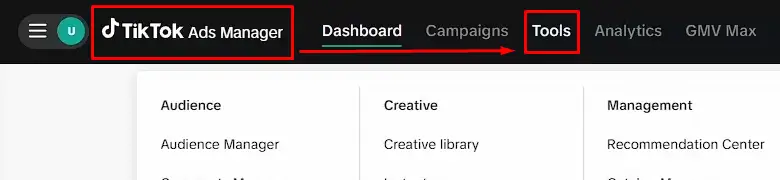
- Select Automated Rules from the dropdown menu.
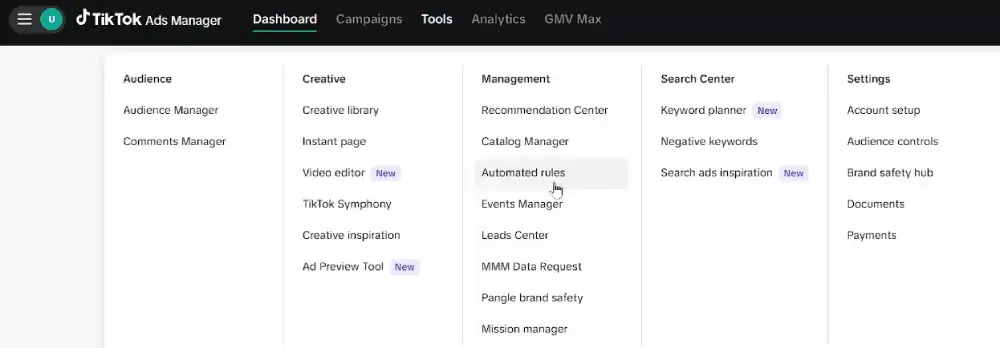
- Click Automated rules, then click Create new Rule in the dropdown menu.
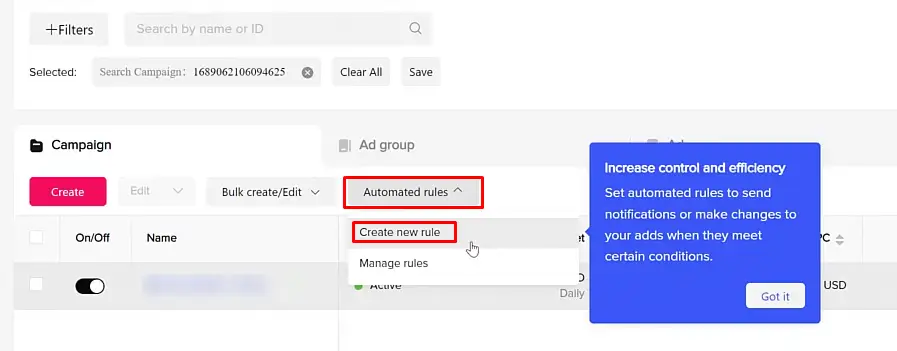
- Choose the level you want the rule to apply to: campaign, ad group, or individual ad.
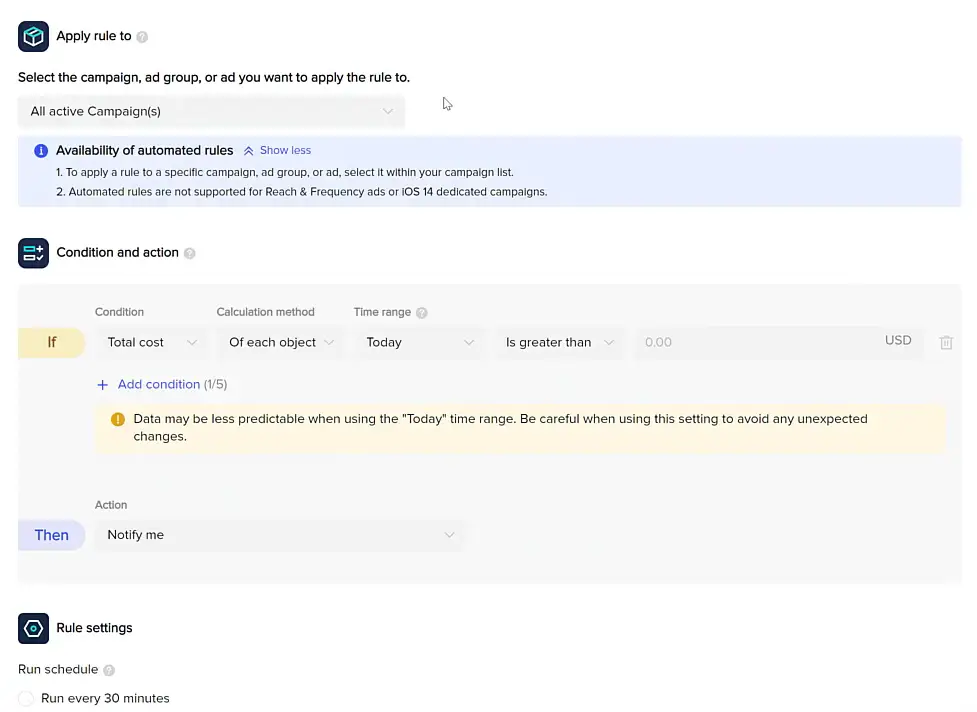
- Select your condition metric: CPA, ROAS, CTR, daily spend, or another available metric.
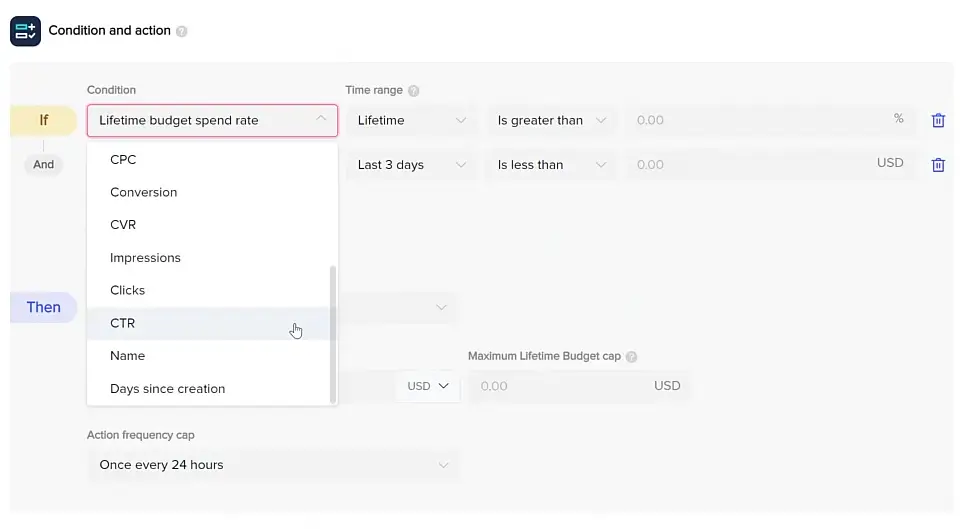
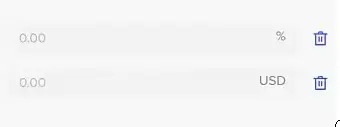
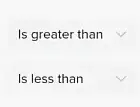
- Enter your threshold value, the specific number that triggers the rule.
- Choose the action: pause, resume, adjust bid, adjust budget, or send a notification email.
- Set the time range the rule evaluates: last 1 day, last 3 days, or last 7 days are the most common.
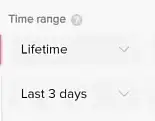
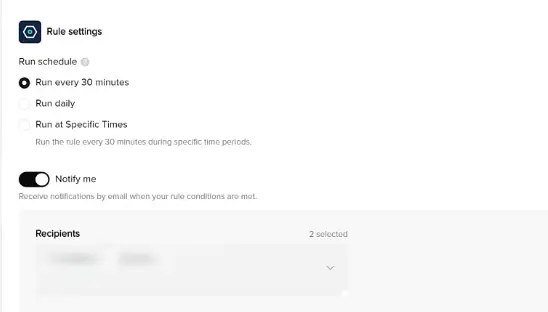
- Set your notification schedule and frequency
- Save and activate the rule.
TikTok runs your rules based on the schedule you select. Some rules can also be set to check at specific times of day, which is useful for campaigns running day-parting strategies.
Protecting the TikTok Learning Phase with your rules
This is the most common and most costly mistake we see in automated rule setups. If your CPA threshold is too tight and the rule fires within the first 24 hours of a new campaign, you shut down the algorithm before it has enough data to find your best-converting audience.
TikTok’s learning phase typically runs 7 days, with volatility starting to ease around 25 conversions, but TikTok’s own budget guidance sizes a healthy ad group around 50 conversions per week before you treat delivery as stable. Set your rules to only evaluate after at least 24 to 48 hours of run time. Set your CPA ceiling at 1.5 to 2 times your actual target, not at the target itself.
A rule like “pause if CPA exceeds $40 for 48 hours” when your real target CPA is $20 gives TikTok the room it needs to optimize while still protecting your budget from sustained failure.
Native automation vs. third-party tools: which one do you actually need?
This is a decision framework based on spend level, team capacity, and rule complexity. It is not a product ranking.
When TikTok’s native tools are enough (under $10K/month)
If you are spending under $10,000 per month on TikTok, you can handle the majority of your automation needs with tools you already have at no extra cost.
Smart+ manages campaign-level optimization. Automated Rules handle budget and bid guardrails. CBO distributes budget across your ad groups in real time. Together, these three native systems cover most of what an advertiser at this spend level actually needs.
The real limitation is rule complexity. TikTok caps you at five conditions per rule and restricts you. You also cannot build rules using data from outside TikTok, like blended ROAS from a third-party attribution tool, or automatically clone high-performing ad groups.
When to upgrade to third-party automation
Consider a third-party tool when:
- You are spending over $10,000 per month and need rules that fire every 10 to 15 minutes
- You want to build conditions using custom metrics from outside TikTok, such as data from Triple Whale, Northbeam, or your own CRM
- You manage multiple TikTok accounts and need centralized rule management from one dashboard
- You want to automatically duplicate high-performing ad groups, which TikTok’s native rules do not support
Bïrch (formerly Revealbot) handles rule-based automation across TikTok, Meta, and Google from a single interface. Smartly is built for enterprise advertisers with high monthly spend and includes dynamic creative templating at scale.
TheOptimizer supports custom metric integration and third-party tracker data for performance-heavy setups.
The approach we see working most consistently in 2026 is a hybrid: Smart+ running at the campaign level for AI-driven optimization, with a third-party tool layered on top for rule complexity, cross-account management, and custom metric triggers.
Common TikTok Ads automation mistakes that destroy ROAS
Automation amplifies both good decisions and bad ones. These are the most common mistakes we see, and why they matter.
Automating before your tracking is verified. If your TikTok Pixel is missing events or your Events API connection is broken, every rule you build is operating on incomplete data. Verify your tracking setup before adding any automation layer on top.
According to TikTok’s own Performance Fundamentals data, advertisers using both the Pixel and Events API together see 19% more events captured and a 15% improvement in CPA compared to using only one tracking method.
Firing rules during the learning phase. Rules that trigger within the first 24 hours routinely kill campaigns before TikTok has enough data to optimize delivery. Always set a minimum evaluation window of 24 to 48 hours, and raise your CPA ceiling during the learning period.
Setting CPA thresholds at your target, not above it. Your automated ceiling during the first week should be 1.5 to 2 times your actual CPA goal. Rules set exactly at your target will pause campaigns that could still stabilize and scale profitably.
Reading platform ROAS as your source of truth. TikTok defaults to a seven-day click, one-day view attribution window. A user who sees your ad on Monday, does not click, but buys through a Google search on Thursday, still gets counted as a TikTok conversion. Use the TikTok conversion API/ Event API to mitigate this issue. Always cross-reference your platform ROAS with your Marketing Efficiency Ratio: total revenue divided by total ad spend across all channels.
Automating your creative decisions. Smart+ will optimize the creative you give it. It will not tell you when your creative concept is the problem. If your hook is not stopping the scroll, automation will efficiently spend your budget on an ad that nobody wants to watch.
FAQs
What is TikTok Ads automation?
TikTok Ads Automation refers to tools and systems that manage your TikTok ad campaigns automatically, adjusting bids, budgets, and creative delivery based on performance conditions you set or AI objectives you define. You can use native tools like Smart+, GMV Max, and Automated Rules at no additional cost, or third-party platforms for more advanced rule logic. Automation works best when your tracking is verified, and your creative pool gives the system meaningful variations to evaluate.
Does TikTok have automated rules?
Yes. TikTok Ads Manager includes a native Automated Rules feature that lets you set condition-based actions for your campaigns, ad groups, and individual ads. You can pause underperforming ads, increase budgets when ROAS hits a defined target, or receive email alerts when spend reaches a set threshold. Each rule supports up to five conditions and applies to the campaigns, ad groups, or ads you select during setup.
How do I automate my TikTok ads budget?
You have three main options. Use Campaign Budget Optimization (CBO) to let TikTok distribute spend across ad groups based on real-time performance. Use Smart+’s goal-based budget increase, which automatically raises your daily budget in 20% increments when your ROAS or cost cap conditions are met. Or create Automated Rules that increase or decrease budget when specific conditions you define are triggered, like pausing spend when daily CPA crosses a ceiling you set.
What is the difference between smart+ and automated rules on TikTok?
Smart+ is an AI-driven campaign type where TikTok’s algorithm controls targeting, bidding, creative rotation, and budget allocation automatically toward your conversion objective. Automated Rules are manual conditions you write yourself, like pausing an ad when CPA exceeds a specific number over a defined time period. Smart+ makes optimization decisions for you. Automated Rules execute the logic you define. Most effective setups use both Smart+ for campaign-level AI optimization and Automated Rules as budget guardrails.
Is TikTok Ads automation safe for my ad account?
Automation is safe when you use tools that connect through TikTok’s official Marketing API. Unofficial tools or browser scripts that interact with TikTok’s interface without proper API access can trigger policy violations and account suspensions. Native tools like Smart+, GMV Max, and Automated Rules are fully compliant by default. Third-party tools that hold official TikTok Marketing Partner status also operate within TikTok’s approved access framework. Always confirm a tool’s API verification status before connecting it to your account.
Can TikTok Ads automation replace a media buyer?
Not fully, and it should not try to. Automation handles execution: bidding adjustments, budget protection, creative rotation, and real-time campaign responses. It does not replace the strategic judgment a media buyer brings: choosing which creative concepts to test, interpreting audience signals, structuring campaigns for long-term scaling, and reading blended ROAS accurately across channels. The most effective setups use automation to handle routine optimization while keeping human judgment focused on strategy and creative direction.
Conclusion
Spending money on TikTok ads without automation in 2026 is like leaving a tap running while you sleep. The platform moves fast, the auction resets constantly, and the gap between what you see in your dashboard and what is actually happening is too wide for manual management to close reliably.
What we have covered here is not about replacing your judgment. It is about removing the delays and blind spots that drain your budget before you even know there is a problem. Smart+ handles campaign-level optimization.
Automated Rules protect your spend at the budget and bid level. GMV Max is now the required format for TikTok Shop. Third-party tools fill the gaps when your complexity grows beyond what native features can manage.
The clearest path to better ROAS on TikTok starts with clean tracking, a steady supply of authentic creative, and automation rules calibrated to your real targets. You do not need every tool available. You need the right layer of automation for your current spend level and your team’s actual capacity.
Automation does not fix a broken strategy. A solid strategy with the right automation behind it compounds results faster than anything you can manage by hand.