
If you sell on TikTok Shop, GMV Max is the only supported Sales-objective campaign format available for new Shop ads. As per TikTok’s official migration documentation, Video Shopping Ads, Product Shopping Ads, and LIVE Shopping Ads can no longer be created, edited, or duplicated as of July 2025.
GMV Max replaced them all. TikTok Search Ads remain available as a separate format for keyword-based targeting, but for Shop-specific Sales campaigns, GMV Max is what you have.
The frustrating part is how often GMV Max is misunderstood. Many brands treat it like a simple toggle. They ignore how attribution actually works, underestimate the volume and type of creatives required, and fail to understand why their reported results look very different from other platforms after the first week.
This guide focuses on what actually matters: how GMV Max works under the hood, how to set it up correctly, how to interpret its performance data without confusion, and the mistakes that quietly kill results before a campaign ever stabilizes.
Table of Contents
Get Up to $6,000 in Free TikTok Ad Credits
TikTok offers ad credit incentives for new advertisers, helping you test campaigns with a lower upfront cost.
Key Takeaways
- GMV Max is the only supported Sales-objective campaign type for TikTok Shop; Video Shopping Ads, Product Shopping Ads, and LIVE Shopping Ads can no longer be created as of July 2025.
- It automates targeting, bidding, and creative selection across paid and organic traffic to maximize ROI toward a target you set.
- Attribution in Seller Center’s GMV Max dashboard uses a 1-day window, while Ads Manager uses a 7-day click, 1-day view window, so the two dashboards will never match exactly.
- Success depends heavily on creative volume and variety; underfeeding the system with too few videos is one of the most common reasons GMV Max underperforms.
- TikTok Search Ads remain a separate, still-available format for keyword targeting outside of Shop Sales campaigns.
Quick Answer
TikTok GMV Max is an automated campaign type for TikTok Shop that combines paid and organic traffic optimization into one system, targeting either Product or LIVE sales. You set a target ROI and budget, and TikTok’s algorithm handles targeting, bidding, and creative rotation. It’s now the default and only way to run Sales-objective Shop ads on TikTok.
What is TikTok GMV Max?
TikTok GMV Max is a fully automated TikTok Shop campaign type that optimizes for Gross Merchandise Value across all available traffic sources at once, including paid ads, organic video, and affiliate content. You set a daily budget and an ROI target, and TikTok’s system allocates spend in real time to drive the highest possible purchase volume. It is available for both shoppable video and TikTok LIVE formats, but results vary significantly based on your creative library, daily order volume, and the products you choose to promote.
Key automation benefits:
- Combines paid, organic, and affiliate traffic into one unified campaign
- Removes the need to manually manage ad sets or audience targeting
- Adjusts spend allocation in real time based on live purchase signals
- Draws from your entire authorized video library to test and rotate creatives automatically
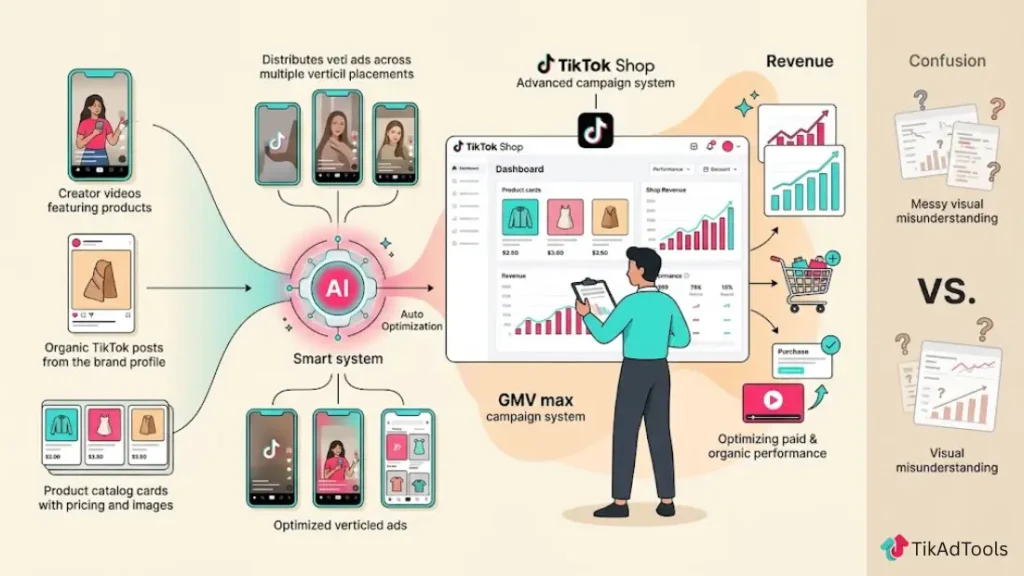
How does TikTok GMV Max work?
GMV Max connects every available traffic source in TikTok’s ecosystem into a single optimized loop. According to TikTok for Business internal data, advertisers using GMV Max in initial tests reported a 30% uplift in GMV compared to running standard campaigns.
Here is how the system works from setup to purchase:
- You connect your TikTok Shop to Ads Manager and create a GMV Max campaign with a daily budget and ROI target.
- TikTok scans your authorized content, including your own organic videos, creator videos you have whitelisted, and affiliate content you have approved.
- The algorithm selects the highest-probability assets and serves them as ads or boosts them organically, depending on where it finds the most efficient path to purchase.
- Attribution runs across all traffic types. When a buyer discovers your product through an organic video, a LIVE stream, or an affiliate link, GMV Max credits that sale to the campaign within the attribution window.
- The system reoptimizes continuously based on real-time purchase signals, shifting budget toward the formats and creatives driving the strongest return.
- You review performance in Seller Center for total shop-level impact and in Ads Manager for paid-only metrics.
Why your GMV Max ROI will always look higher than Meta ROAS
This is worth understanding before you compare platforms. GMV Max attributes organic and affiliate-driven sales to the campaign because those traffic sources operate inside the same optimization window.
On Meta, your ROAS only reflects purchases from paid impressions. On TikTok GMV Max, a sale driven by a creator’s organic post counts as a campaign conversion if it falls within the attribution window.
Your reported ROI figure on TikTok will almost always look higher than your actual paid-only return. This is not inflated reporting. It is a structural difference in how attribution is built. Factor that in every time you benchmark performance across platforms.
Is TikTok GMV Max right for your business?
GMV Max is the only Sales-objective format for new TikTok Shop campaigns, so you are going to use it either way. The real question is whether your shop is set up to get results from it quickly.
The system performs well when there is a sales history, a healthy content library, and enough budget to move through the learning phase efficiently. It struggles with accounts that are brand new or have very thin creative assets.
| Ready to get results from GMV Max | Likely to struggle at first |
|---|---|
| Active TikTok Shop with a consistent order history | Brand new shop with no purchase data |
| A growing library of authorized shoppable videos | Fewer than 10 videos in your content library |
| Affiliate program active with multiple creators | No affiliate program set up |
| Daily budget of $100 or more available | Budget capped below $50 per day |
| Comfortable giving up manual creative control | Brands with strict creative compliance requirements |
| Willing to let the campaign run 7 to 14 days before evaluating | Expecting clear results within 48 to 72 hours |
Does GMV Max work for small sellers?
It can, but the learning phase is the biggest hurdle. TikTok’s system needs consistent purchase signals to optimize efficiently. Shops generating only a handful of orders each day will take much longer to stabilize and may burn through budget before finding their rhythm.
Small sellers with a strong organic following or active affiliate partnerships tend to see better early results, because those non-paid conversions give the algorithm something to learn from even when paid spend is low.
Product GMV Max vs. LIVE GMV Max: what’s the difference?
| Product GMV Max | LIVE GMV Max | |
|---|---|---|
| Goal | Drive purchases from shoppable videos | Drive purchases and viewership during a TikTok LIVE |
| Campaign type | Video shopping ads (automated) | LIVE shopping ads (automated) |
| Creative source | Authorized shoppable videos from your library or affiliates | Your active LIVE stream |
| Attribution window | 1-day (24-hour) window at product level | Session-based, tied to LIVE duration |
| Best for | Always-on product promotion, scaled catalog selling | Event-based selling, product launches, flash sales |
| Budget approach | Set a daily budget that runs continuously | Set a daily or total budget, and pause when LIVE ends |
| Learning phase | 7 to 14 days | Resets with each new LIVE session |
| Creative control | Minimal; the algorithm selects assets | Minimal on the ads side; you control the LIVE content |
The key practical difference is time horizon. Product GMV Max builds optimization data over days and weeks. LIVE GMV Max resets its learning every time you go live, which means it takes longer to reach peak efficiency if you only stream occasionally.
TikTok’s best practices for LIVE GMV Max recommend streaming for at least 3 hours per session and keeping your timing consistent across campaign days.
One distinction worth flagging: the 1-day attribution window used in GMV Max’s Seller Center dashboard is different from the 7-day click, 1-day view window used in TikTok Ads Manager for broader Shop Ad reporting. That difference is why the two dashboards will never show identical numbers.
How to set up TikTok GMV Max: step-by-step
You can create a GMV Max campaign through two entry points: Seller Center or TikTok Ads Manager. Seller Center is the more direct path for most sellers, and the one TikTok’s own documentation leads with.
Path 1: Product GMV Max via Seller Center (recommended)
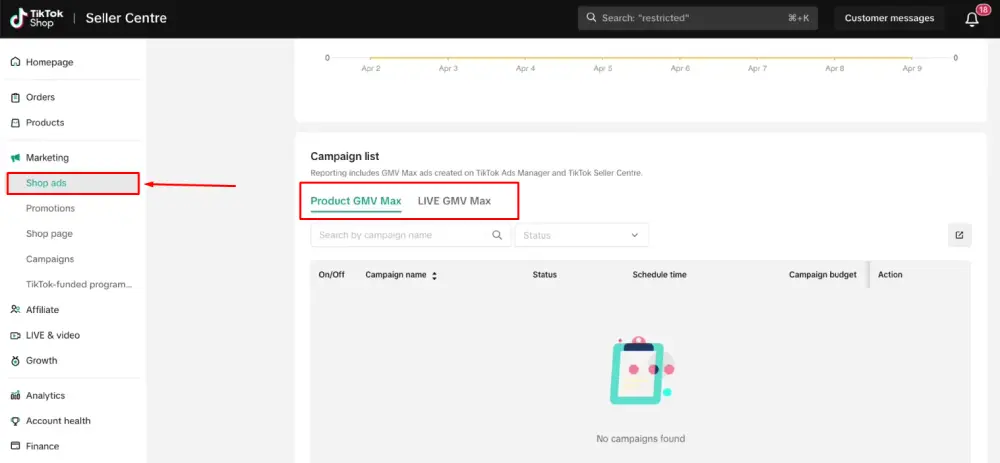
- Log in to Seller Center and click “Shop Ads” in the left-hand menu.
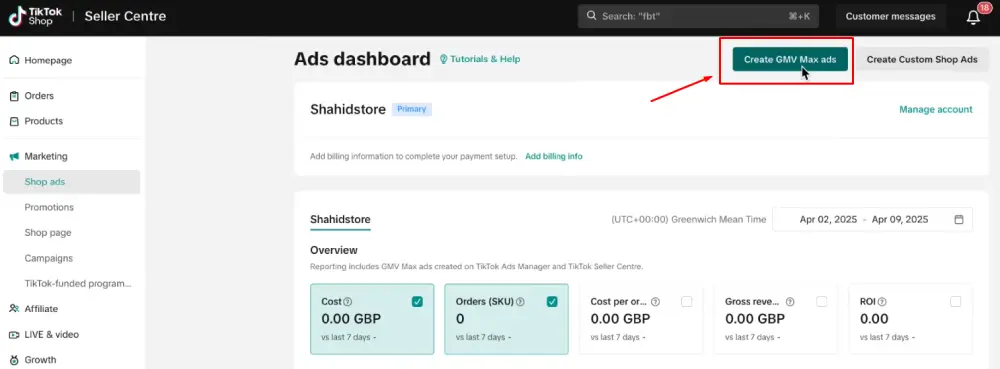
- Click “Create GMV Max ads.” The campaign automatically links to your primary ad account. If you need to switch accounts, click the gear icon next to the account name at the top of the Ads dashboard.
- Click “Promote products.”
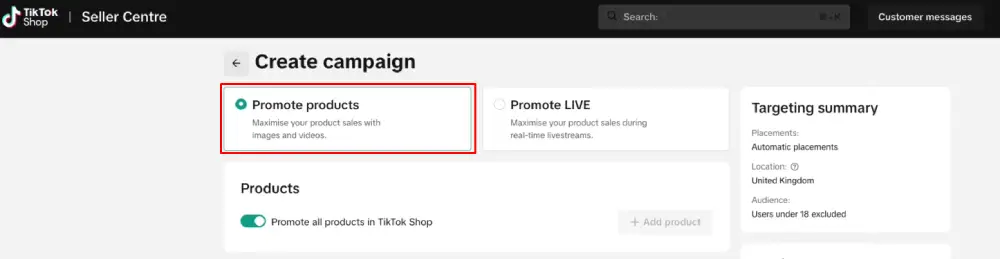
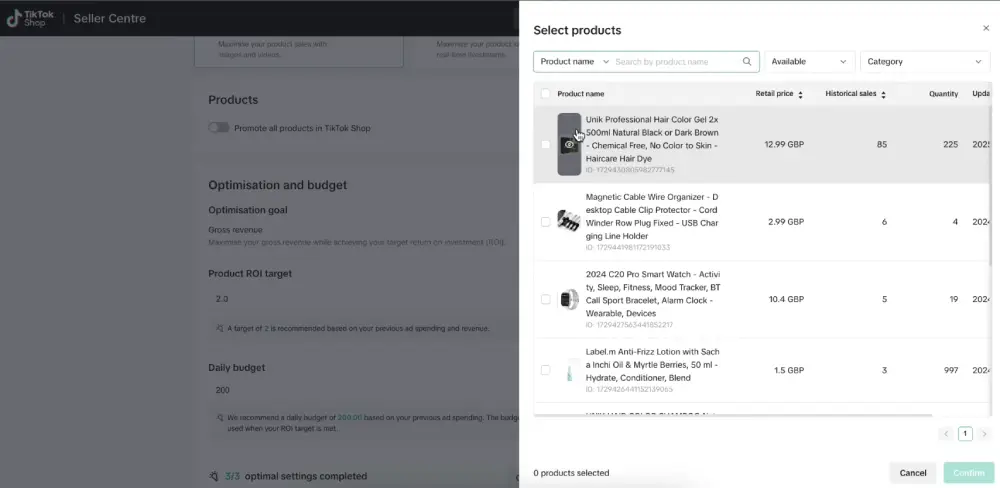
- In the Products section, choose what you want to promote. Click “Promote all products in TikTok Shop” to run the campaign across your full catalog, or click “+Add product” to select specific SKUs.
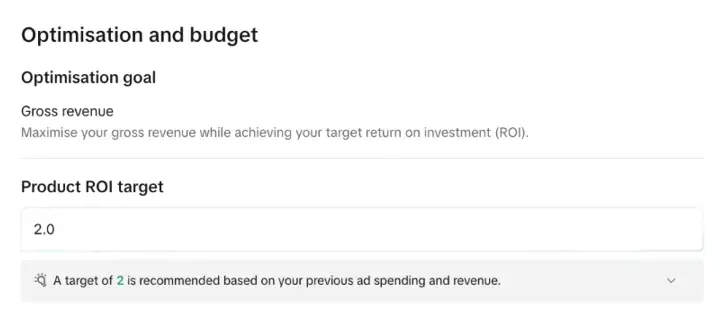
- In the Optimization goal section, set your ROI target. You can use TikTok’s recommended value or set your own.
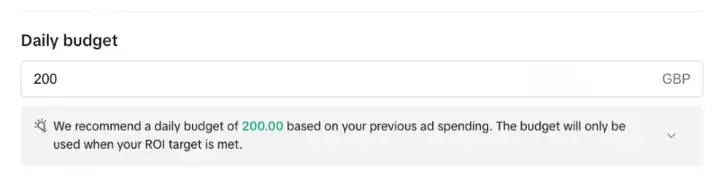
- In the Budget section, enter your daily budget. The platform minimum is $50 per day, though $100 or more is recommended for a faster learning phase.
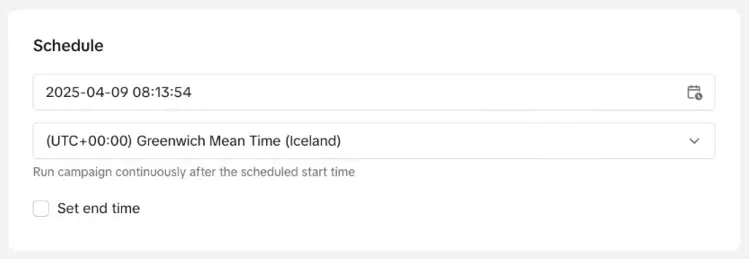
- In the Schedule section, choose your campaign start date and time. The campaign runs continuously from that point.
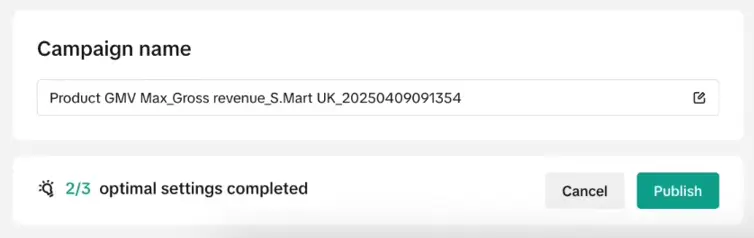
- Click Publish. View performance under the Overview tab in Seller Center.
Path 2: product GMV Max via TikTok Ads Manager
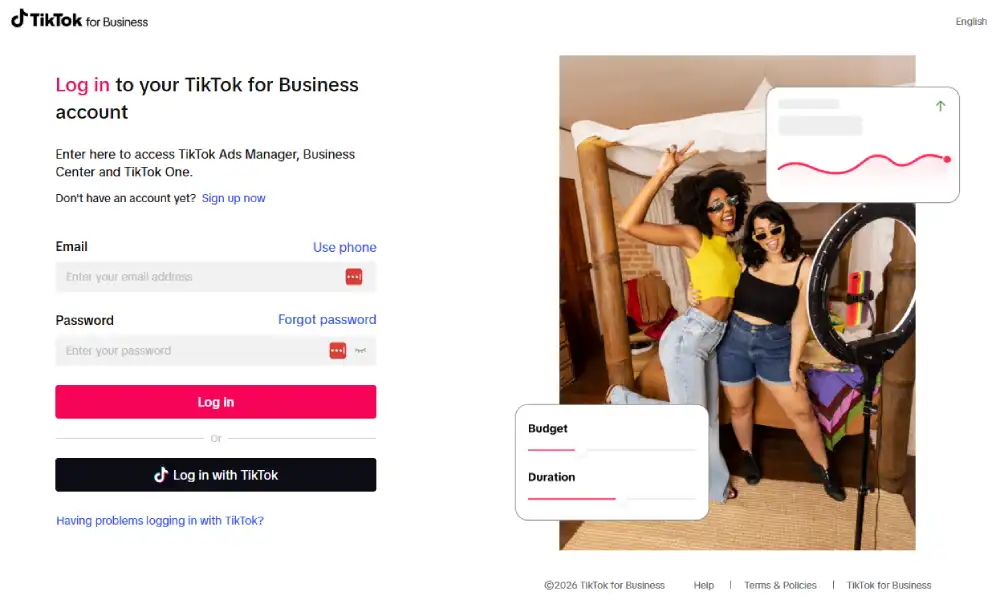
- Log in to TikTok Ads Manager.
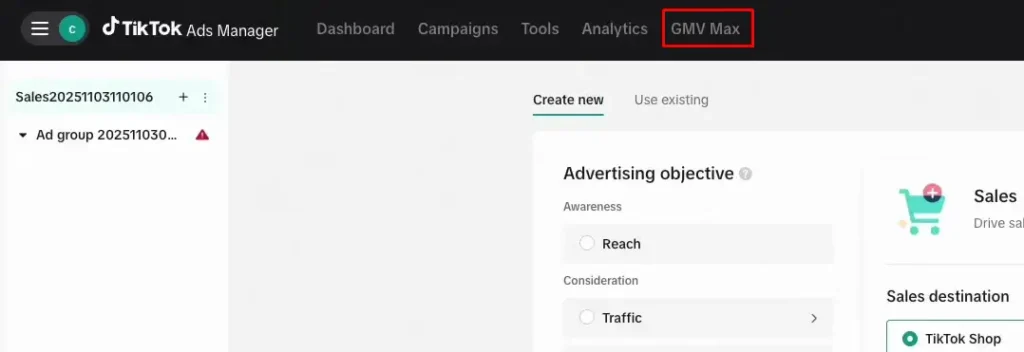
- Click “GMV Max” at the top of your dashboard. This is a dedicated button, not the standard “Create Campaign” flow.
- Select the TikTok Shop you want to promote.
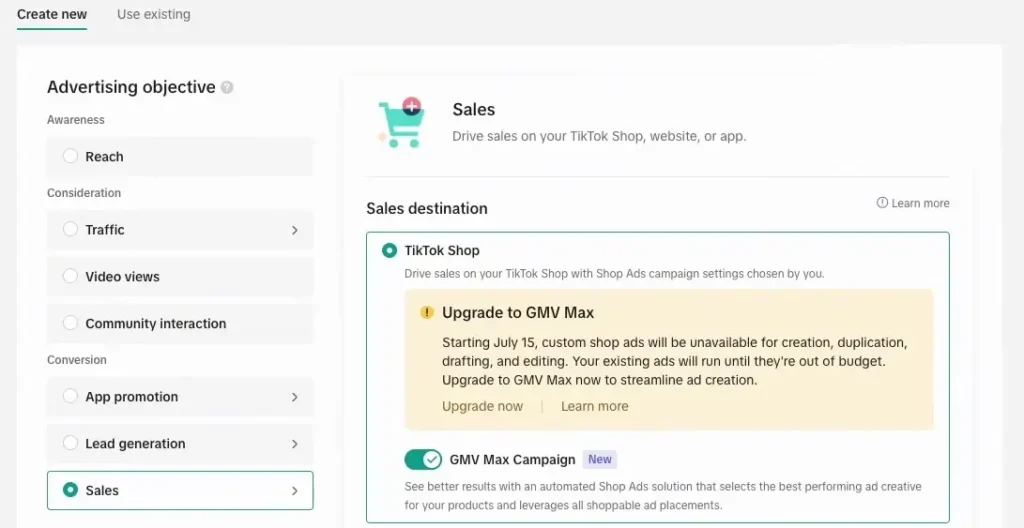
- Click “Create GMV Max ads” and follow the same steps above: select products, set ROI target, set daily budget, set schedule, then publish.
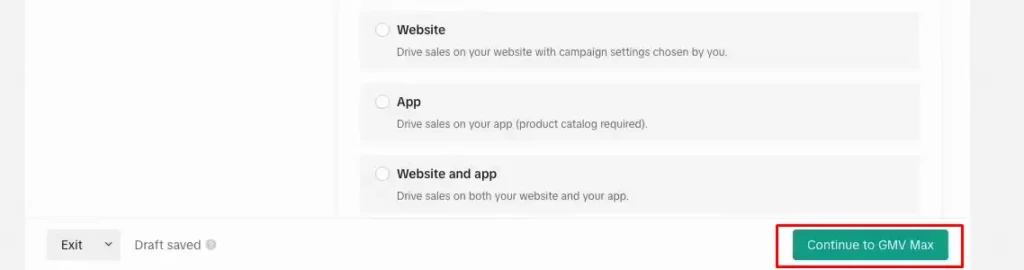
A note on LIVE GMV Max
LIVE GMV Max as an automated campaign type is currently only available in Indonesia, Vietnam, Thailand, the Philippines, Malaysia, and Singapore. It is not available for US sellers as of the time this article was written. US-based sellers running TikTok LIVE events can still drive paid traffic to their streams, but through different available options in Ads Manager.
How to set your GMV Max ROI target (and what ROI protection means)
Your ROI target tells TikTok’s algorithm the minimum return you want for every dollar spent. Set it too high, and the system restricts spend so heavily that delivery crawls. Set it too low, and you hit volume goals but sacrifice margin.
A practical starting point: calculate your break-even ROAS using your product cost and TikTok Shop’s standard 6% referral fee that applies to most product categories (per TikTok Seller Academy, effective April 2024). Then set your GMV Max ROI target at 10 to 15% above that break-even figure for the first two weeks.
Estimate your ROI in seconds with our free TikTok ROI calculator.
What is ROI protection?
Per TikTok’s official ROI protection documentation, ROI Protection is a TikTok-managed feature that automatically issues ad credits when a campaign falls below its stated ROI target, despite following GMV Max best practices. The credit applies at the campaign level and runs for the campaign’s lifetime. Full platform support across Seller Center (desktop and mobile) and TikTok Ads Manager launched on February 25, 2026.
Eligibility criteria for ROI Protection:
- Your campaign’s daily ROI falls below 90% of the target ROI you set at launch
- Your campaign generates more than 20 daily orders
What voids ROI Protection:
- Manually adjusting the Target ROI after launch (voids protection for that specific day)
- Pausing or deleting the campaign (voids protection for that day)
- Products or liverooms using the Max Delivery setting
- Using creative boost budgets within the campaign
- Your shop, ad account, or ads are being suspended for any reason, including insufficient balance, rejected ads, or policy violations
- Editing the products included in your campaign after it goes live
Creative strategy: what GMV Max actually needs to perform
GMV Max handles spend allocation automatically, but it does not create content. The quality and volume of your authorized video library are the most important factors in how fast the system learns and how well it performs.
TikTok confirms there is no hard creative minimum for Product GMV Max because performance depends on content quality and product appeal, not just video count. TikTok’s published creative-volume guidance, a pool of 50 to 70 videos with 5 to 10 new videos added daily, is specifically for LIVE GMV Max, a format not currently available to US sellers (see below).
Treat it as a directional benchmark for creative volume rather than a Product GMV Max requirement: the underlying principle, a growing library with fresh content added regularly, still applies, but there’s no official minimum video count for the Product GMV Max format most US sellers actually run.
What your creative library needs:
- Videos that cover different hooks: problem-solution, demonstration, social proof, and unboxing formats
- Content across different lengths: 15 seconds, 30 seconds, and 45 to 60 seconds
- At least one video showing the product in actual use, not just the product itself
- Affiliate creator content is authorized and linked to the correct product listings
- Consistent product tagging so every video pulls to the right SKU
Pro tip: Authorize your affiliate content before you launch, not after.
A common mistake is launching GMV Max and then chasing creators for authorization once the campaign is already running. The algorithm starts learning immediately with whatever is authorized at launch. Add high-performing affiliate videos three days in, and you force the system to re-learn which assets convert. Build the authorized library first, then publish.
How to track GMV Max performance: Seller Center vs. Ads Manager
These two dashboards report different things and are routinely confused. Using the wrong one to make budget decisions leads directly to wrong conclusions.
| Metric | Where to Find It | What It Measures |
|---|---|---|
| Total GMV | Seller Center, Campaign Overview | All revenue attributed to the campaign, including organic and affiliate |
| Paid GMV | Ads Manager, Campaign Report | Revenue from paid ad impressions only |
| Campaign ROI | Ads Manager | Paid spend divided by paid GMV (organic not included) |
| Shop ROI | Seller Center | Total GMV divided by total ad spend (includes organic and affiliate) |
| Attributed Orders | Seller Center | All orders within the 1-day attribution window across all sources |
| Cost Per Order (CPO) | Ads Manager | Ad spend divided by orders from paid traffic only |
| Video Play Rate | Ads Manager, Creative Report | Percentage of impressions resulting in at least 6 seconds of play |
| Click-Through Rate (CTR) | Ads Manager | Clicks on the product link divided by impressions |
Warning: Per TikTok’s official GMV Max attribution documentation, Seller Center’s GMV Max dashboard uses a 1-day (24-hour) attribution window at the product level, while TikTok Ads Manager applies a 7-day click, 1-day view window for broader Shop Ads reporting. These windows produce different numbers, which is why the dashboards will never perfectly align. Always review Ads Manager performance on a 3-day rolling window rather than daily snapshots to account for this lag.
Use Seller Center to understand the campaign’s total impact on your shop. Use Ads Manager to understand how paid spend alone is performing. Both matter. Neither one on its own tells the full story.
Common GMV Max mistakes and how to avoid them
Setting your ROI target too high on day one causes the most damage early on. Start 10 to 15% above your break-even ROAS instead. An overly aggressive target tells the algorithm to restrict spend so severely that delivery stalls, so raise the target gradually after the learning phase ends.
Pausing the campaign before the learning phase ends resets progress you’ve already paid for. Give it at least 7 days before touching anything, since the system needs consistent purchase signal data to optimize. Pausing at day 3 because early results look shaky resets the learning clock entirely.
Not authorizing affiliate content before launch is a common gap. Collect and authorize all affiliate videos at least 48 hours before the campaign goes live. Any content added after launch disrupts the learning phase and forces the algorithm to recalibrate from a different starting point.
Doubling the budget overnight backfires more often than it helps. Increase your daily budget by no more than 20 to 30% every 3 to 4 days. A sudden spike forces the system to re-learn how to allocate the larger amount efficiently, which extends the learning phase.
Editing products mid-campaign carries a real cost. Lock in your product selection before you publish, since changing SKUs after launch voids ROI Protection for that day and disrupts the optimization signal the algorithm has already built.
Leaving legacy campaigns active on the same products muddies your data. Before launching GMV Max, confirm that any older VSA or PSA campaigns for the same SKUs are archived. TikTok pauses them automatically, but doing it yourself first keeps attribution cleaner.
Pulling creative from the library within the first 5 days cuts things short. Let the algorithm cycle through your content during the learning phase. A video that looks weak on day 2 can turn out to be a top converter by day 8, so give the system time before drawing conclusions.
Only checking Ads Manager and ignoring Seller Center leaves you with half the picture. Ads Manager only shows paid attribution, while Seller Center shows the full picture, including organic and affiliate-driven conversions. Decisions made from Ads Manager data alone will consistently underestimate the campaign’s real contribution.
Frequently asked questions about TikTok GMV Max
Does GMV Max work for small sellers?
Yes, GMV Max can work for smaller shops, but realistic expectations matter. The system needs consistent purchase signals to exit the learning phase efficiently, and shops with low daily order volume will take longer to stabilize. If you have a strong organic following or active affiliate partnerships, those non-paid conversions give the system more to learn from, even when your paid budget is modest. Start with a daily budget of at least $100 if possible, and give the campaign a full two weeks before evaluating.
What is ROI protection on TikTok GMV Max?
ROI Protection is a TikTok feature that issues ad credits automatically when a campaign’s daily ROI falls below 90% of the target you set at launch. To qualify, your campaign needs to generate more than 20 daily orders. Actions that void protection for a given day include manually adjusting your ROI target, pausing the campaign, or editing the products in your campaign after launch. Full platform support across Seller Center and Ads Manager launched on February 25, 2026.
What is the difference between GMV Max and other TikTok Shop ads?
Older TikTok Shop formats like Video Shopping Ads and Product Shopping Ads required you to set targeting, audiences, and budgets manually. GMV Max eliminates all of that. You set one budget, and one ROI target, and TikTok’s algorithm handles the rest: which content to serve, which audiences to reach, and how to split spend across paid, organic, and affiliate traffic. As of July 2025, GMV Max is the only format available for new Sales-objective TikTok Shop campaigns. TikTok Search Ads remain available separately for keyword-based intent targeting.
How long does TikTok GMV Max take to start working?
It takes around 7 to 14 days before GMV Max delivers consistent results. During this window, TikTok’s algorithm processes purchase data and calibrates which content, audiences, and traffic sources generate the most efficient return. Campaigns with a larger creative library and a daily budget of $100 or more tend to move through the learning phase faster than those running lean on both.
Can you run TikTok GMV Max without a big budget?
The platform minimum is $50 per day, but performance at that level will be inconsistent. The algorithm needs enough spend to accumulate meaningful purchase signals. At very low budgets, you may spend weeks in the learning phase before seeing stable ROI. Most sellers find that $100 to $200 per day gives the system enough runway to optimize reliably before making decisions about scaling.
Does TikTok GMV Max replace your organic content strategy?
No. GMV Max amplifies your existing organic content; it does not substitute for it. The system pulls from your authorized video library, which means your content quality directly shapes campaign performance. Sellers who treat GMV Max as a replacement for an organic strategy consistently underperform those who maintain both. Your posting cadence, video quality, and affiliate creator relationships remain the foundation. GMV Max is the distribution engine built on top of them.
Conclusion
TikTok GMV Max is now the standard for TikTok Shop advertising, and for sellers who go in prepared, it produces real, compounding results.
The automation works: the attribution model is genuinely powerful. Combining paid, organic, and affiliate traffic inside one campaign creates a scale effect that the older, manually managed formats could never match.
Sellers who get the most from GMV Max do the groundwork first. They build their creative library before launch, understand why Seller Center ROI reads differently from Ads Manager numbers, account for the 1-day attribution window specific to GMV Max reporting, and give the campaign enough time to move through the learning phase before making judgment calls.
Sellers who struggle treat it like a quick fix. They launch with thin content, push aggressive ROI targets from day one, and pull the campaign after a few days because the early numbers feel uncertain.
Your results reflect how well you prepared for the system you are running. GMV Max rewards that preparation more than almost any other variable in the equation.
GMV Max campaigns run on top of your shop’s overall health, so it’s worth checking that first. Is TikTok Shop worth it for sellers covers the fee structure and margin math that determines whether scaling GMV Max spend actually pays off. If a product tied to an active campaign suddenly stops converting, checking for a frozen or under-review listing is worth ruling out before blaming the algorithm. And since referral fees eat directly into the ROI target you set above, TikTok Shop fees explained breaks down the category-by-category rates behind that break-even calculation.
Sources