
TikTok Ads Optimization: Key Numbers to Know
- Creative refresh window: Every 7 to 10 days
- Learning phase duration: Minimum 7 days, approximately 50 conversions
- Targeting approach: Start broad, refine after data
- Budget scaling rule: Increase by 20 to 30% per adjustment (up to 40% during the learning phase), waiting at least 2 days between changes
- Minimum ad group budget: $20 per day
- Creative variations per ad group: 3 to 5 minimum
- New ad groups per week: Minimum 4 if not using Smart+ campaigns
Most TikTok ad accounts do not have a targeting problem or a bidding problem. They have a timing problem.
Advertisers make changes too early, scale budgets before the algorithm has collected enough data, and let creativity run long after fatigue has already dragged performance down.
TikTok ads optimization is not about constant adjustment. It is about knowing exactly which lever to pull, when to pull it, and what to leave completely alone while the algorithm does its job. This guide covers every stage of that process in the order it needs to happen.
Get Up to $6,000 in Free TikTok Ad Credits
TikTok offers ad credit incentives for new advertisers, helping you test campaigns with a lower upfront cost.
Table of Contents
What is TikTok Ads optimization?
TikTok ads optimization is the process of systematically improving campaign performance by adjusting creative, targeting, bidding, and budget at the right time based on real performance data. On TikTok, creativity is the primary performance variable. It drives the algorithm’s distribution decisions, determines who sees your ad, and accounts for the majority of variance in results between campaigns. Optimization on this platform means building a structured testing and iteration system, not reacting to every daily fluctuation in your metrics.

Why TikTok optimization works differently than other platforms
Before covering what to optimize, it is worth understanding why TikTok requires a different approach than Meta or Google.
On Meta, audience targeting is the dominant performance lever. On Google, keyword intent drives results. On TikTok, the algorithm reads your creative and decides who to show it to.
Your ad’s hook, visual style, pacing, and engagement rate in the first few hours of delivery tell TikTok more about your ideal audience than any targeting filter you manually set.
This means two things. First, creative testing is the highest-return optimization activity on TikTok. Second, over-constraining targeting or making constant manual adjustments actively interferes with the algorithm’s ability to find your best audience.
The best optimization decisions on TikTok are often about what not to do rather than what to change.
Stage 1: pre-launch optimization
The most impactful optimization decisions happen before a single dollar is spent. Getting these right prevents the most common performance problems before they start.
Set your campaign objective to match your funnel stage. New accounts with no pixel history should start with Traffic or Reach objectives.
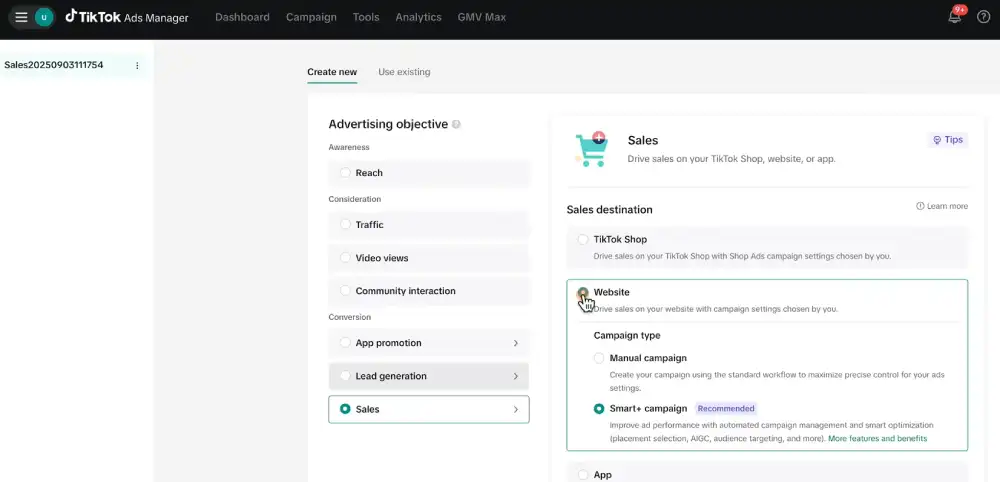
Switching to a Conversions objective before your pixel has accumulated meaningful data gives the algorithm nothing useful to learn from. Once you have at least 25 conversion events on your target optimization event, move to a Conversions objective.
Install the TikTok Pixel and verify it is firing correctly. Use the TikTok Pixel Helper browser extension to confirm every key page on your website is tracked.
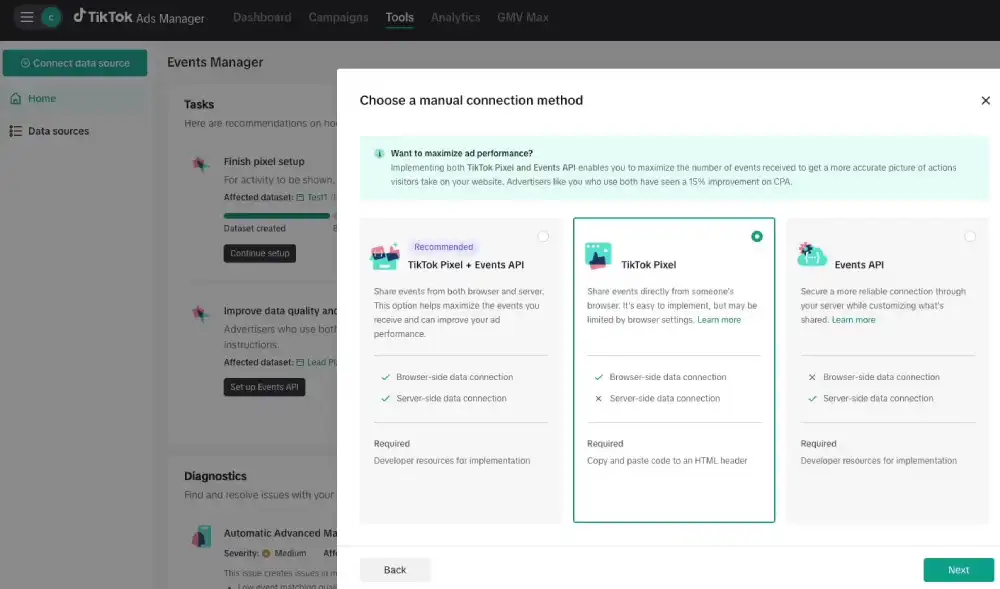
A pixel that fires incorrectly sends corrupted signals to the algorithm and directly degrades delivery quality. Conversion events should be tracked across the full funnel, not just at the purchase stage.
View Content, Add to Cart, Initiate Checkout, and Complete Payment each give the algorithm separate and useful optimization signals.
Connect the Events API alongside your Pixel. Running both together rather than just the Pixel alone gives the algorithm a more complete picture of your conversion activity, particularly on iOS devices, where browser-based tracking has limitations. On average, advertisers using both the TikTok Pixel and Events API see 19% more events captured and a 15% improvement in CPA.
Always use Custom Mode, never Simplified Mode. Simplified Mode removes the controls you need to optimize effectively after launch. Every campaign you intend to actively manage should be built in Custom Mode from the start.
Stage 2: creative optimization
Creative is where TikTok ads are won or lost. A weak creative with perfect targeting will underperform. A strong creative with broad targeting will consistently outperform because TikTok’s algorithm uses creative engagement signals to find and expand your audience automatically.
Structure every ad with a hook, body, and close. TikTok’s own research shows that 90% of ad recall impact is captured within the first six seconds. Your hook must communicate the value of watching within that window.
Use suspense, a direct problem statement, a surprising claim, or a visual pattern interrupt. Opening with a logo, a slow product reveal, or a brand introduction wastes the only window that determines whether your ad gets distributed widely.
Shoot vertically in 9:16 format at 720p minimum. Ads that look like ads get skipped. Content that looks native to the platform earns attention. Use TikTok-specific elements like text overlays, voiceovers, and on-screen captions.
Research from TikTok shows that lo-fi production quality ads drove a 76% increase in uniqueness and a 32% lift in brand likability compared to the average. Authentic always outperforms produced on this platform.
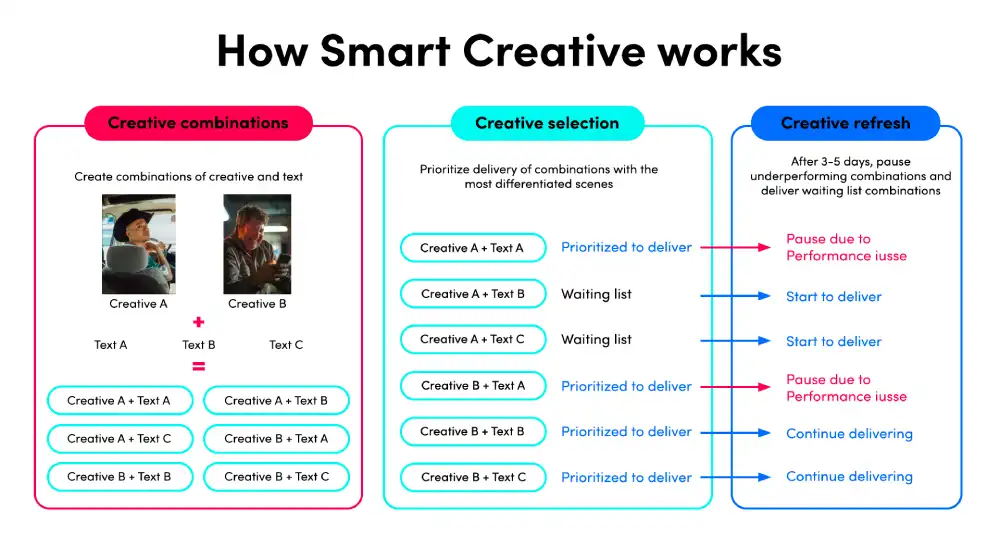
Upload 3 to 5 distinct creative variations per ad group at launch. TikTok officially recommends between 3 and 5 different creatives per ad group with meaningful differences between them, not the same video with a slightly different thumbnail.
Different hooks, different angles, different visual approaches. The algorithm needs variation to test before it can optimize delivery toward the creative that resonates best with your audience.
Add new creatives to existing ad groups, not new ad groups. When refreshing creative to combat fatigue, add the new creative inside the existing ad group rather than creating a new one. This preserves the optimization data your ad group has already accumulated.
A new ad group starts learning from scratch. Extending an existing ad group with fresh creative maintains the learning progress you have already paid for.
Refresh creative every 7 to 10 days. Ad fatigue signals to watch for are a declining click-through rate and a rising cost per result without any change to targeting or budget. When these appear together, your creative has fatigued. A new hook on a proven ad structure often resets performance without requiring a complete rebuild of your creative concept.
Stage 3: targeting optimization
Start with broad targeting on every new campaign. Leave interest and behavior filters empty or very wide in your first 7 days. TikTok’s machine learning reads your creative and locates the audience that responds to it.
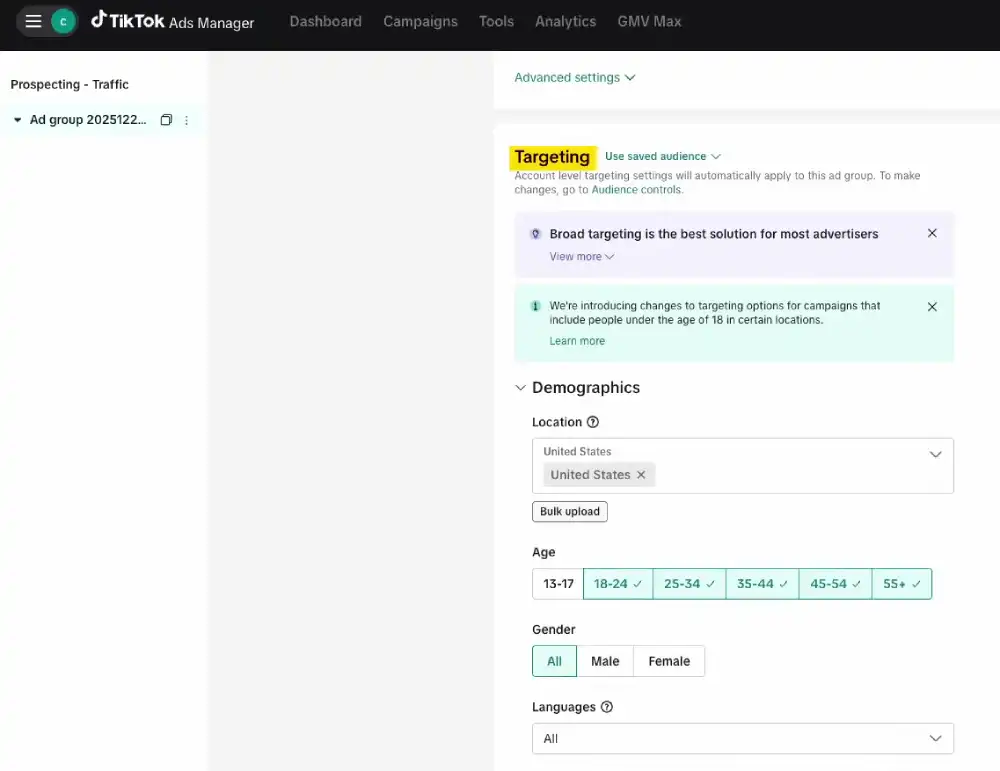
Over-constraining targeting in week one prevents the data collection the algorithm needs to optimize. TikTok’s own performance data confirms that broad audiences consistently produce lower CPA and higher delivery volume than narrow manually-filtered audiences.
Build Custom Audiences from your first-party data. Once your pixel has accumulated website visitor data, customer purchase history, or app engagement data, create Custom Audiences for retargeting.
Retargeting creative should be fundamentally different from prospecting creative. It should be shorter, more direct, and offer-focused, since the viewer already has some familiarity with your brand.
Create Lookalike Audiences from your highest-value customers. A Lookalike built from customers with above-average order values consistently outperforms one built from all website visitors. Use your top customer segment as the seed audience rather than a broad list.
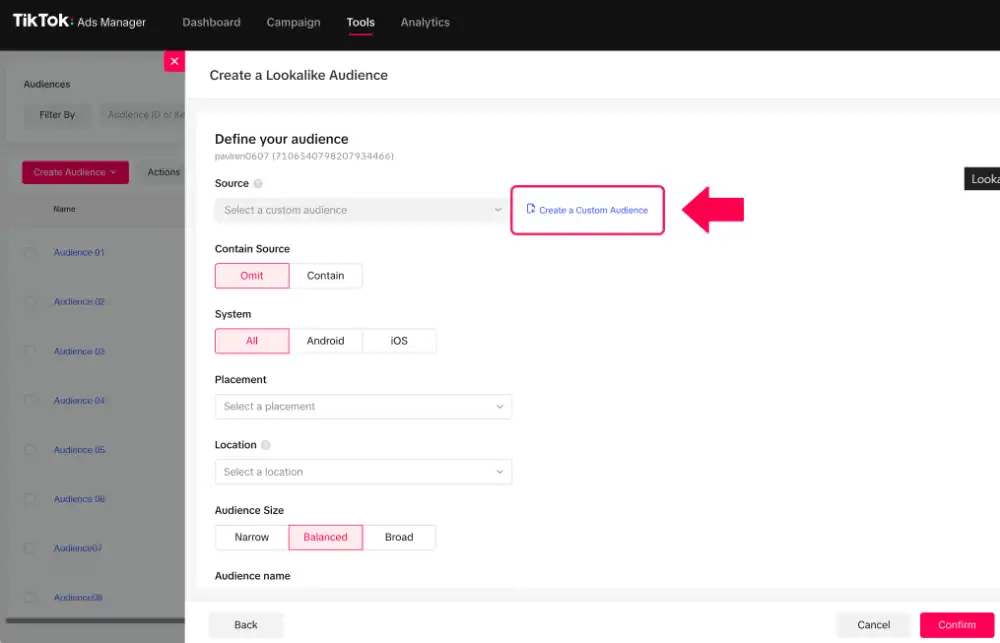
Do not let ad groups overlap on the same audience. Similar ad groups competing for the same audience in the same campaign create internal auction competition. This drives up your costs without improving reach. Each ad group should target a meaningfully different audience segment or use a clearly different creative approach.
Stage 4: bidding and budget optimization
Bidding and budget changes are among the most disruptive actions in TikTok Ads Manager. Every significant change can push a campaign back into the learning phase, resetting the optimization progress you have already built.
Do not make changes during the learning phase. The learning phase typically lasts a minimum of 7 days, and performance volatility starts to decline after approximately 25 conversion events.
Full optimization stability is generally reached at around 50 conversions on your target optimization event. During this window, do not pause campaigns, change targeting, adjust bids, or increase budget significantly.
Performance is often unstable during the learning phase. That instability is normal and expected. Changes were made during the restart of the learning process from scratch.
Use Maximum Delivery bidding until you have a CPA baseline. Maximum Delivery gives the algorithm flexibility to find conversions while you collect the data needed to understand your realistic cost per result.
Switch to Cost Cap once you have a reliable CPA benchmark to work from. TikTok recommends setting the daily ad group budget at a minimum of 10 times your target CPA to give the algorithm enough conversion volume to optimize reliably. Our TikTok ad budget planner can size that number for you before you launch.
Scale budgets in 20 to 30% increments, waiting at least 2 days between adjustments. TikTok’s budget guidance caps increases at 30% once a campaign has exited the learning phase, or 40% while it’s still in it. Aggressive single-step budget increases force the algorithm into a new learning phase and typically cause a temporary performance drop.
Incremental increases spaced at least 2 days apart allow the algorithm to adjust without resetting. If you need to scale faster, consider duplicating a proven campaign at a higher budget rather than increasing an existing campaign’s budget dramatically.
Pause underperforming ads where CPA exceeds twice your target. TikTok’s own performance guidance recommends pausing individual ads where the cost per action runs above twice your usual target. Pause the specific ad, not the entire ad group. This removes the drag on performance without disrupting the delivery of ads within the same group that are working.
Stage 5: measurement and attribution optimization
Optimization is only as accurate as your measurement. Gaps in tracking produce gaps in performance because the algorithm makes delivery decisions based on the conversion signals it receives.
Enable view-through attribution. A significant portion of TikTok conversions happens after a user sees an ad without clicking, particularly on mobile. Research by Fospha found TikTok drove 788% more conversions than last-click attribution alone would suggest. Without view-through attribution enabled, you are optimizing campaigns based on a fraction of TikTok’s actual contribution to your results.
Use TikTok’s split testing tool to isolate variables. TikTok Ads Manager allows you to split test three variables independently: targeting, bidding, optimization, and creative.
Test one variable at a time over a 7 to 14 day window. Testing multiple variables simultaneously makes it impossible to identify which change produced the result.
Add a post-purchase survey for eCommerce campaigns. Integrating a post-purchase survey with your eCommerce platform asks customers directly how they discovered you.
TikTok’s own data shows post-purchase surveys frequently reveal nearly double the TikTok-attributed purchases compared to in-platform attribution data alone. This first-party layer supplements algorithmic attribution with direct customer feedback.
Review Attribution Analytics weekly. TikTok’s Attribution Analytics tool lets you compare performance across different attribution windows. Use it to understand the gap between last-click results and view-through results, and set your optimization decisions based on the fuller picture rather than last-click data in isolation.
Go Deeper on Each Stage of Optimization
Each stage in this guide has its own dedicated breakdown if you want to go further. Start with TikTok ads metrics to get the full picture of what to track, then use the reporting guide to build a repeatable review process and the ROAS breakdown to set realistic return targets.
If your numbers are underperforming, troubleshoot a low CTR or work through why clicks aren’t converting to sales before touching your budget. The common TikTok ads mistakes list covers the outdated advice still costing advertisers money in 2026.
Once a campaign is stable, A/B testing and a structured scaling plan are what turn a working campaign into a growing one. For the numbers behind all of this, the TikTok ad statistics roundup and 2026 ad trends guide provide the broader context.
Frequently Asked Questions
How do I optimize TikTok ads for better performance?
Start with your creative. The first six seconds determine how broadly TikTok distributes your ad. Run at least three creative variations per ad group, refresh visuals every 7 to 10 days, and let campaigns run for a minimum of 7 days before making any adjustments. Once creative is strong, confirm your pixel is tracking accurately across all funnel stages. Creative and tracking together account for the majority of performance variance on TikTok.
Why are my TikTok ads not spending my budget?
Budget underspend is usually caused by one of three things: bids set too low relative to the auction, targeting too narrow to find enough eligible users, or a creative that TikTok’s algorithm has not distributed because early engagement signals were weak. Start by broadening your targeting, then check your bid against TikTok’s suggested bid range in Ads Manager. If the problem persists, test new creative with a stronger opening hook.
How often should I update TikTok ad creatives?
Refresh creative every 7 to 10 days or when you see a consistent drop in click-through rate and a rising cost per result. Add new creatives to the existing ad group rather than creating a new one to preserve your optimization data. You do not always need a completely new concept. A new opening hook on a proven ad structure often restores performance without a full rebuild.
What is the TikTok ads learning phase?
The learning phase is the period during which TikTok’s algorithm collects data to understand who responds to your ad and how to deliver it efficiently. Performance volatility typically starts to decline after 25 conversion events or 7 days, whichever comes first, with full optimization stability generally reached around 50 conversions. Performance during this window is often unstable. Making significant changes to budget, targeting, bids, or creative during the learning phase resets it entirely and forces the algorithm to start over.
Should I use broad or narrow targeting for TikTok ads?
Yes, use broad. TikTok’s algorithm identifies your best audience from your creative signal rather than manual targeting filters. Narrow targeting limits the data volume the algorithm needs to optimize and consistently produces higher CPAs than broad audience approaches. Refine your targeting only after you have real performance data showing which audience segments convert most efficiently.
How do I scale TikTok ads without hurting performance?
Scale budgets in 20 to 30% increments (up to 40% while still in the learning phase), waiting at least 2 days between adjustments, rather than making large single-step increases. Wait until a campaign has shown consistent performance over 3 to 5 days before scaling. Large budget increases in a single step can push campaigns back into the learning phase and cause a temporary performance drop. For faster scaling, duplicate a proven campaign at a higher budget rather than aggressively increasing an existing campaign’s daily spend.
The Discipline behind TikTok Ads optimization
The advertisers who get the best results on TikTok are not the ones who optimize most frequently.
They build a system, test creative consistently, leave the algorithm room to work during the learning phase, and scale methodically behind what the data proves rather than what they assume will perform.
Creative velocity, tracking accuracy, and budget discipline are the three pillars every high-performing TikTok account runs on.
Get those three right in the sequence this guide describes, and optimization becomes a repeatable process rather than a weekly guessing game.
Sources
- TikTok for Business: Unlock the Full Potential of TikTok Advertising
- TikTok Smart Creative
- TikTok for Business: Creative Best Practices for Top-Performing Ads
- TikTok Help: Creative Best Practices
- TikTok Help: Bidding & Budget Solutions to Drive TikTok Auction Ad Performance
- TikTok Help: Best Practices for Bidding Strategies
- Fospha: Last-Click Continues to Undervalue Paid Social in 2024