
A TikTok ad thumbnail is either a frame TikTok’s Smart Mode picks automatically from your video, or a custom image you upload to replace it. TikTok’s own Search Ads guidance confirms that a well-crafted thumbnail affects engagement.
That same guidance also notes that many placements autoplay, which makes the thumbnail less critical there than the ad’s actual opening frames.
That distinction changes how much design effort a thumbnail deserves relative to your hook.
This guide covers how thumbnail selection actually works, what TikTok’s own creative and ad specifications say about designing one, and the mistakes that get flagged during ad review.
Table of Contents
Get Up to $6,000 in Free TikTok Ad Credits
TikTok offers ad credit incentives for new advertisers, helping you test campaigns with a lower upfront cost.
Key Takeaways
- TikTok defaults to Smart or Automatic thumbnail selection, choosing a frame based on an account’s likelihood to engage, unless you upload a custom image, per TikTok’s own Search Ads Creative guidance.
- Spark Ads always use Smart Mode for the thumbnail, since manual selection isn’t available when the creative comes from an existing TikTok account video.
- Many placements autoplay depending on device and placement, which TikTok’s own guidance says makes the thumbnail less critical there than a strong first frame.
- TikTok doesn’t publish one universal safe-zone pixel spec. Safe zone size depends on orientation, caption length, and interactive add-ons, which is why TikTok provides downloadable safe-zone template files instead of fixed numbers.
- TikTok’s ad specifications explicitly warn against white or transparent thumbnail backgrounds, since usernames, captions, and UI icons render in white text and disappear against them.
- Ad creatives, thumbnails included, must not mimic the TikTok interface itself, per TikTok’s advertising specifications.
How TikTok actually selects a thumbnail
TikTok’s Search Ads Creative guidance describes two thumbnail modes. Smart Mode, also called Automatic, is selected by default and can show different accounts a different frame from the same video, based on each account’s predicted likelihood to engage.
That’s a meaningful distinction from a single fixed thumbnail: Smart Mode isn’t necessarily picking one frame for everyone who sees the ad.
Custom Mode lets you upload your own image instead, or manually choose a specific frame from the video rather than letting the system pick one.
TikTok’s guidance recommends adding text to a custom thumbnail that aligns with the rest of the creative, since that alignment is what the guidance ties to improved click-through rate.
Spark Ads are the one exception. When the creative comes from an existing TikTok account video rather than a fresh upload, manual thumbnail selection isn’t available, and Smart Mode is used by default regardless of preference.
When the thumbnail matters less than you’d expect
TikTok’s own guidance includes a specific caveat worth taking seriously: ads may autoplay depending on placement and device.
When that happens, having a strong first frame and thumbnail becomes less crucial than it would be for a static, thumbnail-first placement.
This doesn’t make thumbnail design irrelevant. It means the actual opening frames of the video carry more of the engagement weight than the static thumbnail image, specifically in placements where autoplay is active.
Those opening frames are the part a viewer sees the instant autoplay starts, and the same six-second window where a thumbnail would otherwise carry the load is the window the sound and voiceover strategy guide covers from the audio side.
Treat thumbnail and opening-frame design as one connected decision, not two separate tasks. A custom thumbnail that doesn’t visually match the video’s actual first frame creates a jarring switch the moment autoplay kicks in.
Designing within TikTok’s safe zone
TikTok’s ad specifications don’t publish one fixed safe-zone pixel measurement. Safe zone size changes based on your creative’s orientation, your caption length, and whether you’re using an interactive add-on. TikTok states directly that longer captions shrink the usable safe zone.
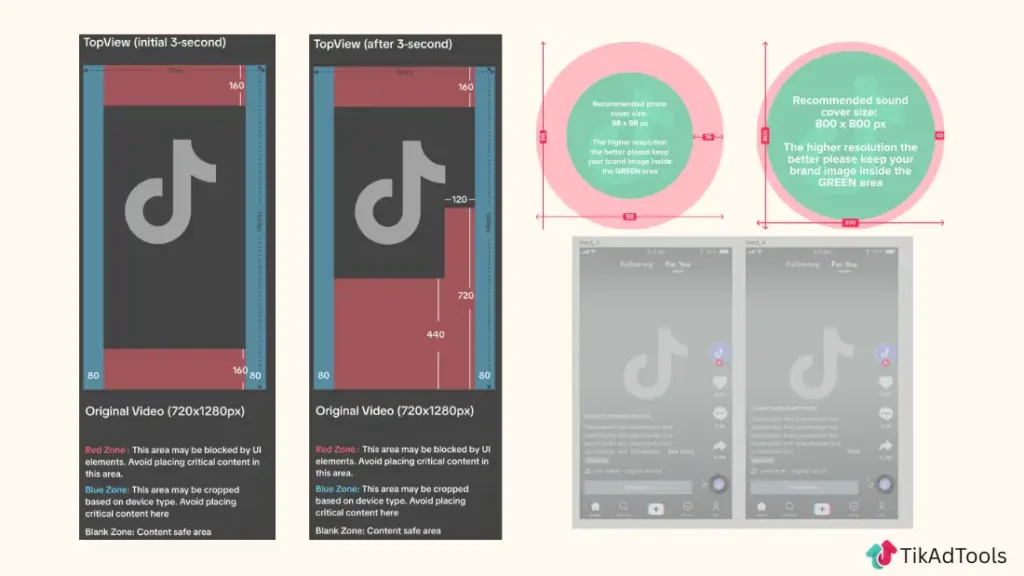
Rather than a single number, TikTok provides downloadable safe-zone template files, separate versions for standard left-to-right regions and for Arabic right-to-left markets, and recommends checking your specific creative against the matching file before launch.
The TikTok video specs and safe zone guide covers those template files and the exact resolution and file-size requirements they sit alongside.
TikTok’s preview tool is the other resource worth using here. TikTok’s own specifications recommend previewing the actual creative before launch specifically because safe-zone rendering varies by phone model and operating system, not just by template.
Keep key elements, faces, product, logo, and any text, inside that safe zone regardless of which file you’re checking against. Elements placed outside it risk being covered or cropped by TikTok’s own interface, per TikTok’s specifications.
Cover images for carousel ads follow a different rule
Everything above covers video ad thumbnails specifically. Carousel image ads work differently, since there’s no video frame to select from, only the images you upload.
TikTok’s Search Ads Creative guidance is explicit here: the first image in a carousel should feature the product, brand, or service directly, with text carrying keywords or a selling point layered on top. That first image functions as the carousel’s cover.
TikTok’s guidance frames this as three possible hook types for that first image: a text hook (keywords as on-screen text), a visual hook (the product shown immediately), or a value hook (a problem set up early).
Pick one deliberately rather than defaulting to a generic product shot.
Common thumbnail mistakes TikTok’s own policies flag
A white or transparent background is a specific, named mistake in TikTok’s ad specifications, not a general design opinion.
Usernames, ad captions, and music captions render in white text over your creative, so a white or transparent background makes that text unreadable.
Designing a thumbnail that mimics TikTok’s own interface, fake like buttons, fake comment icons, fake progress bars, is explicitly against TikTok’s advertising specifications. This applies to the entire creative, thumbnails included, not just the video body.
Adding a watermark, including a TikTok watermark pulled from another source, is also not allowed in ad creatives under TikTok’s specifications. A thumbnail carrying a visible watermark risks the same review issue as a watermarked video.
TikAdTools’ guide to TikTok ad creative covers the broader creative review checklist these thumbnail-specific rules sit inside.
Testing thumbnail variations without extra production
TikTok’s creative best practices recommend 3-5 diversified creatives per ad group, and thumbnail choice is one of the cheaper variables to test inside that range, since a custom thumbnail swap doesn’t require re-editing the underlying video.
Test a custom thumbnail against TikTok’s own Smart Mode selection for the same video before assuming a hand-picked image will outperform the algorithmic pick. Smart Mode is built specifically to select the frame TikTok’s own model predicts will engage that account.
TikAdTools’ Ad Hook Generator can help draft the on-screen text to pair with a custom thumbnail, since TikTok’s guidance ties thumbnail text alignment with the rest of the creative to better click-through performance.
When a creative’s results start declining, TikAdTools’ guide to creative fatigue covers refreshing it within the same ad group, and a thumbnail swap is one of the lower-effort refreshes available before a full reshoot.
Frequently asked questions
Is a TikTok ad thumbnail the same thing as a cover image?
Yes, for video ads. TikTok’s own terminology uses both words for the same static frame or uploaded image that represents a video ad before it plays. For carousel image ads, the equivalent is simply the first image in the set.
Does the thumbnail actually matter for TikTok ads?
It depends on the placement, as covered above: it matters more where autoplay isn’t active, and less where it is.
Should I use a custom thumbnail or let TikTok choose one automatically?
Test both. TikTok’s Smart Mode, the default, picks a frame based on an account’s predicted likelihood to engage, while a custom thumbnail gives you control over added text and framing. Neither is guaranteed to outperform the other for every account.
Can I choose my own thumbnail for a Spark Ad?
No. When the creative comes from an existing TikTok account video, manual thumbnail selection isn’t available, and Smart Mode is used automatically regardless of preference, per TikTok’s Search Ads Creative guidance.
What size should a TikTok ad thumbnail be?
TikTok doesn’t publish one fixed safe-zone size. It varies by orientation, caption length, and interactive add-on usage, which is why TikTok provides downloadable safe-zone template files matched to your specific creative setup instead of one universal spec.
Why does TikTok say not to use a white or transparent thumbnail background?
Because usernames, ad captions, and music captions display in white text over your creative. A white or transparent background makes that overlaid text unreadable, which is why TikTok’s ad specifications flag it directly.
Conclusion
A TikTok ad thumbnail is either an algorithmic pick or a manual override, and TikTok’s own guidance says its importance depends heavily on whether the placement autoplays.
Where it does matter, the fixable mistakes are concrete: avoid white or transparent backgrounds, don’t mimic TikTok’s own interface, skip watermarks, and check every creative against TikTok’s actual safe-zone template rather than a guessed pixel number.
Test a custom thumbnail against Smart Mode’s own pick before assuming either one wins by default. That’s the version of thumbnail strategy TikTok’s own specifications actually support.
Sources