
Most TikTok ads fail in the edit, not the concept.
You can have a strong product, a clear offer, and a real audience. But if your edit feels slow, overproduced, or out of place in the feed, viewers scroll past before your message lands. That is the real problem most advertisers are not fixing.
TikTok ad editing is a distinct skill. It is not the same as editing for YouTube, Meta, or broadcast. The platform has its own rhythm, its own visual language, and its own threshold for what earns attention. It’s one piece of the broader TikTok ads creative strategy that decides whether an ad gets a fair shot at all.
This playbook covers everything you need to edit TikTok ads that convert in 2026. You will get the technical specs, the Hook-Body-CTA framework, a step-by-step CapCut workflow, the best tools available, and the most common mistakes you need to stop making right now.
Table of Contents
Get Up to $6,000 in Free TikTok Ad Credits
TikTok offers ad credit incentives for new advertisers, helping you test campaigns with a lower upfront cost.
Key takeaways
- Structure every ad around the Hook-Body-CTA framework before you open your editing software
- Keep your hook under 3 seconds and lead with your most disruptive frame
- Use native-style fonts, captions, and sound to match the organic TikTok feed
- Place brand cues throughout the video, not just at the end
- Refresh your creatives when performance drops, not on a fixed schedule
- CapCut was built by ByteDance, TikTok’s parent company, and connects directly with TikTok Ads Manager
Quick Answer
TikTok ad editing is the process of structuring and cutting video content to perform as a paid ad inside TikTok’s native feed. Unlike traditional ad production, it prioritizes a disruptive hook in the first 3 seconds, a fast-paced body, and a clear CTA, but only when the final edit feels indistinguishable from organic creator content. Results vary based on your product, audience, and creative format.
What makes TikTok ad editing different from other platforms?
TikTok is the only major ad platform where your paid content competes directly with entertainment in the same uninterrupted scroll. There is no visual border between an ad and a creator video. Your edit either fits the platform or it gets ignored.
On Facebook or YouTube, you can get away with a branded intro, slower pacing, and polished production.
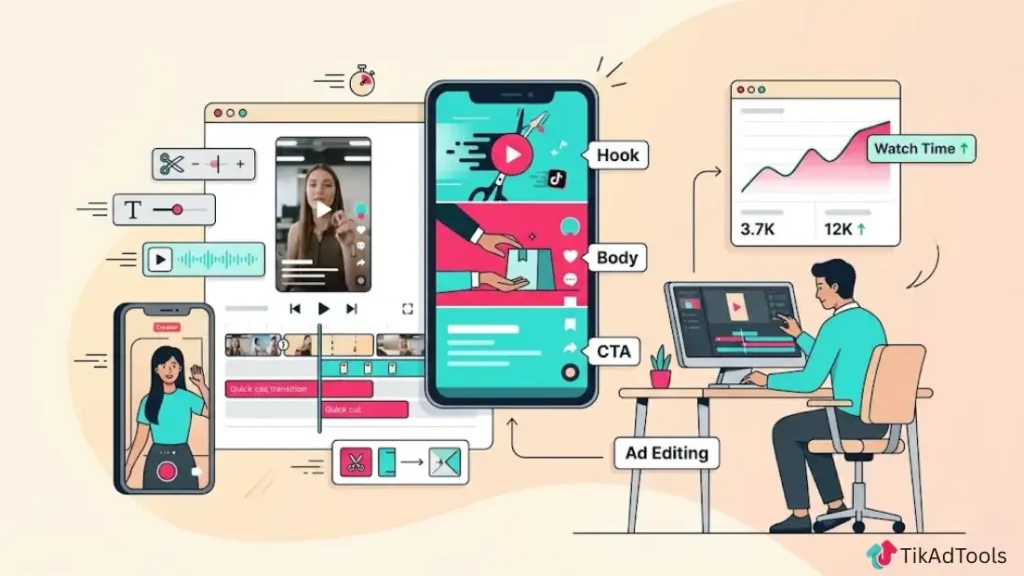
On TikTok, those same choices signal “ad” in under a second. According to TikTok for Business Creative Best Practices, 90% of an ad’s recall impact is captured within the first six seconds, which means your hook needs to work before most viewers have even settled into watching.
The editing standards are also entirely different. TikTok rewards fast cuts, on-screen captions, trending audio, and vertical framing. It punishes slow intros, horizontal footage, stock music, and anything that resembles a TV commercial.
You are not making ads. You are making content that also happens to convert.
This distinction drives every editing decision you will make, from the first frame to the final CTA.
Before you edit: check the specs and safe zones
Getting your specs wrong costs you quality before your ad even runs. Your footage can look sharp in your editing software and still appear cropped, blurry, or misaligned once it goes live. Check the full TikTok video specs and safe zone breakdown for the exact resolution, file size, and safe-zone requirements before you start cutting, then come back here for the editing workflow itself.
The short version: shoot and edit in 9:16 vertical, keep key visuals and text in the center of the frame away from TikTok’s UI overlays, and always preview inside TikTok’s Creative Center or Ads Manager before publishing.
The hook-body-CTA editing framework: how to structure every ad
Every high-converting TikTok ad uses the same three-part structure. The hook earns attention. The body builds belief. The CTA converts intent into action.
Most ads fail because editors treat all three parts equally. The hook deserves the most editing time. It is the only part of your ad that most viewers will actually watch.
How to edit a 3-second hook that stops the scroll
Your hook is not your intro. It is an interruption.
The first frame needs to give the viewer a reason to pause. That reason can be a bold on-screen statement, an unexpected visual, a direct question, or a sound that triggers curiosity.
Four hook editing techniques that work:
- Visual pattern interrupt: Start mid-action. Cut into the movement already in progress instead of opening on a static frame.
- Text-first hook: Place a bold, high-contrast text statement on screen within the first half-second. No voiceover required.
- Question opener: Use a text overlay targeting a specific pain point. Example: “Why do your TikTok ads keep getting ignored?”
- Sound-first hook: Lead with a trending audio cue or a sharp, unexpected sound before any visuals settle.
Avoid fade-ins, logo animations, and slow zooms in the first 3 seconds. These are the most common hook killers we see across underperforming TikTok ad accounts. If your first frame does not create a reason to keep watching, no amount of body editing will save it.
Body editing: pacing, text overlays, and sound layering
The body of your ad needs to maintain the attention your hook earned. The single biggest mistake in this section is pacing that is too slow.
TikTok’s own creative guidance recommends a visual change or new scene element every 2 to 3 seconds throughout the body. Letting shots run longer than that invites scroll.
Body editing checklist:
- Cut timing: Change scene or camera angle every 2 to 3 seconds
- Captions: Add subtitles to every video. According to the Verizon Media and Publicis Media Captions Insights Study, 69% of viewers watch video with the sound off in public spaces
- Font choice: Use clean, readable fonts that feel native to TikTok. Avoid serif fonts and overly designed typography
- Music: Match your audio to the energy of the content. Trending sounds consistently outperform stock music on TikTok placements
- Brand cues: According to TikTok for Business Creative Best Practices, showing your product on screen throughout your ad drives a 65% increase in brand affinity and a 25% uplift in recall. TikTok brand guidelines recommend placing 3 to 5 brand cues across the first half of your video, not just at the end
Do not save your product reveal for the final seconds. Show the product, logo, or core benefit early and reinforce it through the middle of the video.
How to edit a closing CTA that drives action
Your CTA only matters if the viewer reaches it. Once they do, the edit needs to make the next step completely obvious.
CTA editing rules:
- Place your CTA between the 15 and 25-second mark for ads in the 20 to 30-second range
- Show the CTA as on-screen text even when your voiceover also delivers it. Many viewers watch with the sound off
- Add a visual exit cue: a pointing gesture, a product close-up, or a screen recording of the landing page
- Use urgency through specificity. “Only 3 days left” outperforms “Limited time offer” every time
- Design your CTA frame so it reads clearly with no audio. Sound-off design is not optional on TikTok
Avoid ending your ad with a slow fade or logo card. These cues signal “end of content” before the CTA has a chance to land.
Native-style vs. polished editing: which one actually converts?
This is the most common question we hear from brands moving budget to TikTok. The short answer: native-style editing almost always outperforms polished production on this platform, and understanding why matters.
| Factor | Native-Style Editing | Polished Production |
|---|---|---|
| Look and feel | Raw, creator-shot, imperfect | Studio-lit, branded, produced |
| Production cost | Low | High |
| Audience trust in TikTok | Higher | Lower |
| Feed fit | Blends naturally | Signals “ad” immediately |
| Conversion rate (TikTok) | Generally higher | Often lower |
| Best use case | Always-on, direct response | Brand awareness, top-funnel |
Polished production is not wrong. It simply fights against TikTok’s visual culture. When users see overproduced content, they identify it as an ad faster and scroll before the hook can land.
If you are running direct-response TikTok ads with a conversion goal, shoot and edit like a creator, not like an agency. Use natural lighting, handheld movement, and real human faces. Your edit should feel like something a thoughtful creator made on a good phone, not a broadcast crew on a set.
How to edit TikTok Ads in CapCut: step-by-step workflow
CapCut is the most widely used TikTok ad editing tool. It was built by ByteDance, TikTok’s own parent company, which gives it direct integration with TikTok Ads Manager that third-party tools cannot match. Here is the workflow we recommend for building new ad creatives from scratch.
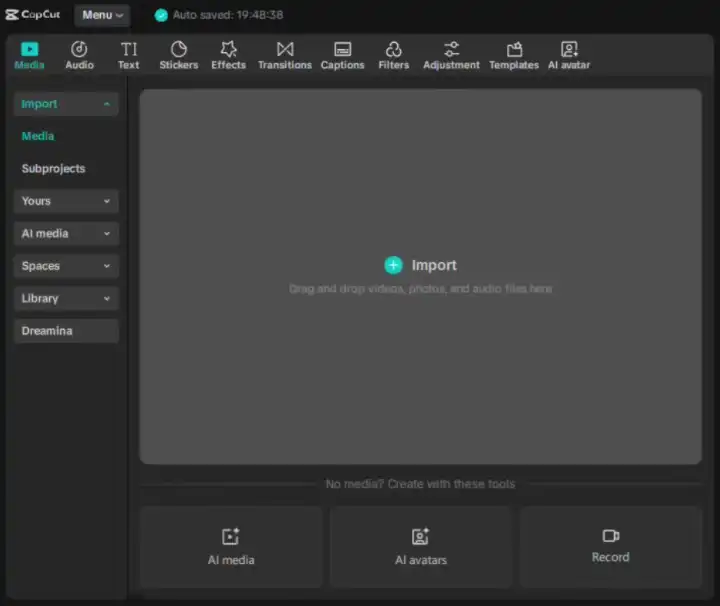
1. Import your raw footage into a new CapCut project. Set the canvas to 9:16 before placing any clips.
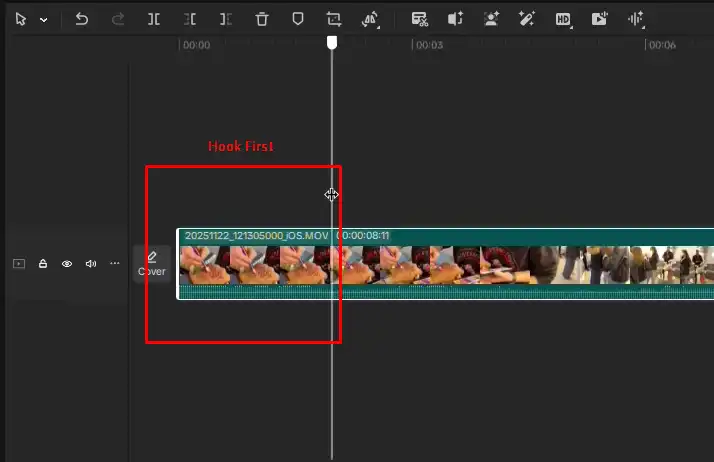
2. Cut your hook first. Pull the strongest 2 to 3 seconds from your footage and place them at the start. Do not edit in chronological order.
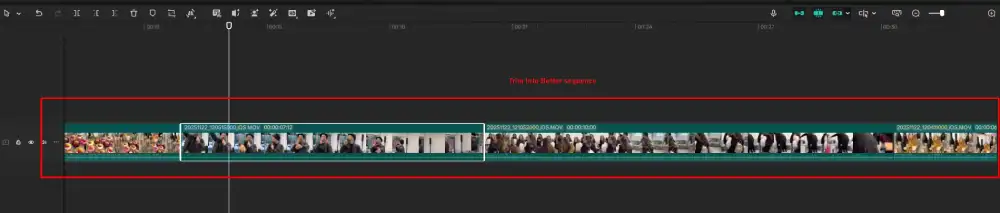
3. Trim each body clip to 2 to 3 seconds. Remove all dead air, slow pans, and hesitations.
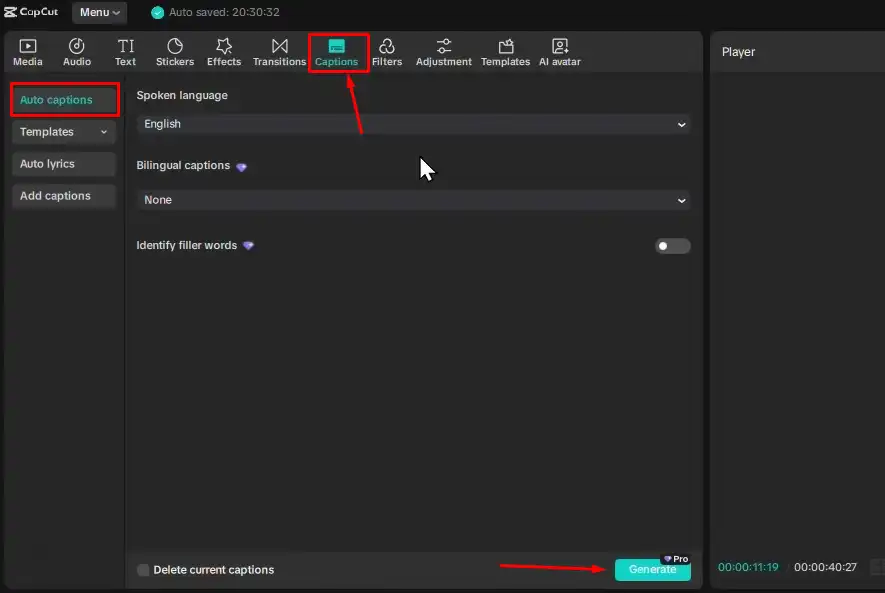
4. Add auto-captions using CapCut’s built-in subtitle generator. Edit for accuracy and set the font to a clean, readable style.
5. Layer your audio. Add your voiceover or trending background sound first. Then adjust clip timing to match the audio beats.

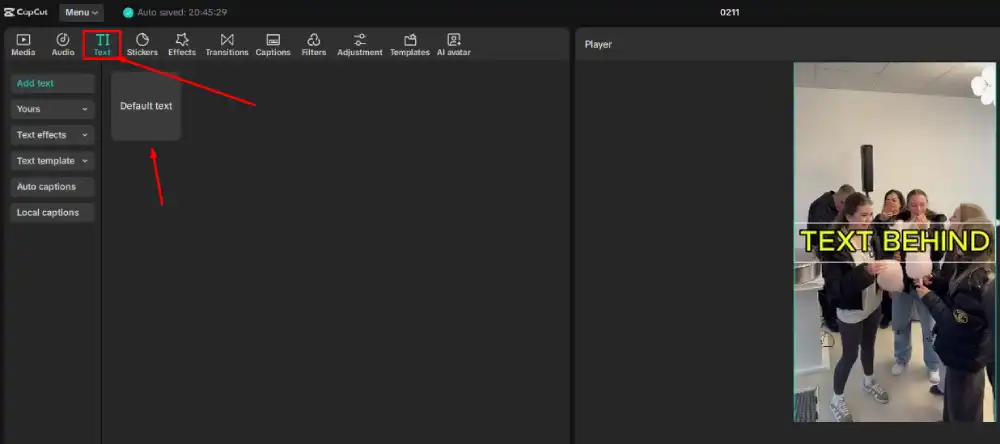
6. Place text overlays for your hook statement and CTA. Keep all text inside the center safe zone.
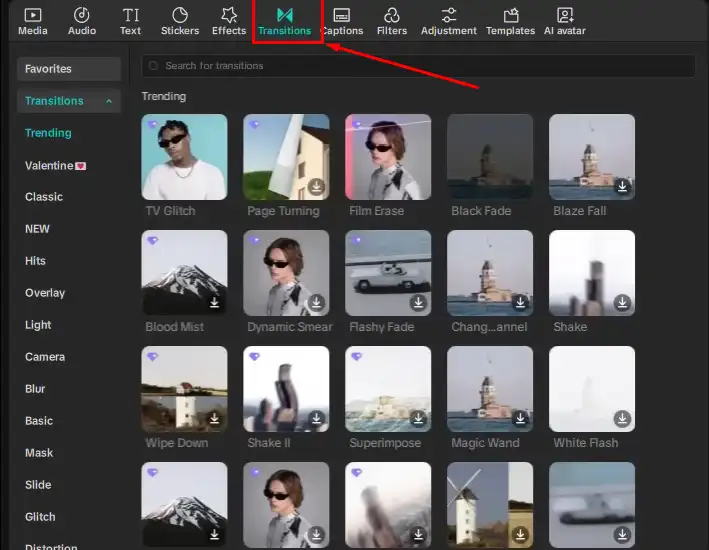
7. Apply transitions sparingly. Hard cuts and zoom cuts perform best on TikTok. Avoid slow crossfades.
8. Add brand cues at three points: within the first 5 seconds, in the middle of the video, and at the CTA frame.
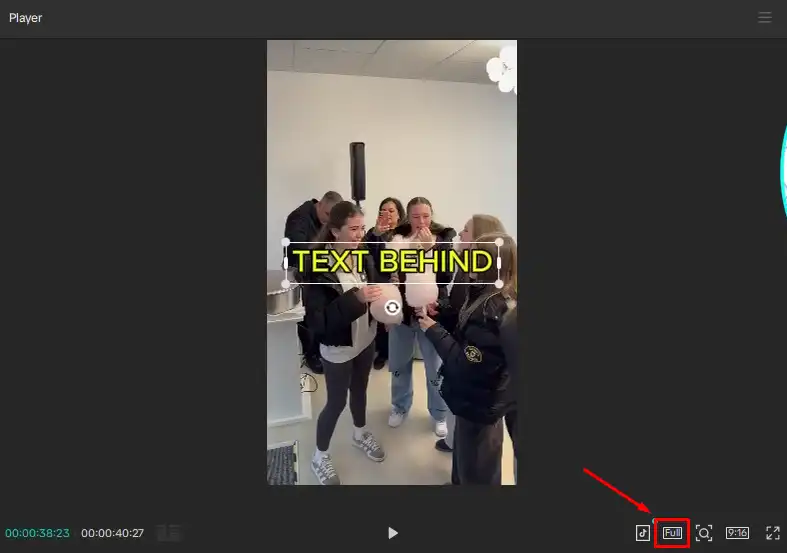
9. Preview in full-screen TikTok format using CapCut’s built-in preview tool before exporting.
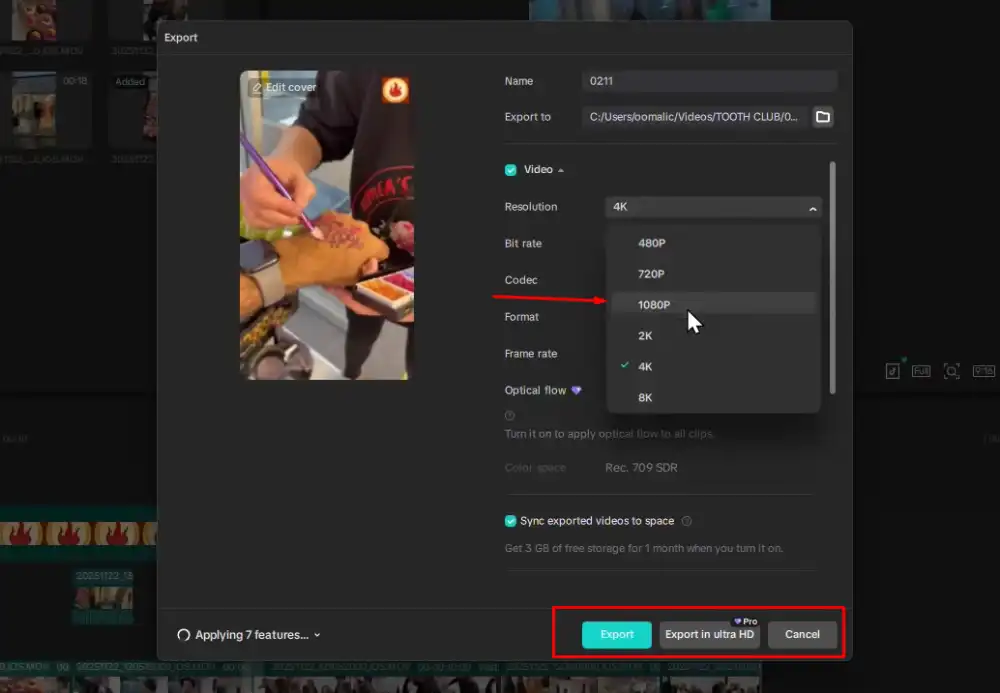
10. Export at 1080 x 1920, 30fps or 60fps, then upload directly to TikTok Ads Manager or save for manual upload.
Best TikTok ad editing tools in 2026 (including AI options)
| Tool | Best For | Price | Notable AI Features |
|---|---|---|---|
| CapCut | Full editing workflow, TikTok integration | Free (Pro available) | Auto captions, AI background removal, AI-assisted editing tools |
| TikTok Creative Exchange | Creator templates and pre-built formats | Free | AI-generated scripts and hook suggestions |
| Adobe Premiere Pro | Advanced editing with full production control | From $22.99/month | AI audio cleanup, auto reframe |
| InShot | Quick mobile edits and fast turnaround | Free (Pro available) | Basic AI filters and trim tools |
| Canva Video | Simple ads with template-based overlays | Free (Pro available) | Text-to-video, AI resize |
| Runway ML | AI-generated and AI-edited video content | From $12/month | Full generative video and background editing |
CapCut was built by ByteDance, TikTok’s parent company, which means its direct integration into TikTok Ads Manager is seamless in a way that third-party tools cannot replicate. If you are new to TikTok ad editing, CapCut is where you start. The free version gives you everything needed to produce a high-performing ad.
AI tools like Runway ML now let smaller teams produce multiple creative variations without a full production budget. Creative velocity, meaning how fast you can test new ad concepts, is one of the strongest competitive advantages in TikTok advertising right now. The brands producing and testing the most creative variations tend to win.
TikTok ad editing mistakes that kill conversions
These are the most common editing errors we see in underperforming TikTok ad accounts:
- Slow intro: Opening with a logo animation, brand name card, or establishing shot. You lose the viewer before the hook can do its job.
- Horizontal footage: Shooting or exporting in 16:9. TikTok is a vertical platform. Horizontal content looks out of place and sees reduced reach.
- Missing captions: Skipping subtitles loses every viewer watching with the sound off, which is the majority of mobile users in public settings.
- Overcrowded text overlays: Placing too many words on screen at once. Each text overlay should contain 5 to 8 words maximum, per TikTok’s own creative guidance.
- Late CTA placement: Putting your call to action only in the final 2 seconds. A large portion of your audience drops off before reaching it.
- Delaying brand cues: Your brand needs to appear within the first 5 seconds. Saving it for the end weakens recall significantly, as confirmed by TikTok’s brand performance research.
- Stock music: Stock audio signals “ad” to experienced TikTok users. Use trending sounds or original audio instead.
- Ignoring safe zones: Placing key visuals and text in areas where TikTok’s interface elements will cover them.
Fix these before testing anything else. Most underperforming ads contain at least three of these in a single edit. The TikTok ad creative audit tool checks a finished edit against this exact list before you spend budget on it.
How to refresh your TikTok ad creatives before fatigue hurts ROI
Creative fatigue happens when your audience has seen your ad enough times that engagement drops and your cost per result rises. TikTok fatigue sets in faster than most platforms because the feed moves at a high pace, and users notice repetitive content quickly.
TikTok’s own Creative Best Practices guide recommends checking performance regularly and refreshing creatives when results show a consistently declining trend. There is no single universal timeframe. In high-budget or high-frequency campaigns, fatigue can appear in as little as 3 to 5 days. In standard-spend accounts, performance often holds for 2 to 3 weeks before dropping off noticeably.
Signs your creative needs a refresh:
- Your click-through rate has dropped more than 20% from its peak performance
- Your frequency score is above 3.0 (the same user has seen the ad three or more times)
- Your cost per result is rising with no changes to targeting or budget
How to refresh without reshooting:
- Re-cut the same footage with a completely different hook
- Swap the opening frame for a different scene from the same shoot
- Change the on-screen text while keeping the video content identical
- Test a new trending sound layered over the same visual edit
- Cut a 15-second version from a 30-second ad and run it in a different placement
You do not always need new footage to reset performance. A new edit with a different hook or audio track is often enough to give a fatigued creative a second run.
FAQs
What is the best editing structure for TikTok ads?
The most effective TikTok ad structure follows a three-part framework: a disruptive hook in the first 3 seconds, a fast-paced body with visual cuts every 2 to 3 seconds, and a clear CTA placed between the 15 and 25-second mark. According to TikTok for Business, 90% of an ad’s recall impact is captured within the first six seconds, which means your hook and opening brand cues carry the most weight.
What app do people use to edit TikTok ads?
CapCut is the most widely used app for TikTok ad editing. It is free, was built by ByteDance (TikTok’s parent company), and integrates directly with TikTok Ads Manager. This native connection makes it the most practical starting point for most advertisers. For more advanced productions, editors also use Adobe Premiere Pro and Runway ML.
How do you make a TikTok ad look native?
To make your TikTok ad look native, shoot vertically on a smartphone, use natural or ring lighting instead of a studio setup, add auto-captions in a clean, readable font, and use trending audio instead of stock music. The goal is for your ad to feel like something a real creator made, not a polished commercial. If your ad could run on TV without looking out of place, it is too polished for TikTok.
How often should you refresh TikTok ad creatives?
TikTok recommends refreshing creatives when you see a consistently declining performance trend, rather than on a fixed schedule. In high-spend accounts, fatigue can appear in 3 to 5 days. For standard-budget campaigns, you typically have 2 to 3 weeks before engagement drops noticeably. Watch your frequency score and cost per result. Those two signals are your clearest early warning.
What are TikTok ad safe zones?
TikTok ad safe zones are the areas of your video frame not covered by the platform’s interface, including the profile icon, caption bar, and action buttons. Keep all important text and visuals centered in the frame, clear of those edges. There is no single fixed pixel or percentage number that works for every format, since the exact margin shifts with caption length and any add-ons attached to the ad. Pull the downloadable safe zone template for your specific ad format from TikTok Ads Manager before publishing.
Can I use AI tools to edit TikTok ads?
Yes. CapCut includes AI tools for auto-captioning, background removal, and assisted editing. Runway ML offers AI-powered video editing and generative video creation starting at $12 per month. TikTok’s own Creative Exchange includes AI-generated script and hook suggestions at no cost. AI editing tools are especially useful for producing multiple creative variations quickly, which helps you test different hooks and CTAs without a large production budget.
Conclusion
TikTok ad editing is not a technical afterthought. It is the core reason your ad earns attention or wastes your budget.
We covered the specs you need to get right before your first cut, the Hook-Body-CTA framework that separates converting ads from forgettable ones, and the exact CapCut workflow you can apply to your next creative today.
You also have a clear picture of when native editing wins over polished production, which tools are worth using in 2026, and how to spot creative fatigue before it quietly drains your results.
Every section of this playbook connects back to one core truth: on TikTok, the edit is the ad. No targeting adjustment or budget increase will fix a weak creative. But a well-structured, natively edited video can outperform a much larger spend from a competitor who never got the edit right.
Get the edit right first. Everything else follows from there.
Sources