
You uploaded the right resolution. You hit the file size limit. Your ad still got flagged, because the “universal TikTok spec” you followed only applies to one format out of five.
That’s the trap. TikTok doesn’t run one spec sheet. It runs five, and they don’t share numbers. Getting these right is table stakes for the creative strategy underneath your ad; a great concept still gets flagged if the file doesn’t match the format.
Table of Contents
Get Up to $6,000 in Free TikTok Ad Credits
TikTok offers ad credit incentives for new advertisers, helping you test campaigns with a lower upfront cost.
TL;DR
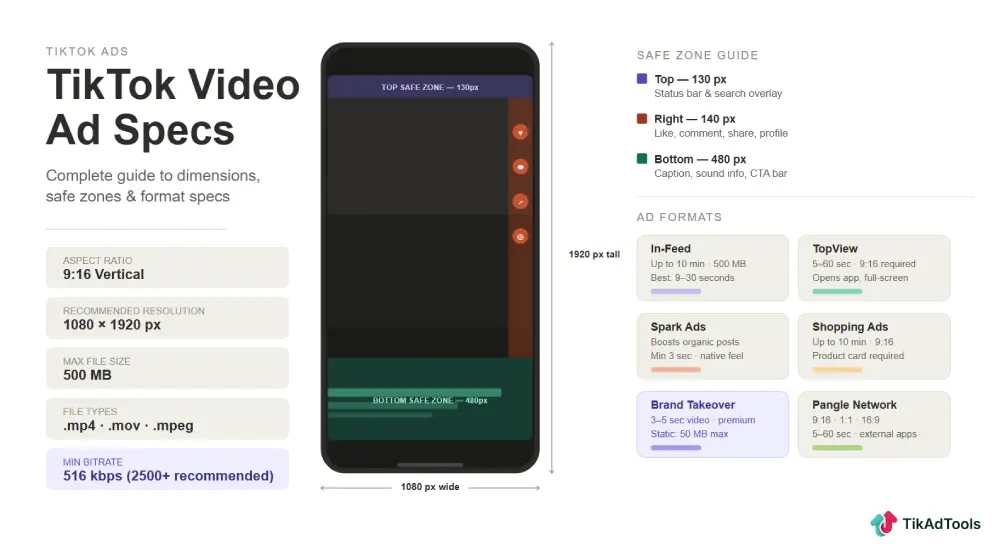
- Standard In-Feed ads run 9:16, 1080×1920 recommended, MP4/MOV, under 500 MB, up to 10 minutes, with a 516 kbps bitrate floor.
- Spark Ads cap out at 10 minutes, not “no limit,” per TikTok’s own Spark Ads documentation.
- Brand Takeover video files max out at 5 MB and play sound-off, not 500 MB with audio.
- Pangle allows video up to 10 minutes, nowhere close to the “5 to 60 seconds” number a lot of guides still repeat.
- TikTok’s safe zones scale with caption length and add-ons, so there’s no fixed “150 pixels from the edge” rule that works for every ad.
Quick answer
Non-Spark In-Feed, TikTok’s default format, runs 9:16 at 1080×1920 recommended, MP4 or MOV, under 500 MB, up to 10 minutes, minimum 516 kbps bitrate. Every other format runs its own rules. Spark, TopView, Takeover, and Pangle each have separate specs, so treat this as five checklists, not one.
Why “one TikTok ad spec” doesn’t exist
In-Feed, Spark, TopView, Takeover, and Pangle aren’t variations on the same format. They’re five different products with five different technical floors.
Spark Ads run on organic posts, so they inherit whatever dimensions the original video already has. Takeover runs on a 5 MB file cap because it has to preload before the app even opens. Mixing these into one “TikTok ad spec” table is how the 500 MB, sound-on, unlimited-duration myth got started in the first place.
Here’s each one, broken out separately, with TikTok’s minimums separated from what’s actually smart to export at.
Non-Spark In-Feed ad specs
This is TikTok’s default ad format, the one that shows up in the regular For You feed. If you’re not sure which spec applies to your campaign, it’s probably this one.
| Spec | TikTok minimum | Recommended |
|---|---|---|
| Aspect ratio | 9:16, 16:9, or 1:1 | 9:16 |
| Resolution | 540×960 (9:16), 960×540 (16:9), 640×640 (1:1) | 1080×1920 |
| File formats | .mp4, .mov, .mpeg, .3gp, .avi | .mp4 |
| Video duration | Up to 10 minutes | Match your hook to 15 to 30 seconds |
| File size | Under 500 MB | Under 100 MB |
| Bitrate | 516 kbps | 2,000 to 2,500 kbps |
That bitrate line trips up a lot of accounts. TikTok’s Auction In-Feed documentation lists 516 kbps as the floor, not the target. Export lower than that and your file may not process cleanly. Export higher, closer to 2,000 kbps, and your creative survives TikTok’s compression without looking soft.
Non-Spark ad captions don’t support clickable links, the @ symbol, or hashtags. That’s an official platform limit, not a suggestion, so don’t build a CTA that relies on any of those three inside the caption field.
Shorter clips generally hold attention better on this placement. The 15-second ad guide breaks down why that length keeps showing up in strong-performing In-Feed campaigns.
Spark Ads specs: pull vs. push
Spark Ads boost an existing organic post instead of uploading fresh creative. That’s also why the specs look nothing like In-Feed.
TikTok actually splits this format into two versions, and most articles skip the difference entirely.
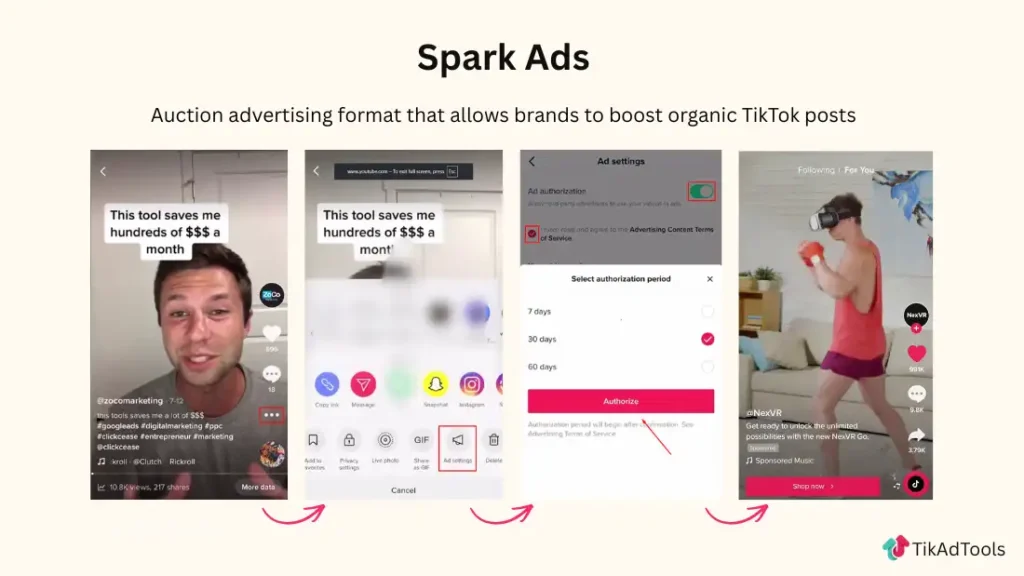
Spark Ads Pull uses an organic video exactly as it was posted, authorized by the creator.
- Video ratio, resolution, file type, and bitrate: no restrictions, since you’re pulling the existing post
- Video duration: 10-minute maximum
- Caption: pulled directly from the organic post, up to 4 lines displayed
- Emojis, account tags, and hashtags: allowed, since they’re already part of the organic caption
Spark Ads Push lets you edit ad-level text before the ad goes live, on top of the same organic video base.
- Same 10-minute duration cap as Pull
- Text edits are available at the ad-setup stage
- Everything else about the base video stays governed by the original organic post
That 10-minute cap is the correction that matters most here. TikTok’s own Spark Ads page states it directly: there’s a 10-minute maximum on videos that can be sparked. Anything claiming Spark Ads have no duration limit at all is working from outdated information.
Spark Ads tend to carry more social proof into the feed than a fresh upload, since likes, comments, and shares all attribute back to the organic post. The Spark Ads guide covers when that trade-off is worth making over a standard In-Feed upload.
TopView ad specs
TopView is the full-screen ad that loads the moment someone opens TikTok. It’s a premium placement, and it comes with its own creative rules on top of the file specs.
| Spec | Requirement |
|---|---|
| Aspect ratio | 9:16 vertical |
| Resolution | 540×960 minimum |
| File formats | .mp4, .mov, .mpeg, .3gp |
| Video duration | 5 to 60 seconds, 9 to 15 seconds recommended |
| File size | Under 500 MB |
| Bitrate | 2,500 kbps minimum |
| Audio | Sound-on, required |
That last row matters. Unlike Takeover, TopView is built to run with sound. TikTok’s TopView specifications explicitly instruct advertisers to create for sound-on and keep audio clear throughout.
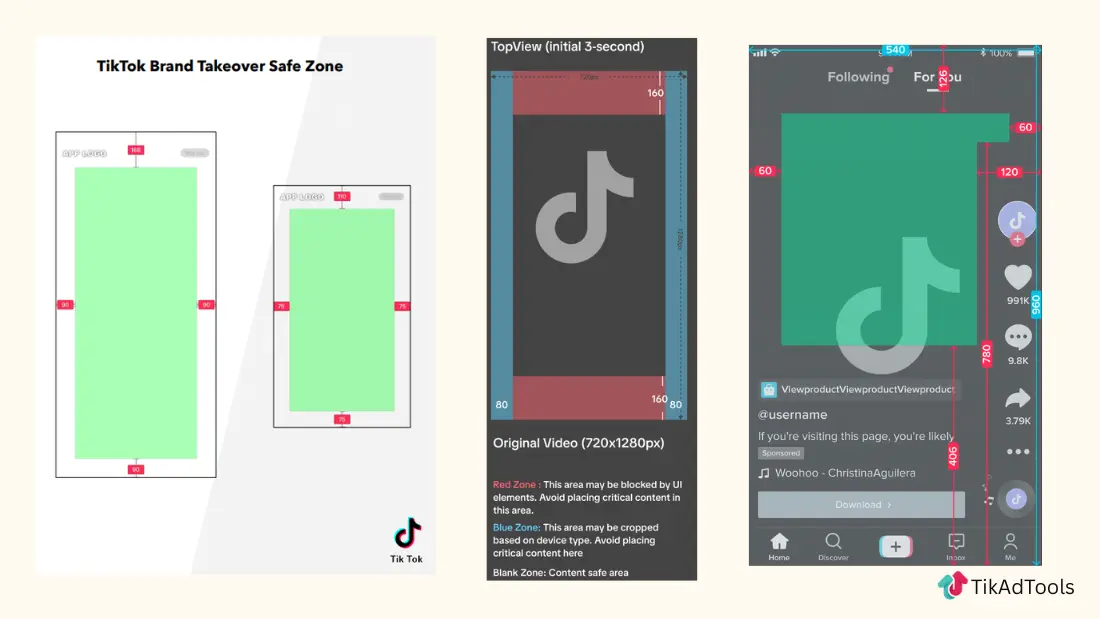
TopView also displays in two stages. The first three seconds run as a full-screen takeover, then the ad transitions into a standard in-feed layout with TikTok’s UI overlaid. That’s why TopView ships two separate safe zone files, one for each stage, instead of a single template.
Brand takeover specs
Brand Takeover is the format most guides get wrong, and it’s the one worth fixing first. It’s a different product from TopView, even though both fire when someone opens the app.
| Spec | Video | Image |
|---|---|---|
| File format | .mp4 | .jpg, .jpeg, .png |
| Max file size | 5 MB | 500 KB |
| One-size dimension | 1242×2208 | 1242×2208 |
| Duration | Maximum 5 seconds | 3 seconds displayed |
| Sound | Off | N/A |
The 5 MB cap is not a typo. TikTok’s Reservation Takeover documentation puts the video ceiling at 5 MB, roughly a hundredth the size of the In-Feed limit, because Takeover creative has to preload before the app finishes opening.
Takeover also runs sound-off across every device. Watermarks, including TikTok’s own, aren’t allowed on this format, and neither is any creative that mimics TikTok’s native interface.
Six additional creative sizes are supported beyond the default 1242×2208, covering everything from 1080×1920 down to 640×1136. Pick the size set that matches your target devices rather than assuming one dimension covers everyone.
Pangle Network specs
Pangle is TikTok’s ad network for third-party apps outside the main TikTok experience. The specs here run looser than the core feed, and TikTok supports more than just video.
| Asset type | Resolutions | Max file size | Formats |
|---|---|---|---|
| Video (up to 10 min) | 1280×720, 720×1280, 720×720 | 500 MB | .mp4, .mov, .mpeg, .avi |
| Image | 1200×628, 640×640, 720×1280 | 100 MB | .jpg, .jpeg, .png |
| Carousel (up to 50 images) | 1200×628, 640×640, 720×1280 | 100 MB | .jpg, .jpeg, .png |
| Playable | 1280×720, 720×1280 | 5 MB | .zip |
Video duration is the number worth flagging. TikTok’s Pangle asset specifications list up to 10 minutes, which is a big gap from the “5 to 60 seconds” figure still circulating in older guides.
Pangle serves ads inside third-party apps and games, so your creative should hold up without any TikTok-specific context, like a trending sound or a native caption style.
Safe zones: why there’s no universal pixel number
Every “keep your logo 150 pixels from the right edge” rule you’ve seen is a simplification, and TikTok says so directly. Safe zone size depends on the ad’s dimensions, the caption length, and any add-ons you’ve attached, like an anchor link.
That means the same 9:16 video can need a different safe margin depending on how long your caption runs. TikTok publishes downloadable safe zone template files for each format instead of one fixed number, because a fixed number would be wrong for half the ads that use it.
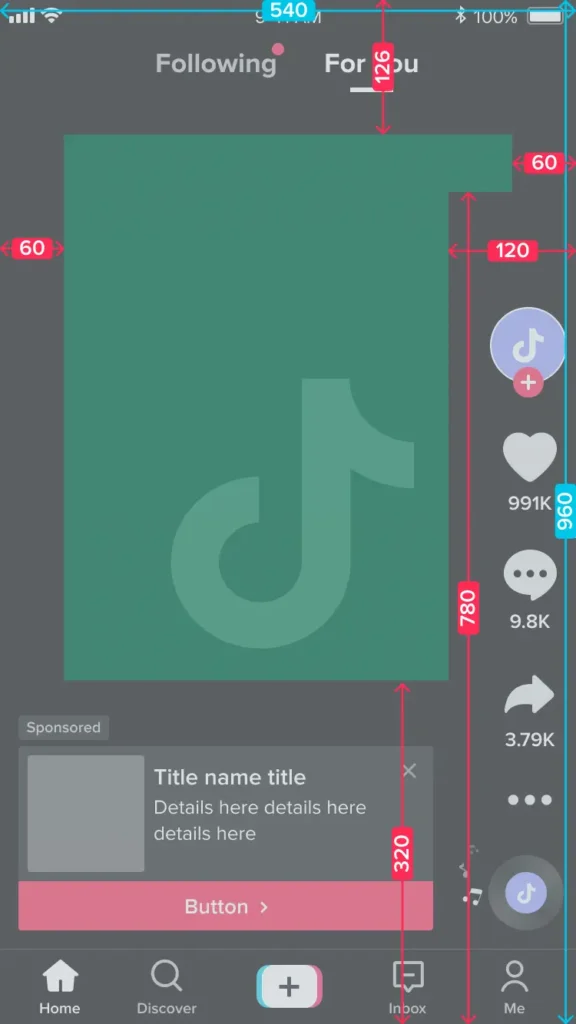
The practical fix: pull the safe zone file for your exact format before you finalize a design, not after. The ad editing workflow guide covers how to build safe zones into your export process from the start, and tools like CapCut ship with TikTok safe zone overlays built in so you’re not eyeballing it.
TikTok Shop, video shopping ads, and GMV Max
TikTok Shop advertising doesn’t run the way it did a year ago. GMV Max became the default and only supported campaign type for Shop Ads under the Sales objective, which pulled Product Shopping Ads and LIVE Shopping Ads out of the manual creation flow.
Video Shopping Ads still exist, but only with Showcase as the sales destination, not TikTok Shop directly. If you’re building shoppable video creative today, check which sales destination your campaign is actually pointed at before you assume the older spec sheet still applies.
The TikTok GMV Max guide covers how the automated system pulls from your paid, organic, and affiliate content at once. If you’re still setting up a standard shoppable campaign, the Shopping Ads guide walks through the current setup path.
Common spec mistakes that get ads rejected
A few mistakes account for most of the wasted uploads we see.
Treating minimums as targets. The 516 kbps bitrate floor and the 540×960 minimum resolution are the lowest acceptable numbers, not what you should be exporting at.
Mixing up format specs. Uploading a Takeover-size 5 MB file to a standard In-Feed slot, or assuming Spark Ads need a fresh 1080×1920 export, wastes production time on numbers that don’t apply.
Assuming one safe zone fits every ad. Caption length changes the safe margin. Check the actual template for your format instead of reusing last quarter’s design.
Confusing a spec issue with a policy issue. A slightly-off resolution might just get auto-corrected or trigger a warning. A policy violation, like a prohibited watermark, gets an outright rejection. They’re not the same failure mode.
Run a final check before you submit. TikTok’s own ad policy guidance and a spec pass with the compliance checker will catch most of what actually causes rejections.
Frequently asked questions
What’s the real difference between Spark Ads and In-Feed Ads?
In-Feed ads use freshly uploaded creative built to your own dimensions and file specs. Spark Ads run an existing organic post instead, inheriting its ratio, resolution, and caption, capped at a 10-minute video length.
Does TikTok require sound on every ad?
No. TopView requires sound-on creative, but Brand Takeover runs sound-off on every device. Non-Spark In-Feed ads support audio but don’t require it.
What’s the actual TikTok video file size limit?
It depends on the format. In-Feed, Spark, TopView, and Pangle all cap at 500 MB, but Brand Takeover video is capped at just 5 MB because it has to preload before the app opens.
Can I use emojis and @ mentions in TikTok ad captions?
Non-Spark In-Feed captions block clickable links, the @ symbol, and hashtags entirely. TopView is more permissive: emojis are allowed, and @ works but isn’t clickable on Non-Spark or Spark Push ads.
How long can a TikTok ad actually run?
In-Feed and Spark both allow up to 10 minutes. TopView caps at 60 seconds, and Brand Takeover caps at 5 seconds. Pangle also allows video up to 10 minutes.
Where do I get TikTok’s exact safe zone measurements?
Download the safe zone template file for your specific format and dimension from TikTok Ads Manager. There’s no single pixel number that applies across formats, since caption length and add-ons both change the margin.
Conclusion
Match the spec sheet to the actual format you’re running, not a blended average of all five. Get that part right and the rest of the upload takes care of itself.
Sources