
Time is money, and getting your ad approved on your first try saves you days. Getting your ad stuck in the rejection loop will lead to your campaign stagnating.
To avoid delays, you need to check the rules, flags, and mistakes before you hit submit. It will save time, money, and also your peace of mind.
In this guide, you will learn about TikTok’s review process, the reasons for rejections, how to set up your landing page, and how to fix a rejected ad quickly. TikTok’s full Ads Policies overview covers the complete rulebook these reviews are checked against.
Table of Contents
Get Up to $6,000 in Free TikTok Ad Credits
TikTok offers ad credit incentives for new advertisers, helping you test campaigns with a lower upfront cost.
Key takeaways
- Most TikTok ads are reviewed within 24 hours, but manual reviews take longer for new accounts and restricted categories.
- Landing page inconsistency is the top rejection trigger, since what your ad promises must match what your destination page delivers.
- Misleading claims and prohibited content cause the majority of rejections, and both are avoidable with a quick pre-submission check.
- Any edit to your ad after submission restarts the review clock, so get your creative finalized before you submit.
How does TikTok ad approval work?
TikTok reviews every ad before it goes live using a combination of automated scanning and human review. The system checks your creative, caption, landing page, and targeting against TikTok’s advertising policies and community guidelines. According to TikTok, most ads complete this process within 24 hours, though some take longer depending on the product category and account history.
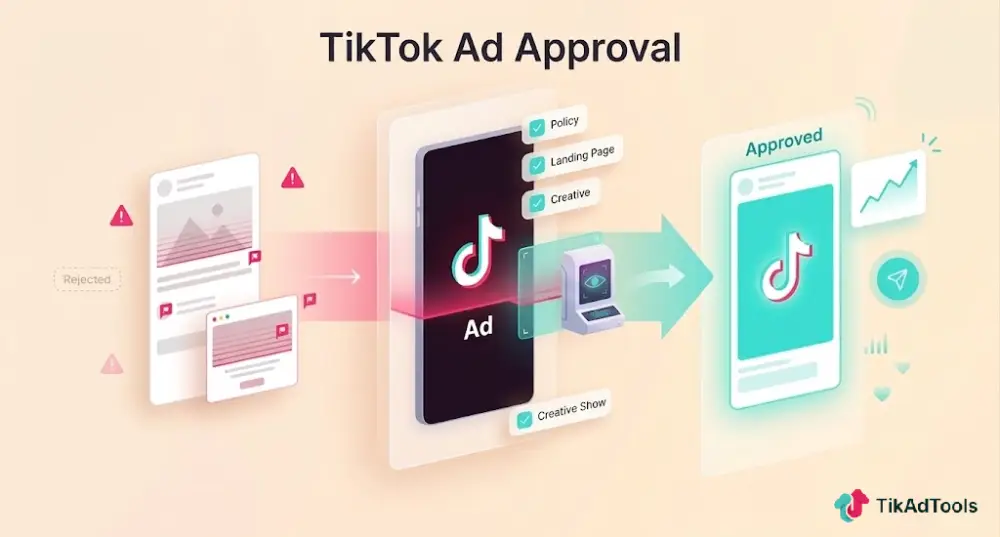
How the TikTok ad review process works
When you submit an ad through TikTok Ads Manager, it does not go live immediately. Every campaign goes through a mandatory review before it can spend a single dollar.
The process starts with an automated scan of your caption, hashtags, display name, and destination URL.
The system looks for banned keywords, prohibited product categories, and obvious policy issues. If something triggers a flag at this stage, your ad is rejected before a human reviewer ever sees it.
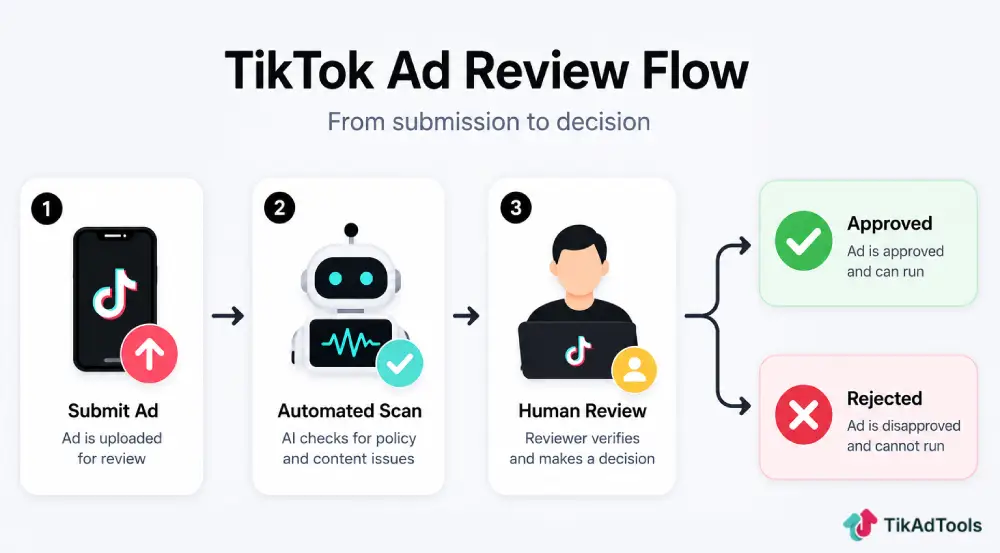
Ads that pass the automated stage move to a detailed creative review. TikTok checks your video or image content, audio, on-screen text, and the landing page your ad links to.
A human reviewer steps in when the system cannot make a clear call, typically for restricted categories, accounts with limited history, or content that requires contextual judgment. This is where most rejections actually happen.
According to TikTok’s Ad Review FAQ, you can track your approval status at the campaign, ad group, and ad level inside TikTok Ads Manager.
Restricted industries such as financial services and health products may face longer timelines and require pre-approval documentation through TikTok’s Industry Entry process before a campaign can run.
The most common reasons TikTok Ads get rejected
Most rejections trace back to the same small set of issues. Knowing them ahead of time is the fastest way to avoid them.
Misleading or exaggerated claims
TikTok rejects ads that make promises the advertiser cannot prove. Phrases like “guaranteed results,” “100% effective,” or “lose 10 pounds in a week” will flag your creative.
Replace absolute language with accurate, provable statements. Instead of “guaranteed to work,” describe what the product is designed to do.
Landing page inconsistency
TikTok’s ad messaging policy requires your ad and your landing page to tell the same story. If your ad features a specific product, that product must appear on your destination page.
Any pricing mentioned in the ad must match what the page actually shows. Brand names must also be consistent throughout.
Before you submit, pull up your landing page on a phone and compare it directly against your ad creative.
Prohibited or restricted product categories
TikTok prohibits advertising for categories including tobacco, recreational drugs, weapons, and counterfeit goods.
Other verticals, such as financial services and dietary supplements, require pre-approval through TikTok’s Industry Entry policy before any campaign can run.
Submitting ads in these categories without prior approval wastes review cycles and risks account-level flags.
Content quality and format problems
TikTok’s Ad Format and Functionality guidelines flag poor-quality media, unclear audio, and videos outside the approved length range.
According to TikTok’s Ad Review FAQ, video ads must run between 5 seconds and 10 minutes, or they won’t be approved at all. Separately, TikTok’s Ad Format and Functionality guidelines set a tighter editorial-quality target of 5 to 60 seconds for the ad content itself. Music from unlicensed sources and third-party logos used without permission also cause rejections at this stage.
What your landing page needs to pass review
Your landing page goes through the same level of scrutiny as your ad creative.
These are the baseline requirements before you submit:
- A working, mobile-optimized URL: Test your link on a smartphone before submitting. A broken page or one that does not render correctly on mobile will fail review.
- A visible privacy policy: TikTok requires one on every landing page. For lead ads, this is a hard requirement.
- Product and price consistency: What you advertise must match what visitors see when they arrive.
- No access barriers: Pages that require users to download software or enter personal data just to view the main content will be rejected.
A quick check before any submission: open your landing page cold on your phone and ask whether a first-time visitor would find exactly what the ad promised. Any gap between the ad and the page is a likely rejection. Running your setup through the Ad Compliance Checker beforehand catches most of these mismatches before you submit.
How to get your TikTok Ads approved faster
Approval speed depends on how clean your submission is and how established your account history is. These four habits make a consistent difference.
Run Smart Fix before every submission. TikTok Ads Manager includes a Smart Fix tool that scans your creative for policy problems before you submit. It flags the kind of issues that cause first-round rejections and often offers one-click fixes.
Do not edit after submitting. According to TikTok, any change to your ad creative or targeting after submission triggers a completely new review cycle. Finalize everything before you hit publish.
Time your submissions around the work week. Human review queues run more slowly over weekends. For campaigns with a fixed launch date, submit by Thursday, so you have buffer time if a revision is needed.
Build a clean account history. Accounts with repeated rejections experience slower review cycles over time. Every clean approval builds trust with the system; every rejection chips away at it. New advertiser accounts are also subject to more scrutiny until a track record is established.
What to do when your ad is rejected
A rejection is not the end of the process. TikTok provides a specific reason for every rejected ad, and most issues are fixable quickly.
- Read the rejection reason in full. It appears on your Campaign tab in Ads Manager. Skipping this step is the most common reason advertisers get rejected twice for the same issue.
- Fix only the specific problem flagged. Address the exact issue, whether it is a landing page mismatch, a prohibited claim, or a music rights problem.
- Resubmit. Saving your edited ad automatically triggers a new review.
- File an appeal if the rejection was an error. TikTok’s One-Click Appeal function in Ads Manager handles wrongly rejected ads. Submit one appeal per issue only. Multiple appeals on the same rejection slow the process further.
If several ads from the same account get rejected in quick succession, audit your full creative library and landing page setup rather than fixing ads one at a time. Repeated rejections across multiple ads usually point to a systemic issue.
Frequently asked questions
How long does TikTok ad approval take?
Most TikTok ads are reviewed within 24 hours, according to TikTok’s official Ad Review FAQ. Restricted categories, manual reviews, and new advertiser accounts can take longer. Build in a 24 to 48-hour buffer for any time-sensitive launch.
What is the most common reason TikTok ads get rejected?
Inconsistency between the ad creative and the landing page is the most frequent trigger. If your ad makes a claim that your landing page does not clearly support, the review system will catch it. Misleading copy and prohibited content follow close behind.
Can I appeal a rejected TikTok ad?
Yes. Use the One-Click Appeal in TikTok Ads Manager for ads rejected in error. If that does not resolve it, submit a support ticket through TikTok Business Support. File one appeal per rejection to avoid adding delays.
Does editing my ad after submission reset the review process?
Yes. Any change to your creative, caption, or destination URL restarts the review clock from the beginning. Finalize all revisions before submitting.
What happens if my ad gets rejected after it has already been running?
TikTok periodically re-reviews active campaigns. An ad can be retroactively rejected after a policy update or user report. Do not simply reactivate it. Fix the flagged issue first, then resubmit.
Conclusion
Faster TikTok ad approval comes down to preparation, not persistence. Match your creative to your landing page, keep your claims accurate, use licensed music, and run Smart Fix before every submission.
If a rejection does come through, read the reason before you change anything. The fix is almost always simpler than it looks.
Sources
- TikTok’s official documentation: Advertising on TikTok – first things to note
- TikTok’s official documentation: Ad Review FAQ
- TikTok’s official documentation: Ad Review Checklist – Ad Messaging
- TikTok’s official documentation: TikTok Advertising Policies
- TikTok’s official documentation: Ad Format and Functionality