
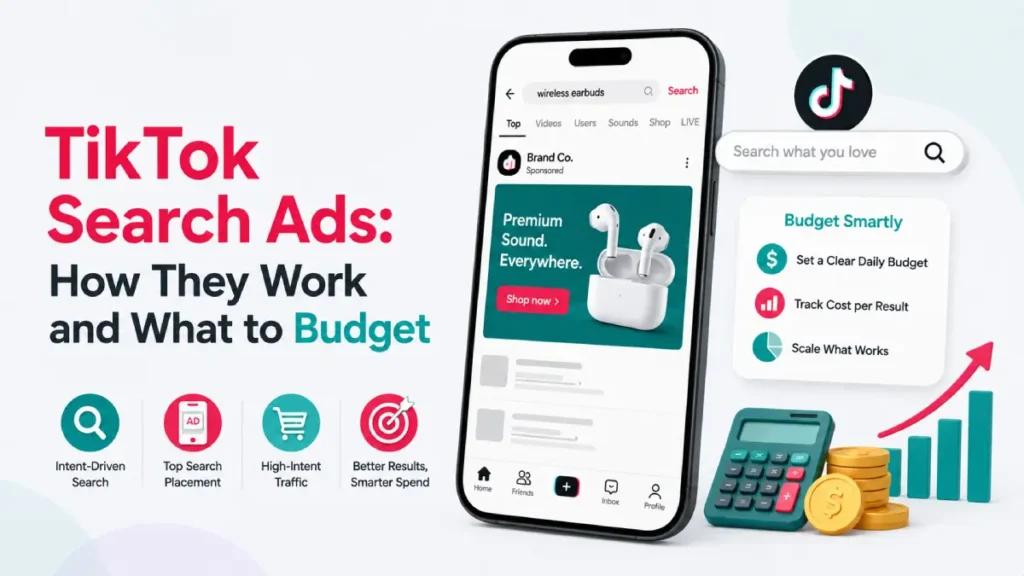
TikTok Search Ads are keyword-targeted ads that appear on TikTok’s search results page the moment someone types in a query that matches what you sell, a different kind of visibility than waiting for the algorithm to surface your ad in a passive scroll.
This piece covers how the format actually works, where it’s available, what verified case studies show it doing, and how to budget for it alongside your existing In-Feed campaigns.
Table of Contents
Get Up to $6,000 in Free TikTok Ad Credits
TikTok offers ad credit incentives for new advertisers, helping you test campaigns with a lower upfront cost.
Key Takeaways
- TikTok Search Ads are keyword-targeted ads that appear on TikTok’s search results page, ranked by keyword relevance, ad quality, and bid strength, not bid alone.
- Per TikTok’s own case study data, Glossier increased conversion rate efficiency by 188% and generated over 8,500 additional website clicks, while Eventbrite saw a 66% CTR increase and a 33% CPA decrease on its in-feed campaigns after adding Search Ads.
- Running Search Ads alongside In-Feed Ads produces a 20% average increase in conversions at a similar or better CPA, per TikTok’s internal testing, since 18% of users who see an In-Feed Ad but don’t convert end up converting after later seeing a matching Search Ad.
- TikTok recommends at least 20 keywords per ad group and a 20:1 budget-to-bid ratio for competitive delivery.
- Search Ads availability varies by objective and country; Lead Generation is currently US-only, so confirm your market and objective before you build a campaign around this format.
What Are TikTok Search Ads?
TikTok Search Ads are keyword-targeted video, carousel, or catalog ads that appear on TikTok’s search results page when a user’s query matches a keyword on your list.
Per TikTok’s own Search Ads Campaign documentation, advertisers manage budgets, target specific keywords, and upload creative assets through a dedicated campaign creation flow separate from standard In-Feed setup. You don’t need active ads running elsewhere in your account to use it. The ad itself looks identical to a normal in-feed video once tapped; it’s the placement and targeting mechanism that’s different, not the viewing experience.
How the Search Ads Auction Works
TikTok ranks Search Ads by keyword relevance, ad quality signals, and bid strength together, not by whichever advertiser bids the highest.
Ad position on the results page varies based on relevance and ongoing feature experimentation, per TikTok’s own documentation, meaning a smaller advertiser with tightly relevant keywords and strong watch-time performance can outrank a bigger budget with generic targeting.
Search Ads also support Spark Ads as creative, so an already-authorized Spark Ad with real organic engagement carries that same quality signal into the search auction.
Where TikTok Search Ads Are Available
Search Ads availability depends on your campaign objective: Web Conversion and Traffic run in 10-11 countries each, while Lead Generation is currently limited to the US only.
| Objective | Available markets |
| Web Conversion | US, Canada, UK, Italy, Mexico, Spain, Germany, France, Saudi Arabia, Australia, Brazil |
| Traffic | US, Canada, UK, Italy, Mexico, Japan, Spain, Germany, France, Saudi Arabia |
| Lead Generation | US only |
Per TikTok’s Search Ads Campaign Availability documentation, the format supports Search Ads Video, Carousel Image Ads, and Search Catalog formats, though catalog formats are currently limited to Sales and Travel & Entertainment categories.
Confirm your objective and market combination before building a campaign around Search Ads, since a mismatch here is the most common reason a Search campaign never launches.
How to Set Up a TikTok Search Ads Campaign
Setting up a Search Ads campaign takes a dedicated flow inside TikTok Ads Manager, separate from a standard In-Feed campaign, and runs through five main steps.
- Choose your objective: In TikTok Ads Manager, select Web Conversion, Traffic, or Lead Generation, then choose “Search campaign” from the campaign type toggle to enter the search-specific flow.
- Set your budget: TikTok recommends a 20:1 budget-to-bid ratio, so a $20 target CPA calls for at least a $400 daily budget to stay competitive in the auction.
- Build your keyword list: Use the in-platform Keyword Suggestion Tool to research terms, aiming for at least 20 keywords per ad group, grouped thematically so each ad group’s keywords match its creative.
- Set bids: Start within TikTok’s suggested bid range at the ad group level (or keyword level, if using the Traffic objective), and refine after the campaign clears its learning phase.
- Upload creative and launch: Search Ads support multiple videos or a Carousel Image Ad per ad group; TikTok automatically serves whichever creative best matches each individual search query.
Keyword Targeting: Match Types and the Right Tool for the Job
TikTok Search Ads use three keyword match types: broad, phrase, and exact, and TikTok recommends starting broad to give the algorithm the widest range of signals before narrowing.
| Match type | How it triggers | Best used for |
| Broad | Synonyms and related terms | Launch phase, maximizing reach |
| Phrase | Query contains your keyword in order | Balancing reach with relevance |
| Exact | Query closely matches keyword meaning | Proven high-intent terms |
One distinction worth getting right: TikAdTools’ SEO Keywords Generator is built for organic TikTok content, captions, titles, and hashtags that help your posts surface in TikTok’s native search. It is not the tool for paid Search Ads keyword research.
For paid campaigns, keyword selection and bidding happen inside TikTok Ads Manager’s own Keyword Suggestion Tool, which shows estimated monthly impressions for each term. Using the wrong tool for the wrong side of this split is a common, avoidable mistake.
Real 2026 Results from Verified Case Studies
Three brands running TikTok Search Ads in 2026 saw measurable gains in conversion efficiency and cost per action, confirmed directly in TikTok’s own published case studies.
Glossier used keyword targeting to reach users actively searching for skincare solutions. Per TikTok’s official case study, the brand increased conversion rate efficiency by 188%, generated more than 8,500 additional clicks to its website from TikTok search, and drove 1,000 conversions directly attributed to the Search Ads campaign.
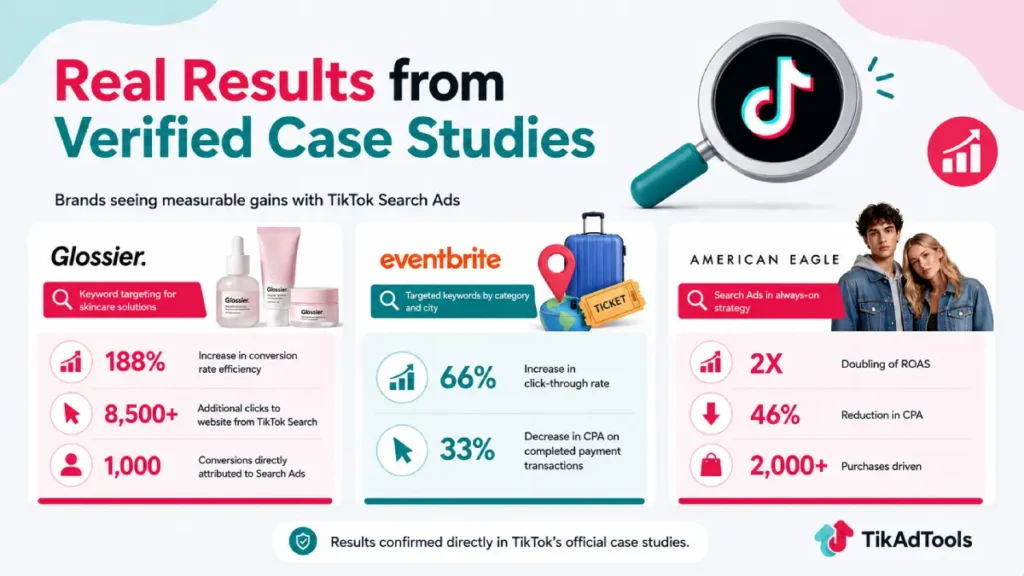
Eventbrite targeted keywords like “travel,” “food & drink,” and “attractions” tailored to specific cities, matching user searches to relevant events in its inventory. Per TikTok’s official case study, click-through rates increased 66%, and CPA on completed payment transactions decreased 33% on its in-feed campaigns after Search Ads were added.
American Eagle folded Search Ads into its always-on strategy and, per TikTok’s official case study, doubled ROAS and reduced CPA by 46%, driving more than 2,000 purchases.
Search Ads vs In-Feed Ads: How to Split Your Budget
Search Ads work as an addition to In-Feed Ads, not a replacement, so most advertisers should allocate a minority of their TikTok budget to search rather than starting there.
Per TikTok’s own internal testing, running Search Ads alongside In-Feed Ads produces a 20% average increase in conversions at a similar or better CPA, largely because 18% of users who see an In-Feed Ad without converting go on to convert after later seeing a matching Search Ad triggered by their own query.
A reasonable starting split is 20-30% of your total TikTok budget to Search, with the remainder in In-Feed, adjusted once you have real performance data.
Model that split for your own budget with the Ad Cost Calculator and Ad Budget Planner before committing spend, and track format-specific CTR, CPA, and ROAS separately so you can see which placement is actually earning its share.
If you’re new to TikTok advertising entirely, running In-Feed Ads alone for two to three weeks first, to build creative data and account history, is a reasonable way to earn the audience Search Ads then convert.
Claim Your Ad Credit Before You Test
New TikTok advertisers can currently claim up to $6,000 in matched ad credit, which lowers the real cost of testing Search Ads alongside your first In-Feed campaigns.
Full details are in the TikTok Ads Credit guide, and setup help for your account and Business Center is covered in the TikTok Ads Manager guide.
Frequently Asked Questions
Are TikTok Search Ads worth it?
Yes, for advertisers with real search demand on the platform. Verified case studies show Glossier increasing conversion efficiency by 188% and American Eagle doubling ROAS while cutting CPA 46% after adding Search Ads to their strategy, though results depend heavily on your category and keyword competition.
How much budget do I need for TikTok Search Ads?
TikTok recommends a 20:1 budget-to-bid ratio, so a $20 target CPA needs roughly a $400 daily budget for competitive delivery. A reasonable starting allocation is 20-30% of your total TikTok budget to Search Ads, with the rest in In-Feed.
Are TikTok Search Ads available everywhere?
No. Availability depends on your objective. Web Conversion and Traffic run in 10-11 countries each, including the US, UK, and most of Western Europe, while Lead Generation is currently limited to the US only.
Should I use TikTok’s SEO Keywords Generator for Search Ads?
No. That tool is built for organic content, captions, titles, and hashtags. For paid Search Ads keyword research and bidding, use TikTok Ads Manager’s own in-platform Keyword Suggestion Tool instead.
Conclusion
TikTok Search Ads capture people at the exact moment they’re searching for what you sell, a different kind of attention than a passive scroll.
The verified results from Glossier, Eventbrite, and American Eagle show the format can meaningfully lower CPA and lift conversions when it’s added on top of an existing In-Feed strategy, not run in isolation.
Confirm your objective and market are supported, build keyword groups around a 20:1 budget-to-bid ratio, and model your search-to-in-feed split with the calculators above before you commit spend.
Sources
- TikTok’s official Search Ads Campaign documentation
- TikTok’s official Search Ads Campaign Availability documentation
- TikTok For Business: Introducing Search Ads Campaign (official case studies)
- TikTok For Business: Glossier Search Ads case study
- TikTok For Business: Eventbrite Search Ads case study
- TikTok For Business: American Eagle Search Ads case study