
Most TikTok ad campaigns plateau not because of creative fatigue, but because you are showing ads to the wrong people.
You have probably tested interest targeting, played with demographics, and watched your cost per acquisition creep up with no clear explanation.
The audience is too broad, too cold, or too far from your actual buyers. That is where TikTok lookalike audiences change the equation.
Get Up to $6,000 in Free TikTok Ad Credits
TikTok offers ad credit incentives for new advertisers, helping you test campaigns with a lower upfront cost.
This guide covers exactly how TikTok lookalike audiences work, which source audiences produce the strongest results, how to build them step by step in the current Ads Manager, and how to measure performance once they are live.
By the end, you will have a complete system for finding new buyers who behave like your best existing customers.
Table of Contents
Key Takeaways
- Your source audience is the single biggest factor in lookalike performance. Low-quality inputs produce low-quality results.
- Narrow (1%) works best for conversion campaigns. Broad (10%) works for awareness and reach.
- TikTok requires a minimum of 1,000 users in your source audience. Most advertising experts recommend 10,000 or more for stronger match quality.
- TikTok auto-refreshes your lookalike audience twice per week when it is applied to an active ad group. You should update your source audience data every 30 to 60 days separately.
- Layering lookalikes with behavioral or interest filters sharpens targeting without shrinking your reach too aggressively.
- Always test at least two source audiences simultaneously so you have real performance data, not assumptions.
What Are TikTok Lookalike Audiences?
TikTok lookalike audiences are a targeting feature inside TikTok Ads Manager that finds new users who share behavioral and demographic patterns with an existing custom audience you upload or build. TikTok’s algorithm analyzes signals like content interaction, purchase behavior, and device usage to identify people most similar to your source group. Results vary based on the quality of your source audience and the size option you select, but when built correctly, lookalikes consistently outperform broad interest targeting for conversion-focused campaigns.
How TikTok Lookalike Audiences Actually Work
TikTok does not build lookalike audiences by matching basic profile data. It analyzes behavioral patterns across its platform and identifies users who act in ways that are statistically similar to the people already in your source audience.
When you submit a source audience, TikTok’s system processes signals, including in-app behavior, content consumption patterns, engagement type, and device and connection data.
It then finds other users on the platform who share those patterns at scale. The output is a new audience segment you can target directly in any ad group.
The role of your source (custom) audience
Your source audience is the foundation. Everything TikTok builds from it reflects the quality of what you put in.
A source audience built from verified purchasers gives TikTok a clear behavioral profile to match. A source audience built from general website visitors gives TikTok a much weaker signal.
You can use the following as source audiences:
- Customer lists uploaded as a CSV file
- TikTok Pixel events such as purchases, add-to-carts, or form completions
- App activity data from your TikTok SDK integration
- Engagement-based custom audiences from your TikTok profile
The more specific and action-based the source, the sharper the lookalike TikTok can build from it.
There are three lookalike audience size options: Narrow, Balanced, and Broad
Once you select your source, TikTok asks you to choose a similarity level. Per TikTok’s official documentation, these three preset options control how closely the lookalike mirrors your source:
- Narrow (1%): Highest similarity to your source audience. Smaller reach, but strongest behavioral match.
- Balanced (5%): A middle ground between match quality and scale.
- Broad (10%): Widest reach, lowest similarity threshold. Best for awareness campaigns.
You are not locked into one. You can create multiple ad groups targeting different options and test which delivers the best return for your specific objective.
Choosing the Right Source Audience (This Makes or Breaks Performance)
The lookalike is only as good as the audience you use to build it. TikTok’s algorithm will find people similar to whoever is in your source list. If that list does not represent your best customers, neither will your lookalike.
High-intent sources that drive strong results
These source audiences consistently produce the best lookalike performance for conversion campaigns:
- Purchasers: A customer list of people who have completed a transaction gives TikTok the clearest possible buying signal. Even a list of 2,000 to 5,000 verified buyers outperforms a website visitor list of 50,000.
- Cart abandoners (high-ticket): People who added a high-value item to cart but did not purchase show strong purchase intent. This is one of the most underused source types.
- Top 25% LTV customers: If your CRM allows segmentation by lifetime value, exporting your top-spending customers as a source audience produces lookalikes with higher average order value potential.
- Pixel-based “Purchase” events: If you have at least 1,000 tracked purchase events via TikTok Pixel, this is often the cleanest source available because the data comes directly from verified on-site behavior.
Weak source audiences to avoid
These source types produce lookalikes that look active but convert poorly:
- All website visitors: This pool includes people who bounced in three seconds, navigated to the wrong page, or came from a completely unrelated search. It dilutes your signal heavily.
- Video viewers (general): Someone who watched 6 seconds of your TikTok did not demonstrate purchase intent. Lookalikes built from this source skew toward entertainment behavior, not buying behavior.
- Email lists with low purchase history: If your email list contains large numbers of cold subscribers, free-offer leads, or contest entrants who never bought, that list will build a poor lookalike. Segment before you upload.
- Engagement-only audiences from early campaigns: If your early ads targeted broadly and generated cheap engagement, that engagement audience does not reflect real buyer behavior.
The rule is simple: use the audience that best represents the action you want more of.
How to Create a TikTok Lookalike Audience: Step-by-Step (2026)
This walkthrough follows TikTok’s official create lookalike audience guide and reflects the current Ads Manager interface.
If you have not yet set up your TikTok Pixel or uploaded a customer list, complete those steps first before building a lookalike.
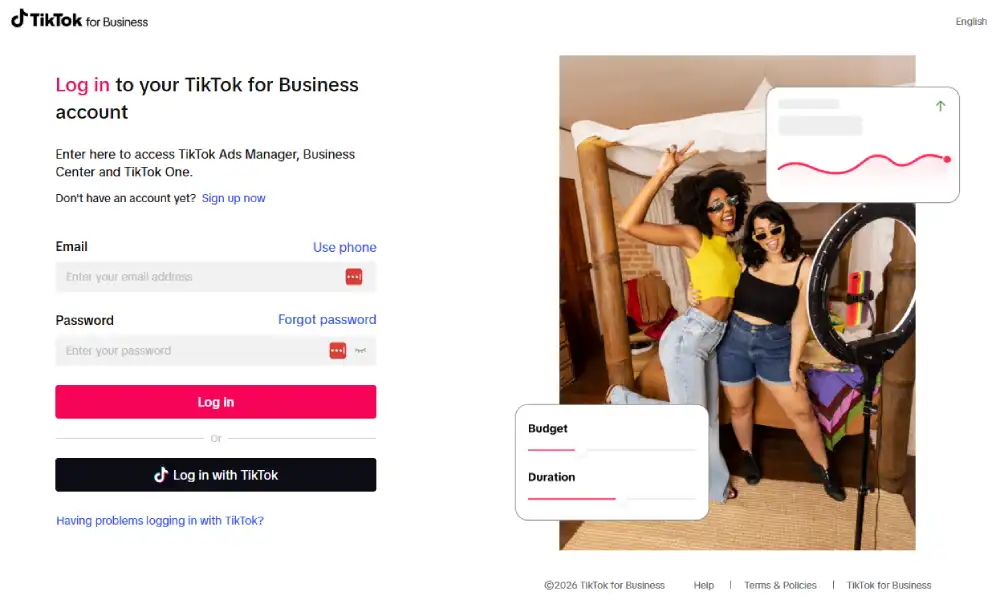
Log in to TikTok Ads Manager at ads.tiktok.com and select the correct ad account.
Click the Tools tab in the top navigation menu.
Select Audience Manager from the dropdown.
Click the “Create Audience” button in the Audience Manager dashboard.
Select “Lookalike Audience” from the audience type options presented.
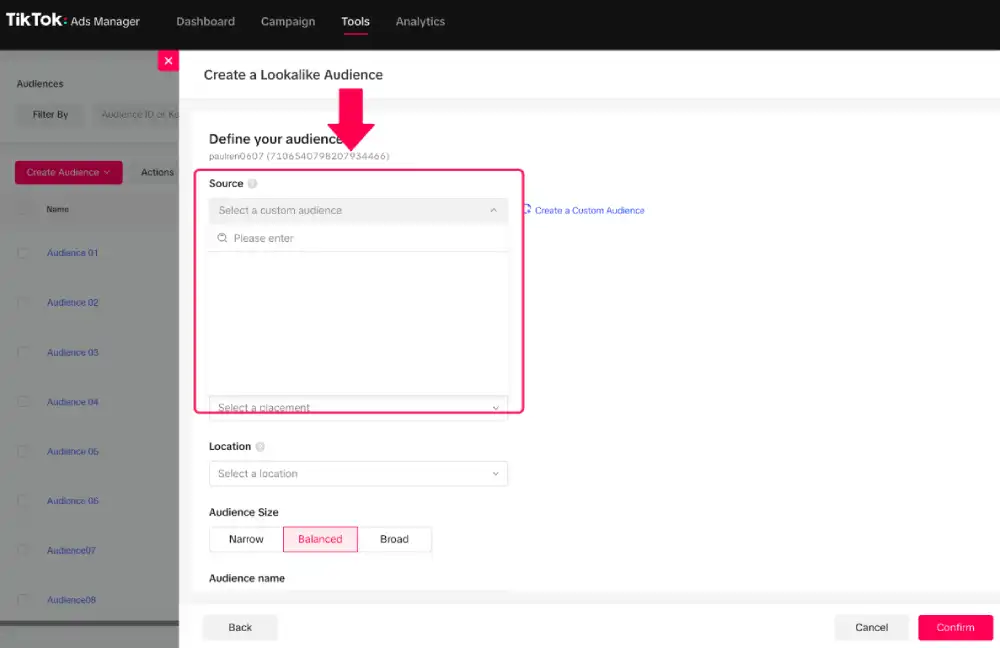
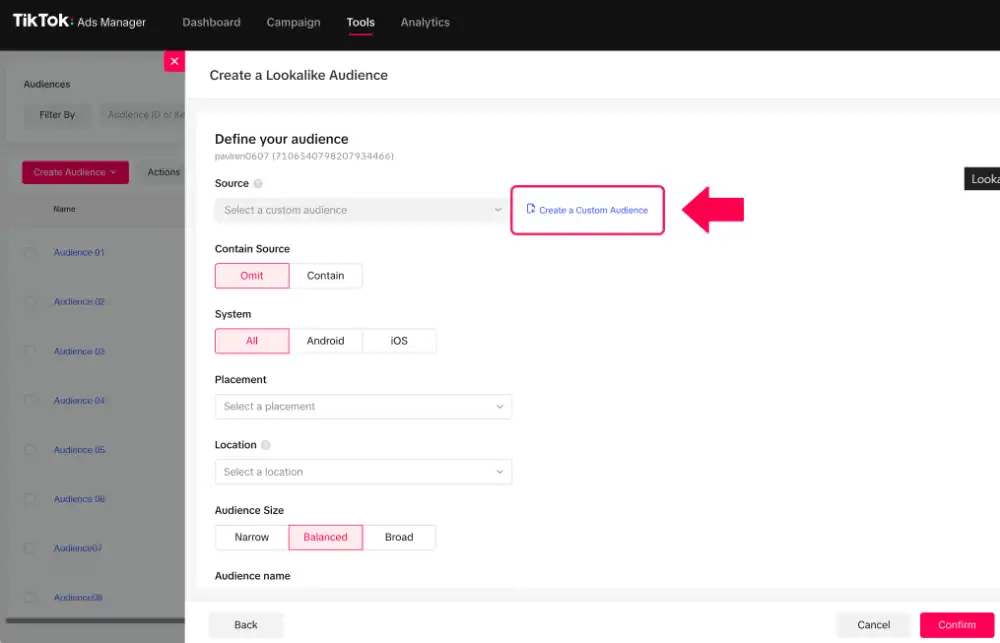
Choose your source audience from the dropdown. This is your custom audience, pixel event audience, or uploaded customer list. If you have not created one yet, click “Create a Custom Audience” and follow the setup flow first.
In the Contain Source section, choose Omit or Contain. Selecting Omit means your ads only go to the lookalike group. Selecting Contain means your ads reach both the lookalike and the original custom audience. For prospecting campaigns, select Omit.
Select your target location. You can target by country or a list of countries. TikTok builds the lookalike within the geographic boundaries you set.
Choose your audience size: Narrow (1%), Balanced (5%), or Broad (10%). Select based on your campaign objective. Conversion campaigns default to Narrow. Awareness campaigns use Balanced or Broad.
Name your audience clearly. Use a naming convention that includes the source type, size, and creation date. Example: “Purchasers-Narrow-Mar2026”. This prevents confusion when you manage multiple lookalikes.
Click “Confirm” to submit the audience for processing. Per TikTok’s official guidance, lookalike audiences are usually created within 24 to 48 hours. Audiences still processing will show as “Unavailable” in Audience Manager.
Check audience status in Audience Manager. Once it shows “Ready”, you can add it to any ad group under the Custom Audiences targeting section.
You do not assign a lookalike audience at the campaign level. You add it at the ad group level under the Targeting section when creating or editing an ad group.
Narrow vs. Balanced vs. Broad: Which Audience Size Should You Use?
The size you choose directly affects reach, similarity, and cost per result. There is no universally correct answer. The right size depends on your campaign objective, budget, and source audience quality.
| Audience Size | Similarity Preset | Best For | Typical Use Case |
| Narrow | 1% match | Conversions, ROAS campaigns | Scaling proven purchaser lookalikes |
| Balanced | 5% match | Consideration, traffic | Testing new source audiences |
| Broad | 10% match | Awareness, reach campaigns | Building upper-funnel volume |
When to choose Narrow: You have a high-quality source audience of 5,000 or more purchasers and want to scale a conversion campaign. Narrow audiences cost more per thousand impressions but typically deliver a lower cost per acquisition because the behavioral match is stronger.
When to choose Balanced: You are testing a new source audience for the first time and want enough reach to generate statistically meaningful data without going too wide. Balanced works well with mid-funnel objectives like landing page traffic or video views with a conversion goal attached.
When to choose Broad: Your primary goal is awareness, or you are in a highly niche market where Narrow produces an audience too small to spend against efficiently. Broad can also work as a prospecting layer when combined with interest filters to add a second level of qualification.
A practical starting point: run Narrow and Balanced in separate ad groups with equal budgets for 7 to 14 days. Let the data tell you which size works for your specific account before committing budget.
Proven Strategies to Get Better Results From TikTok Lookalike Audiences
Layer lookalikes with interest and behavioral targeting
A lookalike audience alone targets anyone who matches the behavioral profile of your source. Adding an interest or behavioral layer means you only reach people within that lookalike who also have a demonstrated connection to relevant categories.
For example: a Narrow lookalike built from purchasers layered with TikTok’s “Online Shopping” behavioral category filters out users who match your buyer profile but have no recent shopping intent signals.
In practice, this combination often reduces CPM slightly while improving click-through rate because the audience is more contextually aligned.
Use this approach when your lookalike is returning high impressions but low click-through rates. It typically means the lookalike is broad enough to include users who are behaviorally similar but not currently in a buying mindset.
One important note: do not over-layer. Adding three or more filters to a Narrow lookalike will shrink your audience to a size that cannot deliver ads efficiently. One to two additional filters is the practical ceiling for most accounts.
Use campaign phases to refresh your lookalike strategy
Per TikTok’s official Manage Lookalike Audience documentation, TikTok automatically refreshes your lookalike audience twice per week when it is applied to an active ad group. You do not need to manually rebuild the lookalike on a recurring schedule.
What you do need to manage is your source audience data. As your customer base evolves, the source audience TikTok is drawing from can become stale.
We consistently see performance decay when source data has not been updated in 60 or more days.
Build this into your campaign process:
- Every 30 to 60 days: Export a fresh customer list or update your pixel-based custom audience with recent purchase events.
- After updating the source: Trigger a manual refresh of your lookalike directly in Audience Manager so TikTok rebuilds the lookalike from updated signals.
- Before scaling spend significantly: If you are moving from $500 to $5,000 in monthly spend, update the source and refresh the lookalike before increasing the budget.
You should also build separate lookalikes for different campaign phases. A lookalike built for an awareness phase campaign and reused in a conversion campaign is a common account-level mistake that inflates cost per acquisition unnecessarily.
Common Mistakes That Kill TikTok Lookalike Audience Performance
Using a source audience that is too small.
TikTok allows lookalike creation from a minimum of 1,000 users, but a source audience of 10,000 or more users consistently produces better match quality across most advertising guides and TikTok’s business partner resources. Below that threshold, the algorithm has too little data to build an accurate behavioral profile.
Uploading unclean customer lists.
If your CSV file contains duplicate entries, outdated emails, or contacts who opted in years ago and have no purchase history, TikTok is matching against the wrong people. Scrub your list to active buyers before uploading.
Running the same lookalike in every campaign objective.
A lookalike optimized during a traffic campaign will not automatically perform well in a conversion campaign. TikTok’s algorithm optimizes delivery based on your campaign objective. When you switch objectives, rebuild or retest the audience in the new context.
Never update the source audience data.
TikTok auto-refreshes your lookalike twice weekly, but it refreshes against the same source. If you never update the source audience itself, the lookalike rebuilds from increasingly stale data. Update the source every 30 to 60 days.
Excluding existing customers from lookalike ad groups.
If you do not exclude your current customer list from lookalike targeting, you are spending your budget reaching people who have already bought. Always add your customer list as an exclusion at the ad group level.
Stacking too many exclusions and filters.
Overcorrecting by adding five or more exclusions and interest filters to a Narrow lookalike can reduce your audience to under 50,000 users in most markets. At that size, TikTok’s delivery system struggles to spend your budget efficiently, and CPMs spike.
How to Measure and Optimize Lookalike Audience Performance
You cannot optimize what you do not track. Before you run a lookalike audience at meaningful spend, define the metrics you will use to evaluate it.
Core metrics to track:
- Cost per acquisition (CPA): Your primary benchmark for conversion campaigns. Compare the lookalike CPA against your interest-based targeting CPA to quantify the performance difference.
- Return on ad spend (ROAS): For e-commerce accounts, ROAS tells you whether the quality of traffic from your lookalike is translating into profitable revenue.
- Click-through rate (CTR): According to data from Lebesgue, the TikTok platform’s average CTR is 0.84%. If your lookalike CTR falls significantly below that, it is a signal to reassess your source audience quality or creative approach.
- Frequency: When frequency climbs above 3 to 4 within a 7-day window, you are exhausting your audience. This is the clearest signal to update your source data or expand to a Balanced size.
How to run a proper A/B test for lookalike audiences:
- Create two ad groups with identical budgets and creatives.
- Assign a different lookalike audience to each (example: Purchasers-Narrow vs. Cart Abandoners-Narrow).
- Run for a minimum of 7 days before drawing conclusions. TikTok’s algorithm needs a learning period to optimize delivery.
- Do not change the creative or budget during the test window.
- Declare a winner based on CPA or ROAS, not CTR alone.
Source audience update cadence:
- Update your source audience every 30 to 60 days to keep the lookalike rebuilding from fresh signals.
- After updating the source, trigger a manual refresh via Audience Manager.
- For accounts spending over $10,000 per month, a 30-day source update cadence is more appropriate.
One honest limitation: TikTok does not give you a direct signal that your source audience data has gone stale. You will only see it in rising CPA or falling CTR over time. Building a review date into your campaign calendar is the only reliable way to catch it early.
Explore these helpful articles next:
👉 Best TikTok Ads for Dropshipping Stores (Product Examples)
👉 TikTok Ads Creative Strategy: What Actually Works
👉 TikTok Ads for App Installs: Setup & Optimization Guide
👉 TikTok Ads Review & Approval: How to Avoid Rejections
Frequently Asked Questions About TikTok Lookalike Audiences
What is the minimum source audience size for TikTok lookalike audiences?
Per TikTok’s official advertising documentation, the minimum source audience size for lookalike creation is 1,000 users. However, most advertising guides and TikTok’s business partner resources recommend a source audience of 10,000 or more for stronger match accuracy. If your source audience is between 1,000 and 5,000 users, you can still create a lookalike, but you should expect lower match quality compared to larger, more data-rich source groups.
How long does it take for a TikTok lookalike audience to be ready?
According to TikTok’s official create lookalike audience guide, lookalike audiences are usually created within 24 to 48 hours. Audiences still processing will show as “Unavailable” in Audience Manager. Once the status changes to “Ready”, you can add it to any active or new ad group. You should not run ads against an audience still showing a processing status.
Why is my TikTok lookalike audience not working?
The most common causes are a low-quality or undersized source audience, stale source audience data that has not been updated in over 60 days, or a mismatch between the audience type and your campaign objective. Check that your source audience contains at least 10,000 high-intent users, such as purchasers or cart abandoners, that you have updated the source audience recently, and that your campaign objective aligns with the intended outcome for that audience. You can manually refresh your lookalike any time via Audience Manager.
Can you create a TikTok lookalike audience from an email list?
Yes, with one additional step. You first upload your customer email list as a CSV file via TikTok Ads Manager’s Custom Audiences feature. TikTok matches the emails against its user database to build a custom audience. You then use that custom audience as the source for a lookalike. For best results, your list should contain emails from verified purchasers or high-intent customers rather than general subscribers, and it should include at least 10,000 records before you use it as a lookalike source.
How is TikTok’s lookalike audience different from Facebook’s lookalike audience?
Both platforms use behavioral data to find users similar to a source audience, but the underlying signals and size presets differ. TikTok offers three preset similarity levels: Narrow (1%), Balanced (5%), and Broad (10%). Facebook allows a custom percentage selection from 1% to 10%. TikTok builds lookalikes primarily from in-app content behavior and video interaction data. Facebook draws from a broader social graph, including off-platform pixel activity and declared interests. TikTok’s lookalikes tend to perform better for younger demographics and video-driven products, while Facebook’s tend to have more purchase-signal depth due to its longer history of pixel data. For most advertisers, testing both simultaneously gives you the most complete picture.
Should you use a TikTok lookalike audience for a new ad account with no data?
No. If your TikTok ad account has no purchase history, no pixel events, and no existing customer list, you do not have a meaningful source audience to build a lookalike from. Start with interest and behavioral targeting to generate your first conversion data. Once you have at least 1,000 purchase events tracked via TikTok Pixel or a customer list of a similar size, you have enough to create your first lookalike. Trying to build a lookalike from a small engagement-only audience in a new account typically wastes budget on poorly matched users.
Conclusion
TikTok lookalike audiences work. But they work because of the decisions you make before you ever click “Create Audience”.
The source audience you choose, the size preset you select, and how consistently you keep your source data fresh are what separate campaigns that scale from campaigns that stall.
We have seen the same creative perform completely differently depending solely on whether the source audience was built from purchasers or general website visitors. The creative did not change. The audience did.
The process is straightforward once you understand the logic: start with your best customers, give TikTok a clean and meaningful data set, match your lookalike size to your campaign objective, and keep your source audience current. Layer carefully, exclude correctly, and test with real structure rather than intuition.
The goal is not to reach more people. The goal is to reach the right people at scale. That is exactly what a well-built TikTok lookalike audience is designed to do.