
TikTok asks most advertisers to verify their business before running ads without restrictions. The document you need depends on whether you’re verifying as a business or as an individual, and getting the wrong one is the single biggest reason submissions get rejected.
This guide covers exactly which documents TikTok accepts, how to submit them in Ads Manager and Business Center, and what to do if your first attempt gets bounced back.
It’s written for advertisers, not creators. If you’re verifying as a TikTok One creator instead, TikTok handles that through a separate process.
Table of Contents
Get Up to $6,000 in Free TikTok Ad Credits
TikTok offers ad credit incentives for new advertisers, helping you test campaigns with a lower upfront cost.
Key Takeaways
- Your account type decides your documents. Businesses submit a certificate of incorporation, business license, or similar registration document. Individuals submit a government-issued photo ID.
- You can verify through TikTok Ads Manager or TikTok Business Center, and Business Center verification can extend to every linked ad account through shared verification.
- Review typically takes up to two business days, but mismatched information between your document and your account details is the most common reason submissions fail.
- Only JPEG, PNG, and PDF files under 10 MB are accepted, and your document can’t expire within 30 days of upload.
Why TikTok asks you to verify your business
TikTok verifies advertisers to confirm that the people and companies running ads are who they claim to be. Per TikTok’s own documentation, this step protects users. It can also directly affect your ability to post ads.
An unverified account isn’t automatically blocked from running campaigns. But verification status shapes the trust signals TikTok applies to your account, and some features sit behind it.
If you skipped verification when you first set up your TikTok Ads Manager account, it’s worth going back and completing it now. And if you haven’t opened an account at all yet, TikTok ads for beginners covers that first step.
Verification isn’t a one-time formality you can skip and forget. If your account gets flagged later for a policy review, having verified business information on file speeds up how fast TikTok can resolve it.
Business vs individual verification: which documents you need
TikTok splits verification into two account types, and each one requires a different kind of document. Confirm which type applies to you before you start gathering paperwork.
| Requirement | Business Account | Individual Account |
|---|---|---|
| Name required | Full legal business name | Full legal personal name |
| Accepted document | Certificate of incorporation, business license, or articles of association | Passport, driver’s license, or national ID |
| ID reference number | Certificate or registration number | Government ID number |
| Company website | Optional | Not applicable |
| Typical use case | Registered companies, LLCs, agencies | Sole proprietors, solo creators, freelancers |
Exact accepted document types vary by country. TikTok maintains a country-specific list on its acceptable documents for business verification page, so check that page for your specific market before you submit anything.
Some countries also accept alternate individual documents beyond the three general ones, including a Green Card in the US, a Work Card in Brazil, or a Smart ID card in South Africa, per TikTok’s acceptable documents for individual identity verification. If your usual ID doesn’t appear on the general list, check that country-specific guidance before assuming you’re out of options.
Document requirements TikTok checks every time
Regardless of which document you submit, TikTok applies the same technical and quality checks to every upload:
- File format: JPEG, PNG, or PDF only. File size can’t exceed 10 MB.
- All four corners visible: A cropped or partially photographed document gets rejected automatically.
- Color copies required: except for documents from the United States, China, and Australia.
- Not expiring within 30 days: TikTok won’t accept a document that’s about to lapse.
- No duplicated copies: A photocopy of a photocopy isn’t acceptable, even if it’s legible.
- No third-party watermarks:
- Full account name matches the document: Your account name, business name, certificate number, and phone number all need to match the document. They also need to match what’s on file with your local government registry.
That last point causes more rejections than any document-type mistake. TikTok’s own troubleshooting guidance lists inconsistent information as a top failure reason. This happens even when the document itself is perfectly valid.
How to submit verification in TikTok Ads Manager
- Open the Tools module inside TikTok Ads Manager and click Account setup under the Settings column.
- Click Verify now. If your account is already verified, you’ll see a “Verified” status here instead.
- Select your entity type and enter your country, business name, and company website (optional).
- Upload your document along with its certificate or ID number, making sure every field matches what’s printed on the file.
- Click Submit.
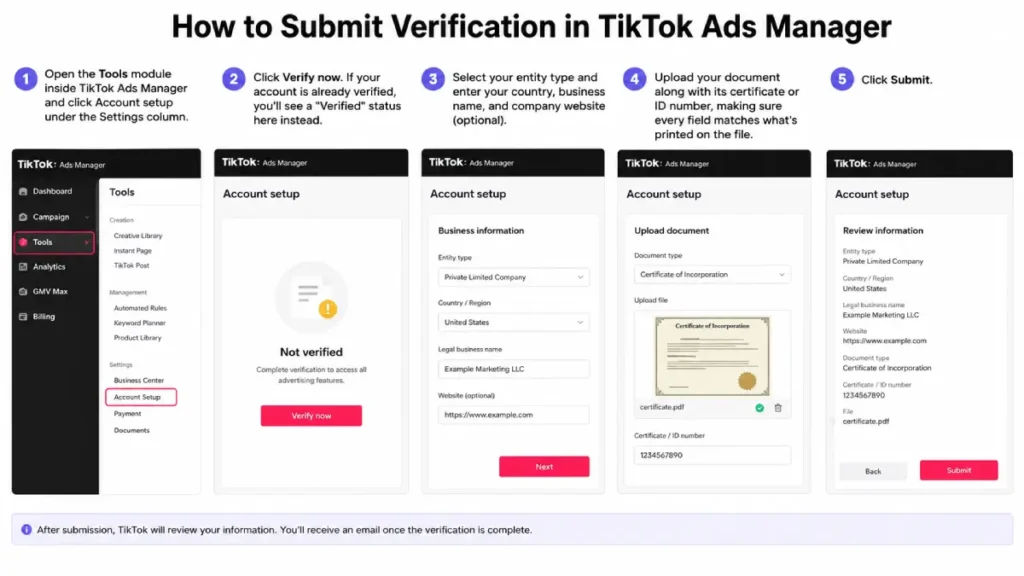
Submiting Verification in TikTok Ads Manager
Your status changes to “Pending” while TikTok reviews it. Only an account admin or owner can edit verification information once it’s submitted, per TikTok’s documentation on adding qualifying documents.
How to submit verification in TikTok Business Center
Business Center verification works a little differently. It can confirm both your company details and your legal representative’s identity. If you haven’t set up your Business Center yet, TikTok Business Center setup walks through that first step.
- Log in to TikTok Business Center and click Verification in the left-hand menu.
- Confirm your status shows “Unverified” and click Verify now.
- Select your account type and enter your business name and industry.
- Upload your verification document and certificate number.
- Click Submit.
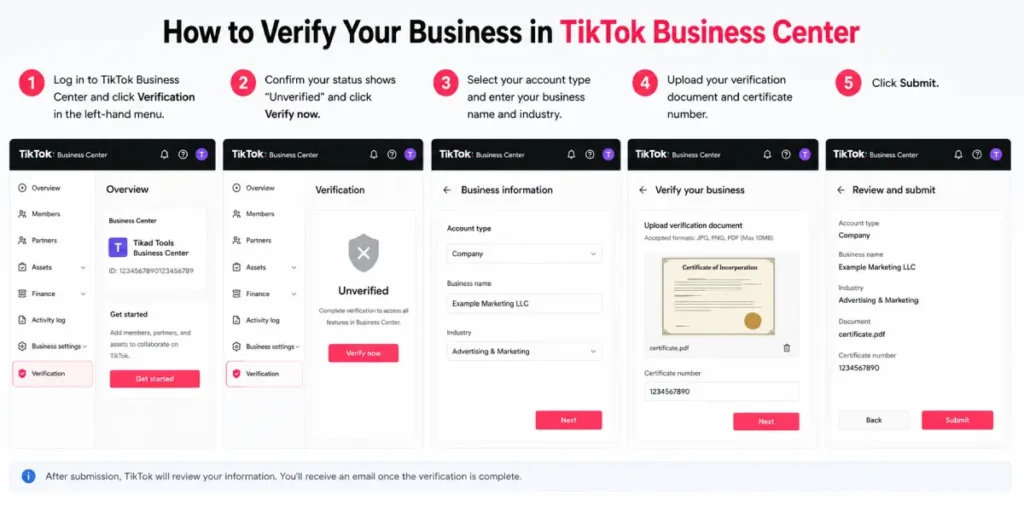
Company verification can take up to two business days. Once your company information shows verified, you can also submit your legal representative’s ID as a secondary step, which is required if you plan to create an Organization Account inside Business Center.
If your Business Center is already verified, you don’t have to repeat this process for every ad account underneath it. TikTok lets you extend, or “share,” that verified status to any linked TikTok account instead of verifying each one from scratch.
What happens after you submit
TikTok reviews your document and updates your status to either “Verified” or “Unverified.” You can track this status directly inside Ads Manager at any time. Your uploaded documents stay stored and associated with your ad account going forward, so you won’t need to re-upload them for routine account changes.
Why verification gets rejected and how to fix it
Most rejected submissions come down to one of four issues, per TikTok’s troubleshooting documentation:
The document doesn’t match your country’s requirements. Check TikTok’s acceptable-documents page for your specific market before resubmitting. The list genuinely differs by country, and guessing just wastes a review cycle.
Information is missing or unclear. The business license number, company name, or other required text isn’t fully visible. If you photographed the document, place it on a dark background so every line of text is legible.
Your account details don’t match the document. Business name, certificate number, phone number, and address all need to line up. That means matching your TikTok account, the uploaded document, and your government’s official records.
The document has expired, or it expires within 30 days of your upload.
If a resubmission still fails, try a different acceptable document type rather than resubmitting the same one.
You can also request an account review from the Account setup page inside Ads Manager. Or contact TikTok Business Support if the issue persists.
One thing worth flagging early: submitting false or misleading information is against TikTok’s policies. It can lead to account-level enforcement, not just a rejected upload.
If your business genuinely can’t produce a matching document, such as a very new registration, resolve that with your local registry first. Don’t try to work around it with an unrelated document.
Frequently asked questions
How long does TikTok business verification take?
Business Center verification typically takes up to two business days. Ads Manager verification timelines can vary, but most reviews complete within a similar window. If your status is still pending after several days, check that your submission met every technical requirement before contacting support.
Can I verify my TikTok Ads account without a registered business?
Yes. If you’re advertising as an individual rather than a registered company, select the individual account type and submit a government-issued photo ID instead of a business document. Sole proprietors and solo creators typically fall into this category.
Do I need to verify every ad account separately?
Not if they’re linked to a verified Business Center. TikTok’s shared verification feature extends your Business Center’s verified status to every TikTok account connected to it, so you don’t need to repeat the document upload for each one.
What if I don’t have any of the accepted documents?
Check TikTok’s country-specific acceptable documents list first since it’s broader than the three general options. If nothing on that list applies to your situation, TikTok’s support team is the next step. Submitting an unrelated or fabricated document to work around the requirement risks account-level enforcement.
Does verification affect my TikTok Account Health?
Verification status is one of several signals TikTok weighs alongside your account’s standing. If you’re unsure where your account currently sits, the TikTok Account Health Checker gives you a quick read before you dig into a verification issue.
Conclusion
Business verification comes down to matching the right document to your account type and making sure every detail on it lines up with what TikTok and your local registry already have on file. Get that consistency right the first time, and most submissions clear within a couple of business days.
If a submission does get rejected, read the specific reason TikTok gives you before resubmitting. Guessing at a second document without addressing the actual issue just costs another review cycle.
Sources