
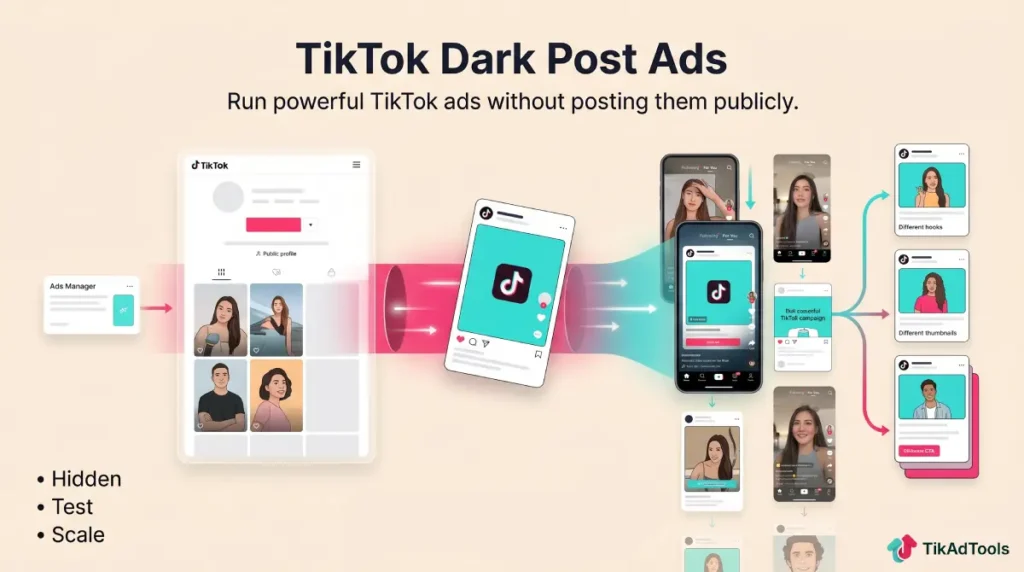
A TikTok dark post is an ad that runs in the For You feed but never shows up on your profile. In TikTok Ads Manager today, you make one by uploading a new video under your linked TikTok account and leaving “Show through ads only” switched on.
People also call these TikTok dark ads or non-Spark ads. Only the audience you target sees them, so your profile stays free of sales videos.
If you’re brand new to TikTok ads, start with the TikTok Ads for Beginners guide, then come back here.
Table of Contents
Get Up to $6,000 in Free TikTok Ad Credits
TikTok offers ad credit incentives for new advertisers, helping you test campaigns with a lower upfront cost.
Dark posts at a glance
- A dark post is an ad that appears only as an ad, never on your profile or as an organic post.
- Since January 2026, new campaigns must use a linked TikTok account, so the old Custom Identity route is gone for most campaign types.
- The setting that hides the ad is “Show through ads only”, and Ads Manager turns it on by default for new ads.
- Spark Ads on real posts usually win on engagement; dark posts win on control, clean tests and a tidy profile.
What is a TikTok dark post?
A TikTok dark post is an ad you create in TikTok Ads Manager that only your target audience sees, and that never appears on your public profile or as a regular post.
For years, advertisers built dark posts with Custom Identity, a separate display name and logo set inside Ads Manager. That option is being phased out: TikTok’s Custom Identity change notice says all new campaigns must be linked to a TikTok account starting January 2026, with a few exceptions such as TikTok Shop sales campaigns and Branded Mission.
So a dark post now runs under your real account. You upload a fresh video in Ads Manager, and the “Show through ads only” setting keeps it off your profile.
One detail trips people up. TikTok’s help treats an ad pushed from your linked account as a Spark Ad using the push method, so a 2026 dark post is technically a hidden Spark Ad. Most advertisers still call it a dark post or non-Spark ad, because it has no organic post history behind it.
Are dark posts native Ads on TikTok?
Yes. A dark post is a native in-feed ad: it appears in the For You feed with a Sponsored label, in the same vertical format as other videos, and people can like, comment on and share it.
The difference is history, not placement. A Spark Ad on an existing post can show the views and comments that post already earned. A dark post starts with none, because it never ran as an organic post.
That’s why the creative has to work on its own.
How to dark post on TikTok
To dark post on TikTok, you build a normal campaign and ad group, then handle the hiding at the ad level. The steps below follow TikTok’s Show through ads only help article, which says the setting is on by default for newly created ads in Ads Manager.
- Link your TikTok account. Do it in Business Center as an ad delivery asset (best for teams and agencies), or click Connect Account in the ad creative section.
- Create the ad. At the ad level, upload a new video or pick one from the Creative Library tab, then click Confirm.
- Choose your identity. Select the linked TikTok account.
- Check “Show through ads only”. The box appears in the ad settings. Leave it on.
- Finish and submit. Complete the rest of the ad setup and send it for review.
With the setting on, the video runs only as an ad. It won’t show as an organic post in the feed or on your profile page, and when you turn it on in Ads Manager, even you won’t see it on the profile.
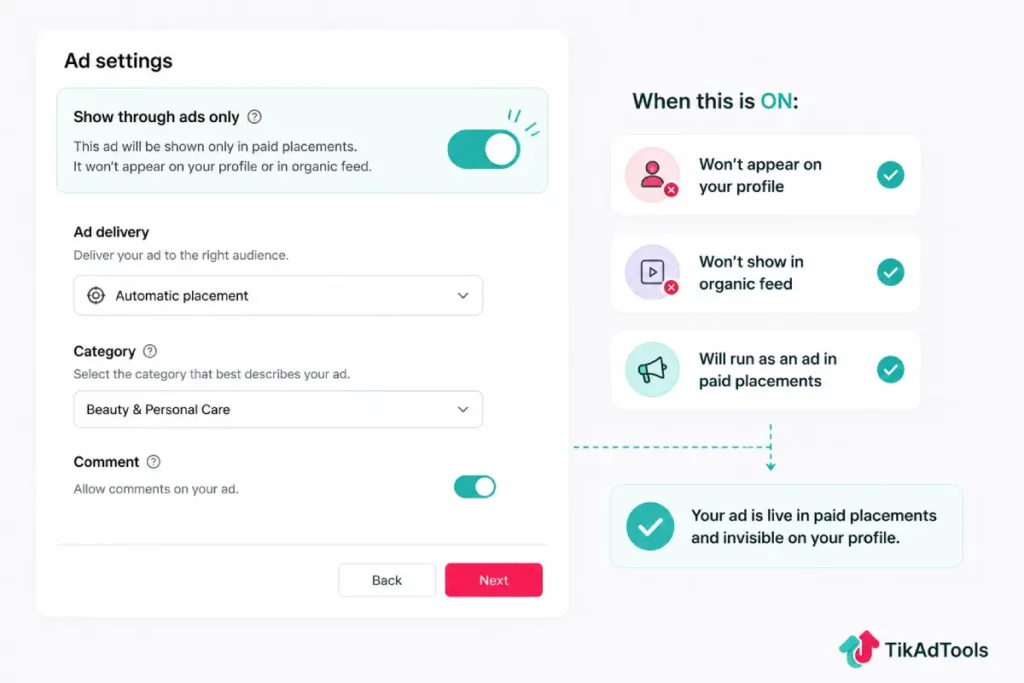
The toggle doesn’t appear when you pull an existing organic post or use a creator’s video code. Those ads are meant to run on a public post.
To check how the video reads before it spends anything, run it through our TikTok ad preview generator first.
Dark posts have no organic comments to soften a weak hook, so the first two seconds carry everything.
Dark posts vs Spark Ads: which is better?
Neither is better for every goal. Spark Ads on real posts tend to win on engagement, while dark posts win when you need control, clean tests or a profile without ads.
TikTok’s Spark Ads guide for Video Shopping Ads puts Spark Ads ahead of non-Spark ads on every measure it lists: completion rate +30%, engagement rate +142%, conversion rate +43% and CPM down 4%. TikTok reports those results for Video Shopping Ads, so read them as a direction, not a promise for your account.
Here is how the two compare on the points that matter when you choose:
| Dark post | Spark Ad on a public post | |
|---|---|---|
| Shows on your profile | No | Yes |
| Organic views and engagement | None while the setting is on | Engagement from the ad counts on the organic post |
| Social proof at launch | Starts from zero | Can carry the post’s earlier views and comments |
| Best for | Testing hooks, short promos, region or language versions | Scaling proven posts and creator content |
Hiding has a cost, though. A hidden post gets no organic views, and Smart+ campaigns can’t use paid and organic optimization on it.
Many accounts run both: dark posts for testing, and Spark Ads for the posts that already work.
When to run dark posts instead of Spark
Run dark posts when you need to test fast. You can try a dozen hooks, captions and edits without any of them landing on your profile or waiting on a creator’s authorization code.
That makes them a good fit for a structured TikTok ad A/B test, since no version starts with extra engagement that skews the result.
They also help when your account has no posts worth promoting yet. A new account can advertise from day one without publishing anything first.
The third case is precision. Dark ads reach only the audience you pick, which suits tight TikTok ad targeting and retargeting campaigns where you don’t want an offer shown to every follower. TikTok also lists region-specific and multi-language campaigns from one account as a good reason to hide ads from the profile.
Frequently asked questions
Are TikTok dark ads better than Spark Ads?
Not across the board. TikTok’s own Spark Ads guide reports higher completion, engagement and conversion rates for Spark Ads than for non-Spark ads. Dark ads are the better choice when you want to test many versions, keep your profile clean or run region-specific offers, because the hidden post gets no organic views.
Are TikTok dark ads and non-Spark ads the same thing?
Mostly. Advertisers use dark ads, dark posts and non-Spark ads for ads that run in the feed without appearing on your profile. Since new campaigns need a linked TikTok account, TikTok’s help treats a pushed, hidden ad as a Spark Ad using the push method, but it behaves like a classic dark post.
What’s the difference between TikTok Promote and Spark Ads?
Promote is the in-app tool that turns one of your existing videos into an ad with a few taps and simple goals like more views. Spark Ads run from TikTok Ads Manager, can use your posts or a creator’s authorized posts, and give you full campaign, targeting and bidding settings.
Do dark posts hurt my organic follower count?
No. A dark post never appears on your profile, so it doesn’t change your timeline. People can still follow you from the ad, but the post itself collects no organic views or engagement while it stays hidden.
Can I run dark posts and Spark Ads in the same campaign?
Yes. Show through ads only is an ad-level setting, so one campaign can hold hidden ads next to ads that use public posts. A common pattern is to test several hidden versions, then post the winner publicly and run that post as a Spark Ad.
Do dark posts work without a TikTok Business account?
You need a TikTok Ads Manager account and, for most new campaigns, a linked TikTok account. You don’t need any public posts on that account, because the ad video can be uploaded in Ads Manager and kept off the profile.
Final thoughts
Dark posts give you control: you test, run promos and keep your profile clean, while Spark Ads give your best posts extra reach. Start with dark posts to find a hook that works, then move the winner to a public post.
New advertisers can stretch that testing budget by claiming a TikTok ad credit before the first campaign goes live.