
TikTok will refund your unspent ad account balance if your account is in good standing, excluding any taxes already paid. It will not refund money already spent on delivered ads, no matter how the campaign performed.
That’s the entire policy in one line, but the process differs depending on your account type and whether it’s suspended.
If you’re still setting up how you’ll pay for TikTok ads in the first place, that’s worth reading alongside this.
Table of Contents
Get Up to $6,000 in Free TikTok Ad Credits
TikTok offers ad credit incentives for new advertisers, helping you test campaigns with a lower upfront cost.
Key Takeaways
- TikTok refunds unspent balance only. Delivered ad spend is not refundable, regardless of results.
- Requesting a refund on a standalone account closes that account permanently. You can’t reopen it.
- Business Center accounts can transfer balance between linked ad accounts instead of requesting cash back.
- Refunds typically arrive within 60 days once your banking information is correct.
- Suspended accounts go through a different, manual review process, and TikTok may charge a service fee of up to 10% of the remaining balance.
What will TikTok actually refund?
Per TikTok’s official refund FAQ, TikTok refunds your unspent ad account balance, the money you deposited or had on file that hasn’t been spent on delivered ads yet. This applies if you use Manual Payment or Automatic Payment and your account is in good standing.
Taxes you’ve already paid are excluded from any refund. And promotional ad credits don’t count as refundable balance either, per TikTok’s own ad credit terms, credits apply automatically to eligible campaigns and can’t be withdrawn as cash.
What won’t TikTok refund?
TikTok will not refund money already spent on ads that delivered, even if the campaign performed poorly. Bad results, a changed strategy, or buyer’s remorse don’t qualify for a refund.
Once TikTok has spent your budget serving ads, that spend is final.
This is the single biggest misunderstanding advertisers have about TikTok’s refund policy. A refund recovers what’s left in your account. It doesn’t undo a campaign you’re unhappy with.
If you’re new to the platform, TikTok Ads for Beginners covers what to expect before you commit real budget, and TikTok’s ads cost benchmarks break down where that budget actually goes.
How do you request a refund on a standard ad account?
Per TikTok’s official refund process for accounts without a Business Center, if your ad account doesn’t belong to a Business Center, you request a refund directly inside TikTok Ads Manager, and it permanently closes the account.
Here’s the process:
- Log in to TikTok Ads Manager as the account’s admin.
- Click Tools, then Account setup under Settings.
- Under My account, go to Basic information.
- Click More actions, then Close Account and Refund.
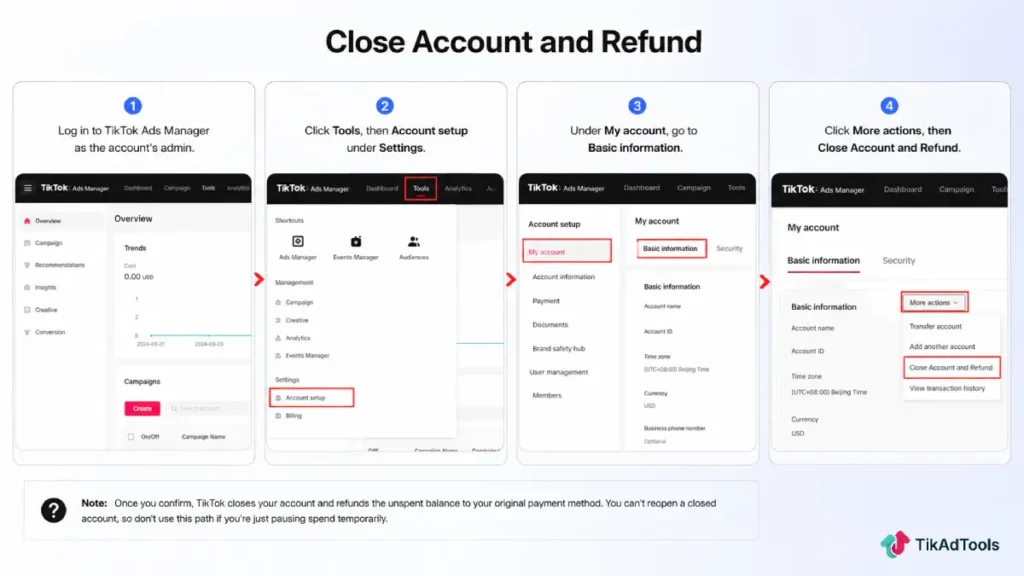
Once you confirm, TikTok closes your account and refunds the unspent balance to your original payment method. You can’t reopen a closed account, so don’t use this path if you’re just pausing spend temporarily.
How does a refund work for Business Center accounts?
Per TikTok’s official refund process for accounts with a Business Center, if your ad account belongs to a Business Center, you have a choice that TikTok doesn’t offer standalone accounts: transfer the balance to another linked ad account instead of taking a refund.
This keeps the money working inside your Business Center rather than cashing out.
If you want cash back instead, you’ll need to close every ad account linked to that Business Center, not just one.
From there, contact your account manager if you have one, or follow TikTok’s deactivation steps to request the refund yourself.
What happens if your ad account is suspended?
Per TikTok’s official refund process for suspended accounts, a suspended account can’t self-process a refund the normal way. Instead, you contact your account manager or TikTok customer support, and TikTok reviews the case individually before deciding whether to approve it.
TikTok may also charge a service fee of up to 10% of your remaining balance on suspended or deactivated accounts, a fee that doesn’t apply to normal, good-standing closures. See TikTok’s official account suspension documentation for what triggers a suspension in the first place.
Whether your refund gets approved at all depends on factors like why the account was suspended and whether you’ve violated TikTok’s policies.
If repeated ad rejections or policy violations put you in this position, checking your standing with the TikTok Ad Account Health Checker before it escalates to suspension is worth doing. And if budget is what’s pushing you toward risky account behavior in the first place, TikTok’s ads budget strategy covers how to spend safely without burning through your balance.
Refund paths compared
| Standalone account | Business Center account | Suspended account | |
|---|---|---|---|
| Where you request it | TikTok Ads Manager | Business Center, or via account manager | Account manager or support |
| Cash or transfer? | Cash only | Transfer between accounts, or cash if you close all accounts | Cash only, if approved |
| Account closes? | Yes, permanently | Yes, all linked accounts, if requesting cash | Case by case |
| Possible service fee | No | No | Up to 10% of remaining balance |
| Typical timeline | Up to 60 days | Up to 60 days | Case by case, review required first |
How long do TikTok ad refunds take?
TikTok typically processes refunds within 60 days once your banking information on file is correct. Outdated or invalid banking details are the most common reason a legitimate refund gets delayed.
If your refund hasn’t arrived after that window, check your status inside Ads Manager under Tools, then Account setup, then Payment, then Summary, then Refund Information.
Update your bank details there if needed, then open a support ticket if the delay continues.
Frequently asked questions
Can I get a refund if my TikTok ads didn’t perform well?
No. Performance has no bearing on refund eligibility. TikTok only refunds unspent balance, money that hasn’t been used to deliver ads yet. A campaign that ran and produced no results has already spent that budget, and that spend isn’t refundable.
Do I have to close my TikTok ad account to get a refund?
Yes, if it’s a standalone account not linked to a Business Center. Business Center accounts have more flexibility: you can transfer balance between linked accounts without closing anything.
Can TikTok deny my refund request?
Yes, particularly for suspended accounts. TikTok reviews suspended-account refund requests individually and can deny them based on account history or policy violations. Refunds on accounts in good standing are generally processed as requested, not subject to the same case-by-case review.
Are TikTok ad credits refundable as cash?
No. Promotional ad credits are time-limited and apply only to eligible ad spend inside your account. They can’t be converted to cash or included in a balance refund.
Does TikTok charge a fee to process a refund?
Only on suspended or deactivated accounts, where a service fee of up to 10% of the remaining balance may apply. Standard refunds on accounts in good standing don’t carry this fee.
Does this refund policy cover TikTok One or creator bookings?
No. TikTok One, the platform’s creator collaboration and sponsorship marketplace, runs on its own separate refund and cancellation policy.
Conclusion
TikTok’s refund policy is simple at its core: unspent balance comes back, delivered spend doesn’t.
The complexity is entirely in the process. Whether your account sits alone or under a Business Center changes your options. A suspension adds a review step, and a possible fee, that a healthy account never faces.
Before requesting a refund, be certain you’re done with the account. Closing it is permanent, and there’s no path back in once you confirm.
Sources