
If you are judging your TikTok ad performance solely by what Google Analytics (GA4) tells you, you are likely pausing your best campaigns.
This is the Silent Crisis of 2026. A user watches your video on their phone, doesn’t click, but later searches for your brand on their laptop and buys.
Google calls that Organic Search. TikTok calls that a View-Through Conversion. Who is right?
Get Up to $6,000 in Free TikTok Ad Credits
TikTok offers ad credit incentives for new advertisers, helping you test campaigns with a lower upfront cost.
They both are, but they are speaking different languages. Understanding TikTok Attribution Windows is the only way to translate these languages.
Without this knowledge, you are optimizing for clicks (cheap traffic) instead of intent (revenue), which is the fastest way to kill a profitable account.
This guide breaks down the technical reality of the 7-Day Click / 1-Day View model, explains why Engaged View is your new best friend, and settles the debate on the best video encoding for ad delivery.
Table of Contents
Quick Summary
- The Default Rule: TikTok’s standard attribution is 7-Day Click / 1-Day View. This means you get credit if they buy within 7 days of clicking or 24 hours of just seeing the ad.
- The Engaged View (EVTA): This is the game-changer. It counts a conversion if a user watches at least 6 seconds of your ad (without clicking) and buys within 7 days. This captures the high-intent scrollers that clicks miss.
- Google Analytics Gap: GA4 is click-based and session-based. It often misses 40–50% of TikTok conversions because it cannot track cross-device behavior (Mobile App View -> Desktop Purchase), a phenomenon KnoCommerce calls the Hidden Halo Effect.
- Encoding Best Practice: Always export ads in H.264, not H.265. While H.265 is newer, TikTok’s media transfer guidelines recommend H.264 to ensure 100% compatibility across devices.
- VTA Strategy: Never turn off View-Through Attribution (VTA) for awareness campaigns, but consider turning it off for Retargeting to avoid over-crediting yourself for sales that would have happened anyway.
1. What Is an Attribution Window?
An attribution window is the specific period of time in which a marketing platform claims credit for a conversion after a user interacts with your ad.
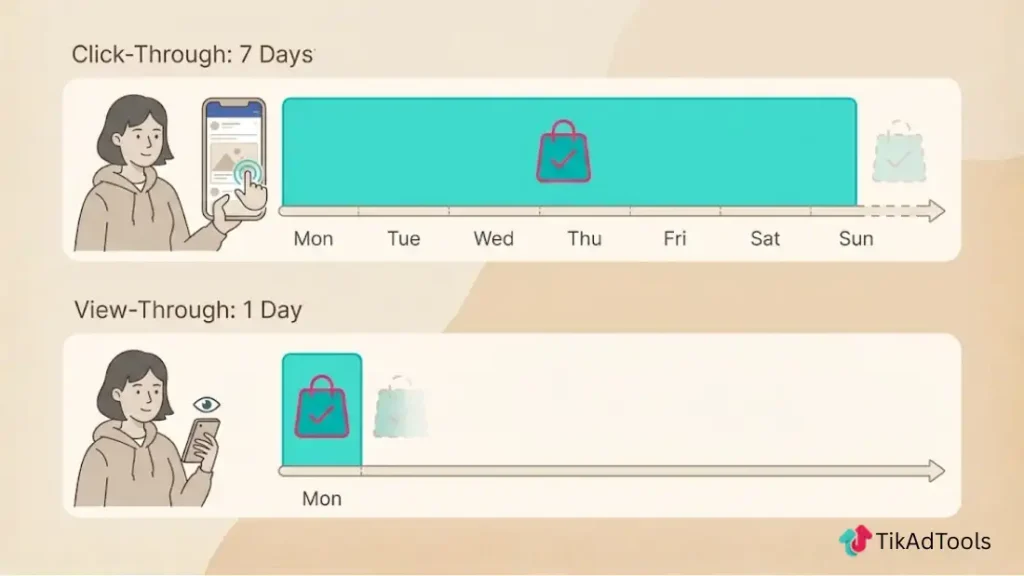
Think of it like a claim check.
- Click-Through (CTA): If the window is 7 Days, and a user clicks on Monday but buys on Friday, TikTok claims the sale. If they buy next Tuesday (Day 8), TikTok does not claim it.
- View-Through (VTA): If the window is 1 Day, and a user sees the ad on Monday morning and buys Monday night, TikTok claims it. If they buy Tuesday morning, it’s lost.
2. The Three Types of TikTok Attribution
TikTok is unique because it splits Views into two categories.
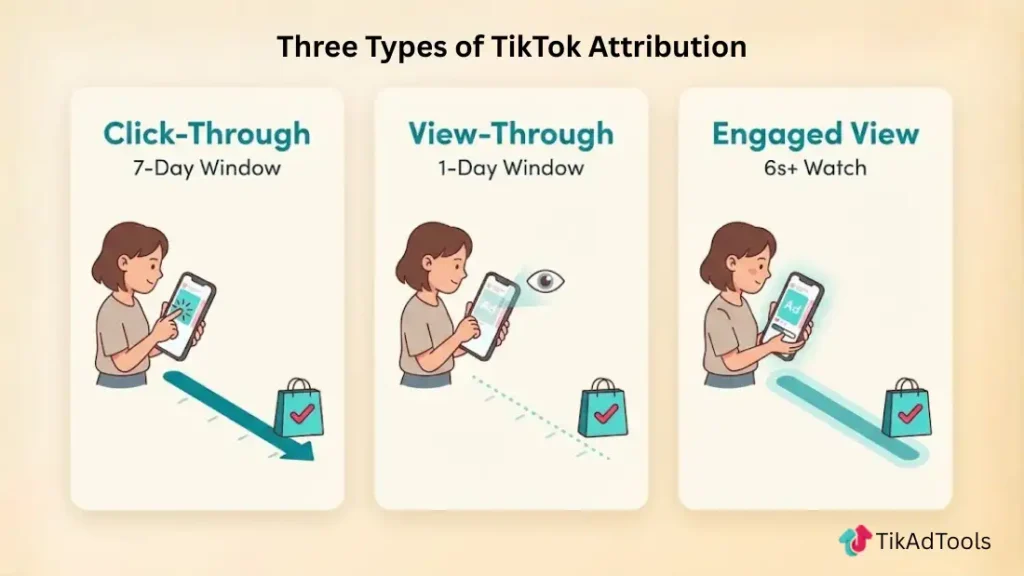
A. Click-Through Attribution (CTA)
- Standard Window: 7 Days.
- Best For: Lower-ticket impulse buys (e.g., $30 beauty products).
- Reality Check: This is the most solid metric. If they clicked, the intent is clear.
B. View-Through Attribution (VTA)
- Standard Window: 1 Day (24 Hours).
- Best For: High-exposure awareness campaigns.
- The Controversy: Google Analytics will never see this. If you rely on VTA, your TikTok dashboard will always show 2x–3x more conversions than your Shopify dashboard.
C. Engaged View-Through Attribution (EVTA)
- Standard Window: 1 Day or 7 Days.
- The Trigger: The user watched at least 6 seconds of the ad (or the whole video if shorter than 6s).
- Why It Matters: This is the most accurate proxy for Interest. A user who watches 6 seconds of a skippable video is highly qualified.
- Strategy: In 2026, optimize your campaigns for EVTA if you sell high-ticket items ($100+), as users rarely click immediately but often return later.
3. Technical Specs: H.264 vs. H.265 Encoding
Your attribution data is useless if the ad doesn’t load. The most common technical error is uploading the wrong video file format.
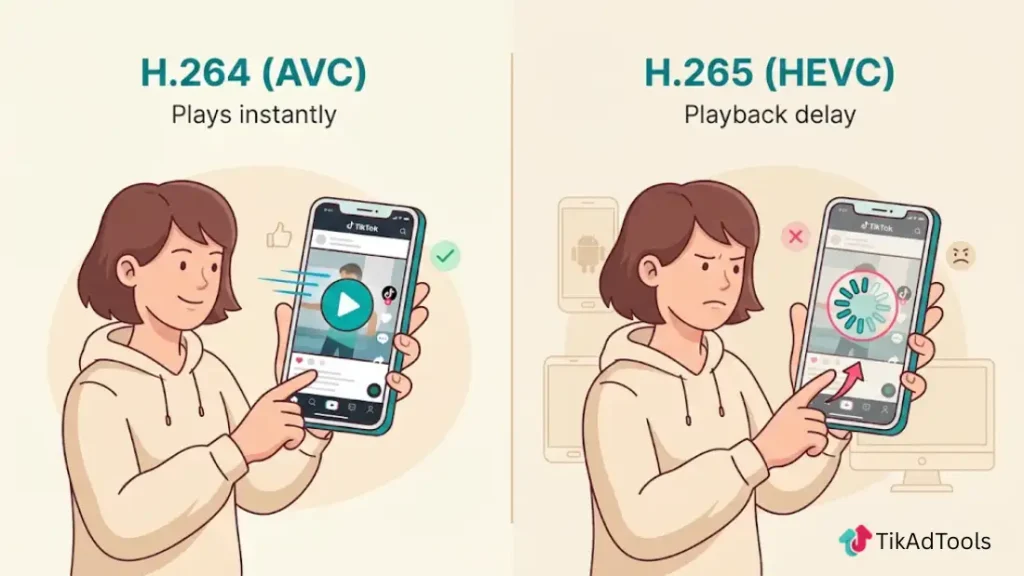
The Verdict: Use H.264 (AVC)
- Compatibility: 99.9% of devices.
- Why: While H.265 (HEVC) offers better compression (smaller file size), many older Android devices and some desktop browsers struggle to decode it quickly. If your ad lags by 0.5 seconds, the user swipes.
- The Risk: Using H.265 can cause delivery throttling, where TikTok stops showing your ad because it detects poor playback performance on user devices.
Recommended Export Settings
- Format: .MP4 or .MOV
- Codec: H.264
- Resolution: 1080 x 1920 (9:16)
- Bitrate: 5–8 Mbps (Don’t go higher; it wastes data without visible improvement).
4. The Discrepancy Headache (TikTok vs. GA4)
Why does TikTok say you made $10,000, but Google says you made $4,000?
1. The Cross-Device Gap
- User Path: Sees ad on iPhone (TikTok App) -> Googles brand on MacBook -> Buys.
- TikTok: Claims credit (via Account ID matching).
- Google: Credits Organic Search or Direct (because there was no click on the MacBook).
2. The In-App Browser
- When a user clicks a TikTok ad, it opens in TikTok’s internal browser. Apple’s Intelligent Tracking Prevention (ITP) and generic ad blockers often strip the tracking parameters (UTMs) before the user lands on your site.
The Fix: Use Post-Purchase Surveys (e.g., KnoCommerce or Fairing). Ask customers: How did you hear about us? If 40% say TikTok but GA4 says 10%, trust the survey.
5. Setting the Right Window for Your Biz
Do not just leave it on default. Match the window to your product’s Time to Purchase.
| Business Type | Recommended Window | Why? |
| Impulse Ecom (<$50) | 7-Day Click / 1-Day View | Decisions are made quickly. VTA captures the I’ll buy it later today crowd. |
| High Ticket ($200+) | 28-Day Click / 7-Day Engagement | Users need weeks to decide. You need a longer lookback to get credit for the sale. |
| Retargeting | 7-Day Click / VTA OFF | Turn off VTA for retargeting. If they are already in your funnel, viewing an ad shouldn’t count as a save. They were likely going to buy anyway. |
Explore these helpful articles next:
👉 TikTok Conversion API Overview: Why It Matters
👉 Avoiding Creative Fatigue in TikTok Ads
👉 TikTok Ads for Fitness Coaches & Trainers
👉 TikTok Ads for Automotive Brands: Targeting Car Buyers
FAQ: TikTok Ads Attribution & Specs
What are the attribution windows for TikTok?
Is H.264 or H.265 better for TikTok?
H.264 is better for TikTok ads. While H.265 provides smaller file sizes, H.264 ensures maximum compatibility across all devices, including older smartphones. Using H.265 can result in playback errors or buffering, which causes users to swipe past your ad instantly.
What is the 7 7 1 attribution window?
This is a common shorthand for 7-Day Click, 7-Day Engaged View, and 1-Day View. It is a robust setting for advertisers who want to value Engaged Views (6+ seconds watch time) as highly as clicks, often used for brand storytelling campaigns where the goal is deep attention rather than just immediate clicks.
What is 7 day click 1 day view attribution?
This means TikTok will count a conversion if a user clicks your ad and buys within 7 days, OR if a user views your ad (without clicking) and buys within 1 day (24 hours). This is the industry standard for measuring social media ad performance.
What are the 4 dimensions of attribution?
In digital marketing, the four dimensions usually refer to:
Source: Where the traffic came from (e.g., TikTok).
Medium: How it arrived (e.g., CPC/Paid).
Campaign: The specific marketing initiative.
Time: The attribution window (e.g., 7 days).
TikTok uses these dimensions to categorize every sale in your reporting dashboard.
How to get 1000 views on TikTok fast?
To get 1,000 views fast on an ad, you must pass the 3-Second Rule. Ensure your video has a visual pattern interrupt (movement or text change) in the first 0-3 seconds. If you are encoding your video, ensure it is H.264 MP4 so it loads instantly; slow-loading videos are skipped before they count as a view.
Conclusion
Attribution is not just a reporting setting; it is a strategic lever.
If you sell expensive products, shifting to a 28-Day Click window might reveal that your ads are actually profitable; they just take longer to convert.
Conversely, if you rely too heavily on 1-Day View, you might be overspending on ads that are just riding the wave of your organic traffic.
Next Step: Go to your TikTok Ads Manager > Assets > Events. Click on your Web Event and check the Attribution Settings.
If you are selling a product over $100, change your Click Window from 7 Days to 28 Days to see if you are missing delayed conversions.