
TikTok gives you two real ways to pay for more reach, and most people pick the wrong one on the first try.
That mistake costs you money, time, and results you could have gotten from day one. Whether you want more profile visits, product clicks, or video views, the boost method you choose changes everything about your outcome.
Get Up to $6,000 in Free TikTok Ad Credits
TikTok offers ad credit incentives for new advertisers, helping you test campaigns with a lower upfront cost.
This article breaks down both options clearly, shows you how to boost TikTok posts with ads, and tells you exactly which one fits your situation, so you stop guessing and start running ads that actually work.
Table of Contents
Quick Answer
TikTok offers two ways to boost posts with ads: Promote, an in-app tool that is beginner-friendly and takes less than two minutes to set up, and Spark Ads, a more powerful option inside TikTok Ads Manager that gives you advanced targeting and creative control. The right choice depends on your goal, your budget, and how much control you want over who sees your content, but only when your video is already strong enough to earn attention on its own.
What Does It Mean to Boost a TikTok Post With Ads?
Boosting a TikTok post means paying TikTok to show your existing video to more people beyond your current followers. Instead of relying on the algorithm to distribute your content organically, you put a budget behind it and tell TikTok who you want to reach.
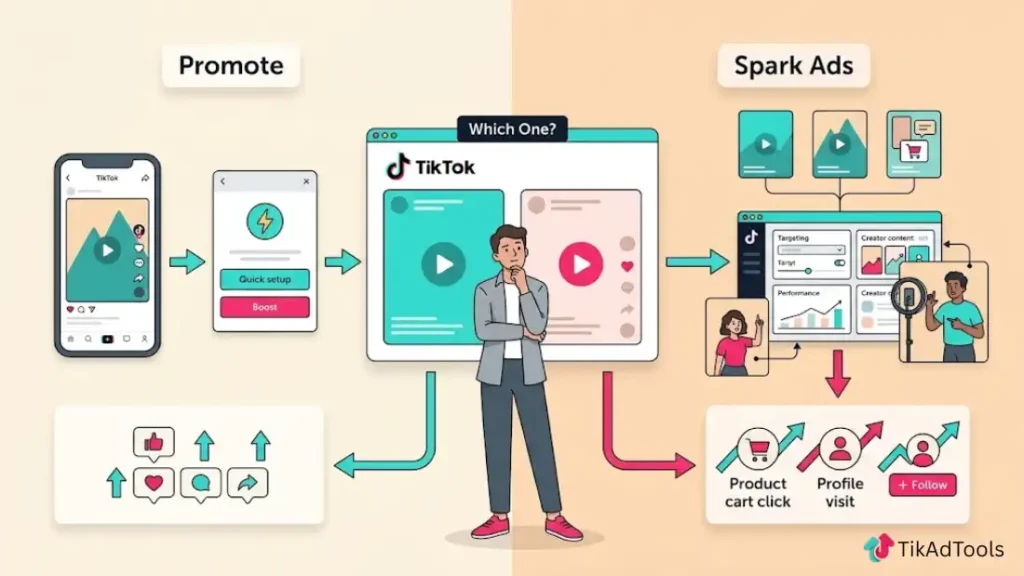
This is different from creating a brand-new ad from scratch. You are taking a video that already exists on your profile and amplifying it with paid distribution.
How TikTok Boosting Differs From Running a Full Ad Campaign
When you run a full TikTok ad campaign inside Ads Manager, you build everything from scratch: campaign objective, ad group, audience, placements, creative, and budget. It gives you full control, but it also takes time and some knowledge of the platform.
Boosting a post skips most of that setup. You pick your goal, set a budget, choose a duration, and launch. It is faster and simpler, but you give up some targeting precision in exchange for that speed. For creators and small businesses, that trade-off often makes sense early on.
TikTok Promote vs. Spark Ads: What’s the Difference?
This is the question we see most often, and it rarely gets a clear answer on the first search. Both options boost TikTok posts with ads, but they work differently, cost differently, and suit different situations.
What is TikTok Promote?
TikTok Promote is a built-in feature inside the TikTok app that lets you boost any public video directly from your profile. You do not need a TikTok Ads Manager account to use it. You just tap a few buttons, set a daily budget starting at $3/day, pick a goal (more video views, website visits, or followers), and your post starts getting paid distribution within minutes.
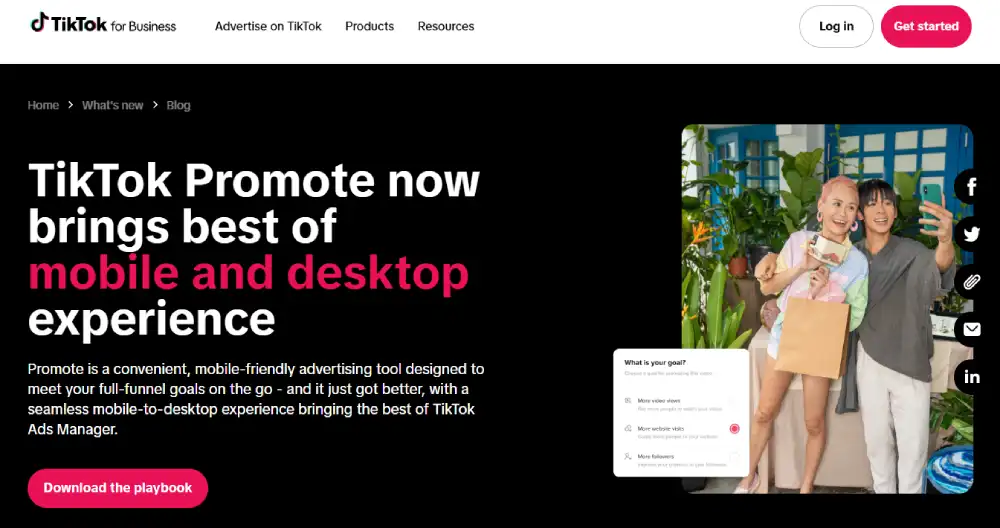
Promote is designed for speed and simplicity. It works well for creators who want more eyes on a video without dealing with a full ad account.
What are TikTok Spark Ads?
TikTok Spark Ads are a paid ad format inside TikTok Ads Manager that lets you boost organic TikTok posts, including posts from other accounts, as long as you have the right authorization. Unlike Promote, Spark Ads run through a full campaign structure with access to custom audiences, retargeting, lookalike audiences, and detailed performance data.
Spark Ads look identical to organic posts in the feed, which means they carry the social proof (likes, comments, shares) the original video already earned. According to TikTok for Business, Spark Ads have a 134% higher completion rate and a 157% higher 6-second view-through rate compared to standard non-Spark in-feed ads.
Side-by-Side Comparison Table
| Feature | TikTok Promote | Spark Ads |
| Setup location | Inside the TikTok app | TikTok Ads Manager |
| Minimum budget | $3/day ($20 minimum total) | $50/day at the campaign level |
| Targeting depth | Basic (age, gender, interest) | Advanced (custom, lookalike, retargeting) |
| Boosts other accounts’ posts | No | Yes (with authorization code) |
| Social proof preserved | Yes | Yes |
| Analytics depth | Basic in-app metrics | Full Ads Manager reporting |
| Best for | Creators, quick boosts | Businesses, agencies, scaling |
| Campaign objective options | 3 (views, followers, website visits) | 8+ objectives |
Which One Should You Use? (Decision Guide)
There is no universally correct answer here. The right tool depends on what you are trying to achieve and how much control you actually need.
Use TikTok Promote if…
- You are a solo creator or small business just starting with paid TikTok ads
- You want to boost a video quickly without setting up an ad account
- Your goal is straightforward: more views, more followers, or more website clicks
- Your daily budget is under $20
- You want to test whether a video has paid potential before committing more budget
Use Spark Ads if…
- You run a business and need real audience targeting, not just basic demographics
- You want to retarget people who have already visited your website or engaged with your content
- You are an agency boosting content on behalf of a client
- You need detailed reporting to justify ad spend to a team or client
- Your monthly ad budget is $500 or more, and you need measurable ROI
Can You Boost Someone Else’s TikTok Post?
Yes, but only through Spark Ads, and only with the creator’s permission. The original account owner must generate a Spark Ads authorization code inside their TikTok app and share it with you. Once you enter that code in Ads Manager, you can run their post as a paid Spark Ad from your account. Promote does not support this feature at all.
How to Boost a TikTok Post Using Promote (Step-by-Step)
You need a public TikTok account and an active video already posted to use Promote. TikTok restricts Promote from being used on private accounts or unpublished drafts.
- Open the TikTok app and go to your profile
- Tap the video you want to boost
- Tap the three-dot menu (More options) on the right side of the screen
- Select Promote
- Choose your goal: More video views, More website visits, or More followers
- Define your audience: you can let TikTok choose automatically, or set it manually by age, gender, and interest
- Set your daily budget (minimum $3/day) and choose how many days to run the boost
- Review the estimated reach TikTok shows you
- Tap Start Promotion and complete the payment
Your boosted video will typically enter review and begin delivering within a few hours.
How to Boost a TikTok Post Using Spark Ads (Step-by-Step)
Spark Ads require a TikTok Ads Manager account. If you do not have one, go to ads.tiktok.com and create one before following these steps.
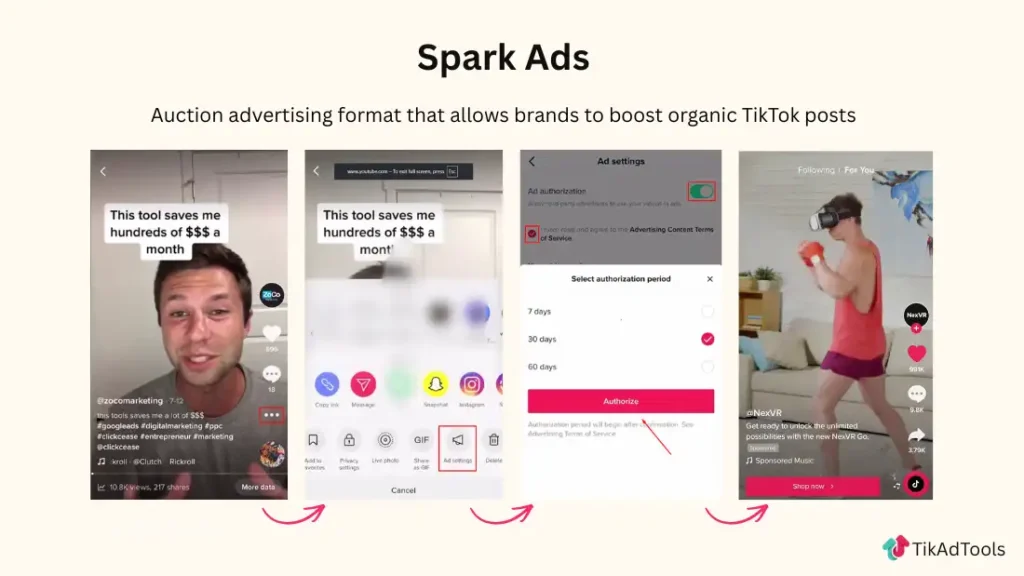
- Log in to TikTok Ads Manager at ads.tiktok.com
- Click Campaign and then click Create
- Select your campaign objective (Traffic, Engagement, Reach, Conversions, etc.)
- Set your campaign budget and click Continue (Plan your budget with precision, try our free budget planner)
- Inside the Ad Group, set your audience targeting, placement, and schedule
- At the Ad level, select Spark Ad as the ad format
- Click Use TikTok Account Post and connect your TikTok account
- Choose the organic post you want to boost from your account library
- Add your destination URL if your goal requires one
- Review your ad preview and click Submit
For a more detailed step-by-step walkthrough, check out our Spark Ads guide.
Your Spark Ad will go through TikTok’s review process, which typically takes between 1 and 24 hours.
How to Get a Spark Ads Authorization Code
If you are boosting someone else’s post, the original creator must follow these steps:
1. Open TikTok and go to Settings and Privacy
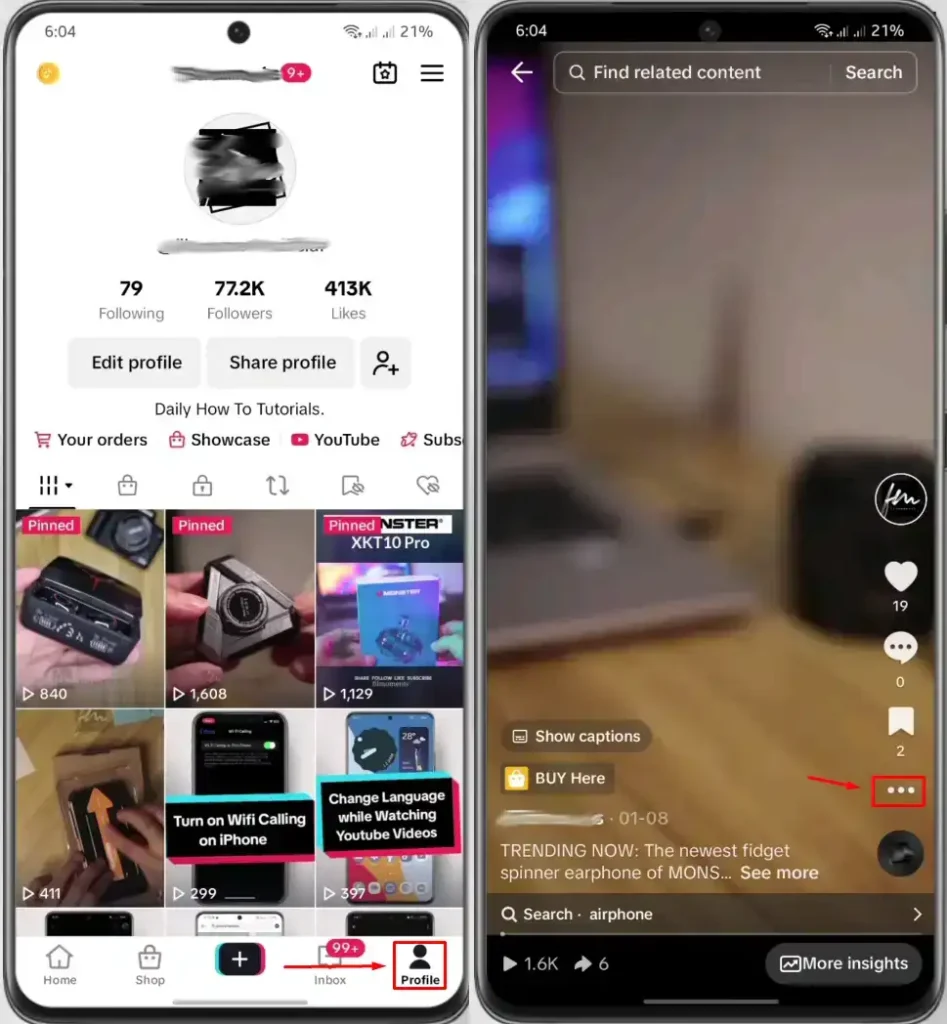
2. Select Ad settings
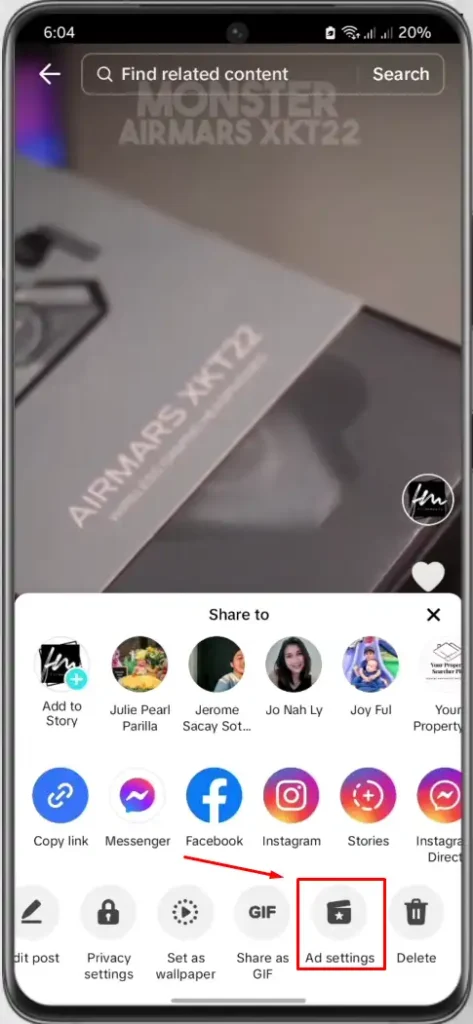
3. Toggle on Ad authorization
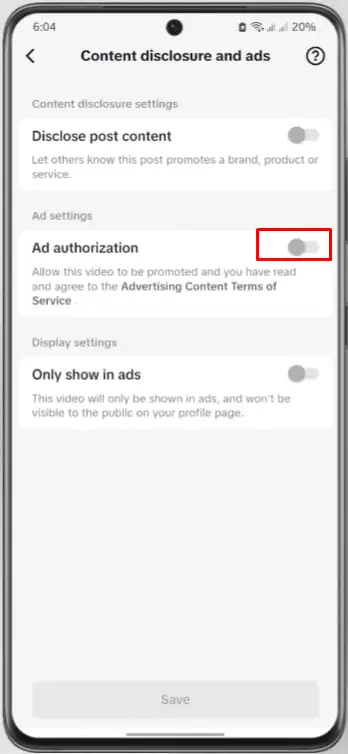
4. Find the specific video and tap Authorize
6. Select an authorization duration (7, 30, 60, or 365 days) and tap Generate Code
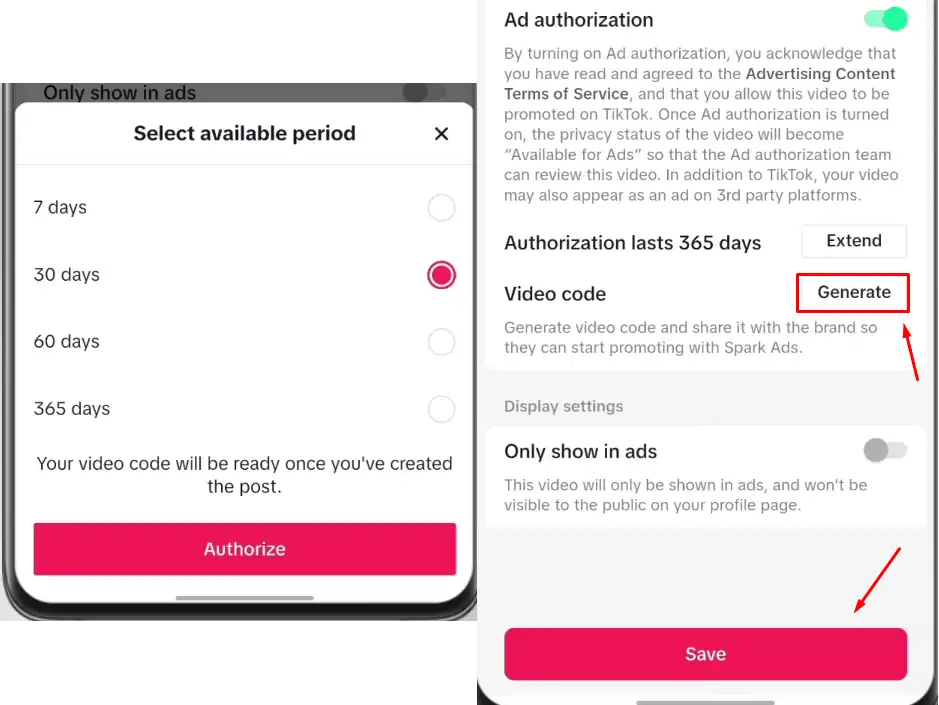
7. Copy the generated code and share it with the advertiser
The advertiser enters this code inside Ads Manager at the ad creation step. The default authorization period is 30 days, but creators can set it anywhere from 7 to 365 days. Once a code expires, it cannot be reactivated. A completely new code must be generated.
How Much Does It Cost to Boost TikTok Posts With Ads?
Cost is one of the first things people ask, and the answer varies depending on which method you use and what goal you are chasing.
TikTok Promote Pricing
TikTok Promote starts at $3 per day, with a minimum total spend of $20. You set a daily budget and a duration, and TikTok shows you an estimated reach before you confirm. A $30 total budget (for example, $3/day for 10 days) can generate anywhere from a few hundred to several thousand video views, depending on your niche and how well your video performs organically.
Results vary by account size, content category, and audience competition. A gaming video will often cost less per view than a finance or real estate video.
Spark Ads Minimum Budget and Costs
Per TikTok’s official budget documentation, Spark Ads require a minimum daily budget of $50 at the campaign level and $20 per day at the ad group level. Your actual cost per result depends on your objective:
- Cost per 1,000 impressions (CPM): typically $4 to $9 for most niches
- Cost per click (CPC): typically $0.17 to $1.00, depending on audience size and competition
- Cost per view (CPV): typically $0.01 to $0.05 for 6-second views
According to Gupta Media’s Social CPM Tracker, the average CPM on TikTok sits around $6.16, making it more cost-efficient than Meta in many verticals. CPMs can dip to around $2.97 in slower months like January and climb above $6 during peak shopping periods such as Black Friday.
Is Boosting a TikTok Post Actually Worth It?
The honest answer is: It depends entirely on what you boost and why.
Paid promotion cannot fix a weak video. If your post is not earning organic engagement, putting money behind it will mostly buy you empty views. We have seen advertisers spend $200 on a Promote boost for a video that had 12 organic likes, and the result was thousands of views with zero follow-through.
The videos that perform best with a paid boost already show early signs of organic traction. When you boost a video that people are already watching, saving, and sharing, you are essentially adding fuel to a fire that is already burning.
For businesses trying to drive website traffic or product sales, Spark Ads with proper conversion tracking consistently outperform Promote because you can measure what actually happens after someone clicks. For creators who just want visibility and follower growth, Promote can absolutely be worth it if the video is strong.
Best Practices to Get More From Your Boosted TikTok Posts
These are the habits that separate wasted ad spend from real results:
- Boost videos that already show organic signals. Pick posts with a strong watch time percentage, shares, or comments before putting budget behind them.
- Match your goal to your CTA. If you want website clicks, your video needs to say something clear and direct about where to click and why.
- Keep your boost window short at first. Start with 3 to 5 days at a low daily budget. If results look strong, extend the duration. Do not set a 30-day boost upfront with no data.
- Target manually in Promote. The automatic audience option often casts too wide a net. Set your own age range and interest category to reduce wasted impressions.
- Use Spark Ads for conversion-focused goals. If you want someone to buy something or book something, Spark Ads with a properly configured pixel give you the data Promote cannot.
- Test multiple videos before scaling. Run two or three different posts as small boosts and let the data tell you which one deserves more budget.
Common Mistakes to Avoid When Boosting TikTok Posts
Most of the budget waste we see with TikTok ad boosting comes from a small set of repeatable mistakes:
- Boosting low-performing organic content. If it did not connect without money behind it, paid reach rarely saves it.
- Ignoring the video hook. If your video does not grab attention in the first 2 to 3 seconds, boosting it will just show more people a reason to scroll past it.
- Setting a vague goal. Choosing “more video views” when you actually want sales leads to mismatched outcomes. Pick the goal that reflects what you actually need.
- Skipping audience testing. Defaulting to an automatic audience every time means you never learn who your best customer actually is on TikTok.
- Letting boosted posts run too long without checking performance. A boost that looked good on day one might lose efficiency by day five. Check your results every 48 hours and adjust.
- Not having a landing page that matches the ad. For traffic campaigns, sending people to a slow or irrelevant page cancels out everything the ad achieved.
Final Verdict: Promote, Spark Ads, or Both?
If you are new to TikTok ads and want to test the water, start with Promote. It is fast, affordable, and requires no technical setup. Use it to identify which of your videos has paid potential before spending more.
If you are running a business with a real acquisition goal, move to Spark Ads. The targeting depth, creative flexibility, and conversion tracking give you the data you need to make smart decisions with your budget.
The most effective approach we have seen is a two-stage process: use Promote to find your top-performing post, then run that same post as a Spark Ad with a proper audience and objective. You get the best of both tools without overpaying for the learning curve.
You do not have to choose one forever. Start where your budget and experience level make sense, learn from the results, and build from there.
Explore these helpful articles next:
👉 TikTok Ads Credit, Coupon, and Promo Code: How to Get Up to $6,000 in Free Ad Spend
👉 TikTok Dynamic Showcase Ads: eCommerce Personalization
👉 Collection Ads on TikTok: What They Are & How to Use
👉 TikTok Ads Dark Posting: Spark vs Non-Spark Explained
FAQs
Can I boost a TikTok post that someone else created?
Yes, but only through Spark Ads. The original creator needs to generate an authorization code inside their TikTok app under Ad settings and share it with you. You then enter the code in TikTok Ads Manager when setting up your Spark Ad campaign. The creator can set the authorization to last 7, 30, 60, or 365 days, so confirm the duration before they generate the code.
How long should I boost a TikTok post?
Most short boosts run between 3 and 7 days. We recommend starting with 3 days at a low daily budget to see how the video performs with paid distribution before extending. Running a boost for 30 days upfront without any performance data is one of the fastest ways to waste your budget.
What is the minimum budget for TikTok Promote?
TikTok Promote starts at $3 per day, with a minimum total spend of $20. You set a daily budget and choose how many days to run the boost. Your total spend is your daily budget multiplied by the number of days you select, and TikTok shows you an estimated reach before you confirm.
What is the difference between TikTok Promote and Spark Ads?
TikTok Promote is a simple in-app feature that lets you boost any public video directly from your profile without an Ads Manager account, starting at $3/day. Spark Ads run inside TikTok Ads Manager and give you advanced targeting, more campaign objectives, and the ability to boost posts from other accounts with their permission. Promote is better for quick, low-budget boosts. Spark Ads are better when you need measurable results and real audience control.
Does boosting a TikTok post increase followers?
Yes, it can, but only if your content gives people a reason to follow you. You can set “More followers” as your Promote goal, which tells TikTok to show your video to people most likely to follow after watching. However, the video itself still needs to give the viewer a clear reason to want more content from your account. Paid reach alone does not guarantee follower growth.
Is TikTok Promote worth it for small businesses?
Yes, for small businesses with a limited budget, TikTok Promote can definitely be worth it if you use it to test which content resonates before committing to a full Spark Ads campaign. It is not ideal for driving direct sales because the targeting is too basic, and there is no conversion tracking. Use Promote for awareness and visibility, then graduate to Spark Ads when your goal becomes measurable conversions.
Conclusion
Boosting TikTok posts with ads is one of the most direct ways to get more reach without waiting for the algorithm to notice you. The two tools TikTok gives you, Promote and Spark Ads, are built for different situations and different stages of growth.
Promote earns its place for creators and early-stage businesses who need speed and simplicity. Spark Ads earns its place when you need real targeting, real data, and real results tied to a business goal.
Understanding which one fits your current situation means you stop spending on the wrong tool and start building with the right one.
The biggest takeaway from everything we covered is this: the ad method matters, but the content matters more. A strong video with a clear hook and a matching goal will always outperform a weak video with a perfect setup. Get the content right first, then put your budget behind it with confidence.