
Adding a VAT number in TikTok Ads Manager takes about a minute. Skipping it is the field that quietly costs advertisers the most, not because the step is hard, but because most people never look for it during setup.
This guide covers exactly where that field lives in both TikTok Ads Manager and Business Center. It also covers how TikTok actually deducts tax from your account balance once it’s on file.
VAT rates by country and writing off ad spend at tax time are a separate topic. Research those directly with a tax advisor, since TikTok itself won’t advise on tax matters either.
Key Takeaways
- Your VAT number lives in two different places depending on whether your ad account is managed by a Business Center or runs standalone through Ads Manager.
- TikTok uses one of two tax deduction methods, top-up deduction or consumption deduction, and which one applies depends on your region and payment method.
- Only an account admin can edit billing information, including your VAT number, so confirm your role before you try to make the change yourself.
- TikTok can’t advise you on tax matters. For anything beyond where the field lives and how the deduction is calculated, that’s a conversation for your own tax advisor.
Get Up to $6,000 in Free TikTok Ad Credits
TikTok offers ad credit incentives for new advertisers, helping you test campaigns with a lower upfront cost.
Table of Contents
Where to Add Your VAT Number in TikTok Ads Manager
If your ad account isn’t managed by a Business Center, add your VAT number directly through Ads Manager:
- Go to the Tools tab and click Account setup.
- Click Basic information in the menu under My account.
- Click Edit.
- Enter or update your VAT number under Billing info.
- Click Confirm.
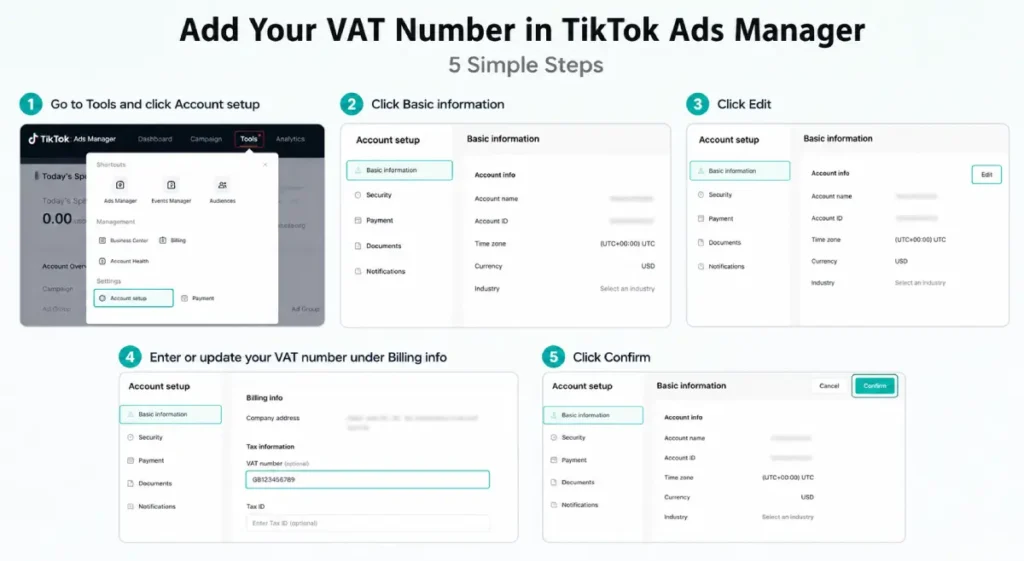
That’s the entire process. There’s no document upload or review step tied to this specific field, unlike business verification, which does require one.
Where to Add Your VAT Number in TikTok Business Center
If your ad account sits inside a Business Center, the field is in a different spot entirely:
- Click the Business settings tab.
- Click Verification.
- Find Billing information and click Edit to update your Tax ID.
- Click Save.
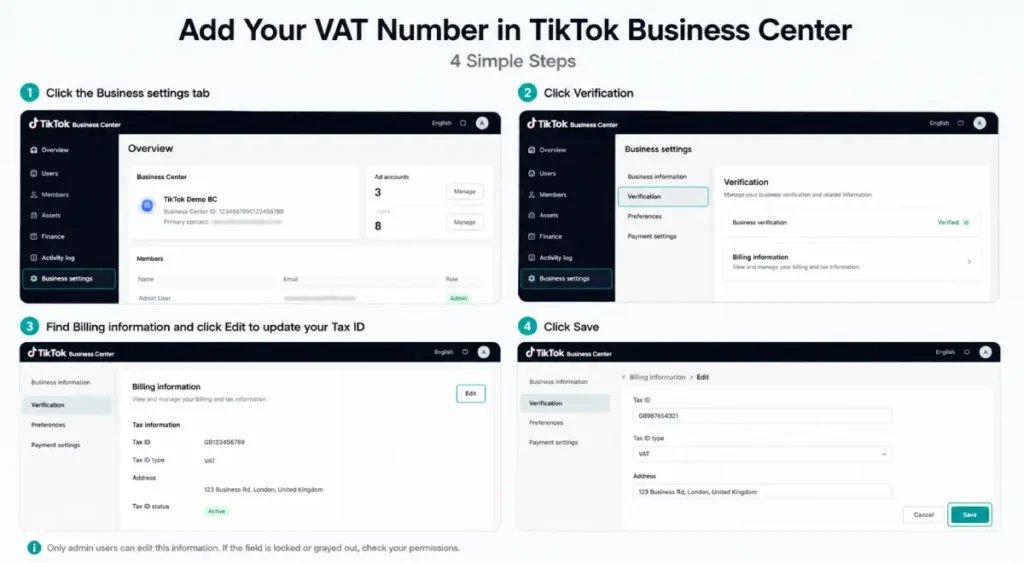
Only users with an admin role can make this change. If you’re on a team and the field looks locked or grayed out, that’s almost always a permissions issue rather than a technical one.
How TikTok Actually Deducts Tax From Your Balance
Once your tax information is on file, TikTok deducts tax using one of two methods. Which one applies depends on your region and the payment method attached to your account.
Top-Up Deduction Method
With this method, TikTok charges tax the moment you add funds, not when you spend them. Here’s TikTok’s own worked example:
| Step | Amount |
| Top-up amount | $100 |
| Tax rate (20%, for illustration) | $20 |
| Total charged to your payment method | $120 |
| Usable balance in your account | $100 |
You pay the tax upfront, and the balance you actually get to spend reflects the pre-tax amount.
Consumption Deduction Method
With this method, TikTok deducts tax daily, based on what you actually spend each day, rather than all at once when you top up.
| Step | Amount |
| Top-up amount | $120 |
| Available balance shown in account | $120 |
| Usable balance after tax | $100 |
| Tax rate (20%, for illustration) | $20 |
The tax comes out gradually as your campaigns spend, rather than as a single charge at deposit time.
Note: TikTok’s own documentation flags that these figures, both the currency and the tax rate, are illustrative only. Your actual rate depends on your region and the currency you selected during account setup.
Results can also take up to 24 hours to process. Because rates float, the balance TikTok displays at any given moment is an estimate.
Does Adding a VAT Number Actually Change What You Pay?
TikTok applies tax to your account balance based on the tax policy of your region, whether or not you’ve entered a VAT number. What changes is how that tax gets treated on your invoice.
In many regions, having a valid number on file is also what lets you reclaim that tax through your own filing.
That reclaiming part is exactly where TikTok draws a hard line. It won’t tell you whether your business qualifies, what rate applies, or how to handle the reclaim on your end.
For that layer, a local tax advisor or your country’s tax authority is the right call, not TikTok support and not this guide.
Since tax comes straight out of your usable balance either way, it’s worth factoring into how much you actually budget per campaign. The TikTok Ad Budget Planner can help you back into a realistic daily number once you know your usable balance after tax.
Frequently Asked Questions
Where do I find the VAT number field in TikTok Ads Manager?
Go to Tools, then Account setup, then Basic information under My account. Click Edit, enter your VAT number under Billing info, and click Confirm. If your account is managed by a Business Center instead, the field is under Business settings, then Verification, then Billing information.
What’s the difference between top-up and consumption tax deduction in TikTok Ads?
Top-up deduction charges tax the moment you add funds to your account, so the tax is baked into your deposit. Consumption deduction charges tax daily based on your actual ad spend, so it comes out gradually as campaigns run.
Which method applies to your account depends on your region and payment method, not something you choose manually.
Can I change my TikTok Ads VAT number after my account is already running campaigns?
Yes, and there’s no separate review process for updating it. Just be aware that only an account admin can make the edit.
If your business’s tax status changes mid-year, update the field as soon as you know. The change only affects tax going forward, not past invoices.
Does TikTok tell me if I qualify for a VAT exemption?
No. TikTok explicitly states it can’t advise on tax matters. It applies whatever tax treatment your entered information and region indicate, but whether you qualify for a specific exemption or reclaim is a question for your own tax advisor or local tax authority.
Why does my TikTok Ads account balance look different from what I expected?
Floating tax rates mean the balance TikTok shows is an estimated value, and it can take up to 24 hours for a deduction to fully process.
If the number still looks off after a day, check which deduction method applies to your account. Compare it against your most recent top-up or spend.
Conclusion
The VAT field takes a minute to fill in, and it’s tucked in a different menu depending on whether you’re running a standalone Ads Manager account or one inside a Business Center.
Get it right once, understand which of the two deduction methods applies to you, and the rest of your billing math stops being a mystery.
Anything past that, actual rates, exemptions, or write-offs, belongs to a tax advisor, not a platform help page.
Sources