
Most TikTok advertisers target by gut feeling. They pick an age range, choose a few interest categories, and hope the algorithm does the rest. That approach burns budget and produces inconsistent results.
TikTok Audience Insights, also called TikTok Ads Manager Audience Insights, is a free research tool inside TikTok Ads Manager that gives you real behavioral data from active users before you spend a dollar on ads.
Instead of relying on guesswork or basic TikTok insights, you can analyze real audience behavior before launching a campaign.
You can see who your audience actually is, what they care about, and how they engage on the platform.
This article walks you through every part of the tool: what it shows, how to access it, how to read each dashboard tab, and how to use that data to build sharper targeting and scale faster.
Table of Contents
Get Up to $6,000 in Free TikTok Ad Credits
TikTok offers ad credit incentives for new advertisers, helping you test campaigns with a lower upfront cost.
What is TikTok Audience Insights?
TikTok Audience Insights is a free research tool inside TikTok Ads Manager that shows aggregated data about TikTok users active in the last 30 days. It combines audience demographics, interests, engagement patterns, and TikTok audience analytics into one dashboard, making it easier to plan campaigns before spending on ads.
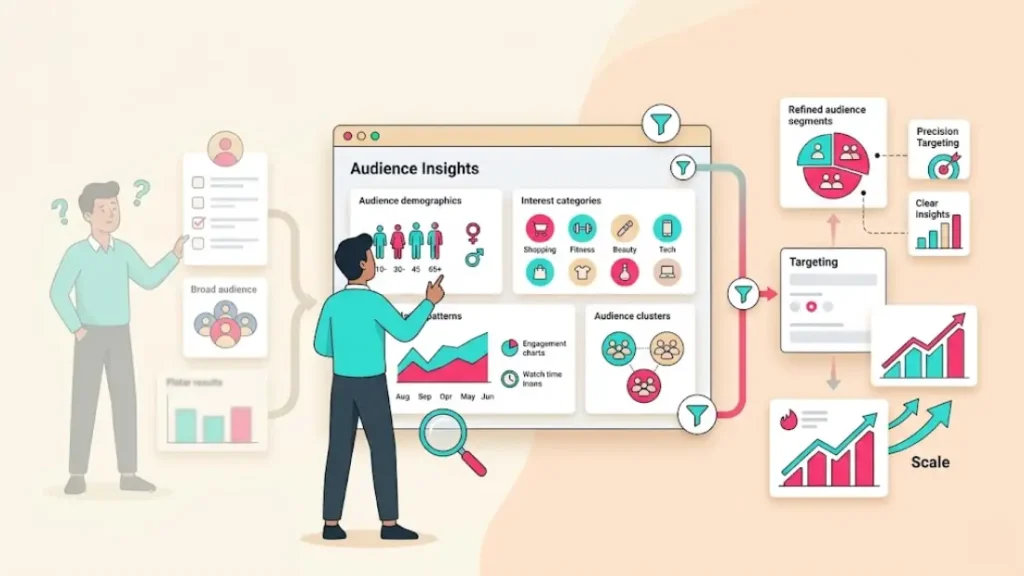
What does TikTok Audience Insights actually show you?
The tool gives you four core categories of data about your audience.
Demographics: You get age, gender, country, and state-level location data. This is usually where advertisers find their first surprise. Many still target as if TikTok skews young, when the on-the-ground reality has shifted.
Interests and hashtags: You can see the top 10 interest categories and top 10 hashtags your audience engages with most. This tells you what content they actually consume, not what you assume they like. The tool also shows the bottom 10 categories, which is just as useful for shaping creative exclusions.
Engagement signals: The tool shows how often your audience opens the app, how many minutes per day they spend on TikTok, and how frequently they like, comment, share, or upload videos. This data tells you how active your audience really is.
Audience overlap: You can compare up to four custom audience segments and see how much they overlap. This matters most when you are running multiple ad groups and want to avoid bidding against yourself in the same auction.
One important note: TikTok states clearly in its official documentation that all data is estimated. Accuracy varies based on user-provided information and device signals. Treat it as directional input, not a precise measurement system.
How to access TikTok Ads Manager Audience Insights
You need an active TikTok Ads Manager account to access TikTok Ads Manager Audience Insights. Once inside Ads Manager, you can filter audiences and review detailed TikTok audience analytics before creating campaigns.
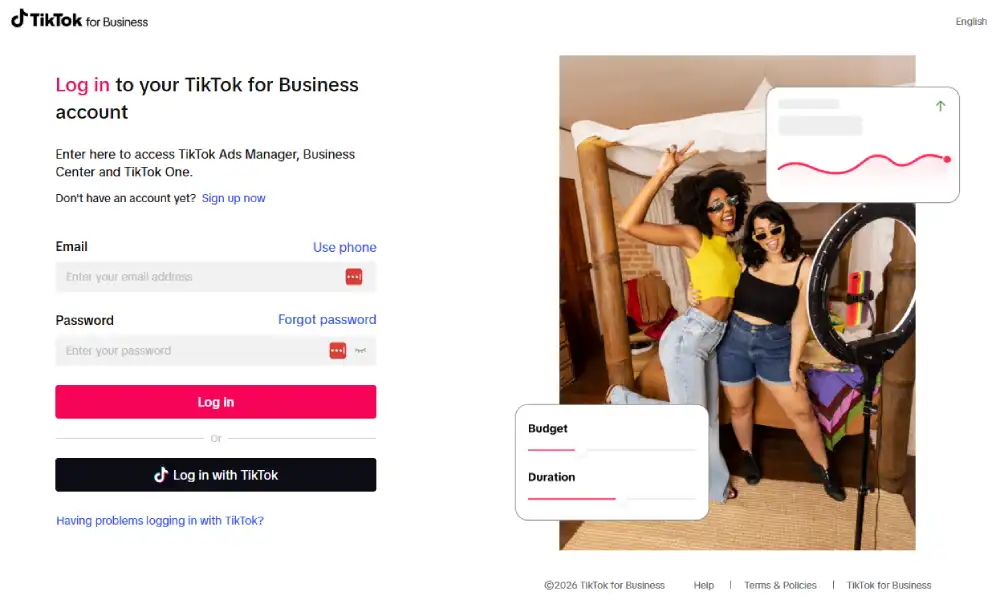
- Log in to your TikTok Ads Manager account.
- Hover over the Analytics tab in the top navigation bar.
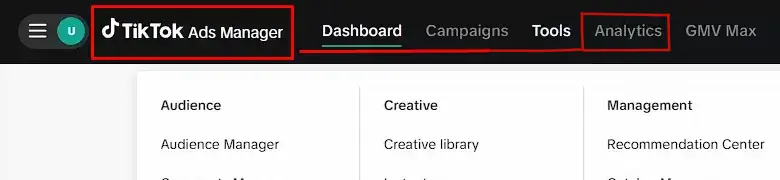
- Click Audience Insights from the dropdown menu.
- On the left panel, click Filter audience to apply demographic or behavioral filters.
- Or click Select custom audience to analyze a specific audience you have already built.
- Set your location. At least one country or region is required before any data populates.
- Review the data across the four tabs on the right side of the screen.
Note: TikTok confirms in its official navigation guide that Audience Insights is still in testing and may not be available in every market. If you do not see it in your account, contact your TikTok sales representative directly.
How to read the Audience Insights dashboard
Before you read any tab, set the right view. Audience Insights shows data through two lenses: Potential Audience, everyone you could target on TikTok before you launch anything, and Reached Audience, the people who actually saw your ads once a campaign has run. Use Potential Audience for pre-launch research and Reached Audience to check whether your delivery matched who you meant to target.
The dashboard splits into four tabs. Each one answers a different question about your audience. Here is what each tab shows and what to look for.
Audience Overview tab
This tab gives you a full snapshot of your selected audience in one view. Think of it as the foundation of your TikTok audience analytics, helping you understand exactly who you’re reaching before you build targeting.
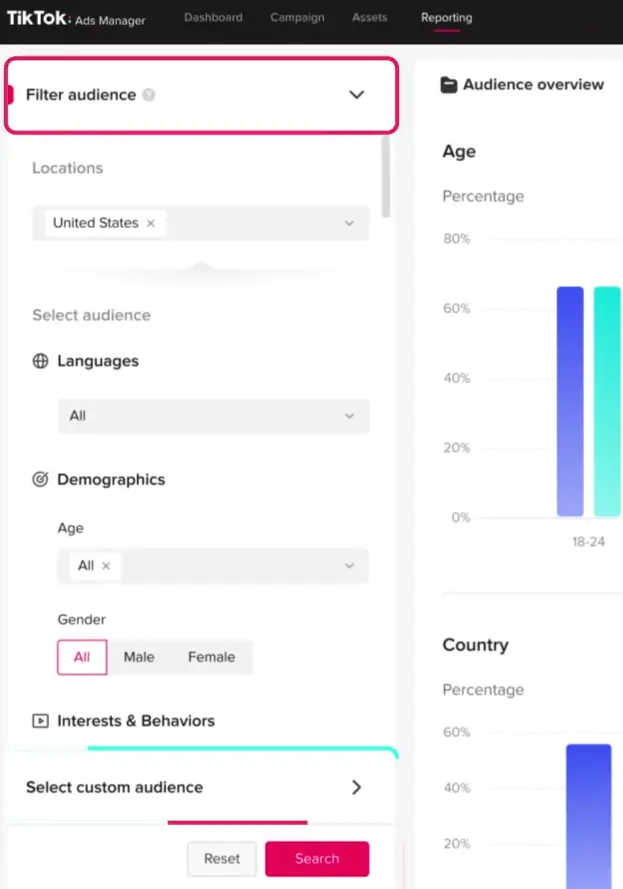
Look for any age group that over-indexes against your expectations. If your assumed audience does not match the data, that is a creative direction shift waiting to happen. Younger segments respond to fast-paced, trend-driven content. Older segments often respond better to clear value propositions and benefit-focused messaging.
Interests tab
This tab shows the top 10 hashtags and top ad interest categories your audience engages with most. It also surfaces the bottom 10 categories, which tells you what your audience actively ignores.
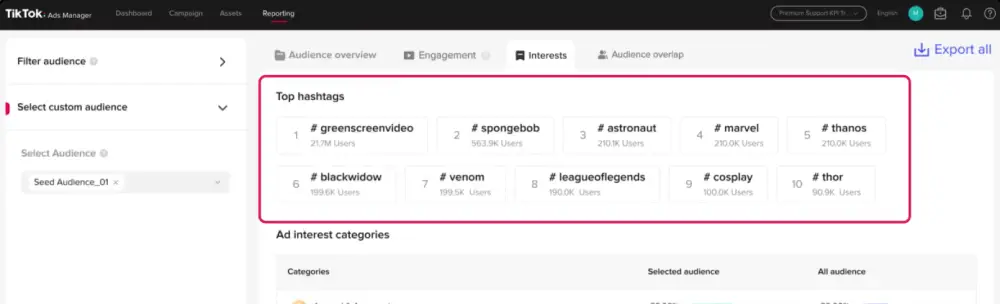
Use this tab before you write a single line of ad copy. If your skincare brand’s audience indexes high against #weddingphotography, that is a real content angle worth testing. Most advertisers never look this deep.
Engagement tab
This tab shows behavioral frequency data.
You will see:
- App opens per day
- Minutes spent in the app per day
- Video likes, comments, and shares per day
- Video uploads per day
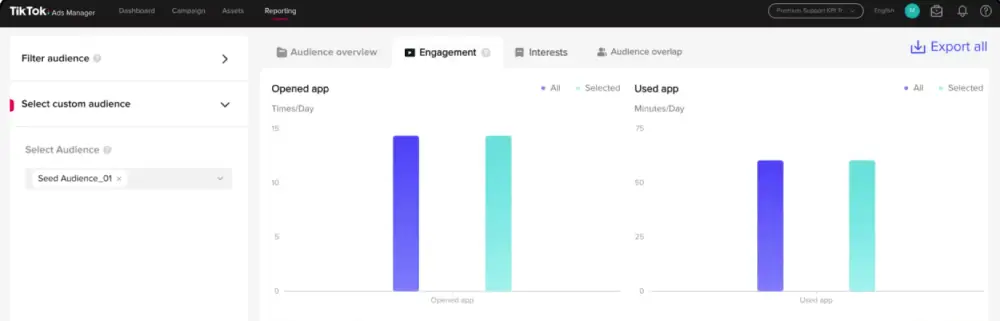
A heavily active audience opens the app many times per day and watches with real intent. This data helps you decide how aggressive your ad frequency capping should be. If your audience is already engaged on the platform, your ads have a higher chance of landing.
Audience Overlap tab
This tab lets you compare your selected custom audience against up to four other custom audience segments. You can see audience size, targetable audience size, overlap percentage, and overlap count.
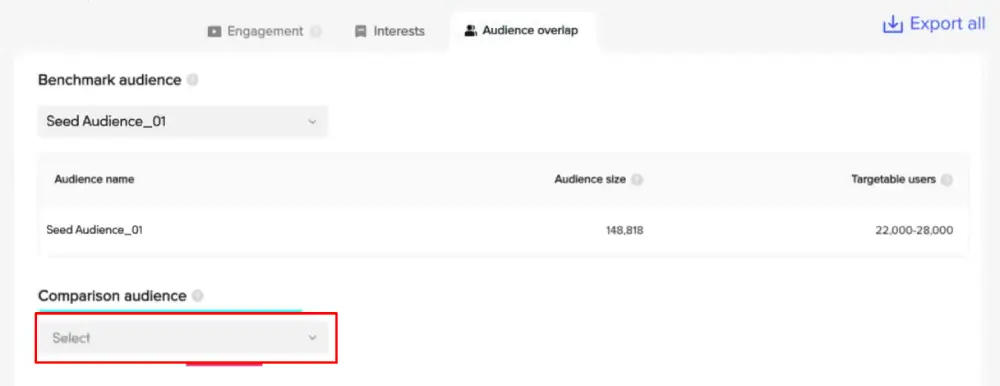
High overlap between two ad groups means you are bidding against yourself in the same auction. Use this tab before launching multiple ad groups targeting a similar pool. Catching high overlap early saves significant wasted budget.
How to use Audience Insights to target smarter
Smart targeting starts with validation, not assumption. Here is how we put the data to work.
Validate your audience size before you spend. Use the Overview tab to confirm your target audience is actually present on TikTok. If the estimated size is very small, your targeting is too narrow before the campaign even launches.
Map hashtag data to interest targeting. The top 10 hashtags your audience engages with map directly to content categories inside Ads Manager. If your audience consumes content around a specific hashtag, align your interest targeting to match those signals.
Find non-traditional audience segments. The Interests tab often surfaces categories you would not have chosen manually. If your fitness brand’s audience also indexes high against Financial Services content, you now have a testable new segment without increasing your budget.
Filter by custom audience for sharper precision. Select a custom audience, such as website visitors or past purchasers, and run Audience Insights on that specific group. This shows you who actually converts, not just who clicks.
Check device and OS data. If your audience heavily uses Android devices estimated under $300, your creative needs to load fast and display cleanly on lower-end screens. That single detail changes your video production decisions.
How to scale your campaigns with Audience Insights data
Audience Insights gives you two clear scaling paths: expanding what works and cutting what does not.
Scale through audience expansion. When the Interests tab shows your audience cares about categories outside your core niche, build a separate ad group targeting those categories. Per TikTok’s official lookalike audience documentation, you need a minimum source size of 1,000 valid users for custom and lookalike audiences to work properly.
Build lookalikes from your strongest custom segments. Run Audience Insights on your highest-value custom audience, such as confirmed buyers or qualified leads. Use the behavioral patterns that surface to build a lookalike audience that mirrors those same signals.
Apply post-campaign data to your next build. The Campaign Reach view inside Audience Insights shows aggregated data from your completed campaigns. Compare your pre-campaign audience assumptions against the actual post-campaign profile. If they differ, adjust your targeting before your next flight.
Start broad, then narrow with data. Broader audiences often outperform highly specific targeting because TikTok’s algorithm needs sufficient data volume to optimize delivery. Use Audience Insights to set a directional starting point, then let real campaign performance refine your targeting over time.
Common mistakes marketers make with TikTok Audience Insights
Even experienced media buyers get this wrong. Here are the most common and costly errors we see.
Treating estimated data as exact. TikTok is transparent that all demographics and behaviors are estimates. Do not make major budget shifts based on a single insight without cross-referencing it against your actual campaign performance.
Ignoring the bottom 10 interest categories. Most people only look at what their audience likes. The bottom 10 tells you what your audience actively avoids. That informs your creative exclusions and keeps your messaging relevant.
Skipping the Audience Overlap check. Running two ad groups with high overlap wastes budget. You end up bidding against your own campaigns in the same auction. Always check overlap before launching multiple ad groups.
Using the default view without a custom audience filter. The default view shows broad platform-wide data. The tool becomes far more useful when you filter it to a specific segment, such as video viewers, app users, or website visitors.
Checking it once and never returning. Audience Insights pulls data from users active in the last 30 days. Audience behavior shifts. Review it at the start of every new campaign flight, not just when you first set up your account.
TikTok Audience Insights best practices for 2026
Here is what we know works right now based on current platform data and TikTok’s official guidance.
Account for the demographic shift. According to Statista, the 25 to 34 age group is now TikTok’s largest user segment, accounting for roughly 35% of the global base. If your creative still defaults to Gen Z aesthetics, you may be missing your actual buyer.
Pair Audience Insights with TikTok Analytics. Audience Insights shows platform-wide behavior about any audience you define. TikTok Analytics, accessed through your Business Profile, shows how your existing followers respond to your published content. Using both tools gives you two distinct data layers for stronger campaign decisions.
Translate hashtag data into video creative, not just targeting. The top hashtags in your audience data are content signals, not just filter options. Build organic video themes around those tags, not only paid interest targeting. Strong organic content lowers your effective cost per acquisition over time.
Use the tool at the planning stage. The most underused application of Audience Insights is pre-campaign planning. Open it before you build the campaign structure, not after. A five-minute pull can prevent significant misdirected spend later.
Frequently asked questions about TikTok Audience Insights
Is TikTok Audience Insights free to use?
Yes, TikTok Audience Insights is available at no extra cost inside TikTok Ads Manager. You need an active Ads Manager account to access it.
What data does TikTok Audience Insights show?
TikTok Audience Insights shows aggregated demographics including age, gender, and location, plus top and bottom interest categories, top hashtags, engagement frequency metrics, and audience overlap data.
Can you use TikTok Audience Insights before running ads?
Yes. You can use Audience Insights during the pre-campaign stage to research and validate your target audience before committing any budget.
How accurate is TikTok Audience Insights data?
TikTok states that audience demographics, interests, and device data are estimates based on user behavior, self-reported profile information, and device signals.
What is the difference between TikTok Audience Insights and TikTok Analytics?
TikTok Audience Insights provides advertiser-focused TikTok audience analytics, allowing you to research demographics, interests, engagement, and audience overlap before running campaigns. TikTok insights inside your Business Account focus on how your own content and followers perform after publishing.
How do I use TikTok Audience Insights to find new audiences?
Open the Interests tab and look for categories or hashtags that appear in your audience data but fall outside your core niche. Those unexpected categories represent segments worth testing.
Conclusion
TikTok Audience Insights gives advertisers something most advertising platforms do not offer: built-in TikTok audience analytics before a campaign launches: real behavioral data before you commit a dollar to a campaign.
You can see who your audience is, what content they engage with, and how they behave on the platform, all inside the same tool where your ads will eventually run.
We covered how to access the dashboard, what each of the four tabs shows, and how to turn that data into smarter targeting and more confident scaling decisions.
The common mistakes section alone addresses errors that quietly drain budget across many otherwise well-run TikTok accounts.
The marketers who get the most from this tool use it consistently. They check it before every new campaign flight. They test the unexpected interest categories.
They cross-reference their pre-campaign assumptions against post-campaign reality and adjust accordingly. The more deliberately you use the data, the sharper your targeting becomes over time.
Precision beats volume. That is what TikTok Audience Insights is built to give you.
Sources