
If your TikTok Shop products suddenly show a Frozen, Under Review, or Unavailable status, you are not alone. This is one of the most common operational issues sellers face on TikTok Shop, especially as the platform tightens enforcement around product quality, compliance, and seller behavior.
A frozen listing does not automatically mean your account is banned. In most cases, it signals that TikTok’s automated or manual review systems have detected a policy risk, missing verification, or abnormal activity that must be resolved before the product can be sold again.
Get Up to $6,000 in Free TikTok Ad Credits
TikTok offers ad credit incentives for new advertisers, helping you test campaigns with a lower upfront cost.
This guide is written for active TikTok Shop sellers managing live product listings who are experiencing review delays, frozen SKUs, or sudden product unavailability.
It explains exactly why TikTok Shop products get frozen, how the review process works in 2026, and the step-by-step actions you should take to restore your listings safely and permanently.
Table of Contents
What Does Frozen or Under Review Mean on TikTok Shop?
On TikTok Shop, a product marked as Frozen or Under Review is temporarily restricted from sale while TikTok evaluates its compliance with platform rules.
Based on observed TikTok Shop Seller Center enforcement patterns, there are two primary product status states:
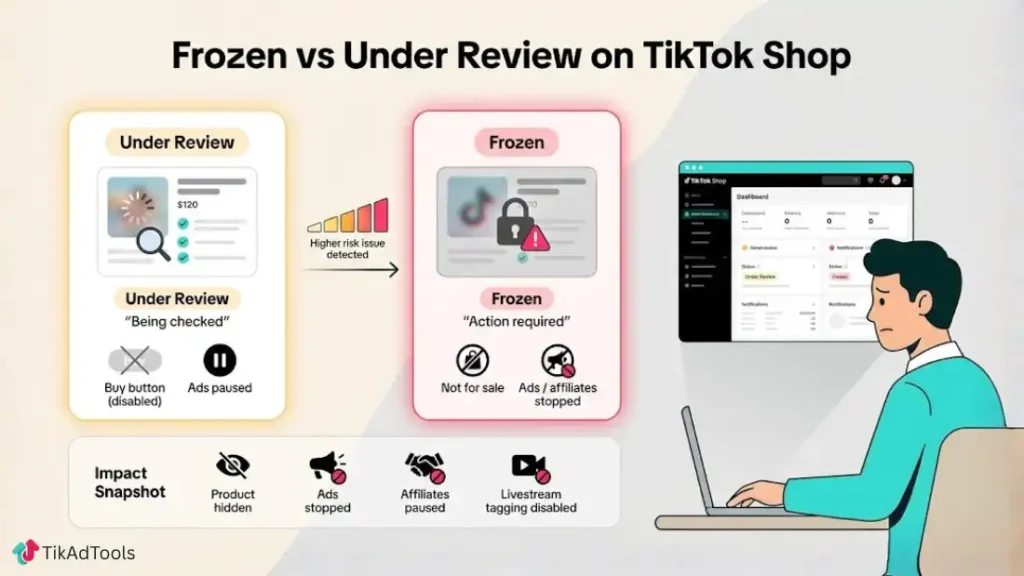
Under Review
The product is actively being evaluated by TikTok’s automated systems or a manual reviewer. Sales are paused, but no violation has been confirmed. This status is common for new listings, edited products, or items entering regulated categories.
Frozen
TikTok has identified a higher-risk issue. The product is blocked from sales until corrective action is taken or an appeal is approved. Frozen products usually require seller intervention before they can be reinstated.
In both cases, the product is removed from purchase visibility, and any linked ads, affiliate promotions, or livestream product tagging may stop working until the review is resolved.
Why TikTok Shop Freezes Products in 2026
TikTok Shop enforcement has become significantly stricter since 2024. In 2026, reviews are driven by AI risk scoring, supported by manual audits for flagged listings.
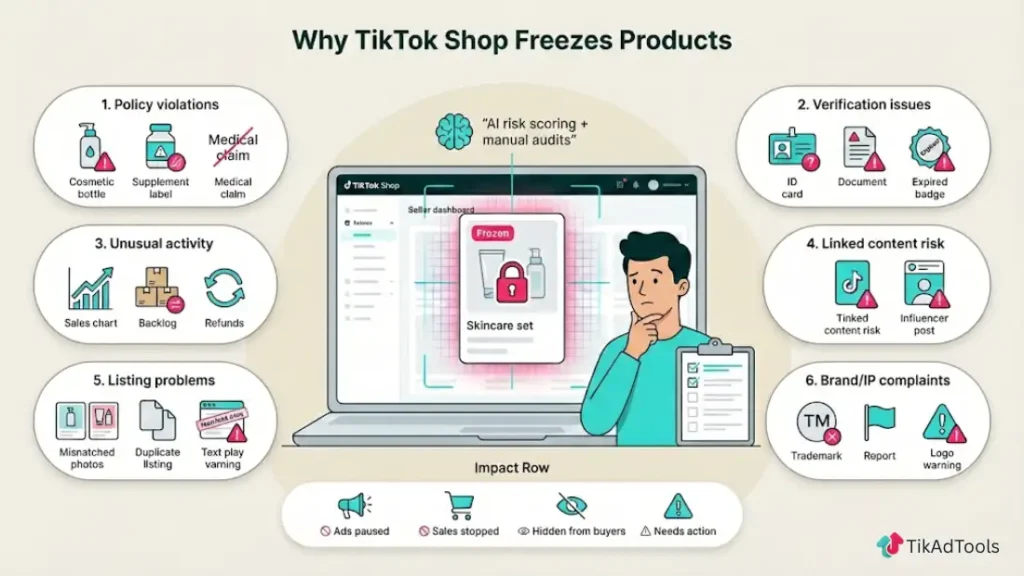
Below are the most common and verified reasons products are frozen.
1. Product Category or Policy Violations
TikTok Shop enforces strict category rules, especially for regulated products.
Products frequently frozen include:
- Cosmetics without ingredient disclosures
- Supplements without certifications
- Health or wellness items making medical claims
- Electronics lacking compliance labeling
- Beauty devices without safety documentation
Even if a product sold successfully in the past, policy updates can retroactively trigger reviews.
Common triggers
- Claims like cures, treats, or guaranteed results
- Before-and-after images in restricted categories
- Misclassification of product category
What to do
- Recheck the product category selection
- Remove prohibited claims from titles, descriptions, and images
- Upload missing compliance documents if requested
2. Incomplete or Missing Seller Verification
TikTok Shop requires sellers to maintain up-to-date verification at both the account and product level.
Products may freeze if:
- Business documents expire
- Identity verification is incomplete
- Tax or payout information is missing
- Brand authorization is not confirmed
This often happens after account changes, not immediately after onboarding.
What to do:
- Go to TikTok Shop Seller Center
- Review Account Health and Verification tabs
- Complete or resubmit the requested documents
3. Sudden Spikes in Orders, Traffic, or Refunds
TikTok monitors behavioral patterns to prevent fraud and low-quality sellers from scaling too fast.
A product may freeze if TikTok detects:
- Sudden viral sales without fulfillment history
- Abnormally high refund or cancellation rates
- Customer complaints or negative feedback spikes
- Shipping delays after a traffic surge
This does not mean success is bad. It means TikTok wants to confirm reliability before allowing further sales.
What to do:
- Ensure tracking numbers are uploaded correctly
- Communicate with buyers proactively
- Reduce ad spend temporarily during review
- Avoid launching multiple new SKUs simultaneously
4. Content Violations Linked to the Product
Even if the product itself is compliant, linked content can trigger a freeze.
This includes:
- Livestreams with misleading claims
- Affiliate videos violating ad disclosure rules
- Influencer content exaggerates benefits
- Reused or misleading UGC
TikTok evaluates products holistically, including how they are promoted.
What to do
- Audit all videos tagged with the product
- Remove or untag risky content
- Ask affiliates to edit or delete violating posts
5. Image, Listing, or Metadata Issues
TikTok’s AI scans product pages visually and semantically.
Products may freeze if:
- Images contain prohibited text or symbols
- The packaging shown does not match the description
- The product title is misleading
- Duplicate listings are detected
This is especially common for dropshippers using supplier images.
What to do
- Replace stock images with original photos
- Ensure title and description match the physical product
- Avoid keyword stuffing or exaggerated language
6. Intellectual Property or Brand Complaints
Brand protection has become a top enforcement priority.
Products freeze quickly if:
- A trademark complaint is filed
- Brand authorization is missing
- Logos appear without permission
- Counterfeit risk is detected
In many cases, TikTok freezes first and asks questions later.
What to do
- Upload brand authorization or invoices
- Remove trademarked terms if unauthorized
- Appeal with proof of authenticity
How Long Does a TikTok Shop Review Take?
TikTok Shop review times vary depending on the product’s risk level and the type of review required.
Typical review timelines in 2026 include:
- Low-risk automated reviews: 24–72 hours
- Manual compliance reviews: 3–7 business days
- Brand or intellectual property disputes: 7–14 days
During major sales events, policy updates, or periods of elevated enforcement, reviews may take longer than usual.
Exact review timelines and enforcement thresholds may vary by region, product category, and risk level, but the review patterns described above are consistent across most seller accounts.
Step-by-Step: How to Unfreeze TikTok Shop Products
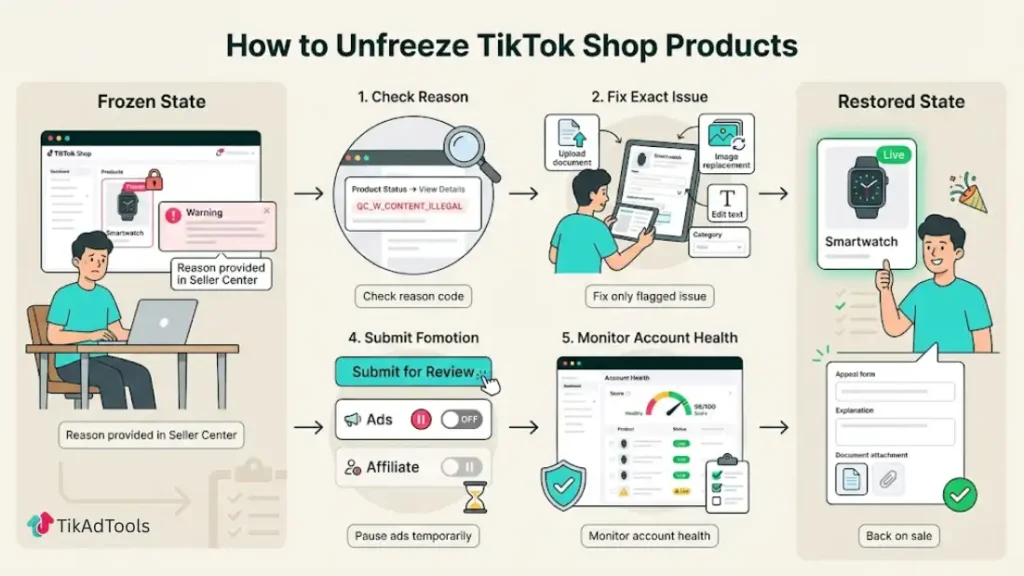
Step 1: Check the Official Reason in the Seller Center
Never guess. TikTok usually provides a reason code or notice.
Go to: Seller Center → Products → Product Status → View Details
Step 2: Fix the Exact Issue Identified
Do not make random edits. Fix only what TikTok flagged.
Examples:
- Upload missing documents
- Edit product description
- Replace images
- Adjust category
Step 3: Submit for Re-Review or Appeal
Once changes are made:
- Click “Submit for Review” or “Appeal”
- Add a clear explanation
- Attach supporting documents
Step 4: Pause Aggressive Promotion
Running ads or affiliate pushes during review can extend the freeze.
Step 5: Monitor Account Health
Multiple frozen products can escalate to account-level restrictions if ignored.
Can a Frozen Product Be Permanently Removed from a TikTok Shop?
Yes, but only if:
- The violation is severe
- Multiple warnings were ignored
- Fraud or counterfeit activity is confirmed
Most freezes are recoverable if addressed correctly.
How to Prevent TikTok Shop Product Freezes
Prevention is easier than recovery.
Best practices for 2026:
- Verify all documents before launching products
- Avoid exaggerated claims in any content
- Use original product images
- Scale gradually after viral growth
- Monitor refund and complaint rates weekly
- Audit affiliate content regularly
TikTok prioritizes long-term seller reliability, not short-term virality.
Explore these helpful articles next:
👉 TikTok Content Trends That Boost Paid Performance
👉 TikTok Ads for Seasonal Sales & Events: The Pulse Strategy
👉 TikTok Ads for Alcohol-Free Beverage Brands: The Sober-Curious Boom
👉 TikTok Ads for Weddings & Event Services: How to Turn Views Into Booked Clients
Frequently Asked Questions
Why are my TikTok Shop products frozen?
TikTok Shop freezes products when policy or performance thresholds are breached. The most common causes include prohibited items (such as counterfeits or replicas), inventory mismatches, or a low Shop Performance Score. Sellers report freezes when SPS drops below 4.5, often triggered by late shipment rates above 4 percent or high cancellation and refund ratios.
How long does TikTok Shop product review take?
TikTok Shop product reviews usually take 24 to 72 hours. During peak periods or when manual checks are required, reviews can extend up to 7 days. Listings involving restricted categories, brand authorization, or repeated edits often take longer. Review status and feedback are always visible inside the TikTok Seller Center dashboard.
What does product under review mean on TikTok Shop?
Product under review means TikTok is actively evaluating your listing for compliance using automated systems and manual moderation. The review checks product images, descriptions, pricing accuracy, category selection, and claims. This status is common for new or edited products, but prolonged reviews usually indicate potential policy or content issues.
Why is my TikTok Shop showing 0 active products?
A TikTok Shop can show zero active products when all listings are frozen, under review, or suspended. This often happens due to inventory sync errors, policy enforcement, SPS penalties, or integration issues with Shopify or ERP systems. Checking Seller Center product status and resolving violations usually restores active listings once reviews finish.
How do I fix frozen TikTok Shop products?
To unfreeze products, go to Seller Center, open the suspended product, and review the violation reason. Fix issues such as prohibited claims, incorrect images, or missing documents, then submit an appeal. TikTok typically responds within 7 days. Maintaining an SPS above 4.5 and keeping late dispatch rates under 4 percent helps prevent repeat freezes.
What causes TikTok Shop product review failure?
TikTok Shop product reviews fail due to incomplete listings, misleading or unsupported claims, low-quality images, or restricted categories without proper documentation. Reviews also fail when seller performance drops, including late shipment rates above 4 percent or excessive cancellations. TikTok evaluates both listing quality and fulfillment behavior together.
Why are new TikTok Shop products stuck in review?
New TikTok Shop products are reviewed to verify compliance, category accuracy, and seller eligibility. Reviews often stall when listings use generic descriptions, mismatched inventory, or fall into high-risk categories like cosmetics or electronics. Providing clear images, accurate stock data, and compliant claims upfront significantly reduces review delays.
Final Takeaway
A frozen TikTok Shop product is not a failure. It is a compliance checkpoint.
TikTok Shop in 2026 operates like a regulated marketplace, not an open social platform. Sellers who treat it seriously, follow policies, and scale responsibly are rewarded with long-term visibility and trust.
If you address the root cause, respond calmly, and maintain clean promotion practices, most frozen products can be restored and continue selling successfully.