
Most businesses that fail with TikTok advertising do not fail because TikTok ads do not work. They fail because they launch before they understand how the platform’s ad system actually operates.
Running ads on TikTok in 2026 is not the same as advertising on Facebook or Google. The creative rules are different.
The targeting logic is different. Even how you read your results is different. If you carry your Meta Ads habits directly into TikTok Ads Manager, you will waste your budget and draw the wrong conclusions.
Get Up to $6,000 in Free TikTok Ad Credits
TikTok offers ad credit incentives for new advertisers, helping you test campaigns with a lower upfront cost.
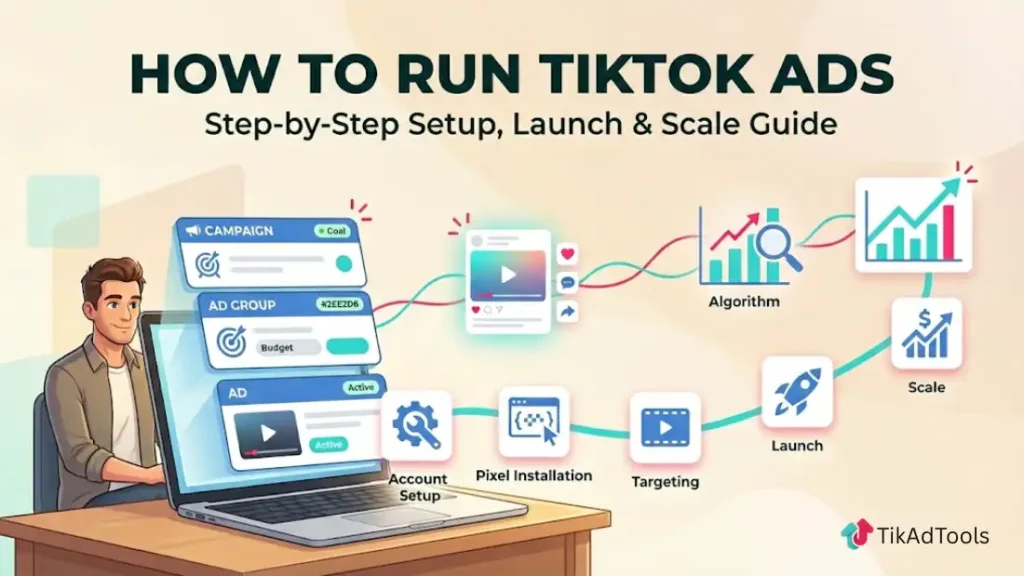
This guide walks you through every step of running TikTok ads correctly, from account setup and pixel installation to campaign structure, targeting, creative strategy, the learning phase, and scaling winners without resetting the algorithm. If you haven’t set up an account yet, TikTok ads for beginners covers the basics first.
What are TikTok ads?
TikTok ads are paid video placements managed through TikTok Ads Manager at ads.tiktok.com. They appear natively inside users’ For You feeds, search results, and across TikTok’s partner network. Unlike traditional display advertising, TikTok ads rely almost entirely on creative performance and algorithm-driven delivery rather than precise demographic targeting. The better your video holds attention, the more efficiently the algorithm distributes it, and the lower your cost per result becomes.
Step 1: Set Up Your TikTok Ads Manager Account
Before you can create TikTok ads, you need a TikTok Ads Manager account. This is separate from your regular TikTok Business account but connects directly to it.
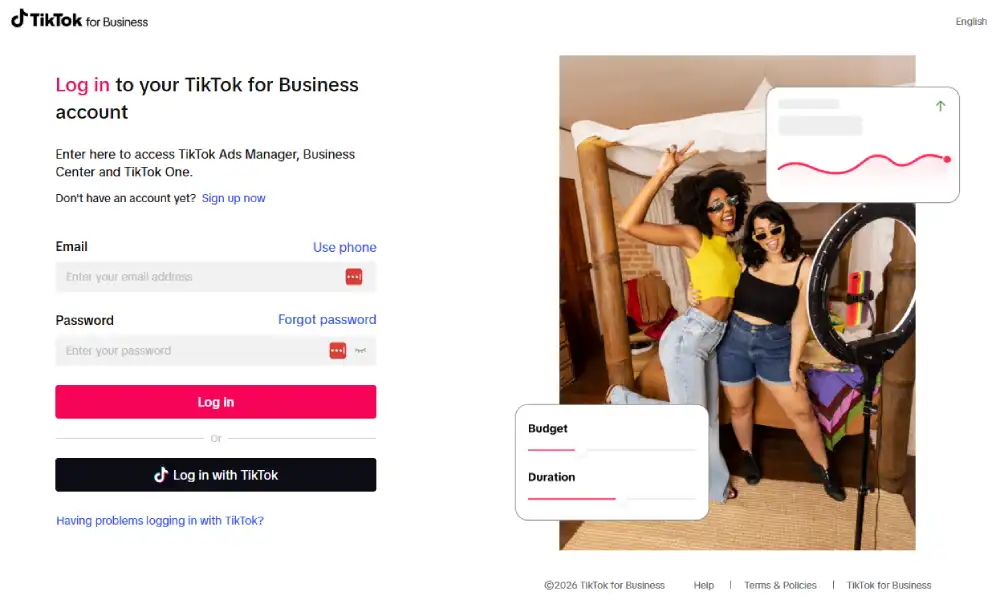
Here is how to set it up:
- Go to ads.tiktok.com and click “Get Started”
- Enter your business email and create a password
- Verify your email with the code TikTok sends you
- Enter your business details: country, industry, legal business name, time zone, and phone number
- Add your billing information and payment method
- Submit for account review. Approval typically takes 24 to 48 hours
Once approved, log into your dashboard and select your Mode of promotion.
If you’re not familiar with how campaigns, ad groups, and ads are organized, TikTok ads structure breaks it down clearly.
Step 2: Install the TikTok Pixel Before You Spend a Single Dollar
This is the most skipped step and the most costly mistake beginners make when they run ads on TikTok. Without the pixel installed, you cannot run conversion campaigns, you cannot build retargeting audiences, and you have no data on what happens after someone clicks your ad.
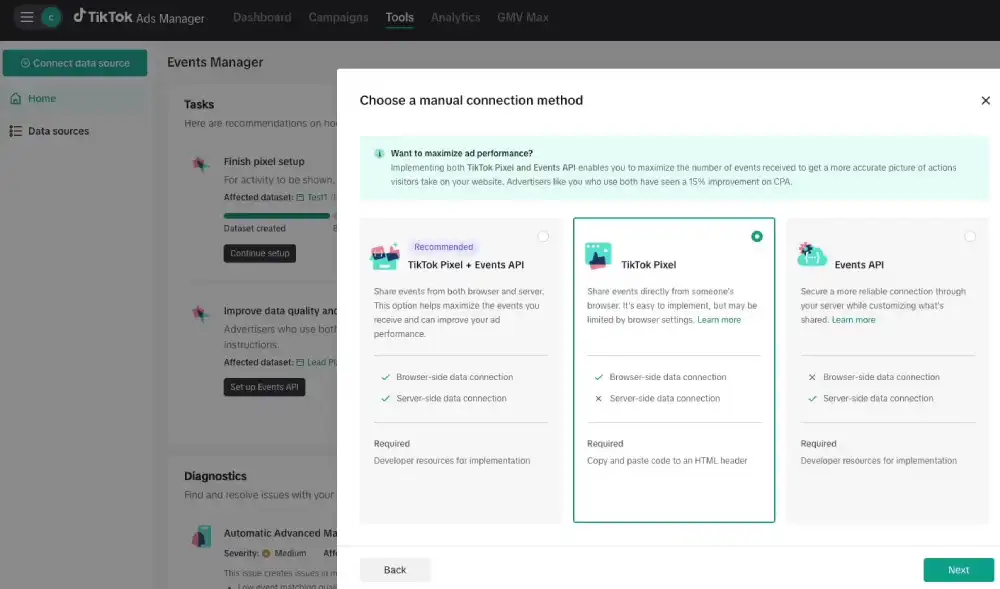
The TikTok Pixel is a code snippet you place on your website that tracks user actions: page views, add-to-cart events, purchases, and lead form submissions.
To install the pixel:
- Inside TikTok Ads Manager, hover over “Assets” in the top navigation
- Click “Events” then select “Web Events”
- Click “Manage” then “Set Up Web Events”
- Select “TikTok Pixel” as your connection method and click Next
- Name your pixel, configure your web events, and set up cookie consent preferences
- Install the pixel code on your website
Platform-specific installation:
- Shopify: Search for the official TikTok app in the Shopify App Store. It installs the pixel in one click and connects your product catalog automatically.
- WordPress or WooCommerce: Use the official TikTok for WooCommerce plugin or install via Google Tag Manager by pasting the pixel code as a custom HTML tag.
- Custom-built sites: Copy the base code from TikTok Ads Manager and paste it into the header of every page on your site.
According to TikTok’s own performance data, advertisers using both the TikTok Pixel and the Events API together see an average of 19% more events captured and a 15% improvement in CPA compared to pixel-only setups. If you are serious about scaling your TikTok advertising, set up both.
Step 3: verify your domain
Domain verification is a required step that most beginner guides skip entirely. Without it, you cannot run certain campaign objectives, and your pixel data may not be attributed correctly.
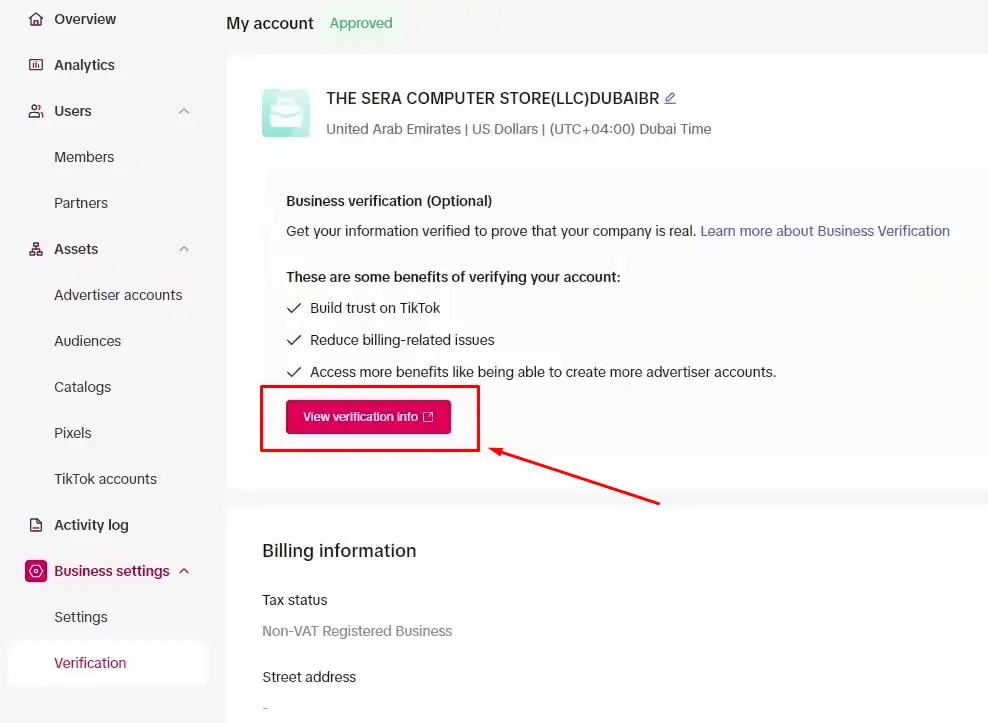
- In TikTok Ads Manager, go to “Assets” and select “Events”
- Click “Website,” then find the “Verify Your Domain” option
- Add the TXT record TikTok provides to your domain’s DNS settings through your hosting provider
- Wait for verification, which typically takes a few minutes to a few hours depending on your DNS provider
Once verified, TikTok confirms ownership, and your pixel tracking becomes fully reliable for conversion campaigns.
Step 4: choose your campaign objective
When you create a new campaign in TikTok Ads Manager, the first decision is your objective. This is how you tell TikTok’s algorithm what kind of result to optimize toward. Getting this wrong means paying for outcomes you do not want.
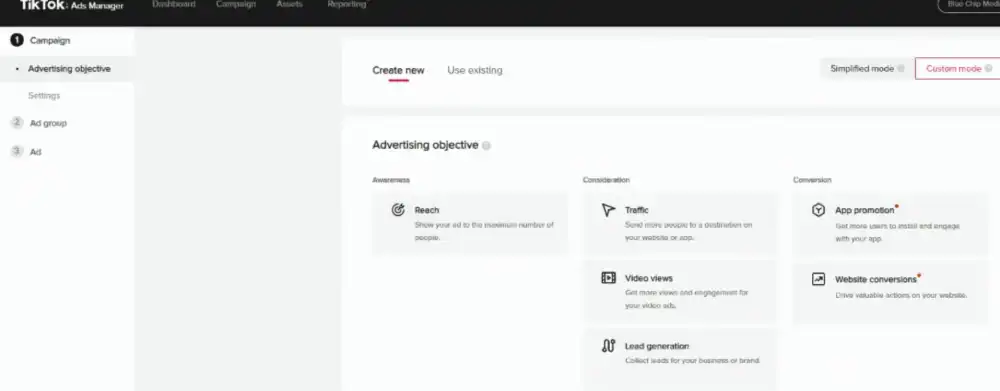
Here are the objectives that matter most for most businesses:
| Objective | What TikTok Optimizes For | Best For |
|---|---|---|
| Sales / Conversions | Users most likely to purchase | E-commerce, direct-to-consumer brands |
| Lead Generation | Users are likely to submit a form | Service businesses, B2B, real estate |
| Traffic | Clicks to your website | Content promotion, early-stage testing only |
| Video Views | Completions and replays | Brand awareness, top-of-funnel reach |
| Community Interaction | Follows and profile visits | Growing a new TikTok account alongside ads |
| App Promotion | App installs and in-app actions | Mobile app businesses |
For most product-based businesses, start with Sales (Website Conversions) and optimize for the Purchase event. This tells TikTok to find users who are likely to buy, not just browse.
If you do not yet have enough purchase data for the algorithm to work with, start with Add to Cart as your optimization event and move to Purchase once you have volume.
Avoid optimizing for Traffic as your primary objective. It generates cheap clicks from users with no demonstrated purchase intent, which drives your CPM down and your CPA through the roof.
Step 5: set your campaign budget
TikTok’s minimum budgets are firm.
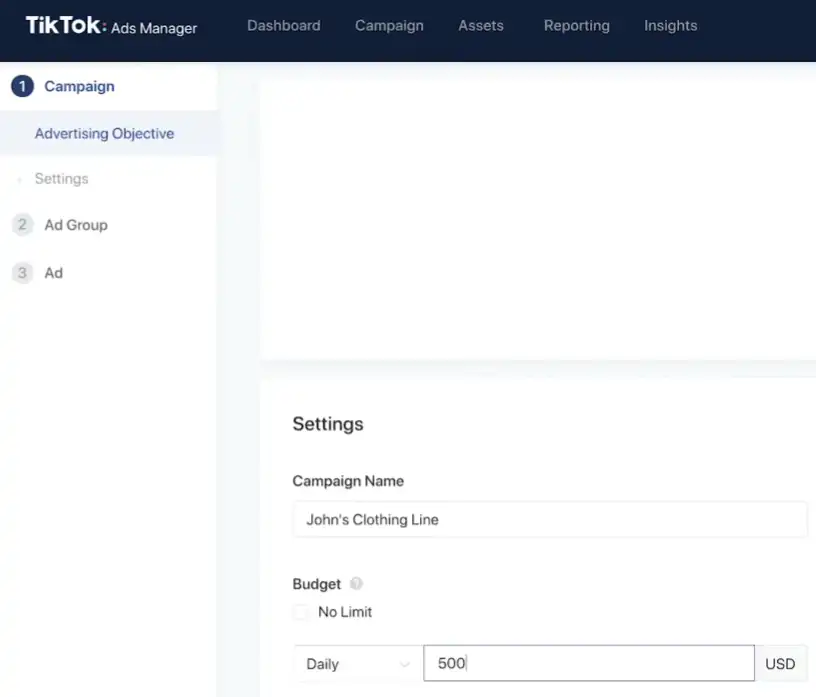
Here is what you need to know before you set your numbers:
- Campaign level minimum: $50 per day
- Ad group level minimum: $20 per day
Recommended starting budget for conversion campaigns: For deep conversion campaigns such as Add to Cart or Purchase, TikTok recommends budgeting at least 10× your current CPA. Other optimization types have different budget recommendations.
That last point comes directly from TikTok’s published performance guidelines. If your target CPA is $30, your ad group budget should be at least $300 per day to give the algorithm enough spend to find converting users efficiently. If that budget is not realistic yet, lower your target CPA expectations during the testing phase and scale once the algorithm has learned.
Daily vs lifetime budget: Use a daily budget during testing so you can pause, adjust, and restart without burning a fixed pool of money. Switch to lifetime budgets only for time-limited campaigns with fixed end dates, like promotional periods or product launch windows.
Step 6: configure your ad group targeting
This is where TikTok advertising in 2026 is fundamentally different from how it worked two or three years ago. The targeting strategy that wins now is broad, not narrow.
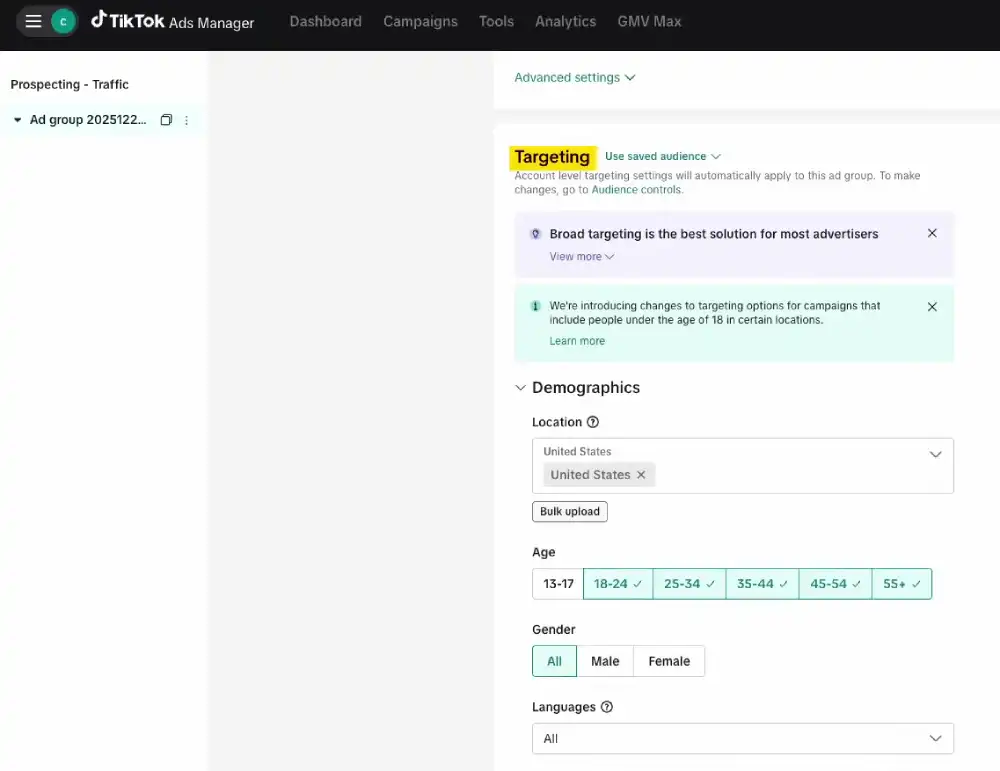
TikTok recommends starting with broad targeting where appropriate. Its data shows that “Fairly Broad” audiences have achieved 15% lower CPA and 20% higher conversion rates on average than narrower audiences, although results vary by campaign.
Here is the recommended targeting setup for most campaigns:
- Location: Select the country, region, or locations where your business actually serves customers.
- Age: Leave open unless your product is genuinely restricted to a specific age group
- Gender: Leave open. TikTok’s algorithm identifies the right gender from your creative content.
- Interests: Leave completely blank. TikTok reads your video content and finds the right audience for it. Adding interest filters narrows your reach without improving relevance.
- Placement: Select Automatic. This allows TikTok to serve your ad across TikTok and its partner apps (Pangle) wherever it is most likely to convert.
The only time you should restrict targeting significantly is when you have a genuinely narrow product, a legally restricted category like alcohol or financial services, or strong existing data from a Custom Audience showing who your buyers are.
Custom and Lookalike Audiences: Once your pixel has collected at least 1,000 matched users, build a Lookalike Audience based on your purchasers. This is one of the most powerful targeting tools in TikTok Ads Manager and significantly reduces CPA for brands with existing customer data.
Step 7: create your ad creative
Creative is the most important variable in TikTok advertising. It is not a slight edge over targeting or budget. It is the primary factor that determines whether your campaign succeeds or fails.
According to TikTok Performance, the creative asset alone is responsible for 47% of a brand’s sales lift, more than any other advertising element. Your targeting can be perfect and your budget healthy, but if your video does not stop the scroll in the first three seconds, nothing else matters.
The format that wins every time on TikTok: native-looking, sound-on, vertical video (9:16) that feels like organic content, not an advertisement.
Here is what a high-performing TikTok ad creative contains:
The hook (first 3 seconds): Make a bold, specific claim, reveal the end result before explaining how you got there, or open on something visually unexpected. Do not open with your brand name or a logo intro. By the time it finishes playing, most of your audience has scrolled away.
The body (seconds 3 to 25): Deliver on the promise your hook made. Keep it focused on one clear point. Every extra second you add needs to earn its place by moving the viewer closer to taking action.
The call to action: State explicitly what you want the viewer to do next. “Shop now,” “Tap the link in bio,” or “Visit our store today.” Vague CTAs produce vague results.
Video length: The optimal length for In-Feed Ads is 15 to 60 seconds for maximum completion rate. Longer videos work for tutorial-style content where the viewer has a clear reason to stay, but every second over 60 requires strong justification in your completion data.
Start with multiple creative variations so you can compare different hooks, messages and visual approaches. TikTok’s algorithm tests them simultaneously and shifts spend toward the winner. Running a single creative gives the algorithm nothing to optimize between.
Step 8: Understand the TikTok Ads Learning Phase
This is the section that most guides ignore and the one that causes the most wasted budget from advertisers.
When you launch a new TikTok ad campaign, it enters a learning phase. During this period, TikTok’s algorithm explores your audience to find the users most likely to complete your optimization event.
Performance during this phase is deliberately unstable as the system tests different user segments.
According to TikTok’s own learning phase documentation, volatility typically starts to decline once an ad group reaches roughly 25 results within 7 days of entering the learning phase. Separately, TikTok’s own budget guidance sizes a healthy daily budget around reaching 50 conversions in that same window. Neither figure is a fixed day count alone, both matter together.
What you must not do during the learning phase:
- Do not pause the campaign. Pausing resets the learning process.
- Do not change your targeting, budget, or creative significantly. Each change can trigger a full learning phase restart.
- Do not judge campaign performance. The data during learning is not representative of your steady-state results.
TikTok recommends increasing the budget by no more than 50% per day to prevent performance issues even after the learning phase ends.
If your campaign fails to exit the learning phase after 7 days, the most common causes are an insufficient budget to generate enough conversions (TikTok’s own volatility marker sits at 25 results, with its budget guidance targeting 50), a creative that is failing to hold attention, or an optimization event that is too rare (like a high-ticket purchase) to accumulate enough signals. Fix one variable at a time before relaunching.
To move faster without guessing, you can use our free TikTok Creative Generator to build multiple creative angles at once.
Step 9: read your results correctly
Once your campaign has exited the learning phase, here is how to evaluate performance without drawing wrong conclusions.
The metrics that matter for conversion campaigns:
- Cost Per Result (CPR): Your total spend divided by total conversions. This is your primary north star metric.
- Click-Through Rate (CTR): The percentage of viewers who click your ad. A CTR below 0.5% usually signals a weak hook or mismatched creative.
- Video Completion Rate: The percentage of viewers who watch your ad to the end. Below 25% means your creative is losing people before your message lands.
- Cost Per Mille (CPM): What you pay per 1,000 impressions. A rising CPM with stable results is normal as you scale. A rising CPM with falling results signals creative fatigue.
A dedicated ad metrics guide covers a deeper breakdown of these numbers and their performance benchmarks.
The metric that does not matter as a primary indicator: Likes and follower growth from ads. These are byproducts of good creative, not performance indicators for conversion campaigns.
Identifying creative fatigue: When you see your CPM rising, your CTR falling, and your conversion rate dropping simultaneously over a 5 to 7 day period, your creative has fatigued. The same users have seen it too many times and are scrolling past. The fix is new creative, not a new audience.
Step 10: scale what works without breaking the algorithm
Scaling TikTok ads correctly is one of the most misunderstood parts of advertising on the platform. The instinct is to double your budget when something works. That instinct will restart your learning phase and tank your performance.
TikTok officially warns that adjusting your budget too drastically will throw the ad group back into the learning phase. They recommend keeping increases to a maximum of 50% per adjustment.
Here is the safe scaling process:
- Confirm your campaign has fully exited the learning phase, volatility declining (around 25 results) with a stable CPA over 3 consecutive days, and enough volume to have cleared TikTok’s 50-conversion budget target
- TikTok currently recommends limiting budget increases to no more than 40% per adjustment during learning and no more than 30% after the campaign exits learning. Wait at least two days between budget changes.
- If CPA remains stable, increase again by the same percentage
- If CPA spikes more than 30% for more than 24 hours, revert to the previous budget level and wait for stability before trying again
- If performance remains stable, consider increasing budget gradually or testing additional campaign/ad-group structures rather than making large changes to a proven setup.
Fresh creative is your scaling fuel: Ad fatigue on TikTok happens faster than on any other platform. Update ad visuals every 7 to 10 days to combat ad fatigue and maintain engagement. Build a pipeline of new hook variations, new angles, and new creative formats before you need them, not after your existing creative has already died.
TikTok ads vs Facebook ads: what the data shows for 2026
| Metric | TikTok Ads | Facebook / Instagram Ads |
|---|---|---|
| Average CPM | $3.20 to $10.00 | $10.00 to $15.00+ |
| Minimum daily spend | $20 per ad group | $1 to $5 per ad group |
| Creative lifespan | 7 to 14 days average | 4 to 8 weeks average |
| Primary targeting driver | Creative content | Audience parameters |
| Best funnel stage | Discovery and impulse purchase | Retargeting and consideration |
| Ad fatigue speed | High | Low to moderate |
TikTok ads cost less per impression but demand more creative output. You need a steady pipeline of fresh content to sustain performance, and that is the trade-off.
Brands that build a content production system win on TikTok. Brands that treat it like Facebook, setting up a campaign and walking away, consistently underperform.
Frequently asked questions about running TikTok ads
How do I set up my first TikTok ad campaign?
Start by creating a TikTok Ads Manager account at ads.tiktok.com, install the TikTok Pixel on your website, and verify your domain.
Then create a new campaign, select your objective (Sales or Lead Generation for most businesses), set your budget at the campaign and ad group level, configure broad targeting with your location set to the United States and interests left blank, and upload at least three creative variations.
Launch and allow at least 7 days, and ideally 50 conversions per TikTok’s own budget guidance, before evaluating performance.
How much do TikTok ads cost for beginners?
The minimum to run TikTok ads is $20 per day at the ad group level and $50 per day at the campaign level.
For conversion-focused campaigns in the US, a realistic starting budget is $50 to $150 per day to give TikTok’s algorithm enough spend to exit the learning phase within a reasonable timeframe.
According to WordStream’s benchmarks, average CPMs range from $3.20 to $10.00 depending on your industry and audience size.
Do TikTok ads work for small businesses?
Yes, TikTok ads work for small businesses, particularly for product-based businesses with a visual product and a clear target customer.
The platform’s algorithm-driven delivery means a small budget can reach a highly relevant audience without precise manual targeting. The key variable for small businesses is creative quality, not budget size.
A single native-style video with a strong hook and a clear call to action can outperform a polished high-budget ad from a larger brand.
What is the TikTok ads learning phase and how long does it take?
The TikTok ads learning phase is the initial period after launching a campaign when TikTok’s algorithm explores different user segments to find the audience most likely to complete your optimization event.
It typically lasts 7 days, with volatility declining around 25 campaign results per TikTok’s own documentation, though TikTok’s separate budget guidance sizes a healthy daily spend around reaching 50 conversions in that window. During this phase, performance is intentionally unstable.
You should not pause the campaign, change your targeting, or significantly alter your budget during this period, as each change can restart the learning process from zero.
What is the best TikTok ad targeting strategy in 2026?
The most effective TikTok ad targeting strategy in 2026 is broad targeting with minimal restrictions.
Leave your interest targeting blank, keep age and gender open unless your product has a genuine restriction, set your location to the United States, and use Automatic placements. TikTok’s algorithm reads your video content and identifies the right audience from the creative itself.
According to TikTok’s own performance data, campaigns reaching over 80% of potential users in a country outperform narrowly targeted campaigns by 15% lower CPA and 20% higher conversion rate.
How do I know when to scale my TikTok ads?
Scale your TikTok ads only after your campaign has fully exited the learning phase, cleared TikTok’s 50-conversion budget target, and maintained a stable CPA for 3 consecutive days after the learning phase ends.
TikTok currently recommends limiting budget increases to no more than 40% per adjustment during learning and no more than 30% after the campaign exits learning.
Wait at least two days between budget changes. If CPA spikes more than 30% for more than 24 hours, revert to the previous budget level. Never double your budget in a single change.
Large budget jumps trigger a new learning phase and reset the optimization progress your campaign has already built.
Conclusion
The gap between brands that get strong results from TikTok advertising and brands that burn through budget without traction comes down to one thing: process.
Knowing how to set up TikTok ads is the easy part. Every competitor guide covers the setup steps.
What they skip is the discipline required to let the learning phase run without interference, the creative pipeline needed to sustain performance beyond the first two weeks, and the scaling logic that grows results without resetting the algorithm every time you increase spend.
You now have the complete system. Account setup, pixel installation, domain verification, campaign structure, broad targeting, native creative strategy, learning phase management, performance reading, and safe scaling, all connected into one coherent process.
Start with your pixel. Set your objective. Upload three creative variations. Give the algorithm 7 days. Then make decisions based on data, not anxiety.
That is how you run TikTok ads in 2026, and that is how you build a paid channel that compounds over time instead of burning out after the first campaign.