
Your TikTok ads dashboard says 120 conversions. Shopify says 47. Google Analytics says 31. All three are looking at the same sales period, and none of them agree.
That’s not a glitch. That’s attribution working exactly as designed, just not in your favour.
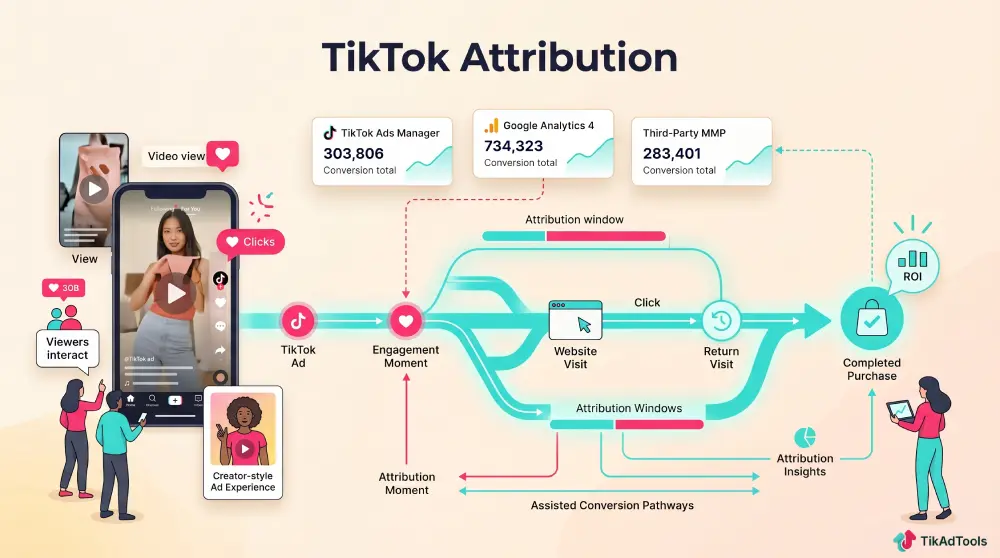
TikTok attribution is the system that decides which ad gets credit for a sale, and when.
Get the settings wrong, and you’re either pausing profitable campaigns because the data looks bad or scaling dead weight because the numbers are inflated. Neither is a good place to run a business.
Here’s what the settings actually mean and how to use them properly.
TL;DR
- TikTok’s default is 7-Day Click / 1-Day View, but that’s not the right setup for every product type.
- Engaged View-Through Attribution (EVTA) captures high-intent viewers who watch 6+ seconds without clicking; it’s the setting most accounts ignore.
- TikTok’s new Attribution Portfolio, launched in May 2026, includes Assisted Conversion tools that show you sales TikTok influenced but didn’t get last-click credit for.
Quick Answer
TikTok attribution is how the platform assigns credit for a conversion after someone interacts with your ad. The default setting is 7-day click-through and 1-day view-through, but you can adjust click windows to 1, 7, 14, or 28 days depending on how long your customers typically take to buy.
What an attribution window actually does
A TikTok attribution window is a countdown timer. It starts the moment someone interacts with your ad, and it runs until either a conversion happens or the window closes.
If someone clicks your ad on Monday and buys on Thursday, a 7-day click window captures that sale.
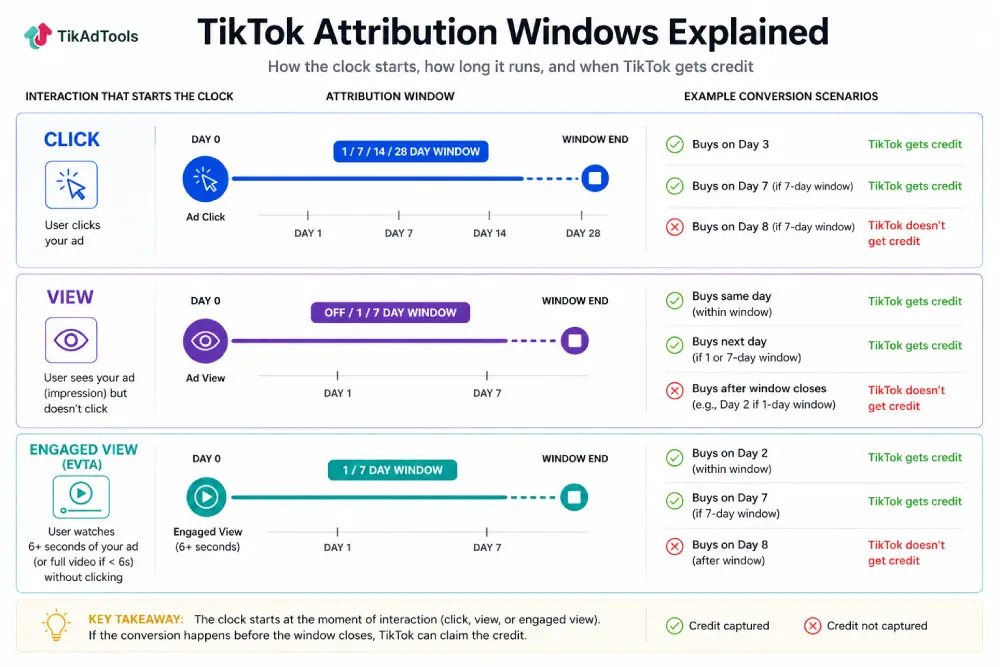
If they buy the following Tuesday (day 8), it doesn’t. That simple mechanic is responsible for most of the reporting confusion advertisers run into on TikTok.
TikTok Ads attribution uses three interaction types that can start the clock: a click, a passive view (impression), or an engaged view. Each one has its own window settings.
The three attribution types in TikTok Ads Manager
| Type | Triggers On | Available Windows | Default |
|---|---|---|---|
| Click-Through Attribution (CTA) | A click on your ad | 1, 7, 14, or 28 days | 7 days |
| View-Through Attribution (VTA) | An impression, no click | Off, 1 day, or 7 days | 1 day |
| Engaged View-Through Attribution (EVTA) | Watching 6+ seconds (or the full video, if shorter), no click | Off, 1, 7, or 28 days | Off |
Click-Through Attribution (CTA)
A user clicks your ad. The window starts. If they purchase before it closes, TikTok claims the conversion.
Available windows: 1 day, 7 days, 14 days, 28 days. The default is 7 days.
This is the most defensible data point you have. A click signals clear intent. The gap between what TikTok reports and what GA4 reports is narrower here, though cross-device journeys still create some discrepancy.
For low-ticket impulse products (under $50), 7-day click is usually enough. The purchase decision happens fast. For anything above $100, you’ll want to test 28-day click to see if you’re missing delayed conversions from customers who need more time to decide.
View-Through Attribution (VTA)
A user sees your ad but doesn’t click. If they convert within the window, TikTok claims credit.
Available windows: off, 1 day, 7 days. The TikTok Help Center recommends 1-day VTA as the baseline for understanding post-impression conversions.
This is where the discrepancy between TikTok and GA4 gets wide. Someone sees your ad on their phone, doesn’t click, then buys on their laptop later that day.
TikTok tracks that via account-level matching and claims the conversion. GA4 sees only a direct visit or branded search and assigns the credit elsewhere.
One important note from TikTok’s own documentation: turning off VTA abruptly can cause campaign performance to fluctuate for several weeks while the algorithm adjusts to the missing signal. Don’t just switch it off cold.
For retargeting campaigns, consider disabling VTA. If someone’s already in your funnel, viewing an ad probably wasn’t the deciding factor. You’re likely over-crediting yourself for sales that were going to happen anyway.
Engaged View-Through Attribution (EVTA)
This is the one most accounts haven’t properly configured.
EVTA counts a conversion when a user watches at least 6 seconds of your ad (or the full video, if it’s under 6 seconds) without clicking, then converts within the window. Per TikTok’s official EVTA documentation, available windows are off, 1 day, 7 days, or 28 days.
According to TikTok’s official documentation, EVTA captures the high-intent viewers that standard VTA and CTA both miss.
Someone who watches 6 seconds of a skippable video is genuinely interested. That behaviour is a stronger purchase signal than most advertisers give it credit for.
Third-party benchmark data suggests EVTA captures 30 to 40% of conversions that last-click models miss entirely.
For high-ticket products where customers spend time researching before buying, this window is where a lot of your actual ROI is hiding.
Which window should you use?
There’s no universal answer. The right window depends on your product price and how long your customers typically take to make a purchase decision.
| Business Type | Recommended Window | Why |
|---|---|---|
| Impulse ecom (under $50) | 7-Day Click / 1-Day View | Decisions happen fast. VTA catches the “I’ll buy it tonight” crowd. |
| Mid-range ($50 to $200) | 7-Day Click / 7-Day EVTA | Buyers research before purchasing. EVTA captures delayed intent. |
| High ticket (over $200) | 28-Day Click / 7-Day or 28-Day EVTA / VTA off | Longer consideration period. You need the lookback to prove ROI. |
| Retargeting | 7-Day Click / VTA off | They’re already warm. View credit inflates your numbers here. |
If you’re not sure where your customers fall, use TikTok’s Time to Conversion report inside Attribution Analytics. It shows the actual lag between first ad interaction and purchase for your account specifically.
To set or change your attribution windows: go to TikTok Ads Manager, click an ad group, scroll to Bidding and Optimization, and look for the Attribution Settings section.
Why your numbers don’t match GA4
This is the question every TikTok advertiser asks eventually. TikTok shows more conversions than everything else combined. Here’s why.
The Cross-Device gap
Someone scrolls TikTok on their phone Tuesday evening. They don’t click. They search your brand on their laptop Wednesday morning and buy.
TikTok’s account-level matching connects the impression to the purchase. GA4 sees a branded search session and credits Organic.
Neither is lying. They’re using different methodologies. TikTok includes the view. GA4 doesn’t know the view existed.
For your TikTok ads reporting, reconciling this gap requires looking at more than one data source.
The In-App browser problem
When a user clicks a TikTok ad, it opens inside TikTok’s built-in browser. Apple’s Intelligent Tracking Prevention (ITP) and most ad blockers strip UTM parameters before the page loads. The conversion happens, but GA4 can’t tie it back to the original ad click.
Some tracking tools report that browser-based pixel accuracy can drop to as low as 40% in environments with aggressive ad blocking and iOS privacy settings active. That’s a significant chunk of conversions disappearing from your third-party reports.
The fix: Post-Purchase surveys
The most practical solution is a post-purchase survey. Ask customers, “How did you hear about us?” If 45% say TikTok but GA4 shows 12%, trust the survey. It’s first-party data with no tracking dependencies.
Tools like KnoCommerce and Fairing integrate directly with Shopify and give you this data automatically.
The Attribution Portfolio: TikTok’s new measurement suite
In May 2026, TikTok launched the Attribution Portfolio, a set of measurement tools inside Ads Manager designed specifically to show advertisers the conversions that last-click reporting misses.
These TikTok attribution tools include four features designed to show how TikTok contributes to conversions across the customer journey.
Assisted Conversion shows conversions where TikTok was part of the path to purchase but wasn’t the last-click channel. Someone sees your TikTok ad, doesn’t click, then converts via Google Search a week later. That sale shows up in Assisted Conversion. This is the most useful tool for understanding TikTok’s real contribution to your revenue.
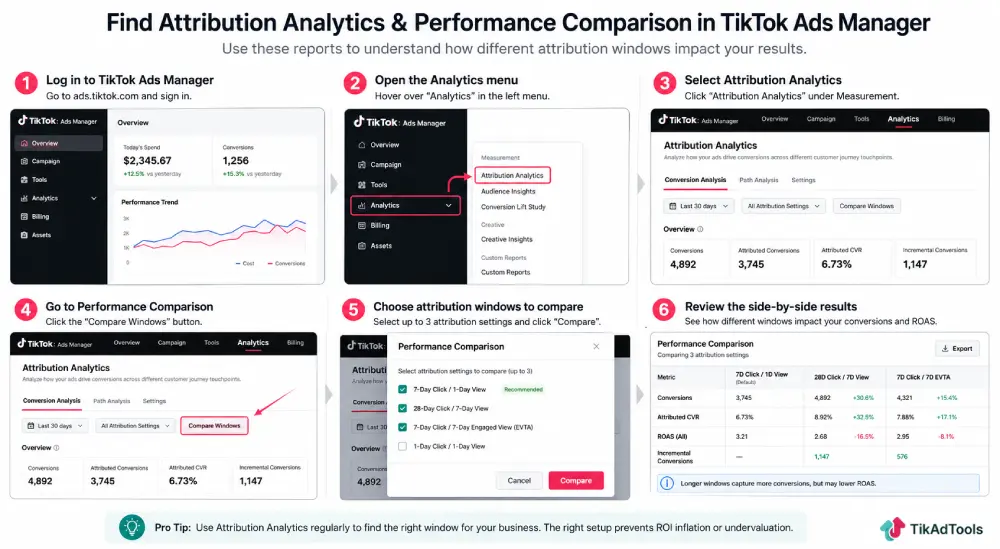
Performance Comparison lets you run side-by-side comparisons across different attribution windows. You can compare your current 7-day click setup against a 28-day window to see how many conversions you’d be capturing with a longer lookback. The lookback window for this report has been extended to 90 days.
Time to Conversion shows the actual lag between first ad interaction and purchase. Use this to choose your click window. If 60% of your conversions happen within 48 hours, a 7-day click is probably enough. If they’re spread across 3 weeks, you need 28 days.
Touchpoints to Conversion maps the full journey. How many times did a customer interact with your ads before buying? If the average is 4 touchpoints, your single-touch attribution is significantly understating what TikTok contributed.
To access these TikTok attribution tools in Ads Manager, open TikTok Ads Manager, click Analytics, then Attribution Analytics. The tools work at account, campaign, and ad group level for web, offline, shops, and lead gen campaigns.
How the TikTok Conversion API affects attribution
Browser-based pixel tracking has a reliability problem. iOS privacy updates, ad blockers, and cookie restrictions all reduce how much data the pixel can collect. When the pixel misses events, your attribution data has gaps.
The TikTok Conversion API sends conversion data server-side, directly from your server to TikTok. It bypasses browser restrictions entirely. Ad blockers can’t stop it. iOS settings don’t affect it.
Running both the pixel and the Conversion API together is the setup TikTok recommends. The pixel captures real-time browser events. The API fills in the gaps. With deduplication active, events aren’t double-counted.
Your Event Match Quality (EMQ) score in Events Manager shows how accurately TikTok can match your conversion events to specific users and ad interactions.
Scores below 5 indicate significant attribution problems. Hashed email and phone number carry the most weight, so include both on every conversion event where you have them.
If you’re using TikTok Ads Manager and haven’t set up the Conversion API yet, this is the highest-leverage change you can make to your attribution accuracy right now.
Is TikTok attribution inflating your ROAS?
Probably, yes, to some degree. The question is by how much.
View-through attribution in particular can credit TikTok for sales that would have happened regardless. If you’re running ads to a warm retargeting list and VTA is on, you’re assigning credit to impressions that may have had no real influence on the purchase decision.
A few checks worth running:
Pause VTA on your retargeting campaigns for two weeks and compare actual revenue. If it doesn’t change, the VTA credit was inflated. If revenue drops, the impressions were genuinely contributing.
Use the Performance Comparison tool to compare what your current window shows versus a shorter window.
If switching from 7-day view to 1-day view removes half your reported conversions, you were crediting a lot of passive impressions.
Look at your TikTok ads ROAS alongside post-purchase survey data. If the survey shows 30% TikTok attribution but your ROAS suggests 60%+ of revenue is coming from TikTok, the window is likely too wide.
The goal isn’t to minimize what TikTok gets credit for. It’s to get an accurate picture so you can make real decisions about budget allocation.
How to set attribution windows in TikTok Ads Manager
You set attribution at the ad group level, not the campaign level.
Here’s the exact path:
- Open TikTok Ads Manager.
- Select a campaign and click into an ad group.
- Scroll to the Bidding and Optimization section.
- Click Attribution Settings.
- Set your Click-through window, View-through window, and Engaged View window.
Each ad group can have different attribution settings. This means you can run a 28-day click window for your top-of-funnel cold traffic ad groups and a 7-day click / VTA off setup for retargeting simultaneously.
For new campaigns, check your settings before you launch. The defaults are reasonable starting points, but they’re not calibrated for your specific product or sales cycle.
FAQs
What is TikTok’s default attribution window?
TikTok’s default is 7-day click-through and 1-day view-through. This is a reasonable baseline for most direct response campaigns, but it’s not the optimal setting for every product. High-ticket items with longer consideration periods often perform better on a 28-day click window. You can change these settings at the ad group level inside Ads Manager.
What is Engaged View-Through Attribution and when should I use it?
EVTA counts a conversion when someone watches at least 6 seconds of your video ad without clicking, then converts within your chosen window (off, 1 day, 7 days, or 28 days). It’s most useful for high-ticket products and brand awareness campaigns where users need multiple exposures before buying. If you’re selling anything over $100, test a 7-day EVTA window and check how many additional conversions it surfaces compared to your current setup.
Why does TikTok show more conversions than Shopify or GA4?
The gap comes down to two things: cross-device tracking and view-through attribution. TikTok uses account-level matching to connect mobile views to desktop purchases. GA4 can’t do this without a click. TikTok also credits conversions that happen after someone just views an ad, which GA4 never captures. The most accurate picture comes from combining TikTok’s Attribution Analytics with post-purchase survey data.
What is the Attribution Portfolio and how do I access it?
TikTok’s Attribution Portfolio is a measurement suite launched in May 2026 that includes Assisted Conversion, Performance Comparison, Time to Conversion, and Touchpoints to Conversion. It’s designed to show conversions TikTok contributed to but didn’t get last-click credit for. Access it at TikTok Ads Manager, click Analytics, then Attribution Analytics. It works at account, campaign, and ad group level.
Should I turn off View-Through Attribution for retargeting?
Yes, in most cases. If someone is already in your retargeting pool, they’ve already shown intent. An ad impression probably didn’t drive the final purchase decision, and counting it as a conversion inflates your ROAS. Set retargeting ad groups to 7-day click / VTA off and compare your reported results against actual revenue to check how much the view credits were overstating performance.
How does iOS tracking (ATT) affect TikTok attribution?
On iOS, users who decline Apple’s App Tracking Transparency prompt limit how much device-level data TikTok can attach to a conversion, which pushes more of your reporting toward modeled and SKAdNetwork data. TikTok Ads and iOS tracking (ATT) covers what that restricts and what still works.
What is the TikTok Shop affiliate attribution window?
TikTok Shop affiliate attribution follows a different measurement context from TikTok Ads attribution. If you’re measuring affiliate-driven Shop sales, use TikTok Shop’s own reporting and attribution settings rather than assuming the attribution windows used for TikTok Ads apply to affiliate orders.
Conclusion
Attribution isn’t just a reporting preference. It directly changes how TikTok’s algorithm bids on your behalf and which conversions it optimises for. Get the window wrong, and you’re training the algorithm on the wrong signal.
Use the Attribution Portfolio tools, test your windows against real revenue data, and pair everything with the Conversion API for the most accurate picture of what your campaigns are actually doing.
Sources