
Most TikTok Conversion API setups I audit are technically “live” and functionally useless. The events fire. The dashboard turns green. And attribution barely moves.
The reason is almost always the same. The server is sending events without the one identifier TikTok weighs hardest, so the platform receives your purchase and has no idea who made it.
TL;DR
- The TikTok Conversion API posts TikTok conversion events to https://business-api.tiktok.com/open_api/v1.3/event/track/ using an Access-Token header, not a browser script.
- Without ttclid captured from the ad click and passed server-side, your Event Match Quality stays low no matter how many events you send.
- Purchase is TikTok’s standard purchase event, and “Lead” isn’t a TikTok web event at all, so lead-gen advertisers should optimize for Submit Form, Complete Registration, or Contact.
- TikTok’s Business Help Center added customer_type and attribution_share parameters in March 2026, and almost nobody’s sending them.
Quick Answer
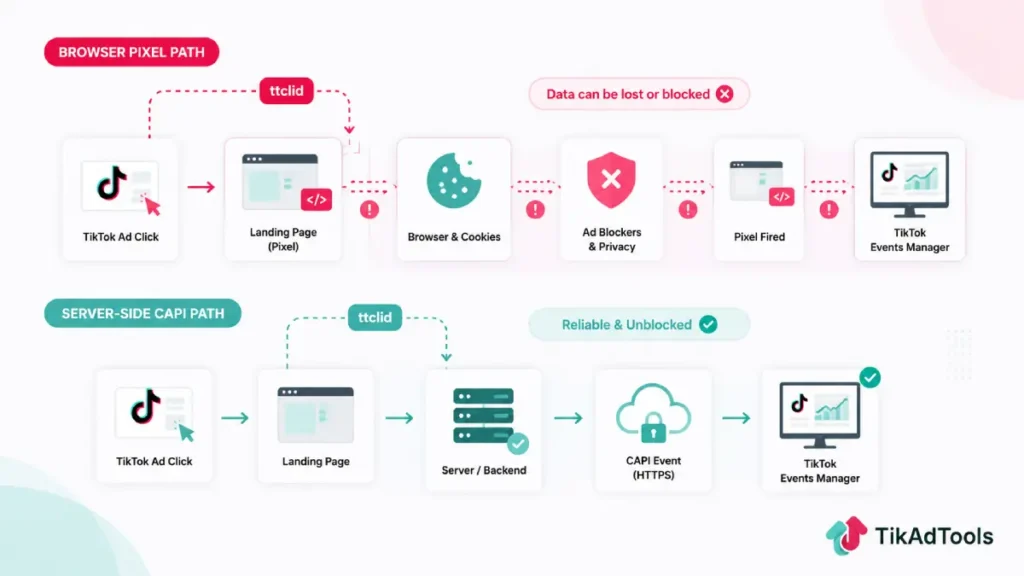
The TikTok Conversion API, also called TikTok Events API or CAPI, is a server-to-server integration that sends conversion data straight from your backend to TikTok. It runs independently of the browser, so ad blockers and cookie restrictions can’t strip it. Attribution still depends on the identifiers you attach to each event, which is where most setups fail.
What the TikTok Conversion API actually sends
CAPI is a single HTTPS POST per event batch. Your server builds a JSON body, authenticates with an access token, and TikTok returns a response code.
TikTok’s Events API documentation describes the TikTok Events API as a reliable connection across web, app, and offline channels. That’s accurate for web. App events are a different story, and I’ll get to that.
Here’s the shape of a web purchase call. Field names should be confirmed against the developer portal before you ship, since TikTok versions this endpoint.
POST https://business-api.tiktok.com/open_api/v1.3/event/track/
Access-Token: YOUR_ACCESS_TOKEN
Content-Type: application/json

{
  "event_source": "web",
  "event_source_id": "YOUR_PIXEL_ID",
  "data": [
    {
      "event": "Purchase",
      "event_time": 1752811200,
      "event_id": "order_10482",
      "user": {
        "ttclid": "E.C.P.xxxxxxxx",
        "email": "sha256_of_lowercased_trimmed_email",
        "phone": "sha256_of_e164_phone",
        "external_id": "sha256_of_customer_id",
        "ip": "203.0.113.7",
        "user_agent": "Mozilla/5.0 ..."
      },
      "page": { "url": "https://yourstore.com/thank-you" },
      "properties": {
        "currency": "USD",
        "value": 89.90,
        "content_type": "product",
        "contents": [
          { "content_id": "SKU-4471", "quantity": 1, "price": 89.90 }
        ],
        "customer_type": "new",
        "attribution_share": 1.0
      },
      "limited_data_use": false
    }
  ]
}
Two things people get wrong here. event_time is a Unix timestamp in seconds, not milliseconds. And the data array accepts batches, which matters for volume.
Why ttclid decides everything
ttclid is the click ID TikTok appends to your landing page URL when someone taps your ad. It’s the strongest matching signal in the system, and it’s the reason a pixel-only site can’t just switch to server-side and expect better numbers.
Your server doesn’t receive ttclid automatically. Something on the landing page has to read it from the query string, store it, and hand it to your backend at conversion time.
The practical setup: capture ttclid on first page load, write it to a first-party cookie with a 30-day expiry, then read that cookie when the order completes. If your checkout runs on a different subdomain, set the cookie at the root domain, or you’ll lose it mid-funnel.
This is also why the pixel still matters. Kill the browser layer entirely, and you lose the easiest ttclid capture point, which is exactly the mistake that tanks attribution after a “clean” server-side migration.
The event names that actually exist
Per TikTok’s own Standard Events and Parameters documentation, last updated April 2026, the accepted standard web event names are Add Payment Info, Add to Cart, Add to Wishlist, Application Approval, Complete Registration, Contact, CustomizeProduct, Download, FindLocation, Initiate Checkout, Purchase, Schedule, Search, Start Trial, Submit Application, Submit Form, Subscribe, and View Content. These are the names both the Pixel and the Events API optimize against.
Notice what isn’t on that list: there’s no generic “Lead” event. Lead-gen advertisers optimize for Submit Form, Complete Registration, Contact, or another Lead-classified event that actually matches what happened on the page, not a made-up “Lead” name.
I bring this up because a lot of published guides copy Meta’s taxonomy into TikTok articles, and some CDP-specific integration guides (Hightouch’s TikTok sync docs, for one) use a narrower allowlist built around names like CompletePayment and ClickButton for that specific tool’s sync path. If you build your direct API integration off a partner-specific list instead of TikTok’s own Standard Events page, your events can land as custom events with nothing to optimize against.
For eCommerce, send Purchase first and get it clean. Add InitiateCheckout and AddToCart afterward for custom audience building, not for optimization.
Two parameters almost nobody sends
TikTok’s parameter documentation was updated in March 2026 with two additions worth your attention.
customer_type accepts “new” or “returning.” Sending it lets you separate acquisition from repeat revenue inside TikTok’s own reporting instead of reconciling in a spreadsheet later.
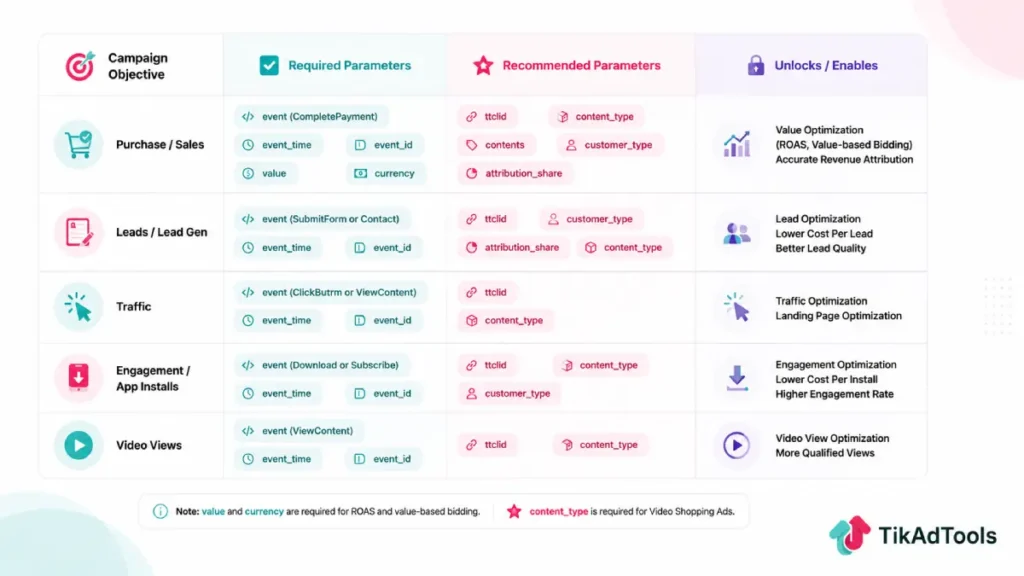
attribution_share is a number between 0.0 and 1.0 representing how much credit your internal model gives TikTok for that conversion. If you run a multi-touch model and TikTok gets 40% of a sale, you send 0.4.
Also worth knowing from the same doc: value and currency are required for ROAS and value-based bidding, and content_type is required for Video Shopping Ads. Miss those and the bidding option simply won’t be available to you.
How do you set up TikTok CAPI without a developer?
You don’t need one if you’re on a supported platform. Partner integrations handle the token, the payload, and deduplication for you.
On Shopify, install the official TikTok channel, connect your business account, and set data sharing to Maximum. That single toggle activates server-side event sending with no code.
WooCommerce and BigCommerce work the same way through TikTok’s commerce partner integrations. Google Tag Manager server-side is the middle option if you want control without a backend rewrite.
Direct TikTok Conversion API integration is worth it in one scenario: your conversions live in a CRM or a warehouse rather than a web checkout. Otherwise, the partner route gets you 90% of the value in an afternoon.
For manual setups, generate your access token inside Events Manager in TikTok Ads Manager, then store it as a server environment variable. Never put it in client-side JavaScript. Anyone who views source can write events into your dataset.
If your browser layer isn’t clean yet, the TikTok Pixel setup helper fixes that first, before you layer the server on top.
Deduplication, batching, and the errors that bite
Deduplication is one rule: the same event_id and the same event name must go out through both the pixel and the API for a single user action.
Use something already unique in your system. Order ID works. Randomly generated IDs on each channel don’t, because they’ll never match and TikTok will count the sale twice.
Batching is where high-volume stores get hurt. You can send up to 1,000 events per call, but TikTok rejects the entire batch if one row is malformed.
Keep batches small when your data quality is uncertain, and log the response body rather than just the status code.
One correction to a claim you’ll see repeated: app event reporting through Events API isn’t openly available. TikTok’s own consolidated endpoint announcement listed App as in testing, and it’s still gated behind access approval. If you need mobile conversions, use the SDK or an MMP.
Reading your EMQ score without panicking
Event Match Quality is a weighted average of your match key coverage, per TikTok’s Events Manager diagnostics documentation. It’s scored 0 to 10 and shown per event type.
Here’s the part most guides skip. Different events have different realistic ceilings. Triple Whale’s EMQ benchmark analysis puts top-of-funnel events like ViewContent in the 4.5 to 7 range as normal, because you have almost no identity data that early.
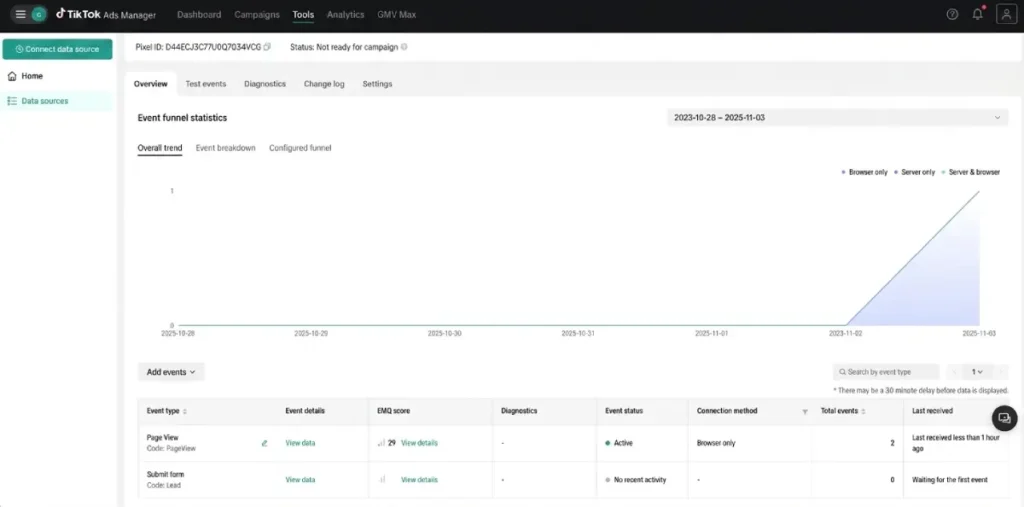
So don’t chase a 10 on ViewContent. Judge your Purchase score, where you have an email, a phone number, and a ttclid, and where a weak number is genuinely costing you money.
When purchase EMQ sits low, the cause is usually one of three things. Hashing before normalizing, which means uppercase or untrimmed emails are hashed into garbage. Phone numbers sent without the country code. Or ttclid missing because nothing on the landing page captured it.
Fix normalization first. Lowercase and trim the email, then SHA-256. Format the phone as E.164 digits, then SHA-256. That alone usually moves the score several points.
TikTok API pricing 2026: what CAPI costs
Nothing, from TikTok. TikTok API pricing does not include a separate charge for the Events API; it is included with an ads account, with no per-event charge.
Your real costs are elsewhere. A CDP or routing tool like a server-side tag manager carries its own subscription, and a custom backend integration is typically a few days of engineering for web, considerably more if you’re piping offline CRM data.
Platform-native integrations cost nothing beyond the app you’re already running, which is why I push most eCommerce advertisers toward them.
FAQs
Does TikTok CAPI replace the TikTok Pixel?
No, and running server-side alone will usually make TikTok conversion tracking worse. The pixel captures ttclid from the ad click, which your server needs to match the conversion back to a campaign.
What does a CAPI event look like when it fails silently?
It returns a success code but never appears in reporting. That happens when the event name isn’t a recognized standard event, or when every match key is missing or badly hashed. Check the Diagnostics tab rather than trusting your own logs.
How long before CAPI improves campaign performance?
Give it a full learning phase at minimum. The algorithm needs consistent conversion volume before better signal quality shows up as lower CPA, so judging it after three days tells you nothing.
Do I need consent management for CAPI in the EU?
Yes. Server-side sending doesn’t remove the consent requirement; it just moves where you enforce it. Gate the API call on consent status and set limited_data_use to true for users who’ve opted out under state privacy laws.
Can I send historical conversions through the API?
You can backfill offline events, but web events sent long after the fact match poorly and won’t retroactively improve optimization. Send events within minutes of the action for anything you want the algorithm to learn from.
Does CAPI fix iOS tracking restrictions from ATT?
It helps, but it doesn’t replace them. CAPI bypasses browser-level blocks, but a user who declines Apple’s App Tracking Transparency prompt still limits how much device-level identity data you can legally attach to an event. TikTok Ads and iOS tracking (ATT) covers what ATT restricts and how SKAdNetwork and modeled conversions fill the gap CAPI alone can’t close.
Is there a rate limit on the Events API?
TikTok doesn’t publish a hard public number for Events API calls, and batching up to 1,000 events per request is the intended way to handle volume. If you’re seeing throttling, consolidate into batches before adding retry logic.
Conclusion
TikTok’s Conversion API isn’t a switch you flip; it’s an identity pipeline you maintain. Get ttclid capture right, normalize before you hash, use the event names TikTok actually recognizes, and the rest of your account gets easier to read.
Sources
- TikTok’s official Events API documentation
- TikTok’s Standard Events and Parameters documentation
- TikTok’s Hightouch sync integration guide
- TikTok’s official parameters documentation
- TikTok’s Events Manager diagnostics documentation
- TikTok for Business: Events API consolidated endpoint announcement
- Triple Whale: Event Match Quality benchmark analysis