
Nothing kills conversion rates faster than a Shop Now button covering your main offer.
In the fast-paced world of TikTok advertising, technical precision is just as important as creative strategy.
If you upload a standard 16:9 YouTube video to TikTok, you aren’t just looking unprofessional; you are actively wasting your ad spend.
Get Up to $6,000 in Free TikTok Ad Credits
TikTok offers ad credit incentives for new advertisers, helping you test campaigns with a lower upfront cost.
The platform is immersive, vertical, and sound-on. If your content doesn’t fit the native language of the screen, users swipe immediately.
Even more critical is the Safe Zone. TikTok’s user interface (UI), the caption, the like button, and the profile photo float on top of your video.
If you place your text hook in the wrong spot, it disappears behind the UI, and your message is lost.
This guide provides the definitive 2026 technical specifications for TikTok ads, including the exact dimensions, file limits, and a clear breakdown of the safe zone to ensure your creative performs flawlessly.
Table of Contents
Quick Summary
- The Golden Ratio: Always film and export in 9:16 Vertical (1080 x 1920 pixels). Avoid square or landscape formats for ads.
- The Safe Zone: Keep all text and logos within the center 80% of the screen. Avoid the bottom 35% (captions) and the right 15% (buttons).
- File Limits: Max file size is 500MB for ads uploaded via Ads Manager. Use MP4 or MOV formats.
- Duration: Ads can be 5–60 seconds, but the highest performing conversion ads fall between 9 and 15 seconds.
- Caption Limit: You have 100 characters, but only the first 4 lines are visible before the See More button hides the rest.
What are TikTok Ad Specs?
TikTok Ad Specs are the mandatory technical requirements for video and image assets to run on the platform.
The standard requirement is a 1080 x 1920 pixel resolution (9:16 aspect ratio), ensuring the video fills the full mobile screen.
Ads must also adhere to Safe Zone guidelines, which define the areas of the screen free from User Interface (UI) obstructions like the profile icon, caption overlay, and engagement buttons.
1. The Core Specifications (2026 Standard)
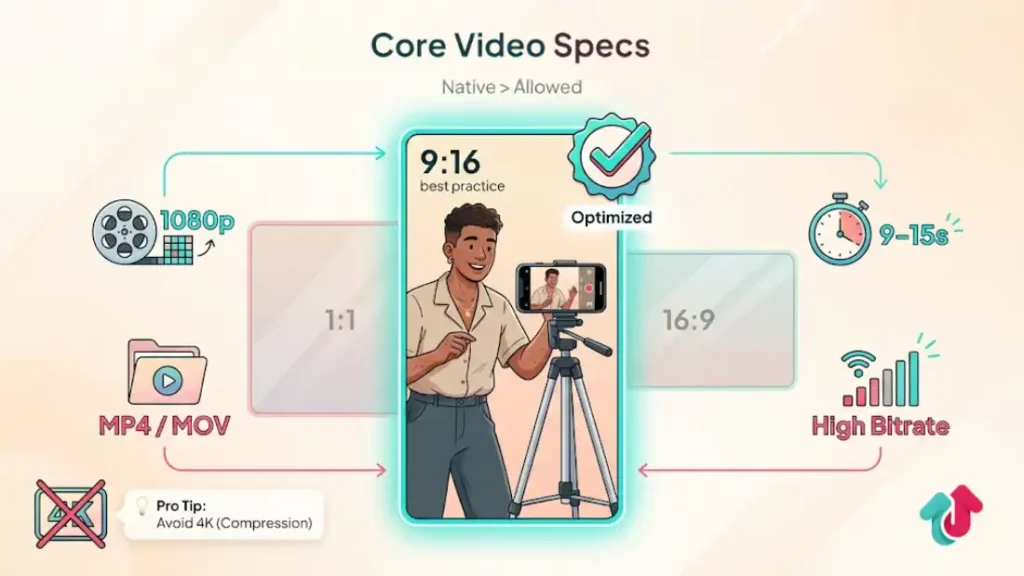
While TikTok technically accepts various formats, technically allowed does not mean high performing. To look native and professional, stick to these exact settings in your video editor (Premiere, CapCut, or Final Cut).
In-Feed Video Ad Specs
| Specification | The Standard (Best Practice) | Technical Limits (Allowed) |
| Aspect Ratio | 9:16 Vertical | 1:1 (Square) or 16:9 (Horizontal) |
| Resolution | 1080 x 1920 px | Minimum 540 x 960 px |
| File Type | .MP4 or .MOV | .MPEG, .3GP, .AVI |
| File Size | < 500 MB | Up to 500 MB |
| Duration | 9 – 15 Seconds | 5 – 60 Seconds |
| Bitrate | ≥ 516 kbps | No lower limit (but quality suffers) |
Pro Tip: Do not upload 4K videos. TikTok compresses them down to 1080p anyway, which can sometimes cause color banding or glitching. Export directly at 1080p for the smoothest playback.
2. Mastering the Safe Zone
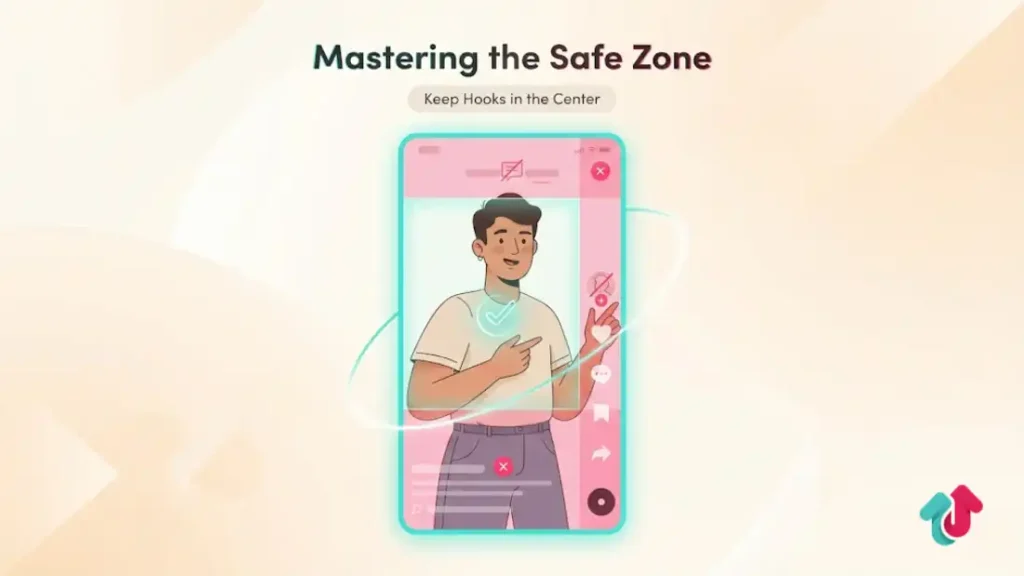
The TikTok interface is crowded. If you place a text overlay at the bottom of the screen, the user’s caption will cover it. If you place it on the right, the Like and Share buttons will cover it.
The No-Go Areas
Visualize your screen divided into sections. You must keep these areas clear of important text, logos, or faces:
- The Bottom 35%: This is reserved for your Display Name, Caption, Music Info, and the CTA Button (e.g., Shop Now).
- The Right 15%: This column is occupied by the Profile Photo, Like Heart, Comment Bubble, and Share Arrow.
- The Top 14%: While often clear, the Following/For You tabs and phone status bar (battery/time) sit here.
The Safe Center
Your canvas is effectively the Center 40-50% of the screen.
Vertical Positioning: Place your hook text and subtitles slightly above the middle of the screen to ensure maximum visibility on all devices (some phones are taller/narrower than others).
How to Check:
TikTok Ads Manager has a built-in Preview Tool. Before launching, always upload your video and view it in Actual Preview mode to see exactly what gets covered.
3. Spark Ads vs. Non-Spark Specs
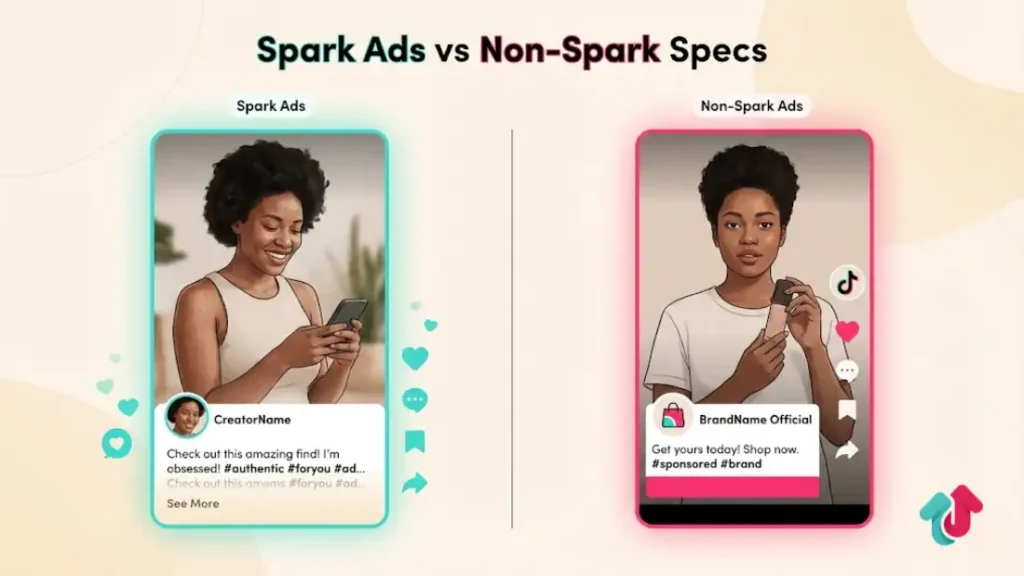
The technical rules change slightly depending on whether you are running a Dark Ad (Non-Spark) or boosting an organic post (Spark Ad).
Spark Ads (Boosted Posts)
Caption: There is no character limit because it pulls the caption from your organic post. However, the See More button still cuts off text after 3-4 lines.
Resolution: Whatever you uploaded organically (usually 1080p) is used.
Profile Image: Uses your current account profile picture.
Non-Spark Ads (Standard In-Feed)
Caption Limit: 100 Characters. This includes spaces and hashtags. Emojis are allowed.
Profile Image: You must upload a specific image (98×98 px) for the ad. It does not automatically pull from your account.
Display Name: 2-20 characters. This is the Brand Name shown above the caption.
4. Profile and Image Assets
Even for video ads, you need static assets for your brand identity.
- Profile Image: Must be 1:1 Square (98 x 98 pixels minimum). File size must be < 50 KB.
- Brand Name: Keep it under 20 characters to avoid truncation (e.g., The Glow… instead of The Glow Company).
5. File Size and Upload Troubleshooting
If your video is getting rejected or failing to upload, it is usually a file size or bitrate issue.
Common Upload Errors:
- File Too Large: If your editor exports a 2GB file (common with ProRes), you must compress it. Use a tool like HandBrake to compress it to H.264 (MP4) under 500MB without losing perceptible quality.
- Resolution Not Supported: Ensure your width is an even number. Sometimes dragging to resize creates a 1081 pixel width, which causes errors. Stick strictly to 1080 x 1920.
- Audio Issue: TikTok ads must have audio. Silent videos are often rejected. If you want a silent feel, add a low-volume background track.
Explore these helpful articles next:
👉 TikTok Ads for Local Businesses: Geo-Targeting Playbook
👉 Retargeting with TikTok Ads: Remarketing Strategies That Work
👉 TikTok Ads Metrics Explained: CPC, CTR, CPM, ROAS & More
👉 The Best TikTok Ads for Beauty & Skincare Brands
FAQ: Tech Specs Questions
Can I run landscape videos (16:9) on TikTok?
Technically, yes. Practically, no. Landscape videos appear with massive black bars on the top and bottom. They scream low effort and typically see 50% lower engagement rates than vertical video. Always crop or re-film for vertical.
What is the best frame rate for TikTok ads?
30fps (frames per second) is the standard for mobile content. 60fps is supported and looks smoother for high-action gameplay or sports, but it doubles your file size. For standard UGC or talking head ads, 30fps is perfect.
Does TikTok compress my video quality?
Yes, aggressively. To minimize quality loss, upload via WiFi (not 5G) and ensure your source file is high bitrate (15-20 Mbps) so that when TikTok compresses it, it still looks sharp.
Where can I download a Safe Zone template?
TikTok Ads Manager provides a downloadable Safe Zone Guide inside the creative upload window. You can import this PNG into CapCut or Premiere Pro as an overlay layer to guide your editing.
Do captions count towards the file size limit?
No. The caption you type in Ads Manager is separate metadata. However, burned-in captions (text inside the video file) do contribute to the video file size.
Conclusion
Technical compliance is the foundation of creative success. You cannot get a high Click-Through Rate (CTR) if your Call-To-Action is hidden behind a Like button.
By adhering to the 9:16 vertical standard, respecting the Safe Zone, and keeping your files under 500MB, you ensure that your creative is delivered exactly as you intended.
Before you spend a dollar on media, spend five minutes previewing your ad to guarantee it fits the frame.