In 2026, the most dangerous thing your ad can look like is an ad. Gen Z and Alpha users have developed a near-perfect filter for commercial polish. If a video looks like it was filmed in a studio with a script, they swipe instantly.
This is why Spark Ads have become the gold standard for high-performance campaigns.
Unlike standard Dark Ads (which come from a faceless brand profile and vanish after the campaign), Spark Ads take an existing, organic video from your own profile or a creator’s, and amplify it with paid budget.
Get Up to $6,000 in Free TikTok Ad Credits
TikTok offers ad credit incentives for new advertisers, helping you test campaigns with a lower upfront cost.
The difference is structural: Spark Ads keep all the likes, comments, and shares attached to the original post.
This creates a snowball effect of social proof that Dark Ads cannot replicate. When a user sees a video with 100k likes, they trust it before they even watch it.
This guide covers the 2026 data on why Spark Ads outperform, the exact technical setup (including the Creator Code workflow), and the three specific strategies that drive the highest ROI.
Table of Contents
Quick Summary
- The Social Proof Engine: Spark Ads retain all organic engagement. A user seeing 12.5k likes is 157% more likely to watch past 6 seconds than a user seeing 0 likes.
- Performance Delta: In 2026, Spark Ads show a 69% higher conversion rate and 37% lower CPA compared to standard In-Feed ads.
- The Creator Code: To boost a creator’s post, you need a unique 7-day to 365-day authorization code generated from their account settings.
- Profile Traffic: Unlike standard ads, Spark Ads allow users to click your profile picture and follow you, driving long-term organic growth alongside immediate sales.
- Best Use Case: Use Spark Ads for Validation Scaling, post organically first, wait for 1,000 views, then boost the winners.
What are TikTok Spark Ads?
TikTok Spark Ads are a native ad format that enables brands to boost existing organic videos, either from their own account or an authorized creator’s account, as paid advertisements.
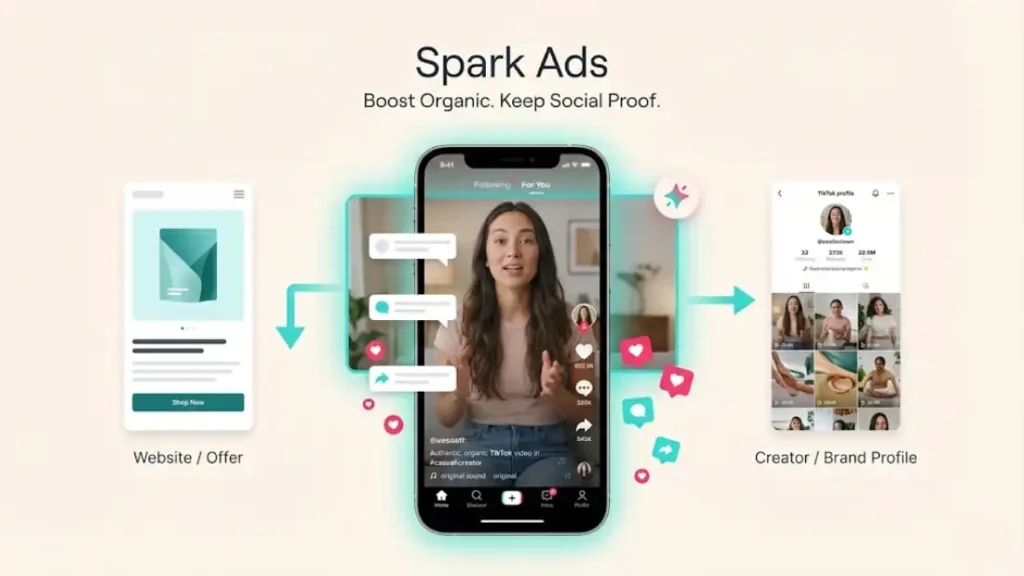
Unlike standard In-Feed ads, Spark Ads link directly to the original organic post, preserving all social interactions (views, likes, comments, shares) and allowing traffic to flow to both the landing page and the TikTok profile.
1. The Performance Data: Spark vs. Non-Spark (2026)
Why go through the extra effort of getting authorization codes? Because the data proves it pays off.
Trust Metrics
Standard ads suffer from Ad Blindness. Spark Ads bypass this because they look exactly like the content users want to see.
- Completion Rate: +134% higher for Spark Ads.
- Engagement: The Halo Effect of seeing existing comments encourages new users to comment, lowering your CPM (Cost Per Mille) by increasing relevance scores.
Conversion Metrics
Because users trust the content, they trust the offer.
- Conversion Rate (CVR): +69% higher.
- Cost Per Acquisition (CPA): -37% lower.
The Profile Bonus: Standard ads are a dead end, users click the link or scroll. Spark Ads allow users to visit your profile. Brands report a 15-20% increase in follower growth when running Spark Ads compared to Non-Spark campaigns.
2. Technical Setup: The Authorization Code Workflow
The setup for Spark Ads is unique because it requires permission from the video owner.
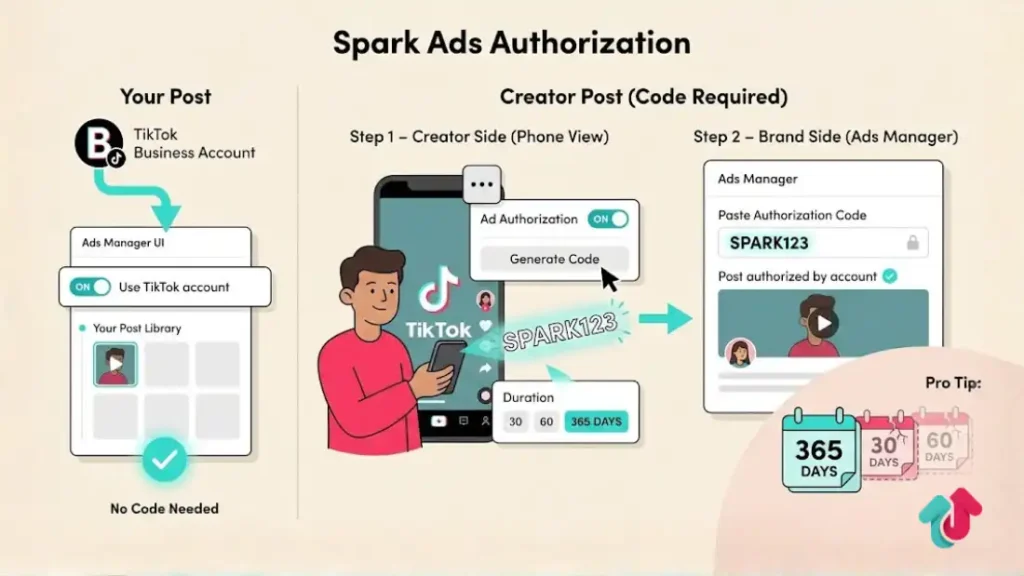
Scenario A: Boosting Your Own Post
- Ads Manager: Go to specific Ad Group settings.
- Identity: Toggle Use TikTok account to deliver Spark Ads to ON.
- Link Account: Select your linked Business Account.
- Ad Creative: Click +TikTok Post and select the video directly from your library. No code needed.
Scenario B: Boosting a Creator’s Post (The Code Method)
You need the creator to do this step on their phone.
Step 1: Creator Generates Code
- Open the video on TikTok.
- Tap the three dots (…) > Ad Settings.
- Toggle Ad Authorization to ON.
- Tap Generate Code and select the duration (30, 60, or 365 days).
- Copy the code and send it to the brand.
Step 2: Brand Inputs Code
- Go to Ads Manager > Creative > Spark Ad Posts.
- Click Apply for Authorization.
- Paste the creator’s code.
- Once approved, create a new ad and select Post authorized by account to find the video.
Pro Tip: Always ask for 365-day authorization. If the code expires while your ad is crushing it, the campaign will instantly pause, and you cannot reactivate it without a new code.
3. Best Use Cases & Strategies
Don’t just boost random videos. Use these three Playbooks.
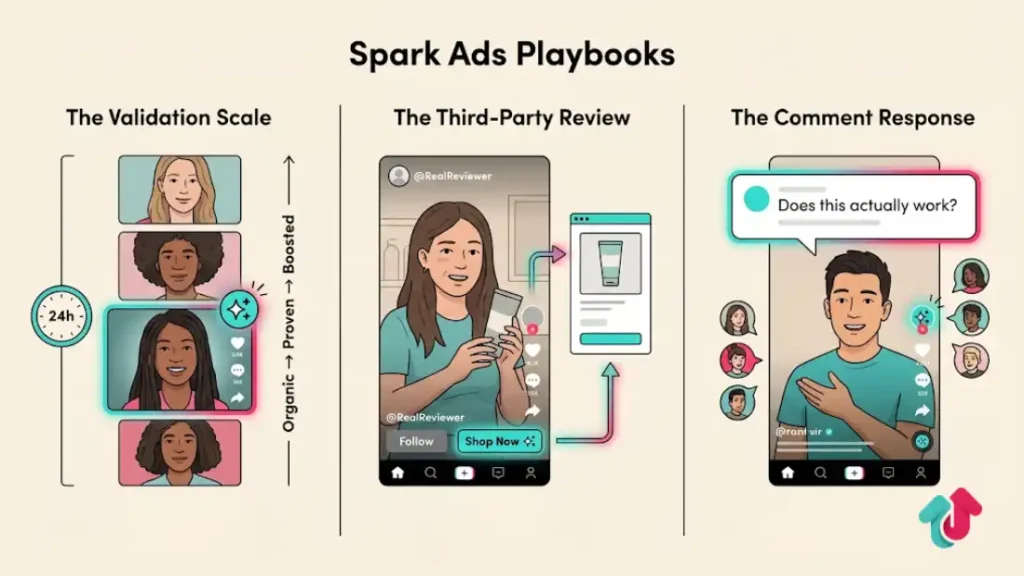
Playbook 1: The Validation Scale
Stop guessing which creative works.
Strategy: Post 3-5 videos organically per day.
Trigger: Wait 24 hours. If a video gets above-average watch time or comments, it is a validated winner.
Action: Spark Ad that specific video immediately.
Why: You are only spending money on creative that has already proven it stops the scroll.
Playbook 2: The Third-Party Review
Consumers trust people, not brands.
Strategy: Hire a creator to post a review on their profile, not yours.
Action: Spark Ad their post but change the Call-To-Action (CTA) to link to your product page.
Why: The ad comes from a person’s face/name, which feels like a genuine recommendation, not a corporate pitch. This typically drives the highest ROAS.
Playbook 3: The Comment Response
Strategy: Find a viral comment on one of your posts (e.g., Does this actually work for acne?).
Action: Reply with a video response showing the proof.
Spark: Boost the response video as a Spark Ad.
Why: It enters the conversation in the middle, creating high curiosity (Wait, what comment are they answering?).
Explore these helpful articles next:
👉 TikTok Ads Landing Page Best Practices for Mobile Sales
👉 Retargeting with TikTok Ads: Remarketing Strategies That Work
👉 TikTok Shopping Ads vs Website Conversion Ads: Pros & Cons
👉 How to Scale TikTok Ads Without Killing ROAS
FAQ: Spark Ads Troubleshooting
Can I edit the caption of a Spark Ad?
No. Because you are boosting a real, live organic post, you cannot change the text, hashtags, or music. If the caption has a typo, you have to live with it or ask the creator to delete and repost (which kills the social proof).
What happens if the creator deletes the video?
Your ad stops running immediately. This is a major risk. Always have a contract clause stating the creator cannot archive or delete the video for the duration of the campaign.
Does the Shop Now button appear on the organic post?
No. The Call-To-Action button (Shop Now, Learn More) only appears to users who see the paid version of the video. Organic viewers just see the normal video.
Do Spark Ads cost more?
The media cost (CPM) is usually the same or lower than standard ads. However, you might have to pay the creator a usage fee (licensing fee) for the right to boost their content.
Can I use trending music in Spark Ads?
Only if you have the commercial rights. If the organic video uses a copyrighted pop song (e.g., Taylor Swift), you cannot boost it as a Spark Ad. Ads Manager will reject it. Ensure creators use the Commercial Music Library.
Conclusion
In 2026, the wall between Organic and Paid has collapsed. Spark Ads are the bridge.
By moving your budget to Spark Ads, you stop fighting the algorithm and start feeding it what it wants: authentic, community-verified content.
The setup takes five extra minutes of coordination with creators, but the 30-40% drop in CPA is worth every second.
Start by auditing your last 10 organic posts. Find the one with the best comments, get the code, and pour fuel on the fire.